MOTPK 39-inch White Gaming Desk User Manual
Model: MKB01011289
1. Produk Lebihview
The MOTPK 39-inch White Gaming Desk is a versatile and ergonomically designed workstation suitable for gaming, home office, or study. It features a sturdy Z-shaped metal frame and a high-quality carbon fiber laminated top, providing durability and a sleek aesthetic. This desk is equipped with convenient accessories such as a monitor stand, cup holder, and headphone hook to optimize your space and enhance your experience.
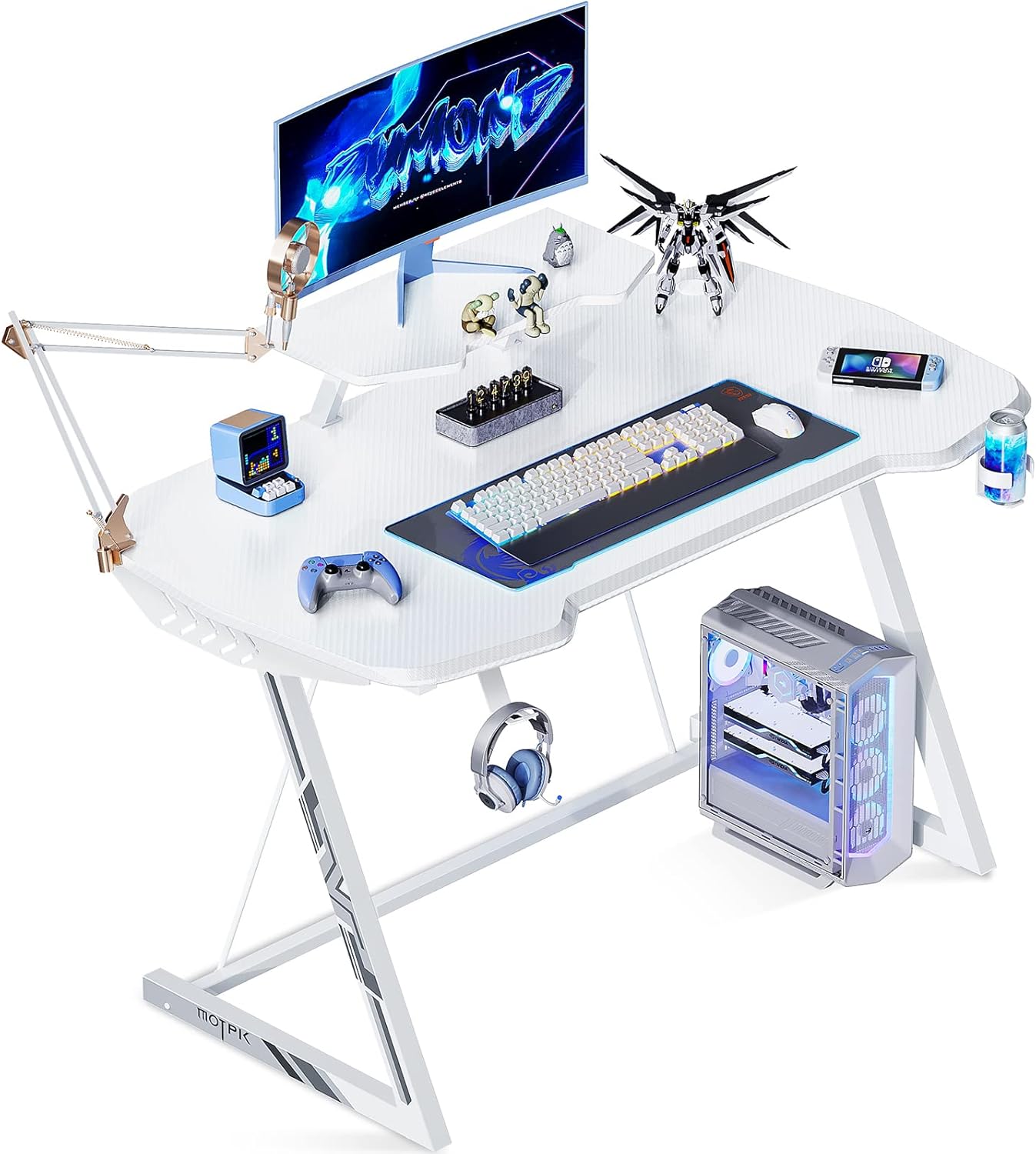
Image 1.1: The MOTPK 39-inch White Gaming Desk set up with a monitor, PC tower, keyboard, mouse, and other gaming accessories, showcasing its functional design and ampluas permukaan.
2. Ciri-ciri Utama
- Reka bentuk ergonomik: Features rounded corners, a sloping surface, and sturdy Z-shaped metal legs for comfortable long-term use.
- Durable Carbon Fiber Surface: The sleek charcoal-colored carbon fiber laminated top is waterproof and wear-resistant, offering a premium feel and appearance.
- Aksesori Bersepadu: Includes a monitor stand, cup holder, and headphone hook to maximize desk space and organization.
- AmpKapasiti le: Supports up to 110 lbs, accommodating monitors, PCs, laptops, games, speakers, and other peripherals.
- Penggunaan pelbagai fungsi: Ideal for gaming setups, home office work, or as a study desk for students.

Imej 2.1: Terperinci view highlighting the integrated headphone hook, cup holder, the distinctive Z-shaped leg design, and the ergonomically designed edges of the desk surface.
3. Kandungan Pakej
Upon opening the package, please verify that all components are present and undamaged. The package typically includes:
- Desk tabletop (Carbon Fiber Laminated)
- Z-shaped metal legs (2 pieces)
- Monitor berdiri
- pemegang cawan
- Cangkuk fon kepala
- Perkakasan pemasangan (skru, bolt, sepana Allen)
- Manual arahan
4. Persediaan dan Pemasangan
Assembly of the MOTPK Gaming Desk is designed to be straightforward and quick, typically taking around 10 minutes. Please follow the included step-by-step instructions and use the provided tools.
- Buka Pembungkusan Komponen: Keluarkan semua bahagian dari bungkusan dengan berhati-hati dan letakkannya di atas permukaan yang bersih dan lembut untuk mengelakkan calar.
- Pasang Kaki ke Atas Meja: Secure the Z-shaped metal legs to the underside of the desk tabletop using the provided screws and Allen wrench. Ensure all connections are tight and stable.
- Pasang Penyangga Monitor: Position the monitor stand on the designated area of the tabletop and secure it as per the instructions.
- Lampirkan Aksesori: Mount the cup holder and headphone hook to the desired locations on the desk edges.
- Semakan Akhir: Once assembled, gently lift and place the desk in its intended location. Verify that all screws are tightened and the desk is stable before placing any equipment on it.
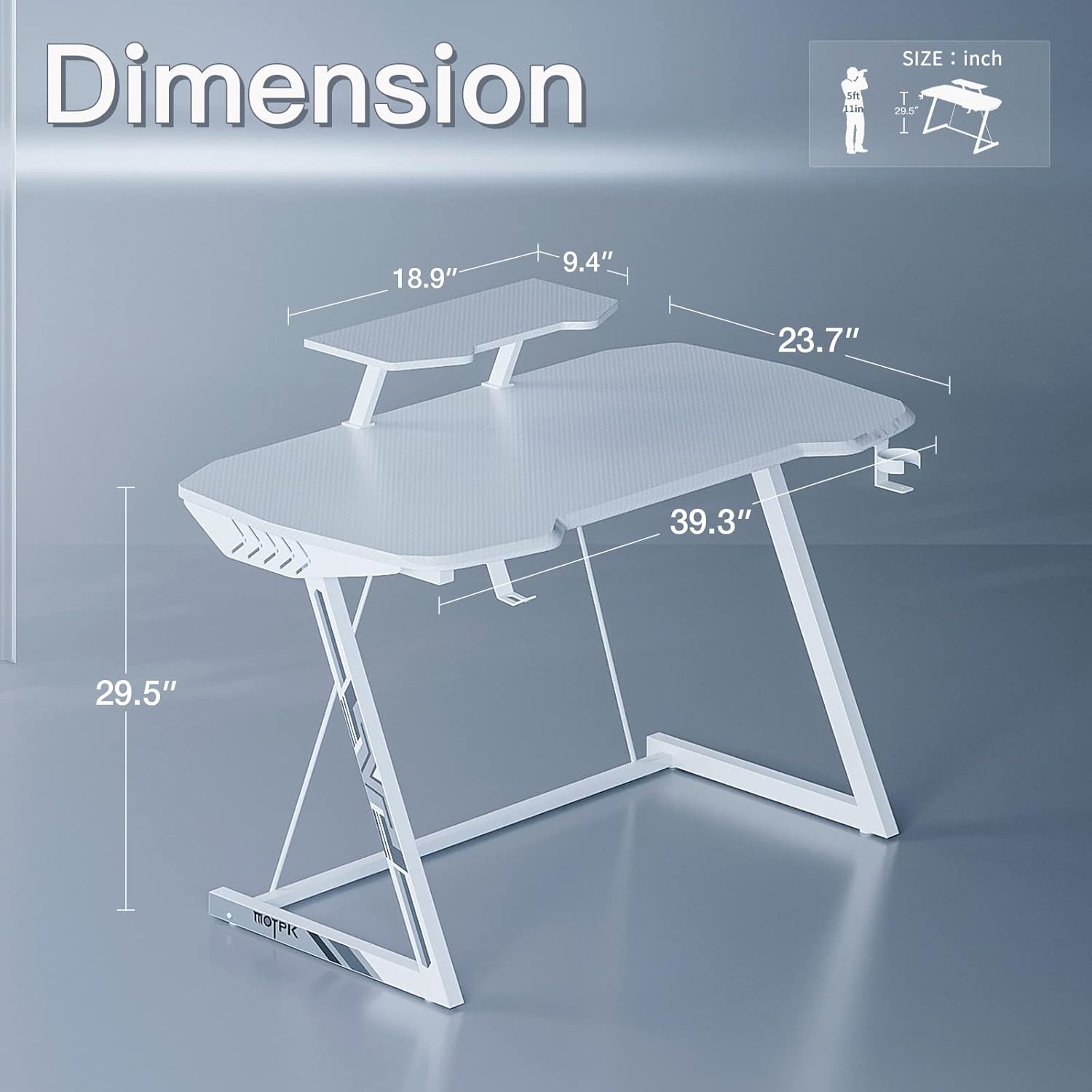
Image 4.1: A diagram illustrating the key dimensions of the MOTPK 39-inch Gaming Desk, including height, width, and depth, along with the monitor stand dimensions.
5. Pengendalian dan Penggunaan
The MOTPK Gaming Desk is designed for optimal functionality and comfort. Here are guidelines for its use:
- penempatan: Position the desk on a flat, stable surface to ensure balance and prevent wobbling.
- Equipment Arrangement: Utilize the spacious tabletop for your monitor(s), keyboard, mouse, and other peripherals. The monitor stand elevates your screen to an ergonomic viewketinggian.
- Penggunaan aksesori: Hang your headphones on the dedicated hook to keep them off the desk and easily accessible. Use the cup holder to securely hold beverages, preventing spills on your equipment.
- Pengurusan Kabel: While not explicitly stated, consider using adhesive cable clips or ties (not included) to manage cables neatly along the desk legs or underside for a clean setup.
- Had Berat: Do not exceed the maximum weight capacity of 110 lbs (approximately 50 kg) to maintain the desk's structural integrity.

Image 5.1: The MOTPK gaming desk integrated into a complete gaming room, demonstrating its suitability for a dedicated gaming environment with multiple screens and accessories.
6. Penyelenggaraan
Proper care will extend the life and maintain the appearance of your MOTPK Gaming Desk.
- Pembersihan: Wipe the carbon fiber surface with a soft, damp kain. Untuk tanda degil, larutan sabun lembut boleh digunakan, diikuti dengan pengeringan dengan kain bersih. Elakkan pembersih yang kasar atau bahan kimia yang keras.
- Tumpahan: The surface is waterproof, but it is best to wipe up spills immediately to prevent any potential damage or staining.
- Pemeriksaan perkakasan: Periksa semua skru dan bolt secara berkala untuk memastikan ia kekal ketat. Ketatkan semula jika perlu untuk mengekalkan kestabilan.
- Elakkan Cahaya Matahari Terus: Prolonged exposure to direct sunlight may cause fading or material degradation over time.
- Perlindungan Haba: While durable, avoid placing extremely hot items directly on the surface without a protective coaster.
7. Penyelesaian masalah
If you encounter any issues with your MOTPK Gaming Desk, please refer to the following common solutions:
| Masalah | Kemungkinan Punca | Penyelesaian |
|---|---|---|
| Meja goyah atau tidak stabil. | Skru longgar atau lantai tidak rata. | Ensure all assembly screws are securely tightened. If the floor is uneven, use furniture pads or shims under the legs to level the desk. |
| Bahagian-bahagian tidak dipasang bersama semasa pemasangan. | Incorrect orientation of parts or missing hardware. | Refer to the assembly manual to confirm correct part orientation. Check if all necessary hardware is present. Contact customer service if parts are missing or defective. |
| Surface appears scratched or damaged. | Pengendalian kasar atau objek tajam. | The carbon fiber surface is wear-resistant but not scratch-proof. Avoid dragging sharp objects across the surface. Minor scratches may be less visible due to the texture. |
If the problem persists or is not listed here, please contact MOTPK customer service for assistance.
8. Spesifikasi
| Jenama | MOTPK |
| Nombor Model | MKB01011289 |
| Dimensi Produk (D x W x H) | 23.62"D x 39.37"W x 29.53"H |
| warna | Snow White |
| Gaya | Permainan |
| Bahan Asas | logam |
| Jenis Bahan Atas | Serat Karbon |
| Ciri Khas | Ergonomik |
| Komponen yang Disertakan | Cup Holder, Headphone Hook, Monitor Stand |
| Cadangan Berat Maksimum | 110 paun |
| Berat Barang | 28.9 paun |
| Perhimpunan yang Diperlukan | ya |
9. Waranti dan Sokongan
The MOTPK Gaming Desk comes with a Waranti Terhad. For specific terms and conditions, please refer to the warranty information provided with your purchase or contact MOTPK customer service.
Perkhidmatan Pelanggan: MOTPK is committed to providing quick-response after-sales service. If you have any problems, questions, or require assistance with assembly or product functionality, please do not hesitate to contact our experienced customer service team. We aim to resolve your inquiries within 24 hours.
For support, please visit the official MOTPK website or use the contact information provided in your product packaging.


