
pengenalan
Thank you for choosing the JALL Digital Alarm Clock. This manual provides detailed instructions on how to set up, operate, and maintain your new alarm clock. Designed for simplicity and functionality, it features a large LED display, adjustable brightness and volume, multiple alarm settings, a convenient USB charging port, and temperature detection.
Ciri-ciri utama termasuk:
- 5.5" High Resolution LED Display for time, date, and temperature.
- 6 Adjustable Brightness Levels (5% to 100%).
- 8 Adjustable Alarm Sounds (30-85 dB) with easy snooze function.
- Dual USB Charging Ports for external devices.
- 12-hour / 24-hour format and indoor temperature display.
- Backup button battery to retain time during power outages.
Produk Selesaiview
Familiarize yourself with the components of your JALL Digital Alarm Clock.

Rajah 1: Depan view of the JALL Digital Alarm Clock, displaying time, month, date, day, and temperature.

Rajah 2: Belakang view of the alarm clock, highlighting the control buttons for settings and the USB charging ports.

Rajah 3: Terperinci view of the 5.5-inch large LED screen, designed for clear visibility.
Persediaan
Sambungan Kuasa:
Connect the provided power cable to the DC 5V input port on the back of the alarm clock. Plug the other end into a standard wall outlet. The display will light up, and the clock will be ready for initial setup.
Sandaran Bateri (Pilihan):
Untuk pengekalan masa semasa kuasa terputustages, insert a CR2032 button battery (not included) into the battery compartment on the back. This battery only maintains time settings and does not power the display.
Tetapan Masa Awal:
Upon first power-up, the clock may display a default time. Refer to the "Operating Instructions" section to set the correct time, date, and day.
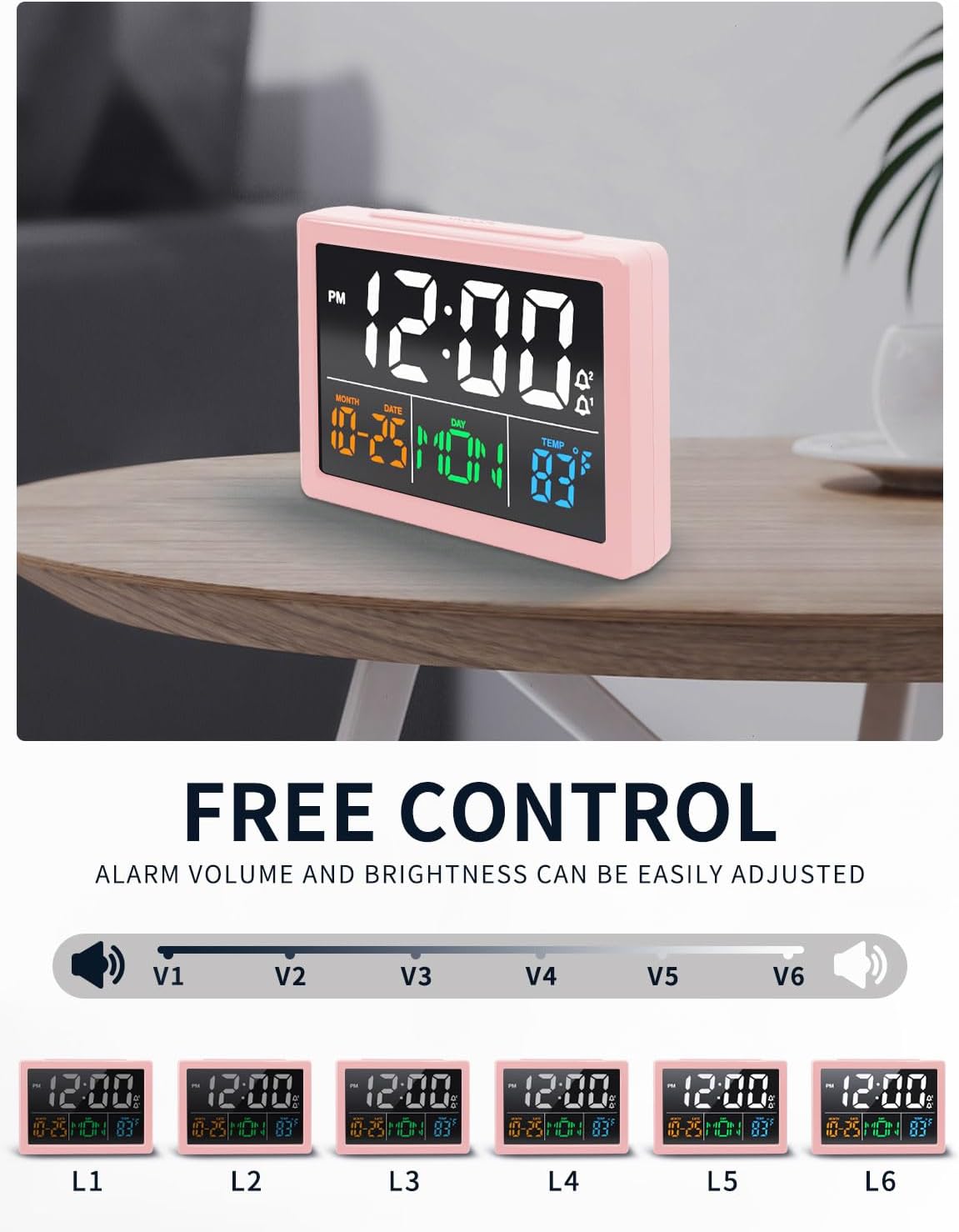
Figure 4: The alarm clock positioned on a nightstand, ready for use.
Arahan Operasi
Menetapkan Masa dan Tarikh
- Tekan dan tahan butang MASA butang di belakang jam sehingga digit jam mula berkelip.
- Gunakan UP or TURUN butang untuk melaraskan jam.
- Tekan ke MASA button again to move to minutes, then use UP or TURUN untuk menyesuaikan diri.
- Teruskan menekan MASA to cycle through setting the year, month, date, and day of the week, adjusting each with the UP or TURUN butang.
- Tekan MASA one last time to save settings and exit.
- Untuk bertukar antara format 12 jam dan 24 jam, tekan butang 12/24J butang.
Tetapan Penggera
The clock supports up to two independent alarms (AL1 and AL2).
- Tekan ke AL1 or AL2 button to select the alarm you wish to set. The alarm time will flash.
- Gunakan UP or TURUN buttons to set the desired alarm hour and minutes.
- Tekan ke AL1 or AL2 butang sekali lagi untuk mengesahkan.
- To activate or deactivate an alarm, press the corresponding AL1 or AL2 button briefly. An alarm icon will appear/disappear on the display.
Fungsi Tunda:
Apabila penggera berbunyi, tekan besar MENGEJUTKAN button on top of the clock for an additional 9 minutes of sleep. The alarm will sound again after 9 minutes.
Melaraskan Kelantangan Penggera:
The alarm offers 8 adjustable sound levels (30-85 dB). Use the JILID button on the back to cycle through the volume levels.
Selecting Ring Tones:
Choose from 8 different ring tones. Press the NOTA MUZIK butang ke praview and select your preferred alarm sound.

Figure 5: Alarm setting options, including daily, weekday, and weekend modes.

Figure 6: A selection of 8 unique ring tones available for your alarm.
Kawalan Kecerahan
The display brightness can be adjusted to 6 levels (L1 to L6, from 5% to 100%).
- Tekan ke KECERAHAN button (sun icon) on the back of the clock to cycle through the brightness levels.
- Select the level that best suits your environment and preference.
Paparan Suhu
The clock displays the indoor temperature. You can switch between Celsius and Fahrenheit.
- Tekan ke ° C / ° F button on the back to toggle between Celsius and Fahrenheit.
Port Pengecasan USB
The clock features two USB output ports (5V) on the back for convenient charging of your mobile devices.
- Simply connect your smartphone, tablet, or other compatible electronic device to one of the USB output ports using its charging cable.
- Ensure the alarm clock is powered via its main power cable for the USB charging function to work.
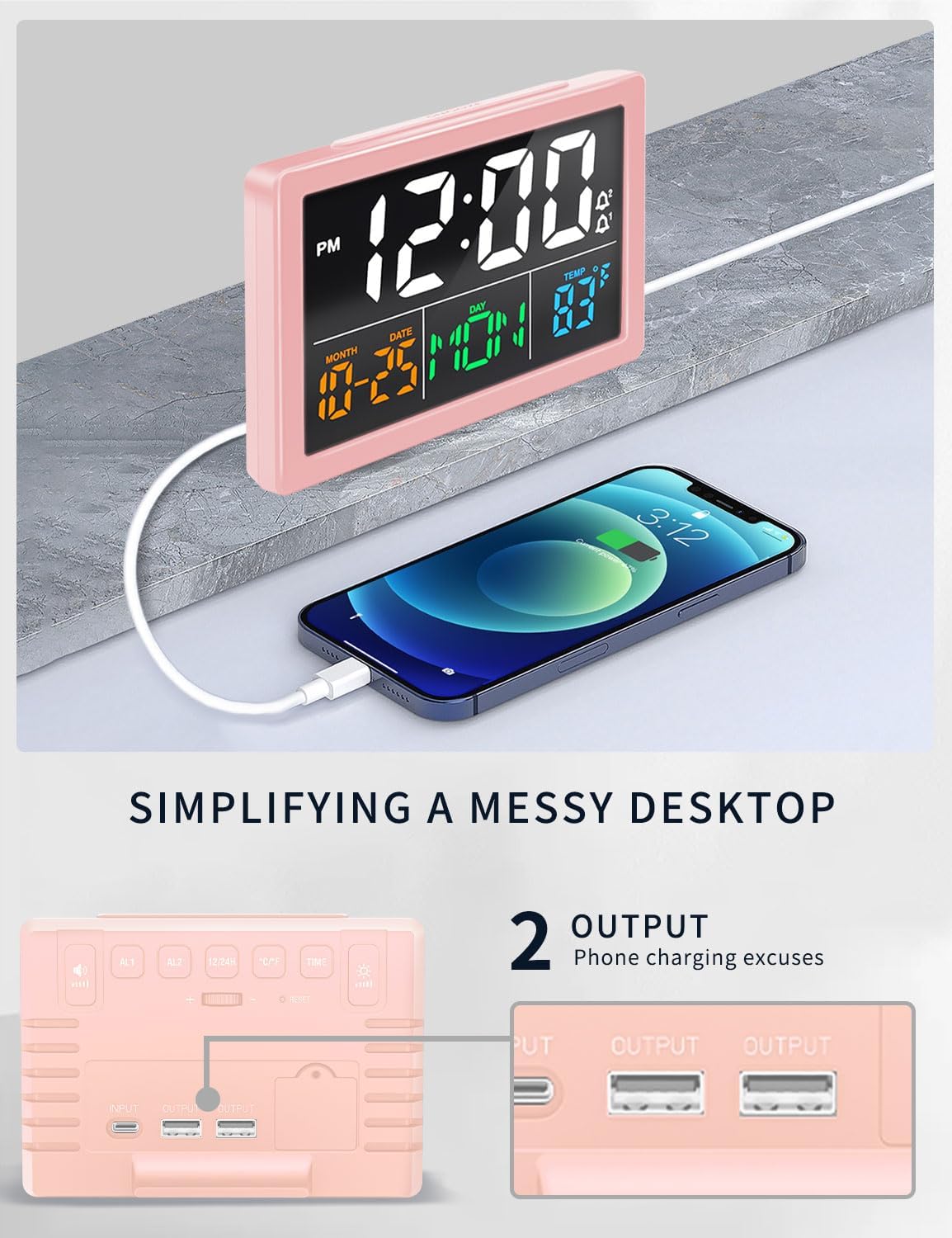
Figure 7: The alarm clock's USB charging port in use, simplifying your desktop by charging devices directly.
Video Demonstrasi Produk
Video 1: A brief demonstration of the JALL Digital Alarm Clock's features and functions, including display, controls, and USB ports.
Penyelenggaraan
Pembersihan:
Wipe the clock surface with a soft, dry cloth. Do not use abrasive cleaners or solvents, as they may damage the finish or display.
Battery Replacement (Backup):
If the clock loses time during a power outage, the CR2032 backup battery may need replacement. Open the battery compartment on the back, replace the old battery with a new one, and close the compartment securely.
Menyelesaikan masalah
| Masalah | Kemungkinan Punca | Penyelesaian |
|---|---|---|
| Paparan kosong atau tidak menyala. | Power cable not connected or faulty. | Ensure the power cable is securely plugged into the clock and a working power outlet. |
| Penggera tidak berbunyi. | Penggera tidak diaktifkan, kelantangan terlalu rendah atau masa penggera ditetapkan dengan salah. | Verify alarm is activated (icon visible), increase volume, and check alarm time settings. |
| Time is inaccurate (running fast/slow). | Internal clock deviation. | Reset the time manually. If the issue persists frequently, contact customer support. |
| Pengecasan USB tidak berfungsi. | Clock not powered by main cable, or device incompatibility. | Ensure the clock is plugged into the wall. Try a different USB cable or device. |
Spesifikasi
| Ciri | Perincian |
|---|---|
| Jenama | JALL |
| Nombor Model | V1021 |
| Jenis Paparan | LED digital |
| Saiz Skrin | 5.5 inci |
| Tahap Kecerahan | 6 (5% to 100%) |
| Kelantangan Penggera | 8 levels (30-85 dB) |
| Nada Dering | 8 pilihan |
| Pelabuhan Keluaran USB | 2 (5V) |
| Format Masa | 12 jam / 24 jam |
| Paparan Suhu | ° C / ° F |
| Sumber Kuasa | Electrical (USB cable) |
| Bateri Sandaran | CR2032 (for time memory only, not included) |
| Dimensi Produk | 5.5"W x 5.5"H |
| bahan | Akrilonitril Butadiena Stirena |
Waranti dan Sokongan
JALL offers a 365-Day Warranty on products sold on Amazon. For any questions, troubleshooting assistance, or warranty claims, please contact our customer support team.
Anda boleh menghubungi kami melalui emel di: ThreeDucksDirect@outlook.com
Please provide your product model number (V1021) and a detailed description of your issue when contacting support for faster service.


