1. Pengenalan
This manual provides detailed instructions for the safe and effective use of your OMMO 16 Lines Green Laser Level. This tool is designed for precise leveling and alignment tasks, featuring two 360° horizontal lines and two 360° vertical lines, providing comprehensive coverage for various applications. Please read this manual thoroughly before operating the device and retain it for future reference.
2. Maklumat Keselamatan
AMARAN: This is a Class II laser product. Avoid direct eye exposure to the laser beam. Staring directly into the laser beam can cause eye injury.
- Jangan merenung sinar laser.
- Jangan halakan pancaran laser kepada orang atau haiwan.
- Jangan kendalikan peranti ini dalam atmosfera yang mudah meletup, seperti dengan kehadiran cecair, gas atau habuk mudah terbakar.
- Jauhkan peranti daripada capaian kanak-kanak.
- Gunakan hanya bateri dan pengecas yang dinyatakan.
- Do not attempt to modify or disassemble the laser level.
3. Kandungan Pakej
Sahkan bahawa semua item yang disenaraikan di bawah disertakan dalam pakej anda:
- 1 x OMMO 16 Lines Green Laser Level
- 2 x Bateri Li-ion Boleh Dicas semula
- 1 x Alat Kawalan Jauh
- 1 x Magnetic Wall Bracket
- 1 x Lifting Base
- 1 x 1/4" Mounting Screw
- 1 x Penyesuai Kuasa/Pengecas
- 1 x Bracket Patch (Metal Plate)
- 1 x Sarung Pembawa
- 1 x Manual Pengguna (dokumen ini)
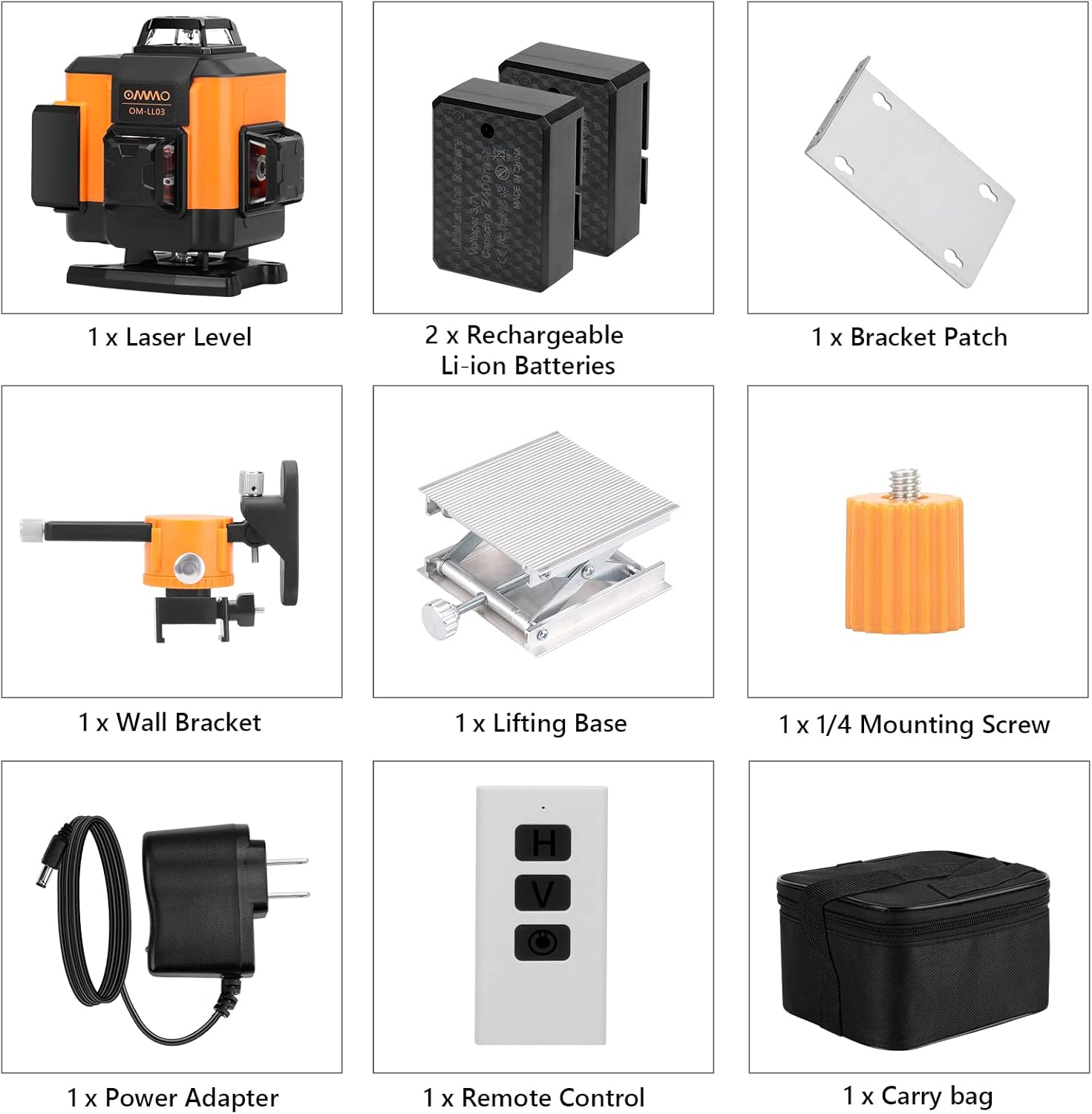
Figure 1: Contents of the OMMO 16 Lines Green Laser Level package, including the laser level, batteries, remote, various mounts, charger, and carrying case.
4. Produk Lebihview
Biasakan diri anda dengan komponen aras laser anda:

Figure 2: Key components of the OMMO 16 Lines Green Laser Level.
- Butang ON / OFF Kuasa: Located on the top panel.
- Horizontal Line Button (H): Activates/deactivates horizontal laser lines.
- Vertical Line Button (V): Activates/deactivates vertical laser lines.
- Petak Bateri: Meletakkan bateri Li-ion yang boleh dicas semula.
- 1/4" Mounting Thread: For attaching to tripods or other mounting accessories.
- Pendulum Lock Switch: Located on the side, controls self-leveling and manual modes.
5. Persediaan
5.1 Pemasangan dan Pengecasan Bateri
- Open the battery compartment cover on the side of the laser level.
- Masukkan bateri Li-ion yang boleh dicas semula, pastikan kekutuban yang betul.
- Tutup penutup petak bateri dengan selamat.
- To charge, connect the power adapter to the charging port on the device and plug it into a power outlet. The indicator light will show charging status.

Figure 3: Battery installation and charging port location.
5.2 Memasang Aras Laser
The laser level can be mounted using various accessories:
- Pemasangan Tripod: Attach the laser level to a standard tripod using the 1/4" mounting thread at the bottom.
- Magnetic Wall Bracket: Use the magnetic wall bracket to attach the device to metal surfaces. The bracket also allows for height and angle adjustments.
- Lifting Base: The included lifting base provides fine height adjustment for precise positioning on flat surfaces.

Figure 4: Different installation methods for the laser level.
6. Arahan Operasi
6.1 Self-Leveling Mode
- Slide the pendulum lock switch to the "ON" (unlocked) position.
- Tekan butang Power ON/OFF untuk menghidupkan peranti.
- The laser level will automatically self-level within a range of ±3°. If the device is outside this range, the laser lines will flash and an audible alarm will sound, indicating it is not level. Adjust the device's position until it is within the self-leveling range.
- Use the "H" button to activate/deactivate horizontal lines and the "V" button to activate/deactivate vertical lines.

Rajah 5: Operasi mod perataan kendiri.
6.2 Manual Mode (Locked Mode)
- Slide the pendulum lock switch to the "OFF" (locked) position.
- Press and hold the Power ON/OFF button for 3 seconds to turn on the device.
- In manual mode, the self-leveling function is disabled, allowing you to project laser lines at any desired angle. The laser lines will not flash or beep in this mode.
- Use the "H" and "V" buttons to control the laser lines.

Rajah 6: Operasi mod manual untuk unjuran bersudut.
6.3 Menggunakan Alat Kawalan Jauh
Alat kawalan jauh membolehkan operasi mudah dari jauh.
- The remote has buttons corresponding to the laser level's functions (Power ON/OFF, Horizontal Line, Vertical Line).
- Ensure the remote is pointed towards the laser level for optimal signal reception.

Figure 7: Remote control in use for different applications.
7. Penyelenggaraan
- Pembersihan: Lap peranti dengan lembut, damp kain. Jangan gunakan pembersih atau pelarut yang melelas.
- Storan: When not in use, store the laser level in its carrying case in a dry, cool place, away from direct sunlight. Ensure the pendulum lock switch is in the "OFF" (locked) position to protect the pendulum mechanism.
- Penjagaan Bateri: Tanggalkan bateri jika peranti tidak akan digunakan untuk tempoh yang lama.

Figure 8: The laser level is designed to be dustproof and shockproof (IP54 rated).
8. Penyelesaian masalah
| Masalah | Kemungkinan Punca | Penyelesaian |
|---|---|---|
| Laser lines are flashing and beeping in self-leveling mode. | Device is outside its ±3° self-leveling range. | Place the device on a more level surface or adjust its position until it is within the self-leveling range. |
| Garisan laser malap atau tidak kelihatan. | Low battery; Bright ambient light. | Charge the battery; Use the device in lower light conditions or closer to the working surface. |
| Peranti tidak dihidupkan. | Battery is dead or incorrectly installed; Pendulum lock switch is in "OFF" position and power button not held for 3s for manual mode. | Charge or reinstall the battery; Ensure pendulum lock is "ON" for self-leveling or hold power button for 3s for manual mode. |
| Alat kawalan jauh tidak berfungsi. | Remote battery is dead; Obstruction between remote and device. | Replace remote battery; Ensure clear line of sight to the laser level. |
9. Spesifikasi
| Jenama | OMMO |
| Nombor Model | OM0893 |
| Garisan Laser | 16 Lines (2x360° Horizontal, 2x360° Vertical) |
| Warna Laser | hijau |
| Visibility Range | Sehingga 150 kaki |
| Julat Meningkat Diri | ±3° |
| bahan | Akrilonitril Butadiena Stirena (ABS) |
| Sumber Kuasa | Dikuasakan Bateri (termasuk 2 bateri Lithium Ion) |
| Berat Barang | 3.56 paun |
| Penilaian Perlindungan | IP54 (Dustproof and Splashproof) |
10. Waranti dan Sokongan
For warranty information or technical support, please refer to the contact details provided with your purchase or visit the official OMMO webtapak. Simpan resit pembelian anda sebagai bukti pembelian untuk tuntutan waranti.
OMMO Official Store: Visit OMMO Store on Amazon


