OFANTOP

OFANTOP 132cm Modern Ceiling Fan User Manual

Model: 7068

1. Pengenalan

Terima kasih kerana membeliasing the OFANTOP 132cm Modern Ceiling Fan. This manual provides detailed instructions for safe installation, operation, and maintenance of your new ceiling fan. Please read this manual thoroughly before installation and keep it for future reference.

OFANTOP 132cm Modern Ceiling Fan

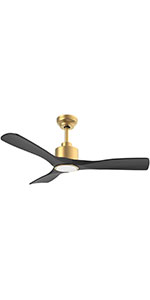
Image 1.1: The OFANTOP 132cm Modern Ceiling Fan, featuring a sleek black motor housing and three dark wood-grain blades, with an integrated LED light kit.

2. Arahan Keselamatan

Sentiasa ikuti langkah berjaga-jaga keselamatan asas semasa memasang dan mengendalikan peralatan elektrik untuk mengurangkan risiko kebakaran, kejutan elektrik dan kecederaan diri.

  • Baca semua arahan sebelum memulakan pemasangan.
  • Pastikan kuasa pada pemutus litar telah diputuskan sambungannya sebelum pemasangan atau servis.
  • Semua pendawaian mesti mengikut kod elektrik kebangsaan dan tempatan. Jika anda tidak pasti tentang pendawaian, sila rujuk juruelektrik yang berkelayakan.
  • The mounting structure must be capable of supporting the fan's weight (approximately 7.91 kg).
  • Jangan kendalikan kipas dengan bilah atau perumah yang rosak.
  • Jauhkan tangan, pakaian dan objek lain daripada bilah kipas apabila kipas sedang beroperasi.
  • This fan is suitable for both indoor and outdoor (patio/porch) use, with an IP44 rating for protection against splashing water.

3. Kandungan Pakej

Sahkan bahawa semua komponen hadir sebelum memulakan pemasangan:

  • Motor Housing Assembly (with integrated LED light)
  • Bilah Kipas (3)
  • Downrods (15cm and 25cm options)
  • Pendakap Pemasangan
  • Kawalan Jauh dengan Pelekap di Dinding
  • Pek Perkakasan (skru, pencuci, kacang dawai)
  • Manual Pengguna

4. Persediaan dan Pemasangan

Follow these steps for proper installation of your ceiling fan.

4.1 Pra-Pemasangan

Before installation, ensure the electrical box is securely mounted to the building structure and can support the fan's weight. Confirm that the power supply is turned off at the main circuit breaker.

4.2 Memasang Pendakap

Attach the mounting bracket to the ceiling electrical box using the provided screws. Ensure the bracket is firmly secured.

Flat Ceiling Mount Diagram

Image 4.1: Diagram illustrating flat ceiling mounting for the fan.

Sloped Ceiling Mount Diagram

Image 4.2: Diagram illustrating sloped ceiling mounting, supporting angles up to 15 degrees.

4.3 Memasang Kipas

  1. Insert the chosen downrod (15cm or 25cm) into the motor housing.
  2. Angkat pemasangan kipas dengan berhati-hati dan gantungkannya pada pendakap pelekap.
  3. Connect the electrical wires according to the wiring diagram (typically black to black, white to white, and green/bare copper to ground).
  4. Attach the fan blades to the motor housing using the provided screws. Ensure all screws are tightened securely.
Ceiling Fan Dimensions Diagram

Image 4.3: Detailed dimensions of the ceiling fan, showing its 132cm (52 inch) span and various height options with different downrods.

5. Arahan Operasi

Your OFANTOP ceiling fan offers multiple control options for convenience.

5.1 Operasi Kawalan Jauh

The included remote control allows full functionality of the fan and light. Install 2 AAA batteries (not included) into the remote.

  • Kelajuan Kipas: Select from 6 wind speeds (1-6) to adjust airflow.
  • Kawalan Cahaya: Hidupkan/matikan lampu LED.
  • Peredupan: Laraskan kecerahan lampu LED.
  • Suhu Warna: Cycle through Cool White (6000K), Natural Light (4500K), and Warm Light (3000K).
  • Pemasa: Tetapkan kipas untuk dimatikan secara automatik selepas 1, 4 atau 8 jam.
  • Fungsi terbalik: Toggle between summer (downward airflow) and winter (upward airflow) modes.
Ceiling Fan with Remote Control and Features

Image 5.1: The ceiling fan in a living room setting, highlighting the remote control and its key features: 6 wind speeds, reversible function, and timer settings.

Dimmable LED Light Options

Image 5.2: Illustration of the dimmable LED light feature, showing the fan's light output at Cool White (6000K), Natural Light (4500K), and Warm Light (3000K).

5.2 Kawalan Pintar (Aplikasi & Suara)

This smart ceiling fan can be controlled via a dedicated mobile application and voice commands through Amazon Alexa or Google Assistant. Ensure your fan is connected to a 2.4GHz Wi-Fi network for initial setup. After setup, it can operate on 5GHz.

  • Kawalan Apl: Download the OFANTOP smart home app (refer to the app store for specific app name). Follow in-app instructions to pair your fan.
  • Kawalan Suara: Once paired with the app, enable the OFANTOP skill/action in your Alexa or Google Home app to control the fan with voice commands.
Control Options: Remote, App, Voice

Image 5.3: Visual representation of the multiple control options available for the fan, including remote control, smart app, and voice control via Alexa and Google Assistant.

5.3 Reverse Function Explained

The reversible function allows you to optimize air circulation for different seasons.

  • Mod Musim Panas: Blades rotate counter-clockwise, pushing cool air downwards, creating a refreshing breeze.
  • Mod Musim Sejuk: Blades rotate clockwise, drawing cool air up towards the ceiling and circulating warm air downwards, helping to distribute heat more evenly.
Summer and Winter Reverse Function

Image 5.4: Diagram illustrating the fan's reversible function, showing downward airflow for summer cooling and upward airflow for winter heat circulation.

6. Penyelenggaraan

Penyelenggaraan tetap memastikan prestasi optimum dan jangka hayat kipas siling anda.

  • Pembersihan: Untuk mengelak daripada menggaru kemasan, bersihkan kipas dengan lembut, damp kain. Jangan gunakan pembersih atau pelarut yang melelas.
  • Pembersihan Bilah: Dust the blades regularly to prevent dust buildup, which can affect balance and performance.
  • Mengetatkan Skru: Periodically check all screws on the fan and mounting hardware to ensure they are tight. Loose connections can cause noise or wobbling.
  • Sumber Cahaya: The integrated LED light source is designed for long life. If replacement is ever needed, consult a qualified technician.

7. Penyelesaian masalah

Jika anda menghadapi masalah dengan kipas anda, rujuk masalah dan penyelesaian biasa berikut:

MasalahKemungkinan PuncaPenyelesaian
Kipas tidak bermulaTiada kuasa untuk kipas
Sambungan wayar longgar
Bateri alat kawalan jauh rendah/mati
Periksa pemutus litar dan suis dinding.
Sahkan semua sambungan wayar selamat (pastikan kuasa dimatikan dahulu).
Gantikan bateri kawalan jauh.
Kipas bergoyangSkru bilah longgar
Bilah yang tidak seimbang
Pendakap pelekap longgar
Ketatkan semua skru bilah.
Ensure blades are installed correctly and are not bent. Use a balancing kit if necessary.
Tighten mounting bracket screws.
Operasi bisingSkru longgar
Motor hum
Bilah-bilah terkena halangan
Periksa dan ketatkan semua skru.
A slight hum from the DC motor is normal, especially at higher speeds. Ensure fan is securely mounted.
Ensure nothing is obstructing the blades' path.
Cahaya tidak berfungsiSambungan wayar longgar
Matikan lampu
Isu modul LED
Check light wire connections.
Ensure light is turned on via remote or app.
Jika masalah berterusan, hubungi sokongan pelanggan.
Alat kawalan jauh tidak berfungsiBatteries dead/incorrectly inserted
Alat jauh tidak berpasangan
Gantikan bateri, pastikan polariti yang betul.
Refer to pairing instructions in the full manual (if applicable).

8. Spesifikasi

CiriSpesifikasi
JenamaOFANTOP
Nombor Model7068
Dimensi (L x W x H)132 x 132 x 29.5 cm (52 inch diameter)
Berat badan7.91 Kilogram
kuasa35 Watt
Voltage230 Volt (DC)
Tahap Kebisingan30 dB
Bilangan Bilah3
Jenis MotorMotor DC
Tetapan Kelajuan6 Kelajuan
Jenis CahayaDimmable LED (3000K/4500K/6000K)
Kaedah KawalanRemote Control, Smart APP, Voice (Alexa, Google Assistant)
Fungsi Pemasa1H, 4H, 8H
Fungsi Boleh BalikYa (Mod Musim Panas/Musim Sejuk)
Penarafan IPIP44 (Suitable for outdoor patios/porches)
Aliran Udara (CFM)Up to 6335 CFM (High Speed)
Ceiling Mount TypeFlat or Sloped (up to 15°)

9. Waranti dan Sokongan

OFANTOP is committed to providing high-quality products. For any questions, technical assistance, or warranty claims, please contact OFANTOP customer support through the retailer's platform or the official brand weblaman web. Sila sediakan nombor model (7068) dan maklumat pembelian anda semasa menghubungi sokongan.

Dokumen Berkaitan -

Praview How to Connect Ofantop Smart Ceiling Fan with Smart Life App
A step-by-step guide on how to connect your Ofantop Smart Ceiling Fan to the Smart Life App, including downloading the app, registering an account, pairing the fan, and controlling its features.