Produk Selesaiview
The Core Innovations Wireless Bluetooth Karaoke Microphone is a portable, handheld device designed for karaoke and entertainment. It features built-in speakers, HD recording capabilities, and Bluetooth connectivity for streaming music from your smartphone.

Image: The Core Innovations Wireless Bluetooth Karaoke Microphone in Rose Gold, showcasing reka bentuknya.
Kandungan Pakej
Pastikan semua item ada dalam pakej:
- Core Innovations Wireless Bluetooth Karaoke Microphone
- Kabel Pengecas Mikro-USB
- Manual Pengguna (dokumen ini)
Kawalan dan Pelabuhan
Familiarize yourself with the microphone's controls and connection points:

Imej: Terperinci view of the microphone's control panel, showing buttons for Mode, Volume, Echo, Music, and power.
- Butang Kuasa: Tekan dan tahan untuk menghidupkan/mematikan.
- Butang Mod: Cycles through different operating modes (e.g., Bluetooth, MP3).
- Volume Sliders: Adjust microphone volume and music volume.
- Echo Slider: Adjust the echo effect level.
- Kawalan Muzik: Main/Jeda, Trek Sebelumnya, Trek Seterusnya.

Imej: Bawah view of the microphone, highlighting the Headphone Jack, Memory Card Slot, and Micro USB Charging Port.
- Port Pengecasan Mikro-USB: Untuk mengecas bateri dalaman.
- Slot Kad Memori: For inserting a memory card for HD recording.
- Jack fon kepala: Untuk mendengar secara peribadi.
Persediaan
1. Mengecas Mikrofon
- Connect the Micro-USB charging cable to the microphone's charging port.
- Sambungkan hujung kabel yang satu lagi ke sumber kuasa USB (cth., komputer, penyesuai dinding USB).
- The charging indicator light will illuminate. Once fully charged, the light may change color or turn off (refer to specific product behavior if indicated by manufacturer).
- Cas penuh biasanya mengambil masa beberapa jam.
2. Menghidupkan/Mematikan
- Tekan dan tahan butang Butang Kuasa for approximately 3 seconds to turn the microphone on or off.
- A voice prompt will indicate the power status.
3. Berpasangan Bluetooth
- Ensure the microphone is powered on and in Bluetooth mode (indicated by a flashing blue light).
- Pada telefon pintar anda atau peranti berdaya Bluetooth lain, pergi ke tetapan Bluetooth.
- Cari untuk available devices and select "Core Innovations Mic" (or similar name).
- Once paired, a voice prompt will confirm the connection, and the blue light will stop flashing.

Image: The microphone connected wirelessly via Bluetooth to a smartphone, ready for music streaming.
Arahan Operasi
1. Singing with Music
- Pair your device via Bluetooth as described in the Setup section.
- Open your preferred music app on your smartphone and start playing a karaoke track or any song.
- Laraskan Kelantangan Muzik slider on the microphone to control the background music level.
- Speak or sing into the microphone. Adjust the Kelantangan Mikrofon slider to control your voice level.
- Gunakan Echo Slider to add a reverberation effect to your voice.
- Gunakan Kawalan Muzik (Play/Pause, Previous Track, Next Track) to manage your music playback directly from the microphone.
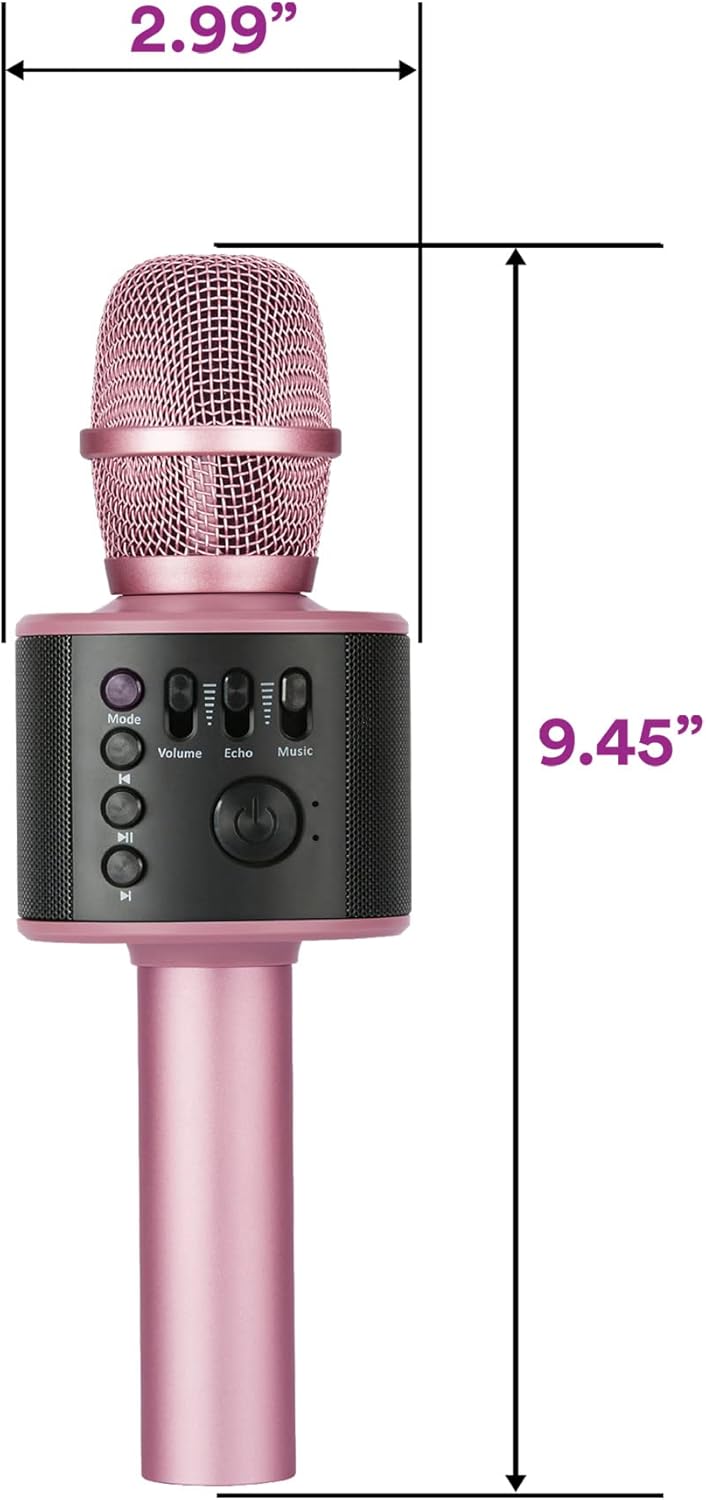
Image: A person holding the microphone, demonstrating its use for singing.
2. HD Recording
- Insert a compatible memory card into the Slot Kad Memori.
- Ensure the microphone is in the appropriate recording mode (check the Mode button functionality for recording options, if available, or use a connected smartphone app for recording).
- Begin singing or speaking into the microphone.
- Recordings are saved to the inserted memory card.
3. Using as a Standalone Speaker
- Sambungkan peranti anda melalui Bluetooth.
- Play music from your device. The microphone's built-in speakers will play the audio.
- Laraskan Kelantangan Muzik slider to control the playback volume.

Image: The microphone emitting sound waves from its built-in speakers.
Penyelenggaraan
- Keep the microphone dry and away from moisture.
- Bersihkan bahagian luar dengan kain lembut dan kering. Jangan gunakan bahan kimia yang keras atau pembersih yang kasar.
- Simpan di tempat yang sejuk dan kering apabila tidak digunakan.
- Elakkan daripada menjatuhkan mikrofon atau mendedahkannya kepada hentaman yang kuat.
Menyelesaikan masalah
| Masalah | Penyelesaian |
|---|---|
| Mikrofon tidak dihidupkan. | Ensure the battery is charged. Connect to a power source using the Micro-USB cable. |
| Tidak boleh berpasangan melalui Bluetooth. |
|
| Tiada bunyi dari pembesar suara. |
|
| Echo effect is too strong/weak. | Laraskan Echo Slider pada mikrofon. |
Spesifikasi
- Nombor Model: KRMC101RG
- Ketersambungan: Bluetooth, USB
- Sumber Kuasa: Dikuasakan Bateri (1 Bateri Lithium Ion diperlukan)
- Kapasiti Bateri: 1200mAh (boleh dicas semula)
- Dimensi Item (L x W x H): 2.99 x 2.99 x 9.45 inci
- Berat Barang: 11.2 auns (0.7 paun)
- Faktor Bentuk Mikrofon: pegang tangan
- Ciri Khas: Kawalan Kelantangan
- Peranti Serasi: Komputer Peribadi, Telefon Pintar
- UPC: 810111500876

Image: Diagram showing the dimensions of the Core Innovations Wireless Bluetooth Karaoke Microphone.
Waranti dan Sokongan
Untuk maklumat jaminan dan sokongan pelanggan, sila rujuk kepada pegawai pengilang webtapak atau hubungi bahagian perkhidmatan pelanggan mereka. Simpan resit pembelian anda untuk tuntutan waranti.
Pengeluar: DP Audio Video
Maklumat Keselamatan Penting
- Jangan dedahkan peranti kepada suhu yang melampau atau cahaya matahari langsung.
- Jangan buka atau cuba membaiki peranti itu sendiri.
- Jauhkan daripada kanak-kanak kecil.
- Buang bateri mengikut peraturan tempatan.
Video Produk Rasmi
Watch these official videos for additional guidance and demonstrations:
Video: "Microphone and karaoke all in one" by Luisana Esquer. This video demonstrates the microphone's features and its use for karaoke.
Video: "UNBOXING: Core Innovations Karaoke Microphone" by TechyNerds. This video provides an unboxing experience and initial look at the microphone.