1. Pengenalan
Thank you for choosing the PUSOKEI Bluetooth Keyboard. This manual provides essential information for setting up, operating, and maintaining your new keyboard. Please read these instructions carefully before use to ensure optimal performance and longevity of your device.
This keyboard is designed for broad compatibility and ease of use, featuring a QWERTZ German layout for specific regional typing needs.
2. Maklumat Keselamatan
- Keep the keyboard away from water, moisture, and extreme temperatures.
- Elakkan daripada menjatuhkan atau mendedahkan papan kekunci kepada hentaman yang kuat.
- Do not attempt to disassemble or repair the keyboard yourself. Contact qualified service personnel for assistance.
- Buang bateri mengikut peraturan tempatan.
3. Kandungan Pakej
Sila semak pakej untuk item berikut:
- 1 x PUSOKEI Bluetooth Keyboard (QWERTZ German Layout)
- 1 x Manual Pengguna
4. Produk Lebihview
The PUSOKEI Bluetooth Keyboard is a slim, silent, and portable wireless keyboard designed for stable connection across various operating systems. It features a QWERTZ German layout for efficient typing.

Image: The PUSOKEI Bluetooth Keyboard showcasing its QWERTZ German layout.

Image: A user operating the PUSOKEI Bluetooth Keyboard with a laptop, highlighting its universal design and portability.
- German Layout: Specifically designed QWERTZ German version keyboard.
- Keserasian Luas: Works with iOS, Android, and Windows operating systems.
- Sambungan Stabil: Bluetooth 3.0 ensures a reliable connection up to 10 meters.
- Reka Bentuk Mudah Alih: Ultra-thin and lightweight for easy transport.
- Menaip Senyap: Responsive keys provide a comfortable and low-noise typing experience.
5. Persediaan
5.1. Pemasangan Bateri
- Cari petak bateri di bahagian bawah papan kekunci.
- Geser buka penutup petak bateri.
- Insert the required batteries (typically 2x AAA, not included) according to the polarity indicators (+/-).
- Tutup penutup petak bateri dengan selamat.
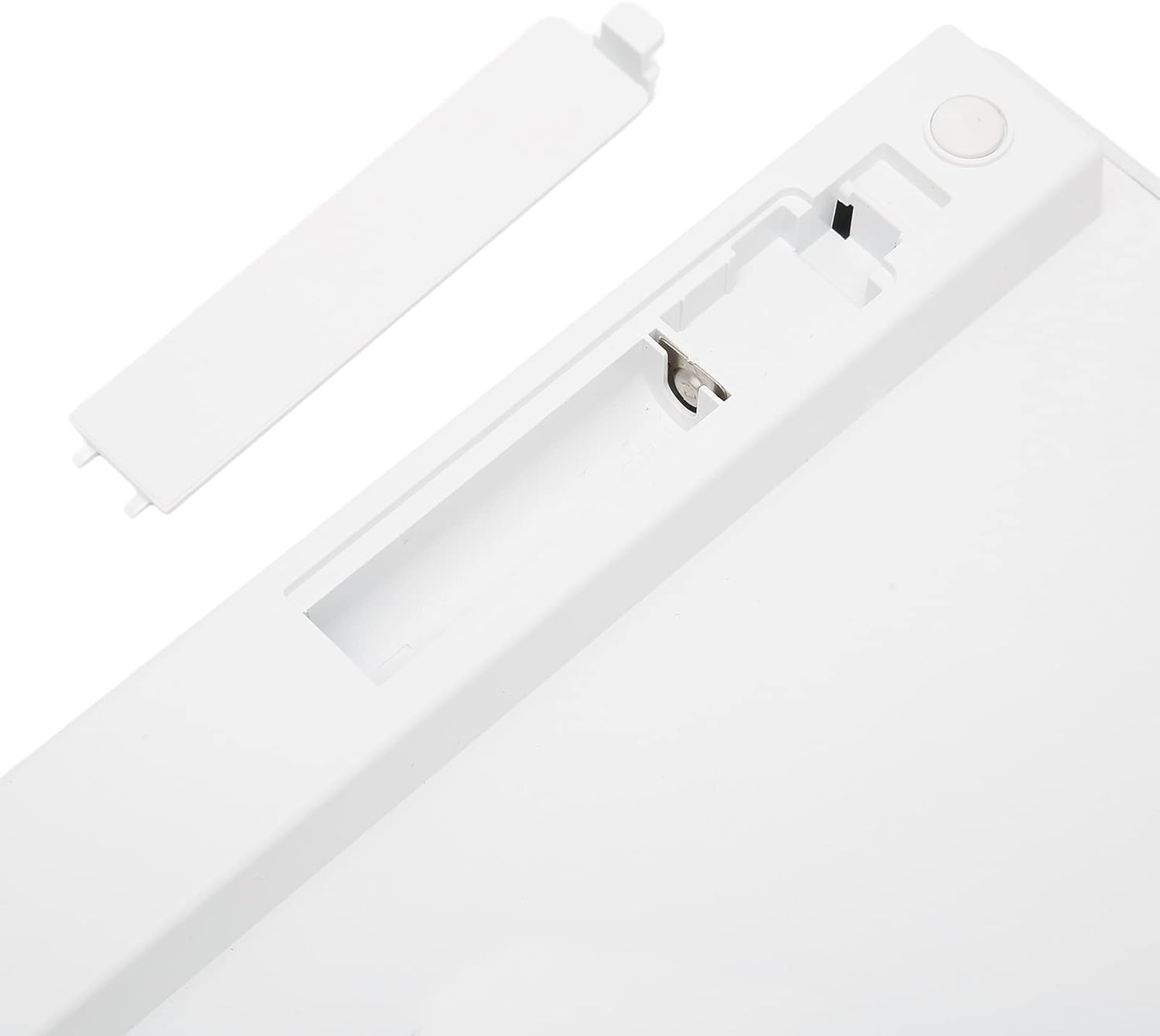
Imej: View of the keyboard's underside, showing the open battery compartment for battery insertion.
5.2. Berpasangan Bluetooth
Ikuti langkah-langkah ini untuk menyambungkan papan kekunci anda melalui Bluetooth:
- Ensure the keyboard has fresh batteries and is powered on (if it has a power switch).
- Activate Bluetooth on your device (tablet, phone, laptop).
- On your device, search for available Bluetooth devices. The keyboard should appear as "Bluetooth Keyboard" or a similar name.
- Select the keyboard from the list to initiate pairing.
- If prompted, enter the displayed pairing code on the PUSOKEI keyboard and press Masuk.
- Once paired, the keyboard will be ready for use.
6. Arahan Operasi
6.1. Penggunaan Asas
After successful pairing, you can begin typing. The keyboard functions like a standard QWERTZ German layout keyboard.
6.2. Kekunci Fungsi
The top row of keys (F1-F12) often includes multimedia and system control functions. These functions are typically accessed by pressing the Fn kekunci serentak dengan kekunci fungsi yang dikehendaki.
- Fn + F1-F12: Control brightness, volume, media playback, etc., depending on your device's operating system.
6.3. Keserasian
The PUSOKEI Bluetooth Keyboard is broadly compatible with devices running:
- iOS (e.g., iPad, iPhone)
- Android (e.g., Android tablets, smartphones)
- Windows (e.g., Windows laptops, desktops)
7. Penyelenggaraan
7.1. Pembersihan
Untuk membersihkan papan kekunci anda:
- Ensure the keyboard is turned off and disconnected from any device.
- Gunakan kain lembut dan tidak berbulu sedikit dampdisapu dengan air atau larutan pembersih lembut.
- Elakkan kelembapan berlebihan dan jangan sembur pembersih terus ke papan kekunci.
- Gunakan udara termampat untuk mengeluarkan habuk dan serpihan dari antara kekunci.
7.2. Penyimpanan
When not in use for extended periods, store the keyboard in a cool, dry place. Consider removing the batteries to prevent leakage.
8. Penyelesaian masalah
8.1. Papan Kekunci Tidak Bersambung
- Ensure the keyboard has power (fresh batteries).
- Sahkan Bluetooth didayakan pada peranti anda.
- Make sure the keyboard is within the 10-meter operating range of your device.
- Cuba nyahpasang dan pasangkan semula papan kekunci dengan peranti anda.
- Mulakan semula kedua-dua papan kekunci dan peranti anda.
8.2. Kekunci Tidak Memberi Respons
- Semak tahap bateri.
- Pastikan papan kekunci disambungkan dengan betul melalui Bluetooth.
- Bersihkan sebarang serpihan yang mungkin tersekat di bawah kunci.
9. Spesifikasi
| Ciri | Spesifikasi |
|---|---|
| Nama Model | PUSOKEIigp690fkrv1355 |
| Jenama | PUSOKEI |
| Teknologi Ketersambungan | Bluetooth 3.0 |
| Penerangan Papan Kekunci | Portable, Slim, Silent, QWERTZ German Layout |
| Peranti Serasi | Laptop, Tablet (iOS, Android, Windows) |
| bahan | Akrilonitril Butadiena Stirena (ABS) |
| Berat Barang | 11.7 auns |
| Dimensi Pakej | 11.54 x 5.08 x 0.94 inci |
10. Waranti dan Sokongan
For warranty information or technical support, please refer to the contact details provided with your purchase or visit the official PUSOKEI webtapak. Simpan bukti pembelian anda untuk tuntutan waranti.