1. Pengenalan
The Jasco V-630 iRM UV-Vis Spectrophotometer is a high-performance analytical instrument designed for precise absorbance and transmittance measurements across the ultraviolet and visible spectrum (190-1100nm). Featuring an intuitive touch panel interface, this device is suitable for a wide range of applications in research, quality control, and educational settings.
Ciri-ciri utama termasuk:
- Jasco V-630 iRM UV-Vis Spectrophotometer with Touch Panel 190-1100nm
- Manufacturer Model Number: V-630
- Manufacturer Name: Jasco

Rajah 1.1: Depan view of the Jasco V-630 iRM UV-Vis Spectrophotometer, showing the main unit with the sample compartment on the left and the integrated touch panel on the right.
2. Persediaan
2.1 Membongkar dan Pemeriksaan
Carefully remove the spectrophotometer and all accessories from the packaging. Inspect for any signs of damage during transit. Retain all packaging materials for future transport or storage.
2.2 Penempatan
Place the instrument on a stable, level surface away from direct sunlight, excessive vibration, and strong magnetic fields. Ensure adequate ventilation around the unit to prevent overheating. Maintain a clear space of at least 10 cm around all sides.
2.3 Sambungan Kuasa
Connect the provided power cord to the instrument's power inlet and then to a grounded electrical outlet. Ensure the power supply matches the instrument's voltage keperluan.
2.4 Hidupkan Kuasa Awal
Press the power button located on the front panel. The system will initiate a self-test and calibration sequence. Allow the instrument to warm up for at least 15-30 minutes for optimal performance and stability.

Rajah 2.1: Jarak dekat view of the Jasco V-630 iRM Spectrophotometer's side panel, showing the product label with model number and manufacturer information.
3. Arahan Operasi
3.1 Touch Panel Interface
The V-630 iRM features an integrated touch panel for all operational controls and data display. Navigate through menus by tapping the corresponding icons or text. Use the stylus provided for precise input if necessary.
3.2 Sample Persediaan
Sediakan s andaamples according to standard laboratory procedures. Ensure cuvettes are clean, free of scratches, and compatible with the desired wavelength range. For UV measurements, quartz cuvettes are recommended.
3.3 Prosedur Pengukuran
- From the main menu, select the desired measurement mode (e.g., Absorbance, Transmittance, Quantitative Analysis).
- Follow the on-screen prompts to set parameters such as wavelength range, scan speed, and data interval.
- Insert a blank (reference) cuvette into the sample compartment and perform a baseline correction or zeroing as prompted.
- Replace the blank with your sample cuvette.
- Initiate the measurement. The results will be displayed on the touch panel.
3.4 Analisis dan Eksport Data
The instrument allows for basic on-board data analysis. Data can typically be saved to internal memory or exported via USB or network connection (if available) for further analysis on external software.
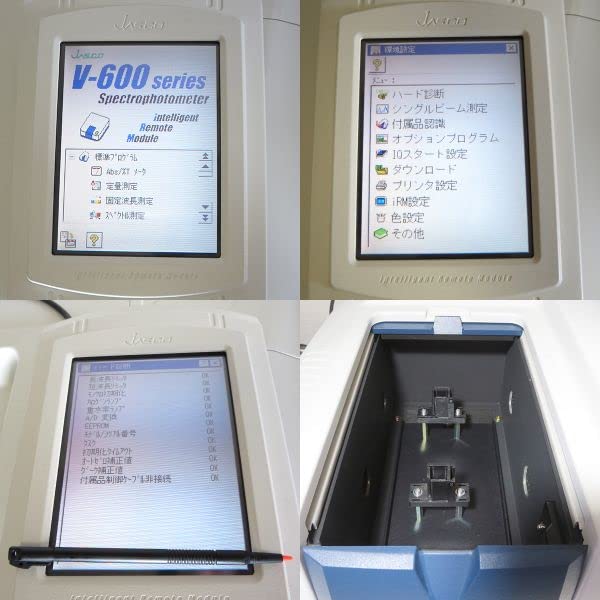
Figure 3.1: Composite image showing the Jasco V-630 iRM's touch panel interface with various menu options and a view daripada sample compartment designed for cuvettes.
4. Penyelenggaraan
4.1 Pembersihan
Regularly clean the exterior of the instrument with a soft, damp cloth. For the touch panel, use a screen-specific cleaner and a microfiber cloth. Avoid abrasive cleaners or solvents. Keep the sample compartment clean and free of spills.
4.2 Penentukuran
Periodic calibration using certified reference materials is recommended to ensure measurement accuracy. Refer to the instrument's on-screen calibration menu or consult a qualified service technician for advanced calibration procedures.
4.3 Penyimpanan
When not in use for extended periods, power off the instrument and cover it with a dust cover to protect it from environmental contaminants. Store in a dry, temperature-controlled environment.
5. Penyelesaian masalah
| Masalah | Kemungkinan Punca | Penyelesaian |
|---|---|---|
| Instrument does not power on | Power cord disconnected; Power outlet fault | Periksa sambungan kord kuasa; Cuba outlet lain |
| Measurement errors / Inconsistent readings | Dirty cuvettes; Incorrect sample preparation; Lamp hampir ke penghujung hayat | Clean cuvettes thoroughly; Re-prepare samples; Contact service for lamp penggantian |
| Panel sentuh tidak bertindak balas | Software glitch; Screen calibration issue | Restart the instrument; Recalibrate touch screen if option is available |
For issues not listed here or if solutions do not resolve the problem, please contact Jasco customer support.
6. Spesifikasi
- Pengeluar: Jasco
- Nombor Bahagian: V-630
- ASIN: B0B7X37887
- Tarikh Tersedia Pertama di Amazon.co.jp: 27 Julai 2022
- Julat panjang gelombang: 190-1100nm
- Antara muka: Panel Sentuh
7. Waranti dan Sokongan
This product is covered by the manufacturer's standard warranty. For specific warranty terms and conditions, please refer to the documentation included with your purchase or contact Jasco directly. Support for the Jasco V-630 iRM Spectrophotometer is available through authorized service centers and the manufacturer's customer service channels.
For technical assistance, service requests, or to inquire about replacement parts, please visit the official Jasco webtapak atau hubungi talian sokongan pelanggan mereka.


