1. Pengenalan
The ROFAVEZCO HDMI Splitter 1x2 (Model EZ-SP12H28S) is an advanced device designed to duplicate a single HDMI input signal to two separate HDMI outputs simultaneously. It supports high-resolution video formats including 8K@60Hz and 4K@120Hz, along with advanced audio and video technologies such as HDR, Dolby Vision, VRR, G-Sync, and HDCP 2.3 bypass. This splitter is ideal for home theater setups, gaming environments, and professional AV distribution, allowing users to display content on multiple screens without signal degradation.

Figure 1.1: ROFAVEZCO HDMI Splitter 1x2
2. Kandungan Pakej
Sila sahkan bahawa semua item terdapat dalam pakej:
- 1 x ROFAVEZCO HDMI 2.1 Splitter
- 1 x Penyesuai Kuasa
- 2 x Reusable Cable Ties
- 1 x Manual Pengguna

Rajah 2.1: Apa yang ada di dalam Kotak
3. Produk Lebihview
The HDMI Splitter features clearly labeled ports and indicators for easy setup and operation. Understanding these components is essential for proper use.
Panel Depan
- OUT2 4K/1080P Switch: Selects output resolution for OUT2 (4K or 1080P downscaled).
- HDMI DALAM: Connects to your HDMI source device.
- HDMI OUT1: Primary HDMI output. Supports full resolution and CEC.
- HDMI OUT2: Secondary HDMI output. Supports downscaling.
- EDID Select Button: Cycles through EDID modes (4K 7.1CH, 4K 5.1CH, 4K 2.1CH, Copy).
- UPDATE Port: Port mikro USB untuk kemas kini perisian tegar.
Panel Belakang
- DC/5V Power Input: Menyambung kepada penyesuai kuasa yang disediakan.

Figure 3.1: HDMI Splitter Port Layout and Functions
4. Persediaan
Follow these steps to set up your HDMI Splitter:
- Matikan Peranti: Ensure all HDMI source devices (e.g., game console, PC) and display devices (e.g., TV, monitor) are powered off before making connections.
- Sambungkan Sumber HDMI: Connect an HDMI cable (HDMI 2.1 recommended for 4K@120Hz/8K@60Hz) from your source device to the HDMI DALAM port pada pembahagi.
- Sambungkan Paparan HDMI:
- Sambungkan kabel HDMI daripada HDMI OUT1 port on the splitter to your primary display.
- Sambungkan kabel HDMI daripada HDMI OUT2 port on the splitter to your secondary display.
- Sambungkan Kuasa: Sambungkan penyesuai kuasa yang disediakan kepada DC/5V input on the splitter, then plug the adapter into a power outlet.
- Hidupkan Peranti: Hidupkan peranti paparan anda dahulu, kemudian peranti sumber HDMI anda.
Nota Penting: For optimal performance with 4K@120Hz or 8K@60Hz signals, use high-quality HDMI 2.1 cables shorter than 3 meters (approximately 10 feet).

Figure 4.1: Typical Setup with Gaming Console
5. Operasi
The HDMI Splitter allows for flexible configuration of video and audio outputs through its EDID and scaler settings.
5.1 Tetapan EDID
The EDID (Extended Display Identification Data) setting determines the video and audio capabilities reported to the source device. Use the EDID Pilih butang untuk kitaran melalui mod berikut:
| Mod | Penerangan |
|---|---|
| 4K@120Hz 7.1CH | Outputs 4K@120Hz video with 7.1 channel audio (e.g., Dolby Atmos). |
| 4K@120Hz 5.1CH | Outputs 4K@120Hz video with 5.1 channel audio. |
| 4K@120Hz 2.1CH | Outputs 4K@120Hz video with 2.1 channel audio (stereo). |
| SALINAN | Learns and copies the EDID from the display connected to HDMI OUT1. This is recommended for most setups to ensure compatibility. |

Figure 5.1: EDID Setting Options
5.2 Scaler Settings (OUT2)
The OUT2 4K/1080P switch on the front panel controls the downscaling behavior for the HDMI OUT2 pelabuhan:
- Switch to "4K": HDMI OUT2 will pass through the 4K signal without downscaling.
- Switch to "1080P": HDMI OUT2 will downscale a 4K signal to 1080P. This is useful when connecting to a 1080P display while your primary display (OUT1) is 4K.
Nota:
- HDMI OUT2 does not support 8K@60Hz; 8K@60Hz is only available on HDMI OUT1.
- If the HDMI source is 4K@60Hz (e.g., PS5, Xbox), OUT2 can downscale to 1080P@60Hz.
- If the HDMI source is 4K@120Hz (e.g., PS5, Xbox), OUT2 can downscale to 1080P@120Hz.
- The splitter does NOT downscale HDR Dolby Vision (4K60 4:2:2) and frequency.

Figure 5.2: Scaler Setting for OUT2
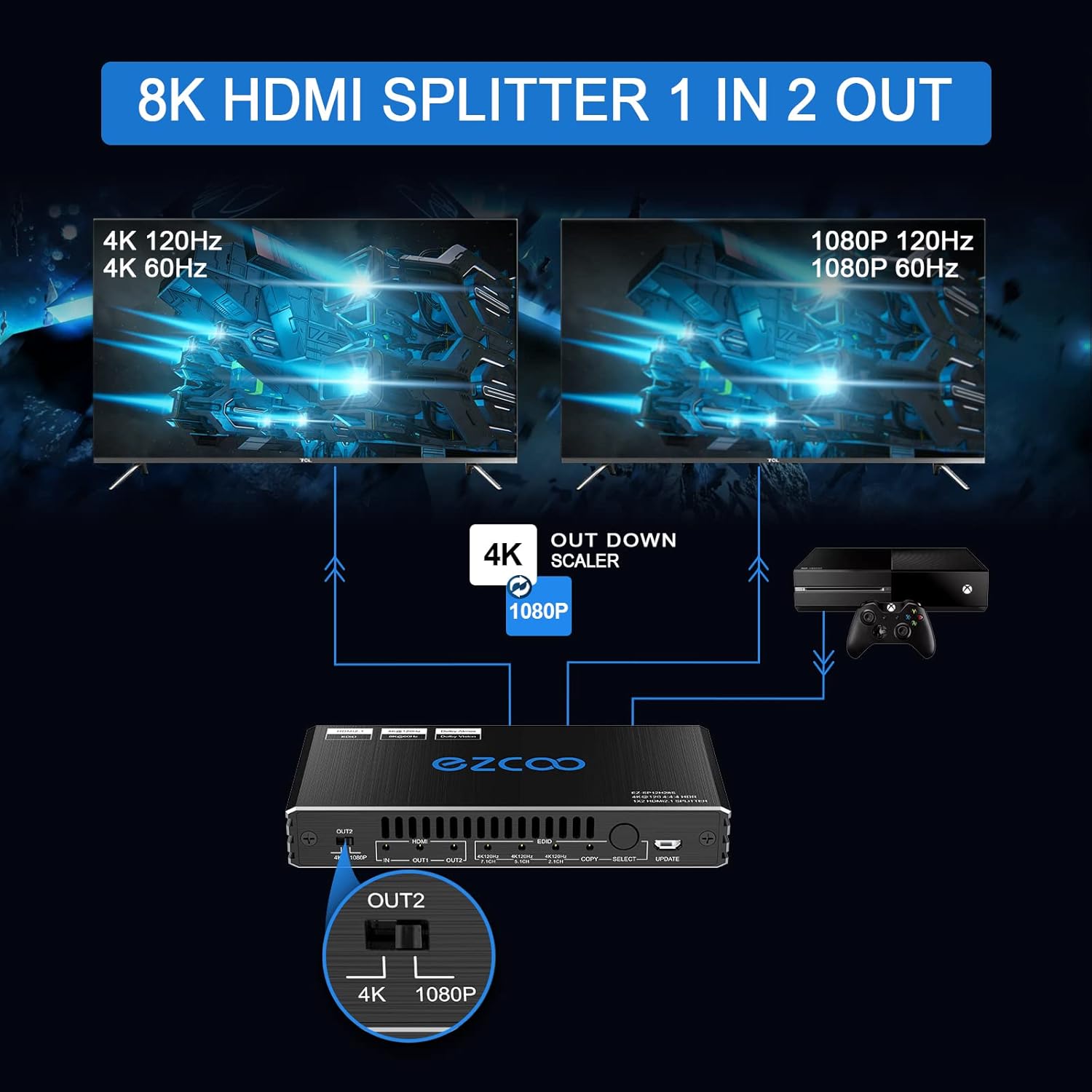
Figure 5.3: Simultaneous Output with Downscaling
6. Keserasian
The ROFAVEZCO HDMI Splitter is widely compatible with various HDMI source and display devices:
- Peranti Sumber: Game consoles (PS5, PS4 Pro, Xbox One S, Xbox Series X, Nintendo Switch), PCs, laptops, projectors, Apple TV, Roku, Fire TV, Nvidia Shield, Xfinity box, Android TV Box, Blu-ray players, 4K cameras.
- Peranti Paparan: 4K TVs, 8K TVs, 1080P TVs, monitors (including VRR, G-Sync, Free Sync compatible monitors like Odyssey G7).
- Format Audio: Dolby Digital 7.1CH, Dolby Atmos, DTS:X, TrueHD, DTS-HD Master.
- Teknologi Video: HDR, HDR10+, Dolby Vision, VRR (Variable Refresh Rate), ALLM (Auto Low Latency Mode), 3D Vision, HDCP 2.3.

Figure 6.1: 8K UHD Input Source Compatibility
7. Kemas Kini Perisian Tegar
Firmware updates can improve product performance and compatibility. To update the firmware:
- Dapatkan perisian tegar terkini file (e.g., EZ-SP12H28EAS-V0.99.20.bin) and the update tool (UartAssist, GigaDevice_MCU_ISP_Programmer) from the manufacturer's official webtapak atau hubungi sokongan pelanggan.
- Connect a Micro USB cable from your computer to the KEMASKINI port on the front panel of the splitter.
- Follow the specific video guide or instructions provided with the firmware update package to enter update mode and run the programming software.
Nota: Ensure stable power supply during the update process. Do not disconnect the device or power off your computer until the update is complete.

Rajah 7.1: Proses Kemas Kini Firmware
8. Penyelesaian masalah
If you encounter issues with your HDMI Splitter, please refer to the following common problems and solutions:
- Tiada Isyarat pada Paparan:
- Ensure all HDMI cables are securely connected and are HDMI 2.1 certified for high resolutions.
- Verify the power adapter is correctly connected and the splitter is receiving power.
- Try setting the EDID mode to "COPY" to match the capabilities of your primary display.
- Test with different HDMI cables or source/display devices to isolate the issue.
- Flickering Screen or Unstable Signal:
- Use shorter, high-quality HDMI 2.1 cables (less than 3m).
- Pastikan bekalan kuasa stabil.
- Reboot the splitter by disconnecting and reconnecting the power.
- Audio Issues (No Audio or Incorrect Channels):
- Adjust the EDID setting to match your audio setup (e.g., 7.1CH, 5.1CH, 2.1CH).
- Ensure your source device's audio output settings are configured correctly.
- Downscaling Not Working on OUT2:
- Sahkan OUT2 4K/1080P switch is set to "1080P".
- Note that OUT2 does not support 8K@60Hz and does not downscale HDR Dolby Vision.
- CEC Not Functioning:
- Sahaja HDMI OUT1 supports CEC. Ensure your primary display is connected to OUT1 and supports CEC.
- Check CEC settings on your connected devices.
If problems persist, please contact ROFAVEZCO customer support for assistance.
9. Spesifikasi
| Ciri | Spesifikasi |
|---|---|
| Nombor Model | EZ-SP12H28S |
| Versi HDMI | HDMI 2.1 |
| Versi HDCP | HDCP 2.3, HDCP 2.2 Bypass |
| Resolusi Maks | 8K@60Hz, 4K@120Hz (4:4:4 8bit) |
| Kedalaman Warna | Deep Color, 3D |
| Sokongan HDR | HDR, HDR10+, Dolby Vision |
| VRR/ALLM | Disokong |
| Sokongan Audio | Dolby Digital 7.1CH, Dolby Atmos, DTS:X, TrueHD, DTS-HD Master |
| Pengurusan EDID | 4K5.1/4K7.1/Copy Mode |
| Penskalaan rendah | OUT2 only: 4K@120Hz to 1080P@120Hz, 4K@60Hz to 1080P@60Hz |
| Sokongan CEC | OUT1 only |
| Dimensi Produk | 6 x 5 x 3.3 inci |
| Berat Barang | 13 auns |
| Bekalan Kuasa | DC 5V |
10. Maklumat Keselamatan
To ensure safe and reliable operation of your HDMI Splitter, please observe the following:
- Do not expose the device to high temperatures, humidity, or direct sunlight.
- Elakkan daripada menjatuhkan atau meletakkan peranti kepada kesan yang kuat.
- Jangan buka atau cuba membaiki peranti ini sendiri. Rujuk semua servis kepada kakitangan yang berkelayakan.
- Gunakan hanya penyesuai kuasa yang disediakan.
- Jauhkan peranti daripada air atau cecair lain.
- Pastikan pengudaraan yang betul di sekeliling peranti untuk mengelakkan terlalu panas.
11. Waranti dan Sokongan
ROFAVEZCO products come with a standard warranty. For specific warranty terms and conditions, please refer to the warranty card included with your product or visit the official ROFAVEZCO webtapak.
For technical support, troubleshooting assistance, or any inquiries regarding your HDMI Splitter, please contact ROFAVEZCO customer service. Contact information can typically be found on the product packaging, the official webtapak, atau manual pengguna yang disertakan.
Anda juga boleh menemui sumber dan Soalan Lazim tambahan di EZCOOTECH Brand Store on Amazon.


