1. Pengenalan
This instruction manual provides essential information for the assembly, operation, maintenance, and troubleshooting of your MOTPK 47 Inch L Shaped Gaming Desk. Please read this manual thoroughly before beginning assembly or use to ensure proper function and longevity of your product.

Gambar 1.1: Lebihview of the MOTPK 47 Inch L Shaped Gaming Desk.
2. Maklumat Keselamatan
Langkah-langkah Keselamatan Penting:
- Ensure proper assembly according to the provided manual.
- Use within the recommended weight limit of 220lbs (approximately 100 kg). Exceeding this limit may cause damage to the desk or personal injury.
- Keep away from water or other liquids that could damage the desk, electrical components, or create slippery surfaces.
- Jangan berdiri atau duduk di atas meja.
- Periksa semua skru dan sambungan secara berkala untuk memastikan ia kekal ketat dan selamat.
3. Persediaan dan Pemasangan
Your MOTPK Gaming Desk requires assembly. A detailed installation manual is included in the packaging. For visual guidance, an easy-to-follow assembly video is available. You can typically find this video by scanning a QR code provided in the physical manual or by visiting the official MOTPK brand store online.
Ciri Perhimpunan Utama:
- The desk features an L-shaped design, optimized for corner placement to maximize space utilization.
- An ultra-stable updated Z-shaped leg design provides robust support.
- Adjustable leg pads are included to ensure stability on uneven surfaces.
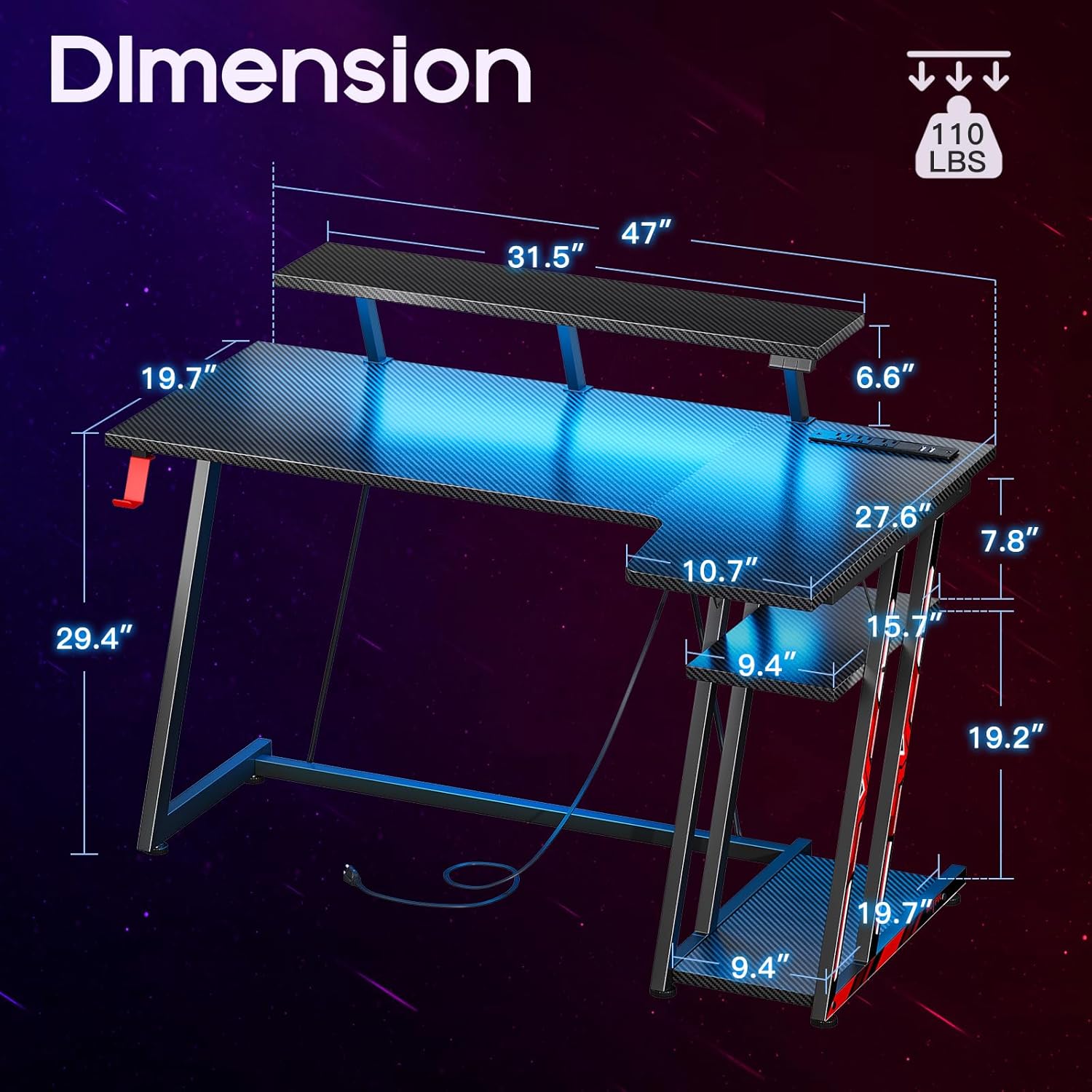
Figure 3.1: Desk Dimensions and Structure. The main desktop measures approximately 47 inches in width, with a monitor shelf above and multi-level storage shelves on the side.

Rajah 3.2: Ample Storage Space and Stable Leg Design. The side shelves offer convenient storage for PC towers, books, or other accessories, while the robust Z-shaped legs ensure stability.
4. Arahan Operasi
4.1 LED Strips Lights
The MOTPK Gaming Desk is equipped with high-quality LED strips designed to enhance your gaming environment. These lights offer a variety of customization options:
- Pelbagai warna: Choose from 10 distinct light colors.
- Pelbagai mod: Access 7 different lighting modes.
- Kelajuan Boleh Laras: Set from 7 flashing speeds.
- Mod Dinamik: Explore 20 dynamic lighting patterns.
Control of the LED lights is typically managed via a remote control or a control panel integrated into the desk. Refer to the specific instructions provided with the LED light kit for detailed operation.

Figure 4.1: LED Light Features and Customization Options.
4.2 Soket Kuasa Terbina Dalam
The desk includes a built-in power strip for convenient charging of your devices. This integrated socket features:
- 3 Soket AC (125V/12A)
- 2 Port USB (5V/2A)
Ensure that the desk's main power cord is securely plugged into a wall outlet before using the built-in power outlets and USB ports.

Figure 4.2: Recessed Power Strip with AC Outlets and USB Ports.
4.3 Monitor Shelf
The large monitor shelf is designed to provide an ergonomic viewing experience. It can support up to 40 lbs (approximately 18 kg), accommodating multiple monitors or a monitor arm with accessories. The shelf height ranges from 29.5 inches to 36.7 inches, allowing for optimal screen positioning.

Figure 4.3: Ergonomic Benefits of the Monitor Shelf.
4.4 Rotatable Headphone Hook
A convenient rotatable headphone hook is integrated into the desk design, allowing you to easily store your headphones within reach and keep your desktop clutter-free.

Figure 4.4: Rotatable Headphone Hook.
5. Penyelenggaraan
To ensure the longevity and appearance of your MOTPK Gaming Desk, follow these maintenance guidelines:
- Pembersihan: Lap permukaan meja dengan lembut, damp cloth. Avoid using harsh chemicals or abrasive cleaners, as they may damage the carbon fiber texture or finish.
- Tumpahan: Immediately wipe up any spills to prevent liquid from seeping into the material or damaging electrical components.
- Integriti Struktur: Periksa semua skru dan sambungan secara berkala untuk memastikan ia ketat. Ketatkan semula jika perlu untuk mengekalkan kestabilan.
- Lampu LED: If the LED lights accumulate dust, gently wipe them with a dry, soft cloth. Do not use liquids directly on the LED strips or their connections.
6. Penyelesaian masalah
Bahagian ini menangani isu biasa yang mungkin anda hadapi dengan meja permainan anda.
| Masalah | Kemungkinan Punca | Penyelesaian |
|---|---|---|
| Meja bergoyang atau tidak stabil. | Lantai tidak rata; sambungan longgar; pemasangan yang salah. | Adjust the leg pads to level the desk. Check all screws and bolts and tighten them securely. Review the assembly manual to ensure all steps were followed correctly. |
| Lampu LED tidak berfungsi. | Power connection issue; remote control battery low; LED strip damage. | Ensure the LED power cable is securely plugged into the desk's power strip and the wall outlet. Check the remote control battery. If issues persist, contact customer support. |
| Power outlets/USB ports not charging. | Desk's main power cord unplugged; device not properly connected; power strip overload. | Verify the desk's main power cord is fully plugged into a functional wall outlet. Ensure devices are correctly plugged into the outlets/USB ports. Avoid overloading the power strip with too many high-power devices. |
7. Spesifikasi
Detailed specifications for the MOTPK 47 Inch L Shaped Gaming Desk:
- Jenama: MOTPK
- Dimensi Produk (D x W x H): 27.56"D x 47.24"W x 36.22"H
- warna: Hitam
- gaya: Permainan
- Bahan asas: Keluli Aloi
- Jenis Bahan Atas: Kayu Kejuruteraan
- Jenis Selesai: Waxed, Varnished
- Ciri Khas: Ergonomic, Built-in Outlet, Built-in USB Ports
- Jenis Bilik: Pejabat
- Kegunaan Disyorkan Untuk Produk: Permainan
- Penerangan Julat Umur: Dewasa
- Gred Produk: baru
- Nombor Model: B01011187C2USDFODK
- Nama Model: L shaped gaming desk
- UPC: 196852831180
- Pengeluar: MOTPK
- Berat Barang: 39.5 paun
- Saiz: 47 inci
- Number Of Shelves: 1 (monitor shelf) + additional storage shelves
- Saran Maksimum Berat: 222 paun (100 kg)
- Perhimpunan yang diperlukan: ya
- Bilangan Orang yang Disyorkan untuk Perhimpunan: 1
- Termasuk Semua Alat Perhimpunan: ya
- bentuk: Rectangular (L-shaped configuration)
- Pilihan Storan: 1 monitor shelf, multi-level side storage
- Adakah Elektrik: Yes (for LED lights and power outlets)
8. Waranti dan Sokongan
MOTPK is committed to providing high-quality products and excellent pre-sales and after-sales service. If you encounter any issues or have questions regarding your gaming desk, please do not hesitate to contact the seller, Motpk, directly through their official channels.
For additional peace of mind, protection plans may be available for purchase. Please refer to your point of purchase for details on available protection plans and their terms.
Maklumat Penjual:
- Seller Name: Motpk
- Pautan Penjual: Visit Motpk Seller Page


