1. Produk Lebihview
The MOTPK 55-inch L-Shaped Gaming Desk is designed to provide an ergonomic and functional workspace for gamers. It features integrated LED lighting, built-in power outlets with USB ports, a large monitor shelf, and a durable carbon fiber textured surface. Its L-shaped design is optimized for corner placement, maximizing space efficiency.

Image 1.1: The MOTPK 55-inch L-Shaped Gaming Desk in a gaming setup, showcasing LED lighting and monitor placement.
2. Maklumat Keselamatan
AMARAN: Kegagalan mematuhi arahan keselamatan ini boleh mengakibatkan kecederaan atau kerosakan pada produk.
- This product has a maximum weight limit of 220 lbs (approximately 100 kg). Do not exceed this limit to ensure stability and prevent structural damage.
- Ensure proper assembly as detailed in the instructions to maintain desk stability and prevent wobbling.
- Exercise caution when handling electrical components, including LED lights and power outlets, to avoid electrical shock.
- Always unplug the desk from the power source when not in use or before cleaning and maintenance.
- Keep liquids away from electrical components to prevent short circuits and electrical hazards.
- Do not modify the electrical components or wiring of the desk. Contact qualified personnel for any repairs.
3. Arahan Perhimpunan
Assembly of the MOTPK Gaming Desk is designed to be straightforward. It is recommended to have at least one person for assembly, though two people may make the process easier.
- Buka Pembungkusan Komponen: Berhati-hati mengeluarkan semua bahagian dari pembungkusan dan sahkan terhadap senarai bahagian yang disertakan.
- Review Manual: Read the detailed installation manual thoroughly before beginning assembly.
- Follow Step-by-Step Video: For visual guidance, scan the QR code provided in the manual or visit the MOTPK brand store for a step-by-step assembly video. This can significantly reduce assembly time.
- Install Power Outlets: It is advised to install the built-in power outlets onto the desk surface before attaching the upper monitor shelf to the desktop back. This provides easier access for securing the outlets.
- Sambungan Selamat: Ensure all screws and connections are tightened securely for a stable structure. Adjustable leg pads should be used to level the desk on uneven surfaces.
Video 3.1: Official MOTPK L-shaped Gaming Desk with LED Lights assembly guide. This video demonstrates the step-by-step process for setting up the desk, including attaching the LED strips and power outlets, and securing the frame components.

Imej 3.1: Jarak dekat view of the integrated LED strips and power outlets on the MOTPK Gaming Desk, highlighting their placement and functionality.
4. Arahan Operasi
4.1 LED Strips Lights
The desk is equipped with high-quality LED strips offering multiple colors and modes to enhance your gaming environment.
- Hidupkan/Mati Kuasa: Connect the LED strip power cable to the built-in power outlet or a suitable power source. Use the included remote control or integrated button (if available) to turn the lights on or off.
- Pilihan Warna: Cycle through 10 different light colors to match your preference.
- Pemilihan Mod: Choose from 7 lighting modes (e.g., static, fade, strobe) and 20 dynamic modes for various effects.
- Pelarasan Kelajuan: Adjust the flashing speed of dynamic modes using the controls.
Image 4.1: Visual representation of the various LED lighting options, including multiple colors, modes, and speed adjustments available on the desk.
4.2 Soket Kuasa dan Port USB
The desk includes a built-in socket with 2 AC outlets and 2 USB ports for convenient device charging and power supply.
- Cawangan AC: Use the 125V/12A AC outlets to power your computer, monitors, and other peripherals.
- Port USB: The 5V/2A USB ports are suitable for charging smartphones, tablets, and other USB-powered devices.
- penggunaan: Plug devices directly into the integrated outlets and USB ports. Ensure devices are compatible with the provided power specifications.

Image 4.2: Close-up of the recessed power strip on the MOTPK Gaming Desk, showing the AC outlets and USB ports in use for charging devices.
4.3 Monitor Shelf and Storage
The large monitor shelf supports up to 40 lbs and provides an ergonomic viewing height between 29.5 inches and 36.7 inches. The L-shaped design also includes additional storage shelves for your PC tower and other accessories.
- Penempatan Monitor: Place your monitor(s) on the elevated shelf for improved posture and reduced neck strain.
- PC Tower Storage: Utilize the dedicated lower shelf for your PC tower, keeping it off the floor and integrated into the desk design.
- Cangkuk Fon Kepala: Use the rotatable headphone hook to keep your headphones organized and easily accessible.
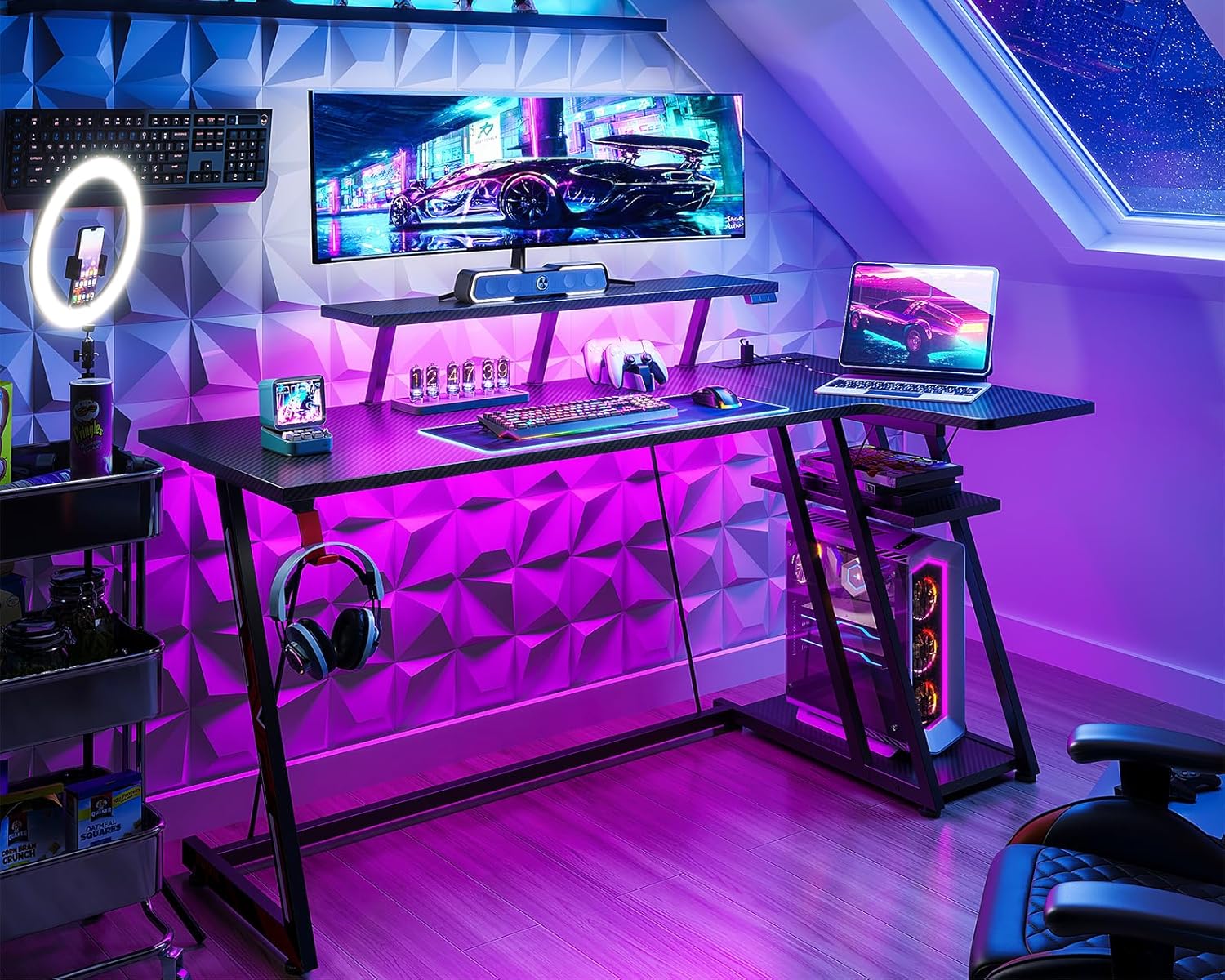
Image 4.3: Detailed diagram illustrating the dimensions of the MOTPK Gaming Desk, including the monitor shelf height and storage shelf measurements.
5. Penyelenggaraan
- Pembersihan: Lap permukaan meja dengan lembut, damp cloth. Avoid abrasive cleaners or harsh chemicals that could damage the carbon fiber texture or finish. For electrical components, ensure the desk is unplugged and use a dry cloth.
- Ketatkan Pengikat: Periksa dan ketatkan semua skru dan pengikat secara berkala untuk memastikan meja kekal stabil dan kukuh.
- Pengurusan Kabel: Organize cables to prevent tangles and reduce strain on connections.
- Jalur LED: If LED strips become dirty, gently wipe them with a dry, soft cloth. Do not immerse in water.
6. Penyelesaian masalah
| Masalah | Kemungkinan Punca | Penyelesaian |
|---|---|---|
| Meja bergoyang | Lantai tidak rata; pengikat longgar | Adjust leg pads to level the desk. Check and tighten all assembly screws. |
| Lampu LED tidak berfungsi | Power cable disconnected; faulty LED strip; remote control battery low | Ensure power cable is securely plugged in. Check remote control battery. If issues persist, contact customer support. |
| Power outlets/USB ports not working | Desk not plugged into wall outlet; internal wiring issue | Verify the desk's main power cord is plugged into a functional wall outlet. Ensure the power strip is correctly installed. If still not working, contact customer support. |
| Monitor shelf feels unstable | Overloaded; loose connections | Ensure the weight on the monitor shelf does not exceed 40 lbs. Re-tighten all screws securing the monitor shelf. |
7. Spesifikasi
| Ciri | Perincian |
|---|---|
| Jenama | MOTPK |
| Nombor Model | B01011188C2USDFODK |
| Reka Bentuk Meja | Meja Komputer Berbentuk L |
| warna | Hitam |
| Dimensi Produk (D x W x H) | 27.56"D x 55.11"W x 36.22"H |
| Berat Barang | 42.99 paun |
| Jenis Bahan Atas | Engineered Wood with Carbon Fiber Texture |
| Bahan Asas | Keluli Aloi |
| Ciri Khas | LED Lights, Built-in Power Outlets (2 AC, 2 USB), Monitor Stand, Headphone Hook, Ergonomic Design |
| Monitor Shelf Capacity | Sehingga 40 lbs |
| Cadangan Berat Maksimum | 220 paun |
| Perhimpunan yang Diperlukan | Ya (Alat disertakan) |
8. Waranti dan Sokongan
MOTPK is committed to providing high-quality products and excellent customer service. This product comes with a limited warranty.
- Jenis Waranti: Limited Warranty. For specific terms and conditions, please refer to the warranty card included with your product or contact MOTPK customer support.
- Sokongan Pelanggan: For any questions, missing parts, or assistance with assembly or operation, please visit the official MOTPK brand store on Amazon or contact their customer service directly.
- Pengesahan Ketelusan: Each item includes a unique code for verification before shipping, ensuring product authenticity.