1. Pengenalan
Thank you for choosing the ErGear 63" x 55" Dual Motor L-Shaped Standing Desk. This manual provides essential information for the safe assembly, operation, and maintenance of your new electric height-adjustable desk. Please read these instructions carefully before use and retain them for future reference.

Image 1.1: The ErGear 63" x 55" L-Shaped Standing Desk, showcasing its spacious design and electric height adjustment feature.
2. Maklumat Keselamatan
Untuk memastikan operasi yang selamat dan mengelakkan kerosakan, sila patuhi garis panduan keselamatan berikut:
- Pastikan semua komponen diikat dengan selamat sebelum digunakan.
- Jauhkan kanak-kanak dan haiwan peliharaan daripada meja semasa melaraskan ketinggian.
- Jangan membebankan meja. Rujuk spesifikasi untuk kapasiti berat maksimum.
- Elakkan meletakkan cecair terus pada panel kawalan atau berhampiran komponen elektrik.
- Putuskan sambungan kuasa sebelum membersihkan atau melakukan penyelenggaraan.
- Meja ini direka untuk kegunaan dalaman sahaja.

Image 2.1: The desk is certified safe, meeting US federal and state air standards for low VOC emissions, and complies with FCC and UL safety standards.
3. Kandungan Pakej
The ErGear 63" L-Shaped Electric Standing Desk package includes all necessary components for assembly. Please verify that all parts are present and undamaged before beginning assembly.
- Desktop sections (multiple pieces for L-shape)
- Leg columns with dual motors
- Foot pads/bases
- Panel kawalan
- Penyesuai kuasa dan kabel
- Perkakasan pemasangan (skru, bolt, alat)
- Manual arahan
4. Persediaan dan Pemasangan
Assembly of the ErGear L-Shaped Standing Desk requires two people. A screwdriver is recommended for assembly. For detailed step-by-step instructions, please refer to the comprehensive PDF installation manual available online or included with your product.
4.1 Pilihan Perhimpunan
The L-shaped desktop can be assembled with the longer section on either the left or right side, allowing you to customize the desk to fit your space and preference.
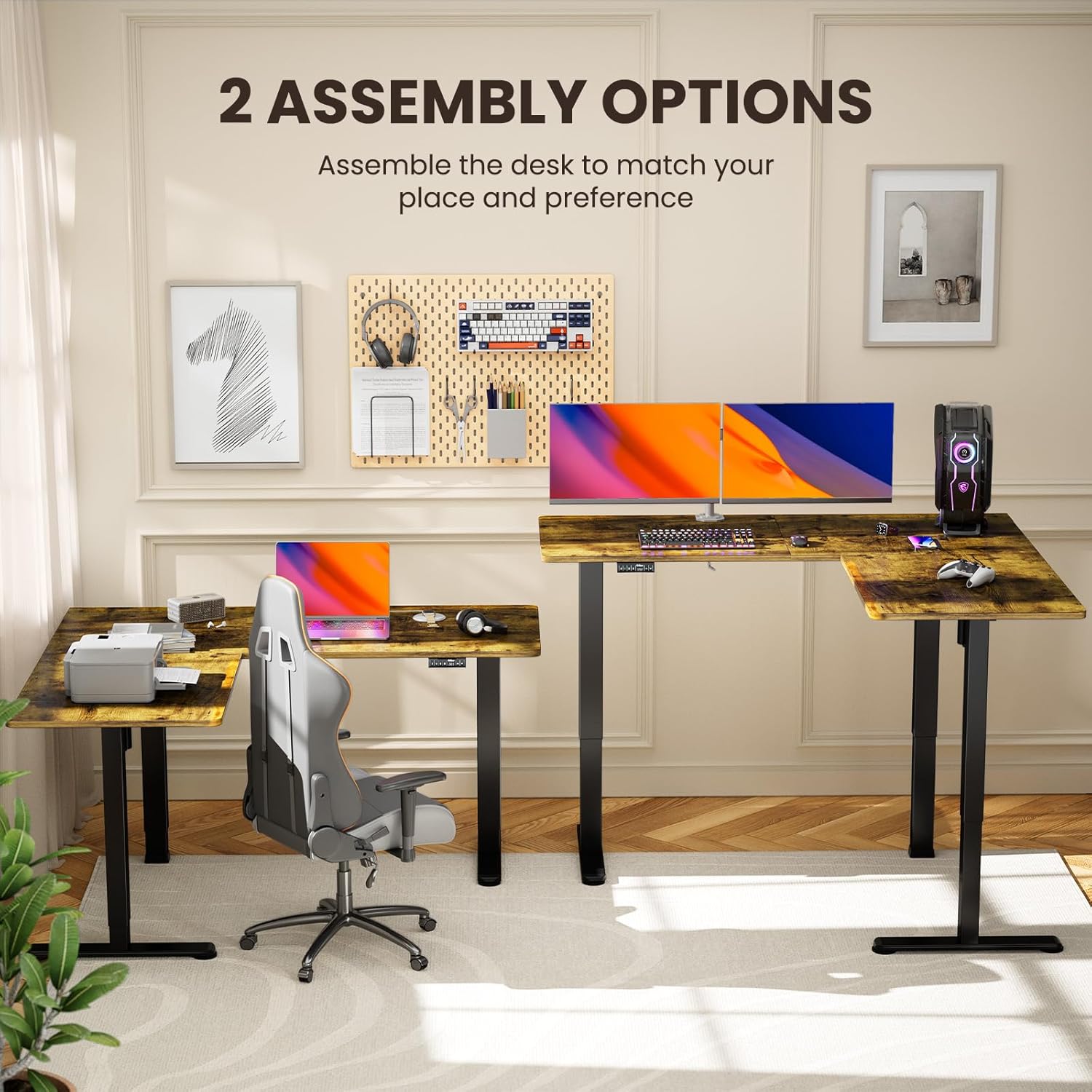
Image 4.1: Illustration of the two possible configurations for the L-shaped desktop, allowing for left or right-hand setup.

Imej 4.2: Overhed view demonstrating the flexibility of assembling the desk with the longer section on either side.
4.2 General Assembly Steps (Refer to PDF for details)
- Buka bungkusan semua komponen dan sahkan terhadap senarai bahagian.
- Attach the lifting columns to the desktop sections.
- Secure the foot pads to the lifting columns.
- Connect the motor cables and control panel to the main control box.
- Plug in the power adapter and perform initial calibration as per the detailed manual.
5. Arahan Operasi
Your ErGear standing desk features a dual-motor system for smooth and quiet height adjustments, along with a control panel for easy operation and memory presets.
5.1 Pelarasan Ketinggian
Use the up and down arrow buttons on the control panel to adjust the desk height. The desk can be adjusted from 28.35 inches to 46.46 inches.

Image 5.1: The desk in a standing position, demonstrating the electric height adjustment feature for ergonomic use.
5.2 Pratetap Memori
The control panel allows you to save custom sit and stand height settings for quick transitions. Consult your detailed manual for specific instructions on setting and recalling memory positions.
5.3 Dual Motor System
The desk is equipped with dual motors for faster, smoother, and quieter operation. This system ensures stable and reliable long-term performance.

Imej 5.2: Satu dalaman view highlighting the dual motor mechanism responsible for the desk's smooth and efficient height adjustment.

Image 5.3: The quiet operation of the desk allows for an undisturbed work environment, as demonstrated by a sleeping cat.
6. Penyelenggaraan
Regular maintenance helps prolong the life and performance of your desk.
- Pembersihan: Lap desktop dan bingkai dengan lembut, damp kain. Elakkan bahan kimia yang keras atau pembersih yang kasar.
- Pengurusan Kabel: Periodically check and organize cables to prevent entanglement or damage during height adjustments.
- Pengikat: Occasionally check all screws and bolts to ensure they remain tight.
7. Penyelesaian masalah
If you encounter issues with your desk, refer to the following common solutions:
| Masalah | Kemungkinan Punca | Penyelesaian |
|---|---|---|
| Meja tidak bergerak | Kabel kuasa terputus, beban lampau, ralat motor | Check power connections. Reduce weight on desk. Refer to manual for error code interpretation and reset procedures. |
| Pelarasan ketinggian tidak sekata | Obstruction, calibration issue | Ensure no obstructions. Perform a reset/calibration as per the detailed manual. |
| Unusual noise during adjustment | Loose fasteners, obstruction | Check all fasteners for tightness. Remove any objects that may be interfering with the lifting columns. |
If the problem persists, please contact ErGear customer support.
8. Spesifikasi
Key technical details for your ErGear L-Shaped Standing Desk:
- Nombor Model: EGESD8V
- Dimensi Produk: 55"D x 63"W x 28.35"H
- Ketinggian Minimum: 28.35 inci
- Ketinggian Maksimum: 46.46 inci
- Saran Maksimum Berat: 220 paun
- Bahan asas: Keluli Karbon
- Jenis Bahan Atas: Wood (Laminated)
- Motor: Sistem Dwi Motor
- Perhimpunan: Diperlukan (Disyorkan 2 orang)
- Waranti: Waranti 5 tahun

Image 8.1: Detailed dimensions of the ErGear L-Shaped Standing Desk, including the adjustable height range.

Image 8.2: The desk's robust lifting system is tested to support up to 220 lbs, ensuring dependable performance.
9. Waranti dan Sokongan
ErGear provides a 5-year warranty for this product, covering parts and labor. For warranty claims, technical assistance, or further inquiries, please visit the official ErGear store or contact customer support.
ErGear Store: Visit the ErGear Store on Amazon
Manual Pemasangan (PDF): For a detailed installation guide, please refer to the official PDF document: Muat turun Manual PDF


