1. Pengenalan
Thank you for choosing the ZKLiLi Cute Cat Night Light. This manual provides essential information for the safe and effective use of your new night light. Please read it thoroughly before operation and retain it for future reference.
2. Maklumat Keselamatan
- Jauhkan peranti daripada air dan kelembapan yang tinggi.
- Do not attempt to disassemble or repair the device yourself. Contact customer support if service is required.
- Gunakan hanya kabel pengecasan yang disediakan atau setara yang diperakui.
- Produk ini direka untuk kegunaan dalaman.
- Keep out of reach of very young children without supervision to prevent choking hazards from small parts (if applicable) or improper use.
3. Kandungan Pakej
- 1 x ZKLiLi Cute Cat Night Light
- 1 x Kabel Pengecas USB
- 1 x Manual Pengguna
4. Produk Lebihview
The ZKLiLi Cute Cat Night Light is a portable, rechargeable LED lamp made from soft, BPA-free silicone. It features warm white light and a 7-color breathing mode, controlled by simple tap gestures. Its durable design and long-lasting battery make it suitable for various uses, including as a sleep aid or portable light source.

Image: The ZKLiLi Cute Cat Night Light, approximately 5.1 inches long and 2.6 inches high, highlighting its soft material, tap control, USB charging, energy-saving LED, washable silicone, and 7-color options.
5. Persediaan
5.1 Pengecasan Awal
Before first use, fully charge the night light. Connect the provided USB charging cable to the charging port on the night light and to a standard USB power adapter (not included) or a computer USB port. The indicator light will show charging status (usually red while charging, off when fully charged). A full charge takes approximately 2 hours.
5.2 Hidupkan/Mati Kuasa
Locate the main power switch at the bottom of the night light. Slide the switch to the 'ON' position to activate the light. Slide it to 'OFF' to completely power down the device.
6. Arahan Operasi
The ZKLiLi Cute Cat Night Light features intuitive tap control for changing light modes.
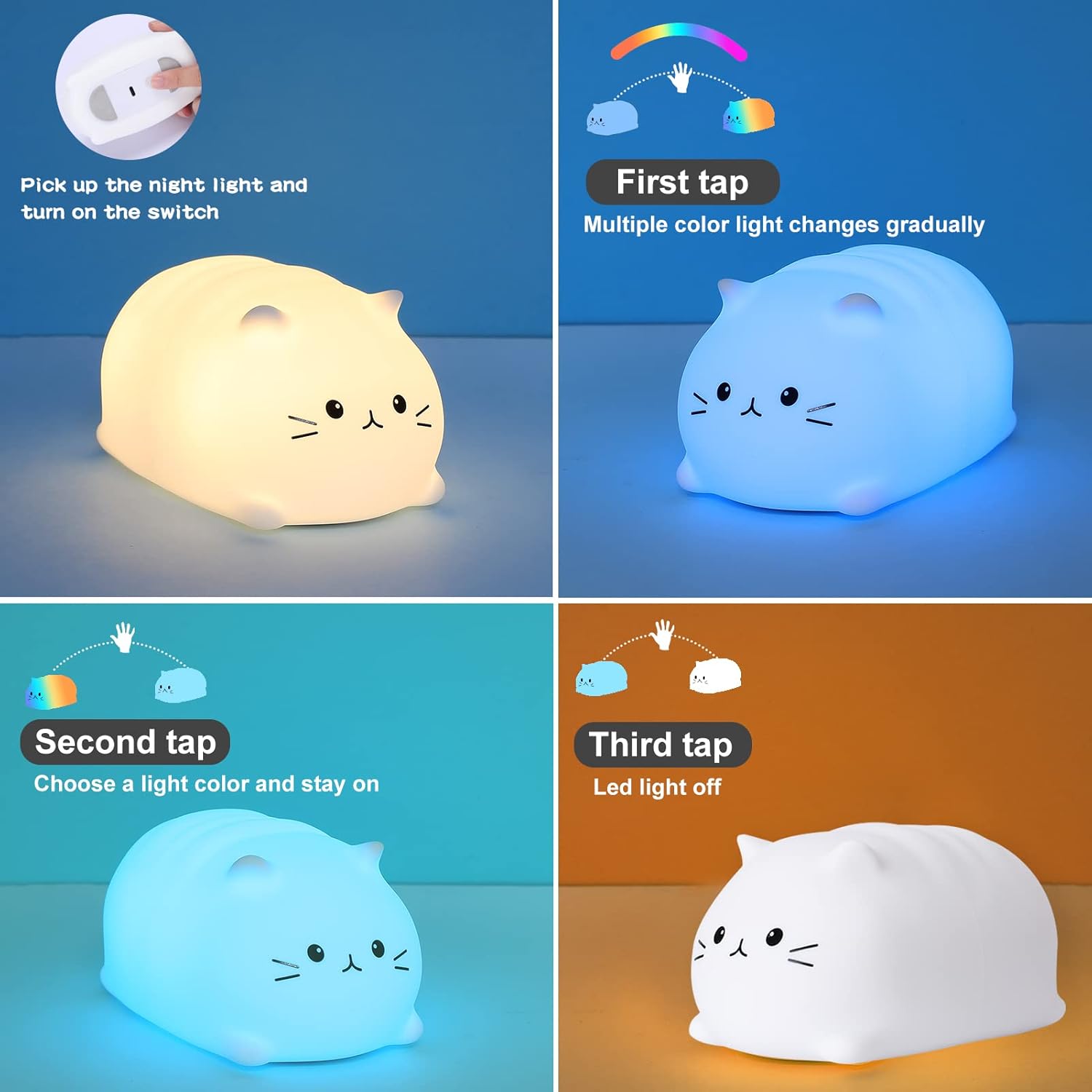
Image: A four-panel diagram illustrating the tap control functions. The first panel shows picking up the light and turning on the switch. The second panel shows the first tap activating a gradual multi-color change. The third panel shows a second tap selecting and holding a specific color. The fourth panel shows a third tap turning the LED light off.
6.1 Operasi Asas
- Hidupkan: Ensure the bottom switch is in the 'ON' position. The light will initially glow in warm white mode.
- First Tap: Gently tap the silicone surface of the night light. The light will enter a 7-color breathing mode, cycling through various colors gradually.
- Second Tap: Tap the silicone surface again while in breathing mode. The light will pause on the current color, allowing you to select and keep a specific color.
- Third Tap: Tap the silicone surface a third time. The LED light will turn off.
- Subsequent Taps: Tapping again will cycle back to the warm white mode, then breathing mode, and so on.
6.2 Sleep Aid Function
The soft, dimmable light and gentle colors are designed to create a calming environment, assisting with sleep. The portable nature allows it to be placed directly on a bedside table or carried if needed during the night.

Image: A child sleeping peacefully in bed with the ZKLiLi Cute Cat Night Light glowing softly on a nearby bedside table, indicating its use as a sleep companion.
7. Penyelenggaraan
7.1 Pembersihan
The silicone exterior is washable. To clean, gently wipe the surface with a damp cloth. Do not immerse the entire unit in water. Ensure the charging port is dry before recharging.
7.2 Penyimpanan
When not in use for extended periods, store the night light in a cool, dry place. It is recommended to fully charge the battery every 3 months to maintain battery health.
8. Penyelesaian masalah
| Masalah | Kemungkinan Punca | Penyelesaian |
|---|---|---|
| Cahaya tidak menyala. | Battery is depleted. Main switch is off. | Charge the night light. Ensure the main switch at the bottom is in the 'ON' position. |
| Light does not change color with tap. | Tap is too light or too hard. | Apply a gentle but firm tap to the silicone surface. Ensure the light is not already in the 'off' state from a previous tap. |
| Cahaya berkelip atau malap tanpa diduga. | Bateri lemah. | Isi semula lampu malam sepenuhnya. |
| Mengecas tidak berfungsi. | Faulty cable or power adapter. Charging port obstruction. | Try a different USB cable and power adapter. Check the charging port for debris. |
9. Spesifikasi
| Ciri | Perincian |
|---|---|
| Jenama | ZKLiLi |
| Nombor Model | ZKLiLi-03 |
| bahan | silikon |
| warna | White (Shade: Grey/Brown) |
| Dimensi Produk (L x W x H) | 10 x 10 x 15 cm |
| Berat Barang | 180 gram |
| Bateri | Litium 1200mAh (Termasuk) |
| Sumber Kuasa | Dikuasakan Bateri (Boleh Dicas Semula USB) |
| Jenis Mentol | LED |
| Ciri Khas | Dimmable, Rechargeable, Tap Control |
| Komponen yang Disertakan | Kabel Kuasa USB |
10. Waranti dan Sokongan
For warranty information or technical support, please contact the manufacturer directly through their official channels or the retailer from whom the product was purchased. Information regarding spare parts availability and software updates is currently not available.


