1. Pengenalan
Terima kasih kerana membeliasing the ROADSTAR RS-3760BR Car CD Player. This manual provides essential information for the proper installation, operation, and maintenance of your new car audio system. Please read this manual thoroughly before using the product to ensure safe and optimal performance. Keep this manual for future reference.
2. Maklumat Keselamatan
- Pemasangan: Professional installation is highly recommended. Incorrect wiring can cause damage to the unit or your vehicle.
- Bekalan Kuasa: This unit is designed for 12V DC negative ground systems only.
- Kawalan Kelantangan: Keep the volume at a level where you can still hear outside traffic sounds. Excessive volume can impair your ability to hear emergency vehicles or other warnings.
- Kelembapan: Do not expose the unit to moisture or water to prevent electric shock or fire.
- Pembersihan: Gunakan kain lembut dan kering untuk pembersihan. Jangan gunakan pembersih atau pelarut yang melelas.
- Pengendalian CD: Handle CDs by their edges. Do not touch the playing surface.
3. Kandungan Pakej
Sahkan bahawa semua item terdapat dalam pakej:
- ROADSTAR RS-3760BR Car CD Player Unit
- Alat Kawalan Jauh
- Pendawaian abah-abah
- Manual Pengguna (dokumen ini)
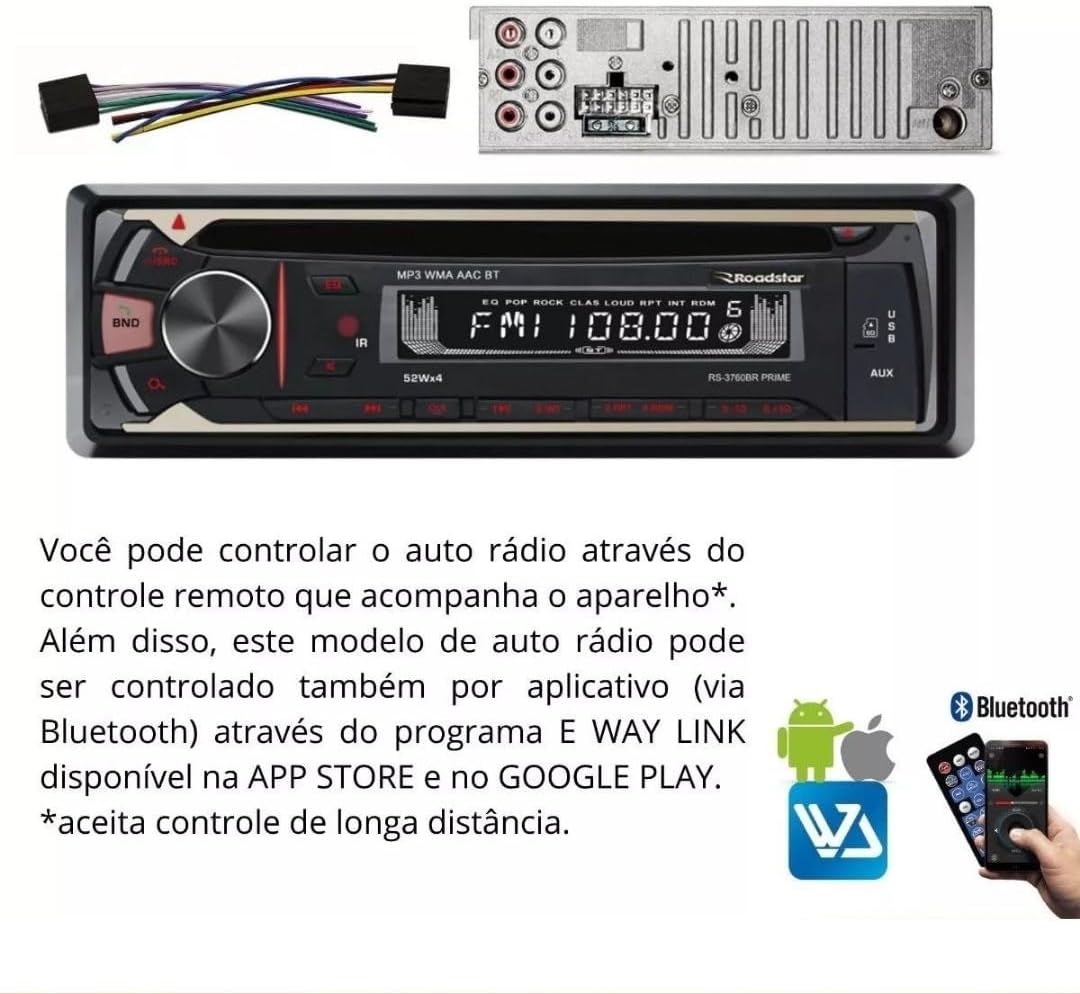
Image: The RS-3760BR unit, its wiring harness, and the included remote control.
4. Ciri-ciri Produk
The ROADSTAR RS-3760BR is a versatile car audio system designed to enhance your driving experience with multiple playback options and convenient controls.
- Pemain CD: Supports playback of audio CDs and MP3/WMA files on CD-R/RW discs.
- Radio AM/FM: Digital tuner with memory for 18 FM and 12 AM stations.
- Kesambungan Bluetooth: For hands-free calling and wireless audio streaming from compatible devices.
- Input USB: Frontal USB port for MP3/WMA file playback and folder browsing.
- Slot Kad SD: Frontal SD card slot for MP3/WMA file playback and folder browsing.
- Input Bantu: Frontal 3.5mm auxiliary input for connecting external audio devices.
- Output RCA: 4 RCA outputs for connecting external amppenyelamat.
- paparan: LED display with 7 selectable illumination colors (blue, light blue, white, yellow, red, purple, green).
- Kawalan: Bass, Treble, and Balance adjustments.
- Kawalan Jauh: Includes a physical remote control and supports app control via Bluetooth (E WAY LINK app).
- Output Kuasa: 4 channels x 52 Watts RMS.

Image: Visual representation of the unit's key features including CD, Bluetooth, USB, and remote control.
5. Persediaan dan Pemasangan
Proper installation is crucial for the performance and longevity of your car stereo. If you are unsure about any steps, consult a professional installer.
5.1 Gambarajah Pendawaian
Refer to the wiring harness provided with your unit. Each wire is color-coded and labeled for specific connections. Ensure all connections are secure and properly insulated to prevent short circuits.
- Kuning: 12V malar (Bateri)
- merah: Switched 12V (Ignition/ACC)
- hitam: tanah
- Biru: Antena Kuasa / Amppenyambung Hidupkan Jauh
- Wayar Pembesar suara: Typically white, gray, green, purple (with black stripes for negative). Connect to corresponding vehicle speakers.
5.2 Memasang Unit
The RS-3760BR is a single-DIN unit. Use the included mounting sleeve and hardware to secure the unit in your vehicle's dashboard opening. Ensure adequate space for wiring and ventilation.

Imej: Depan view of the RS-3760BR car stereo with its remote control, showing the unit's dimensions.
6. Arahan Operasi
This section details the basic functions and operations of your RS-3760BR car stereo.
6.1 Panel Hadapan Atasview

Image: Close-up of the RS-3760BR front panel, indicating the CD slot, USB input, and Auxiliary input.
- Tombol Kuasa/Kelantangan: Press to turn on/off. Rotate to adjust volume.
- Butang MOD: Press to cycle through sources (CD, USB, SD, AUX, FM, AM, Bluetooth).
- Butang BAND: In radio mode, press to switch between FM1, FM2, FM3, AM1, AM2 bands.
- Butang EQ: Press to select preset equalizer settings.
- paparan: Shows current mode, frequency, track information, etc.
- Port USB: Sambungkan pemacu kilat USB untuk main balik media.
- Slot Kad SD: Insert SD cards for media playback.
- Input AUX: Sambungkan peranti audio luaran menggunakan kabel 3.5mm.
6.2 Operasi Radio (AM/FM)
- Tekan ke MODE butang untuk memilih radio FM atau AM.
- Tekan ke BAND button to select the desired band (FM1, FM2, FM3, AM1, AM2).
- Carian automatik: Tekan dan tahan butang TUNE UP/DOWN buttons (forward/backward arrows) to automatically search for the next strong station.
- Carian Manual: Tekan sebentar TUNE UP/DOWN buttons to manually tune the frequency step by step.
- Pratetap Kedai: To store a station, tune to the desired frequency, then press and hold one of the numeric preset buttons (1-6) until you hear a beep.
6.3 CD/USB/SD Playback
- CD: Insert an audio CD or a CD with MP3/WMA files into the CD slot. The unit will automatically switch to CD mode and begin playback.
- USB: Insert a USB flash drive into the front USB port. The unit will switch to USB mode and begin playback.
- SD: Insert an SD card into the front SD card slot. The unit will switch to SD mode and begin playback.
- Main/Jeda: Tekan ke MAIN/JEDA button (usually the volume knob press) to pause or resume playback.
- Track Skip: Tekan ke SETERUSNYA / SEBELUMNYA butang (anak panah ke hadapan/belakang) untuk melangkau trek.
- Navigasi Folder: Untuk MP3/WMA files, press and hold the SETERUSNYA / SEBELUMNYA buttons for two seconds to navigate between folders.
6.4 Penggandingan dan Operasi Bluetooth
- Dayakan Bluetooth: Tekan ke MODE button to select Bluetooth mode. The display will show "BT" or "PAIRING".
- Berpasangan: On your mobile device, enable Bluetooth and search for available devices. Select "ROADSTAR RS-3760BR" (or similar) from the list. If prompted for a password, enter "0000".
- Penstriman Audio: Once paired, you can play audio from your device, and it will stream through the car stereo. Use the unit's controls or your device to manage playback.
- Panggilan Bebas Tangan: Apabila panggilan masuk, unit akan memaparkan ID pemanggil. Tekan ke PANGGILAN button (often the green phone icon on the remote) to answer, or the TAMAT PANGGILAN button (red phone icon) to reject.
6.5 App Control (E WAY LINK)
The RS-3760BR can be controlled via a smartphone app called E WAY LINK, available on the App Store and Google Play. This allows for convenient control of various functions from your phone.
- Muat turun Aplikasi: Cari untuk "E WAY LINK" in your device's app store and install it.
- Sambung: Ensure your phone is paired with the RS-3760BR via Bluetooth.
- Lancarkan Apl: Open the E WAY LINK app. It should automatically connect to the car stereo.
- Kawalan: Use the app interface to control functions such as source selection, volume, radio tuning, track skipping, and equalizer settings.

Image: The RS-3760BR unit's display, technical specifications, and a visual guide to controlling the unit via the E WAY LINK app on a smartphone.
7. Penyelenggaraan
Penyelenggaraan tetap membantu memastikan jangka hayat dan prestasi optimum stereo kereta anda.
- Membersihkan Unit: Gunakan kain lembut dan kering untuk mengelap panel hadapan. Untuk kotoran degil, dampen the cloth lightly with water. Never use harsh chemicals, solvents, or abrasive cleaners.
- CD Player Maintenance: Avoid inserting dirty, scratched, or warped CDs. If the CD player malfunctions, try using a CD lens cleaner disc.
- Sambungan: Periksa semua sambungan pendawaian secara berkala untuk memastikan ia selamat dan bebas daripada kakisan.
- Kemas kini Firmware: Check the Roadstar official webtapak secara berkala untuk sebarang kemas kini perisian tegar yang tersedia untuk model anda.
8. Penyelesaian masalah
If you encounter problems with your RS-3760BR, refer to the following common issues and solutions before contacting support.
| Masalah | Kemungkinan Punca | Penyelesaian |
|---|---|---|
| Tiada kuasa | Blown fuse; Incorrect wiring; Loose power connection | Check vehicle's fuse box and unit's fuse; Verify wiring connections (Yellow, Red, Black); Ensure power cables are securely connected. |
| Tiada bunyi | Kelantangan terlalu rendah; Redam diaktifkan; Pendawaian pembesar suara yang salah; Amplifier not powered (if applicable) | Meningkatkan volum; Nyahaktifkan senyap; Semak sambungan pembesar suara; Sahkan luaran ampkuasa penguat. |
| CD/USB/SD not playing | Disc/device not inserted correctly; Incompatible file format; Damaged disc/device | Re-insert disc/device; Ensure files are MP3/WMA; Try a different disc/device. |
| Kegagalan berpasangan Bluetooth | Bluetooth not enabled on device/unit; Device too far; Interference | Ensure Bluetooth is active on both devices; Bring devices closer; Restart both devices. |
| Penerimaan radio yang lemah | Antena tidak disambungkan; Kawasan isyarat lemah; Antena rosak | Check antenna connection; Move to an area with better signal; Inspect antenna for damage. |
9. Spesifikasi
Detailed technical specifications for the ROADSTAR RS-3760BR.
- model: RS3760BR
- Jenis Panel: Fixed with 7-color illumination buttons (blue, light blue, white, yellow, red, purple, green)
- paparan: LED
- Radio: AM/FM with 18 FM and 12 AM station memory
- Kawalan: Bass, Treble, Balance
- Sambungan: Bluetooth, Frontal SD, Frontal USB, Frontal Auxiliary Input, 2 RCA Audio Inputs
- Keluaran: 4 Keluaran RCA
- Kawalan Jauh: Physical remote and App control (E WAY LINK)
- Output Kuasa: 4 x 52 Watt RMS
- Peranti Serasi: Portable computer, Smartphone, Tablet (for Bluetooth/App control)
- Format Audio yang Disokong: MP3, WMA (from CD, USB, SD)
- Dimensi Produk: 9 x 23 x 27 cm (lebih kurang 3.5 x 9 x 10.6 inci)
- Berat produk: 1.5 kg (kira-kira 3.3 paun)
- Pensijilan: Anatel Homologation: 05898-19-12378
10. Waranti dan Sokongan
10.1 Maklumat Waranti
The ROADSTAR RS-3760BR comes with a Waranti pengilang selama 1 tahun. This warranty covers defects in materials and workmanship under normal use. It does not cover damage caused by improper installation, accident, misuse, abuse, neglect, unauthorized modification, or normal wear and tear. Please retain your proof of purchase for warranty claims.
10.2 Sokongan Pelanggan
For technical assistance, warranty claims, or further inquiries, please contact Roadstar customer support through their official website or the contact information provided with your purchase documentation. Before contacting support, please ensure you have reviewed the troubleshooting section of this manual.


