pengenalan
This manual provides detailed instructions for the setup, operation, and maintenance of your Amazon Basics Projection Alarm Clock. Please read this manual thoroughly before using the product to ensure proper function and to prevent damage.

Image: The Amazon Basics Projection Alarm Clock, showing its digital display and projection lens.
Arahan Keselamatan
- Jangan dedahkan unit pada suhu yang melampau, cahaya matahari langsung, habuk, atau kelembapan.
- Pastikan penyesuai kuasa serasi dengan bekalan kuasa tempatan anda.
- Jauhkan unit daripada air atau cecair lain.
- Jangan cuba membuka atau mengubah suai unit ini. Ini akan membatalkan jaminan.
- Clean the unit only with a soft, dry cloth. Do not use liquid cleaners.
- Buang bateri dengan betul mengikut peraturan tempatan.
Kandungan Pakej
- Amazon Basics Projection Alarm Clock
- Penyesuai Kuasa AC
- Manual Pengguna
Ciri-ciri Produk
- Projection of time onto a wall or ceiling.
- FM Radio with automatic/manual scan and up to 15 preset stations.
- USB port for charging mobile phones or tablets.
- 7-inch high-definition LED display with adjustable brightness.
- Dual alarms for separate wake-up times.
- Snooze function with adjustable duration (2 to 60 minutes).
- Sleep timer for automatic radio shut-off (5 to 90 minutes).
- DST button for Daylight Saving Time adjustment.
- Battery backup (requires 2 AAA batteries, not included) to maintain time settings during power outages.

Imej: Selesaiview of key features including sleep timer, radio presets, and snooze function.
Kawalan dan Paparan
Familiarize yourself with the buttons and ports on your alarm clock for optimal use.

Imej: Sisi view illustrating the location of controls, USB charging port, and projection lens.
- Butang Tetapan Masa: Digunakan untuk menetapkan masa semasa.
- Butang 1/2 penggera: Used to set and activate Alarm 1 and Alarm 2.
- Butang Tunda/Malap: Activates snooze during an alarm; adjusts display brightness when not alarming.
- Radio/Sleep Button: Turns FM radio on/off; sets sleep timer.
- Volume/Tune Dial: Adjusts radio volume and tunes FM frequencies.
- Projection On/Off/Flip Button: Controls the projection feature and flips the projected time.
- Projection Focus Wheel: Adjusts the clarity of the projected time.
- Projection Angle Adjuster: Changes the angle of the projected time.
- Port Pengecasan USB: Untuk mengecas peranti luaran.
- Butang DST: Toggles Daylight Saving Time.
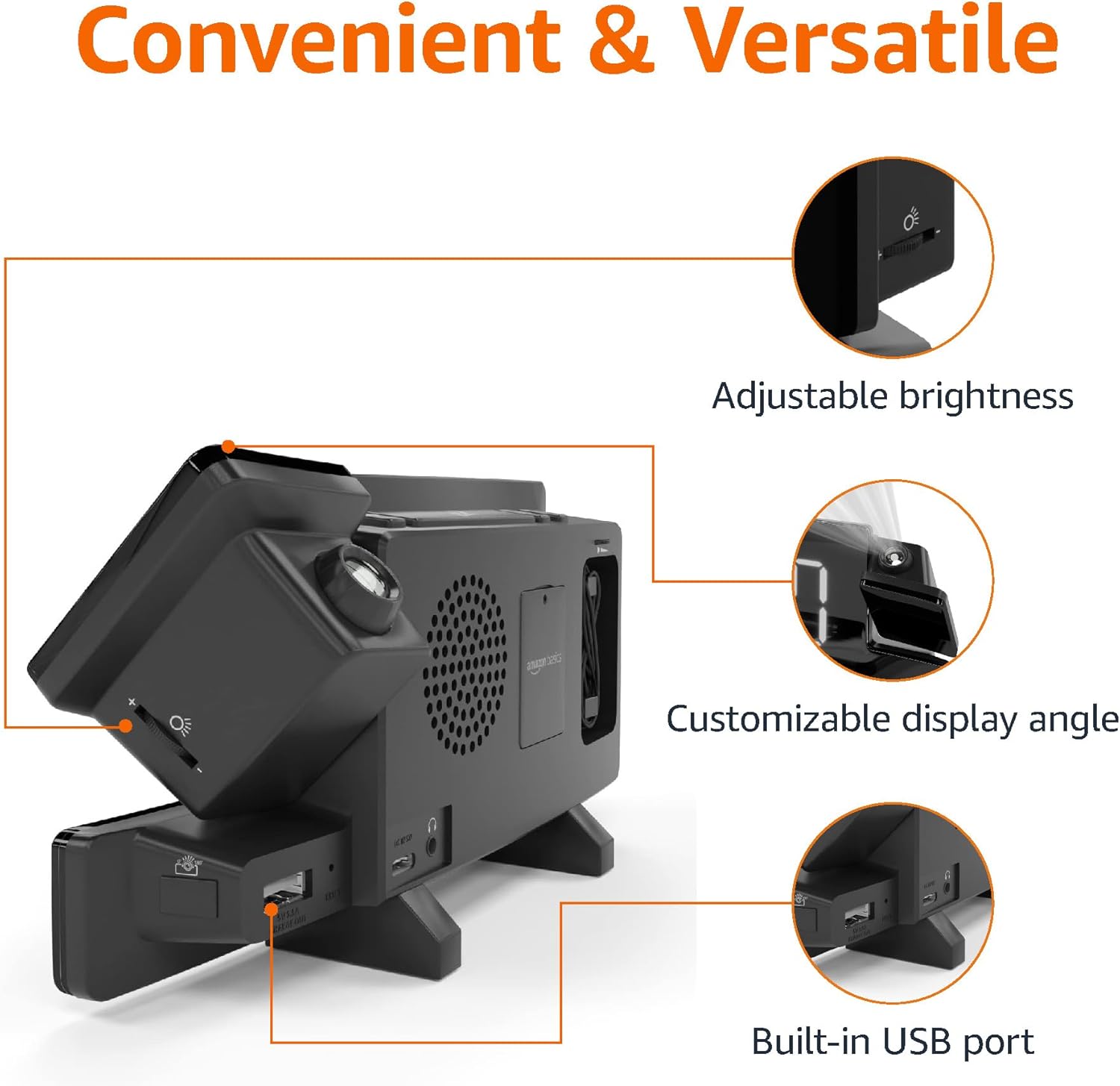
Image: Diagram highlighting the adjustable brightness, customizable projection angle, and USB charging port.
Persediaan
1. Sambungan Kuasa
Connect the AC power adapter to the DC IN port on the back of the alarm clock and plug it into a standard wall outlet. The display will light up.
2. Pemasangan Sandaran Bateri
For battery backup, open the battery compartment on the bottom of the unit. Insert 2 AAA batteries (not included), ensuring correct polarity (+/-). Close the compartment. The battery backup maintains time settings during power outages but does not power the display or alarm functions.
3. Penetapan Masa Awal
- Tekan dan tahan butang Masa Ditetapkan butang. Angka jam akan berkelip.
- Gunakan Volume/Tune Dial untuk menyesuaikan jam. Tekan Masa Ditetapkan sekali lagi untuk mengesahkan.
- The minute digits will flash. Use the Volume/Tune Dial untuk menyesuaikan minit. Tekan Masa Ditetapkan sekali lagi untuk mengesahkan.
- The time format (12H/24H) will flash. Use the Volume/Tune Dial to select your preferred format. Press Masa Ditetapkan to confirm and exit time setting mode.
4. Waktu Penjimatan Siang (DST)
Tekan ke DST button to toggle Daylight Saving Time on or off. The DST indicator will appear or disappear on the display.
Arahan Operasi
1. Menetapkan Penggera (Penggera 1 dan Penggera 2)
- Tekan dan tahan butang Penggera 1 or Penggera 2 butang. Angka waktu penggera akan berkelip.
- Gunakan Volume/Tune Dial to adjust the alarm hour. Press the respective Penggera butang sekali lagi untuk mengesahkan.
- The alarm minute digits will flash. Use the Volume/Tune Dial to adjust the alarm minutes. Press the respective Penggera butang sekali lagi untuk mengesahkan.
- The alarm source (FM radio or buzzer) will flash. Use the Volume/Tune Dial to select your preference. Press the respective Penggera button to confirm and activate the alarm. An alarm icon will appear on the display.
- To deactivate an alarm, press the respective Penggera butang sekali. Ikon penggera akan hilang.
2. Using Snooze
Apabila penggera berbunyi, tekan butang Tunda / Kelam button to temporarily silence the alarm. The alarm will sound again after the set snooze duration. The default snooze duration is 9 minutes. To adjust the snooze duration, press and hold the Tunda / Kelam butang, kemudian gunakan Volume/Tune Dial to select a duration between 2 and 60 minutes. Press Tunda / Kelam sekali lagi untuk mengesahkan.
3. Operasi Radio FM
- Hidupkan/Matikan: Tekan ke Radio/Sleep button to turn the FM radio on or off.
- Stesen-stesen Tala: Gunakan Volume/Tune Dial to manually tune to a desired FM frequency.
- Imbasan Auto: Tekan dan tahan butang Radio/Sleep button to automatically scan and save available FM stations as presets.
- Pilih Pratetap: Once stations are saved, short press the Radio/Sleep button to cycle through the preset stations.
- Laraskan Kelantangan: Putar Volume/Tune Dial to adjust the radio volume.
4. Pemasa Tidur
While the FM radio is playing, press the Radio/Sleep button repeatedly to set the sleep timer. Options typically range from 5 to 90 minutes. The radio will automatically turn off after the selected duration.
5. Ciri Unjuran

Image: The alarm clock projecting the time onto a bedroom ceiling.
- Aktifkan/Nyahaktifkan: Tekan ke Projection On/Off/Flip butang untuk menghidupkan atau mematikan unjuran masa.
- Laraskan Sudut: Manually adjust the projection arm to direct the time onto your desired surface (wall or ceiling).
- Fokus: Putar Projection Focus Wheel to achieve a clear image.
- Flip Display: Tekan ke Projection On/Off/Flip button repeatedly to rotate the projected time 180 degrees, ensuring correct orientation.

Image: The alarm clock on a nightstand, projecting the time onto a wall, demonstrating its use in a bedroom setting.
6. Pengecasan USB
Connect your mobile phone or tablet's USB charging cable to the Port Pengecasan USB on the back of the alarm clock. The device will begin charging. This port is for charging only and does not support data transfer.
7. Pelarasan Kecerahan Paparan
Tekan ke Tunda / Kelam button (when no alarm is sounding) to cycle through different brightness levels for the main LED display.
Penyelenggaraan
1. Pembersihan
Wipe the unit with a soft, dry, lint-free cloth. Do not use abrasive cleaners, waxes, or solvents as they may damage the surface.
2. Penggantian Bateri
If the battery backup is not functioning correctly (e.g., time resets after a power outage), replace the 2 AAA batteries in the battery compartment, ensuring correct polarity.
Menyelesaikan masalah
| Masalah | Kemungkinan Punca | Penyelesaian |
|---|---|---|
| Paparan kosong. | Tiada sambungan kuasa. | Pastikan penyesuai AC dipasang dengan selamat ke dalam unit dan salur keluar dinding yang berfungsi. |
| Penggera tidak berbunyi. | Penggera tidak diaktifkan atau kelantangan terlalu rendah. | Check if the alarm icon is visible on the display. Re-set the alarm if necessary. Increase radio volume if FM is selected as alarm source. |
| Masa yang diunjurkan kabur. | Projection focus is not adjusted. | Putar Projection Focus Wheel sehingga gambar jelas. |
| Projected time is not visible. | Projection is off or room is too bright. | Tekan ke Projection On/Off/Flip button to activate. The projection is best viewed in a dark room. |
| Penerimaan radio kurang baik. | Antenna position or interference. | Adjust the position of the FM antenna wire. Move the unit away from other electronic devices that may cause interference. |
| Pengecasan USB tidak berfungsi. | Isu kabel atau ketidakserasian peranti. | Ensure the USB cable is functional and properly connected. Try a different cable or device. |
Spesifikasi
- model: MET8831-AS
- Input Kuasa: Penyesuai AC (termasuk)
- Bateri tambahan: 2 x bateri AAA (tidak termasuk)
- paparan: LED 7 inci
- Frekuensi radio: FM
- Output USB: 5V, 1A (for charging)
- Dimensi (L x W x H): 7.1 x 1.6 x 3.7 inci (18.03 x 4.06 x 9.4 cm)
- Berat: Kira-kira 0.59 paun (267.62 g)

Image: Product dimensions for the Amazon Basics Projection Alarm Clock.
Maklumat Waranti
This product is covered by the Amazon Basics warranty. For detailed information regarding warranty terms and conditions, please refer to the official Amazon Basics webtapak atau hubungi sokongan pelanggan.
Sokongan Pelanggan
For further assistance, troubleshooting, or product inquiries, please contact Amazon Basics customer support through the Amazon website or your purchase platform. Have your product model number (MET8831-US) and purchase details ready.


