1. Pengenalan
Terima kasih kerana membeliasing the VANBAR Dual Dash Cam. This device is designed to record your driving journey with high-definition video, providing crucial evidence in case of incidents and capturing memorable moments. Please read this manual carefully before use to ensure proper installation and operation.
2. Kandungan Pakej
Sila sahkan bahawa semua item yang disenaraikan di bawah disertakan dalam pakej anda:
- Main Dash Cam Unit
- Kamera Belakang
- Car Charger (2-in-1 Cigarette Lighter Adapter)
- Mount Piala Sedutan
- Kabel USB
- 32GB High Endurance SD Card
- Manual Pengguna
- Rear Camera Mounting Kit (screws, adhesive)
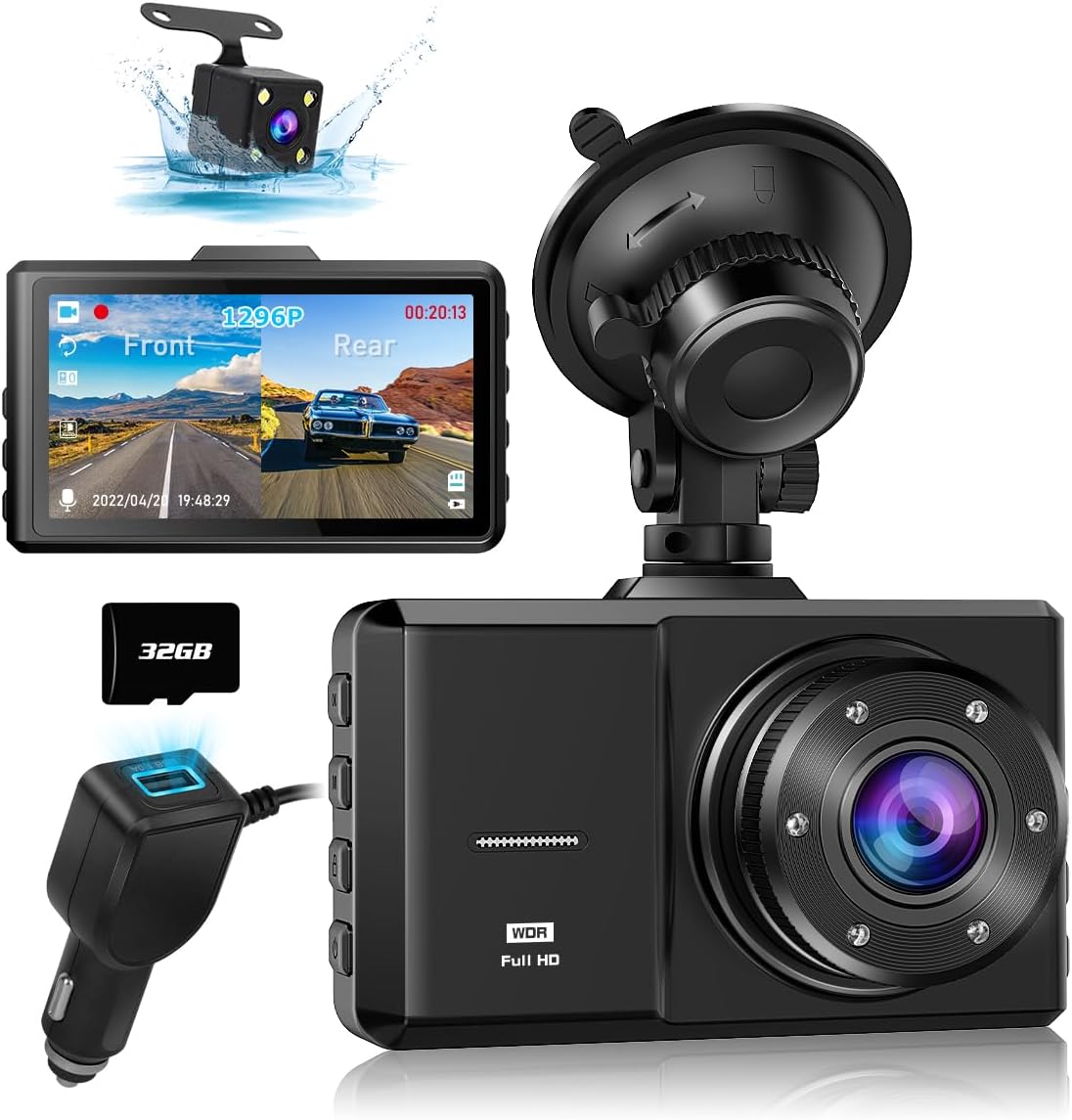
Image: Main dash cam unit, rear camera, car charger, and 32GB SD card.
3. Persediaan dan Pemasangan
3.1 Memasukkan Kad SD
- Pastikan cam dash dimatikan.
- Cari slot kad SD di sisi unit utama.
- Insert the provided 32GB Class 10 high endurance SD card into the slot until it clicks. Ensure correct orientation to avoid damage.
3.2 Memasang Kamera Hadapan
- Bersihkan kawasan cermin depan tempat anda berhasrat untuk memasang sesondol pemuka.
- Pasang pelekap cawan sedutan pada sesondol pemuka.
- Press the suction cup firmly against the windshield and lock it into place.
- Laraskan sudut kamera untuk memastikan gambar yang jelas view jalan di hadapan.
3.3 Memasang Kamera Belakang
- Sambungkan kabel kamera belakang ke unit kamera papan pemuka utama.
- Route the cable neatly along the vehicle's interior trim to the rear of the vehicle.
- Mount the rear camera on the rear windshield or license plate area using the provided adhesive or screws. Ensure it has a clear view bahagian belakang.
- For reverse assist functionality, connect the red wire from the rear camera cable to your vehicle's reverse light positive wire.
3.4 Sambungan Kuasa
- Pasangkan pengecas kereta ke dalam soket pemetik api kenderaan anda.
- Connect the mini USB end of the power cable to the main dash cam unit.
- The dash cam will automatically power on and begin recording when the vehicle engine starts.

Image: Illustration of the dash cam mounted on the windshield, showing both front and rear camera views pada paparan.
4. Arahan Operasi
4.1 Operasi Asas
- Hidupkan/Mati Kuasa: The device powers on automatically with the car engine and powers off when the engine is turned off. You can also manually power on/off by pressing and holding the power button.
- Rakaman: Continuous recording starts automatically when the device is powered on. A red indicator light or icon on the screen confirms recording is active.
- Navigasi Menu: Use the menu buttons (usually located on the side or bottom of the device) to navigate through settings on the 3-inch LCD screen.
4.2 Ciri-ciri Utama
- Kanta Sudut Lebar 170°: The front camera captures a 170-degree field of view, and the rear camera captures 150 degrees, minimizing blind spots.
- Rakaman Gelung: When the SD card is full, the dash cam automatically overwrites the oldest unlocked footage. Video segments are typically 1, 3, or 5 minutes long.
- G-Sensor (Impact Detection): The built-in 3-axis G-sensor detects sudden movements or collisions. In such an event, the current video segment is automatically locked and saved to a protected folder, preventing it from being overwritten.
- Parking Monitor (Time-lapse): With the dedicated hardwire kit (available upon request), the dash cam can record in time-lapse mode (1 frame/second) for up to 24 hours when the engine is off, providing surveillance against vandalism or hit-and-runs.
- HDR/WDR Technology: High Dynamic Range (HDR) and Wide Dynamic Range (WDR) technologies enhance video quality in varying light conditions, ensuring clear recordings in both bright daylight and low-light environments.
- Penglihatan Malam: The front camera features 6 IR LEDs, and the rear camera has a fill light, improving visibility and recording clarity in dark conditions. License plates are clearly visible.
- LED Traffic Signal Support: The dash cam is configured to record at 27.5 frames per second (fps) to avoid flickering issues with LED traffic lights in both East and West Japan.
- Rakaman Audio: Audio recording can be enabled or disabled in the settings. This feature can capture important sounds as evidence or for travel memories.

Image: Visual representation of the 170-degree wide-angle coverage from the front camera.

Image: Illustration demonstrating how WDR technology improves video clarity in both bright and dark areas.
5. Main semula dan File Pengurusan
5.1 On-Device Playback
Recorded videos and captured photos can be easily reviewed directly on the dash cam's 3-inch LCD screen. Navigate to the playback menu using the device buttons.
5.2 Main balik Komputer
Kepada view files on a computer, remove the SD card from the dash cam and insert it into a computer's SD card reader. The video files are typically in MP4 or MOV format and can be played using standard media players.
6. Penyelenggaraan
- Pemformatan Kad SD: It is recommended to format the SD card regularly (e.g., once a month) to ensure optimal performance and prevent data corruption. Format the card using the dash cam's menu settings.
- Pembersihan Kanta: Keep the camera lenses clean using a soft, lint-free cloth. Avoid abrasive materials that could scratch the lens.
- Suhu: The dash cam is designed to operate in temperatures from -10°C to 70°C. Avoid prolonged exposure to extreme temperatures outside this range.
- Kemas kini Firmware: Check the official VANBAR weblaman web ini secara berkala untuk kemas kini perisian tegar bagi meningkatkan prestasi dan menambah ciri baharu.
7. Penyelesaian masalah
- Kamera Pemuka tidak dapat dihidupkan: Ensure the car charger is properly connected to both the dash cam and the vehicle's cigarette lighter socket. Check if the vehicle's cigarette lighter socket is receiving power.
- Rakaman berhenti tanpa diduga: Format the SD card. Ensure you are using a Class 10 or higher high endurance SD card. Replace the SD card if the issue persists.
- Kualiti video kurang memuaskan: Clean the camera lenses. Ensure the protective film has been removed from the lenses. Check video resolution settings in the menu.
- Rear camera not working: Check the connection between the rear camera and the main unit. Ensure the cable is not damaged.
- Butang tidak responsif: Try resetting the device by pressing the reset button (if available) or disconnecting and reconnecting the power.
8. Spesifikasi
| Ciri | Spesifikasi |
|---|---|
| Saiz Skrin | LCD 3 inci |
| Resolusi Kamera Depan | 1296P Full HD |
| Sudut Kamera Depan | 170° Sudut ultra lebar |
| Sudut Kamera Belakang | 150 ° Sudut lebar |
| Penderia Imej | SONY STARVIS CMOS (Front) |
| Teknologi Video | HDR, WDR, Noise Reduction |
| Ciri Khas | G-Sensor, Loop Recording, Parking Monitor (Time-lapse), Motion Detection, Night Vision (IR LED front, Fill Light rear), Engine ON/OFF Linkage, LED Traffic Signal Support (27.5fps) |
| Penyimpanan | Supports Class 10 or higher Micro SD card (32GB included) |
| Bekalan Kuasa | USB Car Charger (12V/24V) |
| Suhu Operasi | -10°C hingga 70°C |
| Jenis Pemasangan | Pelekat pelekat |
| Dimensi (Pakej) | 14.2 x 10.9 x 9.8 cm |
| Berat (Pakej) | 420 g |
9. Waranti dan Sokongan
Your VANBAR Dash Cam comes with a standard 1-year warranty. You can extend this to a Waranti 3 tahun by registering your product. To register, please send your order number and a request for "3-year warranty extension registration" to our customer service center.
VANBAR is committed to providing the best products and continuously improving based on customer feedback. We offer lifetime free version updates. If you require any updates or have questions, please contact us.
Maklumat Hubungan:
- e-mel: vanbar_JP@163.com
- LINE: @645cthlb
Nota: When contacting us via email, please use a Yahoo Mail or Gmail address if possible, as replies to au, docomo, or SoftBank email addresses may sometimes be blocked.

Imej: Selesaiview of included components and customer support contact details.


