1. Pengenalan
This manual provides essential information for the safe and efficient assembly, operation, and maintenance of your Tempur-Pedic TP7000 Mesh Back Fabric Task Chair. Please read all instructions carefully before use and retain this manual for future reference.
2. Maklumat Keselamatan
- Kapasiti Berat Maksimum: This chair is designed to support a maximum weight of 250 pounds (113 kg). Exceeding this limit may cause damage to the chair or personal injury.
- Penggunaan yang Dimaksudkan: This chair is intended for office and task use. Do not use it for purposes other than its intended design.
- Perhimpunan: Ensure all components are securely fastened before using the chair. Periodically check all bolts and screws for tightness.
- Kestabilan: Avoid standing on the chair or using it as a step stool. Do not lean excessively to one side or the back, as this may cause the chair to tip over.
- Kanak-kanak: Keep children away from the chair during assembly. Do not allow children to play on or around the chair.
3. Kandungan Pakej
Before beginning assembly, verify that all parts are present and undamaged. If any parts are missing or damaged, do not proceed with assembly. Contact customer support for assistance.
- Chair Back (Mesh)
- Chair Seat (Fabric with Tempur Material)
- Tempat letak tangan (2)
- Chair Base (5-star with casters)
- Silinder Angkat Gas
- Plat Mekanisme
- Pek Perkakasan (skru, pencuci, sepana Allen)
4. Persediaan dan Pemasangan
Follow these steps to assemble your Tempur-Pedic TP7000 Task Chair. It is recommended to assemble the chair on a soft, non-abrasive surface to prevent damage.
- Pasang Kastor ke Pangkalan: Masukkan lima roda ke dalam lubang di hujung setiap kaki tapak kerusi. Tolak dengan kuat sehingga ia klik pada tempatnya.
- Masukkan Pengangkat Gas: Letakkan silinder pengangkat gas ke dalam lubang tengah tapak kerusi yang telah dipasang.
- Pasang Plat Mekanisme pada Tempat Duduk: Align the mechanism plate with the pre-drilled holes on the underside of the chair seat. Secure it using the provided screws and Allen wrench. Ensure the front of the mechanism faces the front of the seat.
- Pasangkan Tempat Letak Tangan pada Tempat Duduk: Attach the armrests to the sides of the chair seat using the designated screws. Do not fully tighten yet.
- Attach Backrest to Seat/Mechanism: Align the backrest with the mounting points on the mechanism plate or seat. Secure with screws. Once the backrest is attached, fully tighten all armrest screws.
- Sambungkan Pemasangan Tempat Duduk ke Lif Gas: Carefully place the assembled seat and backrest onto the gas lift cylinder, ensuring the tapered end of the gas lift fits securely into the mechanism plate.


5. Arahan Pengendalian (Pelarasan)
Your Tempur-Pedic TP7000 chair offers several adjustments to customize your seating experience for optimal comfort and support.
- Pelarasan Ketinggian Tempat Duduk: To raise the seat, lift the lever located under the right side of the seat while taking your weight off the chair. To lower the seat, lift the lever while seated. Release the lever at the desired height.
- Pelarasan ketinggian tempat letak tangan: Press the button on the side of each armrest and move the armrest up or down to your preferred height. Release the button to lock it in place.
- Kunci/Buka Kunci Condong: The chair features a single reclining position. To allow the chair to recline, pull the lever (usually the same as the height adjustment lever, or a separate one) outwards. To lock the chair in an upright position, push the lever inwards.
- Pelarasan Ketegangan Condongkan: Rotate the round knob located under the front of the seat to adjust the tension of the recline. Turn clockwise to increase tension (making it harder to recline) and counter-clockwise to decrease tension (making it easier to recline).
6. Penyelenggaraan
Penjagaan yang betul akan memanjangkan hayat dan penampilan kerusi anda.
- Pembersihan: The fabric seat and mesh back should be spot cleaned only. Use a mild detergent and a damp cloth. Do not saturate the fabric. Test any cleaning solution on an inconspicuous area first.
- Pemeriksaan: Periodically inspect all bolts, screws, and connections to ensure they are tight. Retighten as necessary.
- Kastor: Pastikan kastor bebas daripada rambut dan serpihan untuk memastikan pergerakan lancar.
- Elakkan Bahan Kimia Keras: Do not use abrasive cleaners, solvents, or strong detergents, as these can damage the chair's materials.
7. Penyelesaian masalah
Jika anda menghadapi masalah dengan kerusi anda, rujuk masalah dan penyelesaian biasa berikut:
- Chair Sinks or Does Not Stay Up:
Penyelesaian: The gas lift cylinder may be faulty. Contact customer support for a replacement. - Kerusi berdecit:
Penyelesaian: Check all screws and bolts and tighten them. A small amount of silicone lubricant can be applied to moving parts if the squeaking persists. - Casters Do Not Roll Smoothly:
Penyelesaian: Tanggalkan sebarang rambut atau serpihan yang membalut roda kastor. Bersihkan roda denganamp kain. - Kerusi Tidak Boleh Bersandar:
Penyelesaian: Ensure the tilt lock lever is disengaged (pulled outwards). Adjust the tilt tension knob counter-clockwise to reduce tension.
8. Spesifikasi
| Ciri | Perincian |
|---|---|
| Jenama | Tempur-Pedic |
| Model | TP7000 |
| warna | Cobalt (Seat), Black (Mesh Back) |
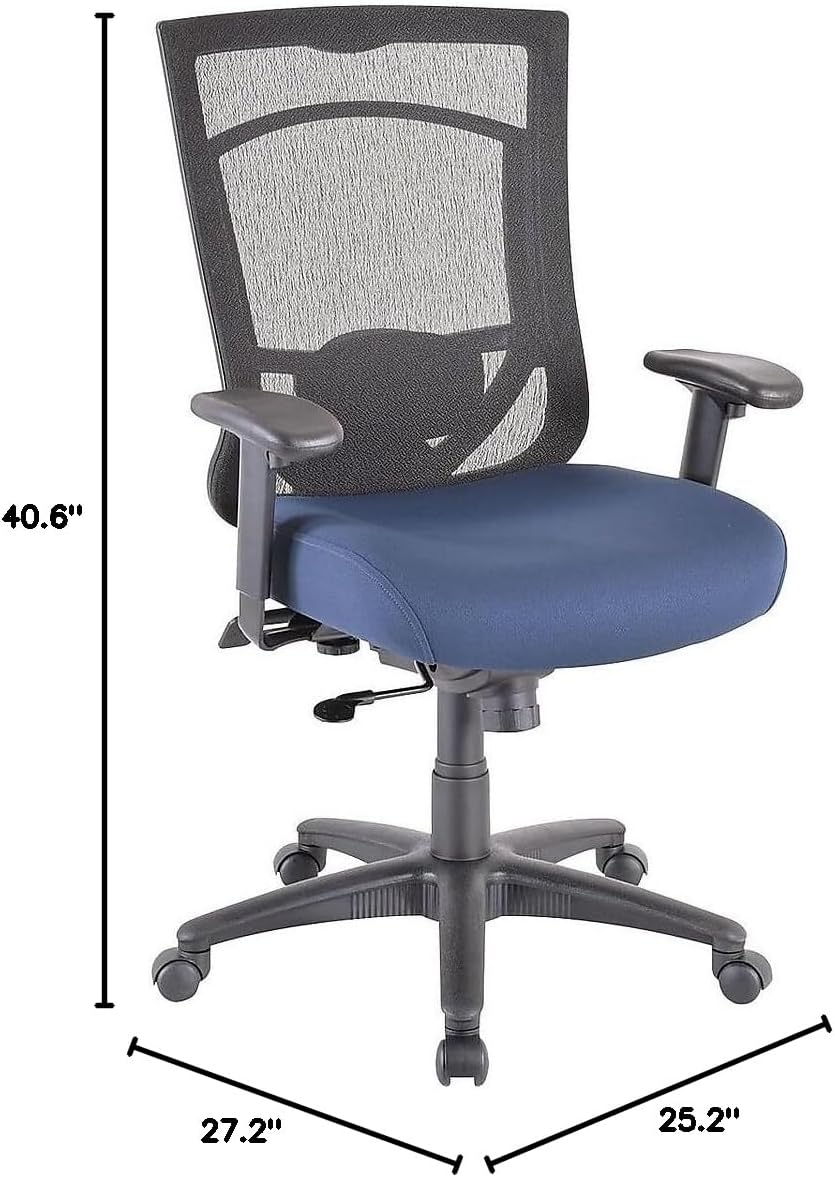
| Dimensi Keseluruhan (H x W x D) | 40.6-44.1" x 27.2" x 25.2" |
| Dimensi Tempat Duduk (W x D) | 20.9" x 20.1" |
| Back Dimensions (W x H) | 20.9" x 22.4" |
| Cadangan Berat Maksimum | 250 paun (113 kg) |
| bahan | Mesh Back, Fabric Seat with Authentic Tempur Material |
| Ciri Khas | Adjustable Height, Adjustable Armrests, Tilt Lock, Tilt Tension |
| Arahan Penjagaan Produk | Bersih Tempat |
| Disyorkan Penggunaan Harian | 8-10 jam |
9. Waranti dan Sokongan
Your Tempur-Pedic TP7000 Mesh Back Fabric Task Chair is backed by a Waranti Terhad Sepanjang Hayat. This warranty covers defects in materials and workmanship under normal use. Specific terms and conditions apply.
For warranty claims, technical support, or to order replacement parts, please contact Tempur-Pedic customer service. Refer to your purchase documentation or the official Tempur-Pedic webtapak untuk maklumat hubungan terkini.
Apabila menghubungi sokongan, sila sediakan nombor model (TP7000) dan bukti pembelian anda.


