Produk Selesaiview
The tectake 800599 File Cabinet is a robust and versatile storage solution designed for office environments. It features multiple compartments and drawers, each equipped with a safety lock to secure important documents. The cabinet is constructed from powder-coated steel, ensuring durability and ease of maintenance.

Rajah 1: Depan view of the tectake 800599 File Kabinet.
Key features include three height-adjustable shelves, reinforced doors with rubber stops for noise dampening, and a wide door opening angle for convenient access. Its design prioritizes both functionality and security for your office storage needs.
Persediaan dan Perhimpunan
The tectake 800599 File Cabinet requires assembly. Please ensure all components are present before beginning. It is recommended to assemble the cabinet on a soft, clean surface to prevent scratches.
Komponen yang Disertakan:
- File cabinet panels (sides, top, bottom, back, doors, drawers)
- 3 x Rak
- 8 x Keys (for all locks)
- Mounting material (screws, bolts, shelf clips, etc.)
- Manual Pemasangan (dokumen ini)
Langkah Perhimpunan:
- Buka bungkusan dan Sahkan: Carefully unpack all parts and compare them with the component list to ensure nothing is missing or damaged.
- Pasang Bingkai: Begin by connecting the side panels to the base and top panels using the provided mounting hardware. Ensure all connections are secure.
- Pasang Panel Belakang: Pasang panel belakang pada bingkai yang dipasang.
- Insert Shelf Supports: Place the shelf support clips into the desired slots on the interior side panels. The cabinet offers multiple height levels for shelf adjustment.
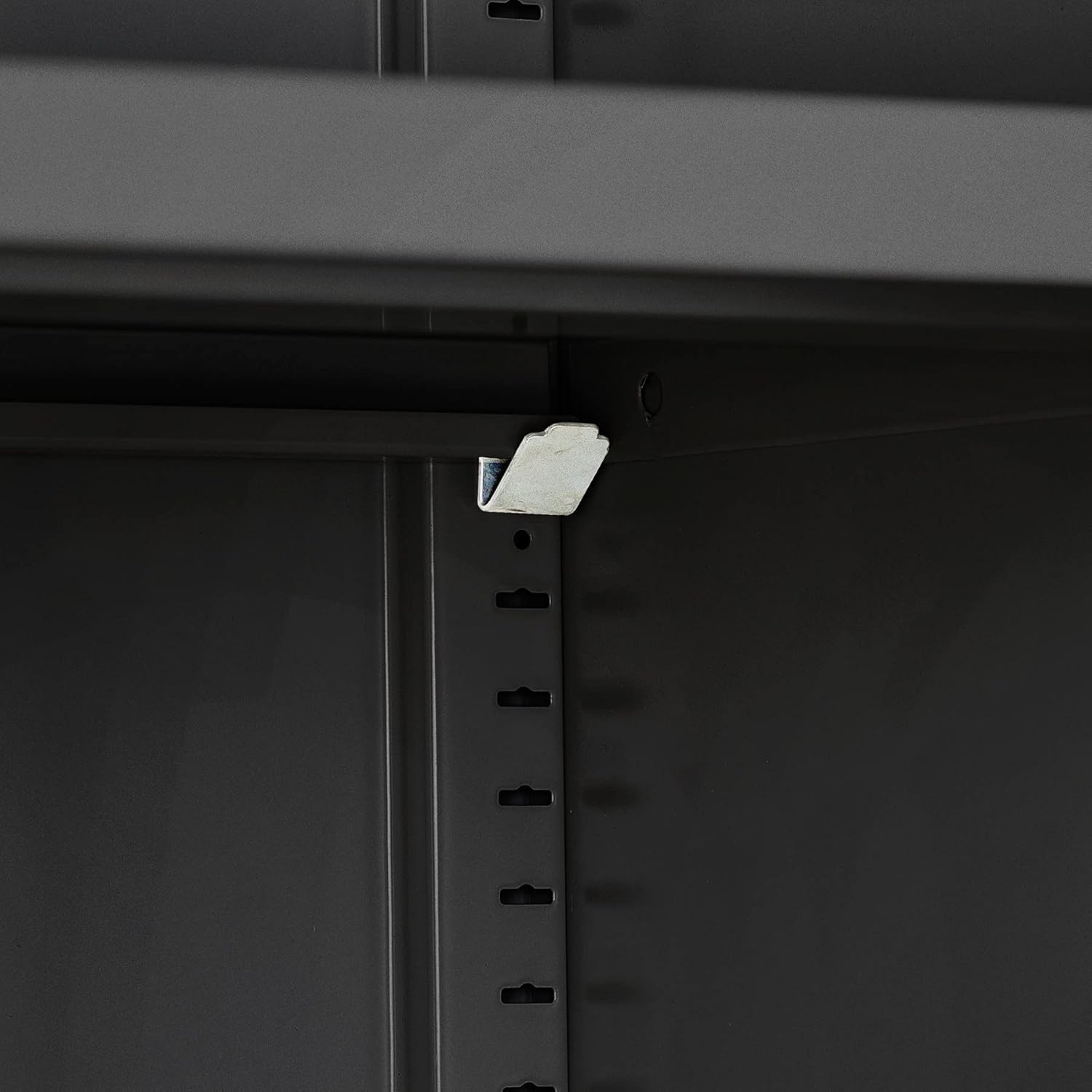
Figure 2: Shelf support clip installation.
- Letakkan Rak: Carefully place the shelves onto the installed shelf supports.

Figure 3: Shelves placed inside the cabinet.
- Pasang Laci: Assemble the two drawers according to the instructions in the separate assembly manual for drawers, then install them into their designated slots.
- Pasang Pintu: Mount the upper and lower doors to the cabinet frame using the hinges and screws provided. Ensure the doors swing freely and align correctly.
- Install Locks: The locks are pre-installed on the doors and drawers. Ensure the locking mechanisms function correctly with the provided keys.

Figure 4: Cabinet with visible locks and stable base.
- Semakan Akhir: Verify that all screws are tightened, doors and drawers operate smoothly, and the cabinet is stable.
Arahan Operasi
This section details the proper operation of your tectake file kabinet.
Menggunakan Pintu:
- To open a door, insert the corresponding key into the lock and turn it to the unlock position. Pull the handle to open the door.
- The doors feature a wide opening angle of approximately 130° for easy access to the interior. Rubber stops are integrated to dampen noise when closing.
- To close and lock a door, push it firmly until it clicks shut, then turn the key to the lock position and remove it.

Figure 5: Cabinet with doors open, showcasing interior and door features.
Menggunakan Laci:
- To open a drawer, insert the key into its lock, turn to unlock, and pull the drawer handle.
- The drawers are designed for smooth operation, providing convenient storage for smaller items.
- To close and lock a drawer, push it completely shut, turn the key to the lock position, and remove it.

Figure 6: Drawers in use, demonstrating storage capacity.
Melaraskan Rak:
- The cabinet includes three height-adjustable shelves. To adjust a shelf, first remove all items from it.
- Carefully lift the shelf and remove the four shelf support clips from their current positions.
- Reinsert the clips into the desired slots at the new height level, ensuring they are securely seated.
- Place the shelf back onto the clips, ensuring it is level and stable before placing items back on it.

Figure 7: Interior storage with adjustable shelves.
Penyelenggaraan
Regular maintenance will ensure the longevity and optimal performance of your file kabinet.
Pembersihan:
- The powder-coated steel surface is designed for easy cleaning. Use a soft, damp cloth with mild soap and water to wipe down the exterior and interior surfaces.
- Elakkan pembersih yang melelas, bahan kimia yang keras, atau pad penyental, kerana ini boleh merosakkan kemasan.
- Dry the surfaces thoroughly after cleaning to prevent water spots.
Penjagaan Kunci:
- If a lock becomes stiff, apply a small amount of graphite lubricant or a silicone-based spray lubricant to the keyhole. Do not use oil-based lubricants as they can attract dust.
- Insert and turn the key several times to distribute the lubricant.
Penjagaan Am:
- Periodically check all screws and fasteners to ensure they remain tight. Tighten any loose connections to maintain stability.
- Avoid overloading shelves or drawers beyond their specified weight capacity to prevent damage or instability.
Menyelesaikan masalah
Bahagian ini menyediakan penyelesaian kepada isu biasa yang mungkin anda hadapi dengan anda file kabinet.
| Masalah | Kemungkinan Punca | Penyelesaian |
|---|---|---|
| Doors/Drawers do not close properly. | Misalignment of hinges or drawer slides; obstruction. | Check for obstructions. Adjust hinges or drawer slides if necessary. Ensure the cabinet is on a level surface. |
| Key is difficult to turn in lock. | Lack of lubrication; debris in lock mechanism. | Apply graphite lubricant or silicone spray to the keyhole. Insert and turn the key several times. Do not force the key. |
| Kabinet berasa tidak stabil atau goyah. | Lantai tidak rata; skru pemasangan longgar. | Ensure the cabinet is placed on a level surface. Tighten all assembly screws. |
| Shelves sag or are not level. | Overloaded shelf; shelf clips not properly seated. | Reduce weight on the shelf. Re-seat shelf clips securely into the slots. Ensure clips are at the same height on both sides. |
If you encounter an issue not listed here, or if the suggested solutions do not resolve the problem, please refer to the support information provided in your purchase documentation.
Spesifikasi
Detailed technical specifications for the tectake 800500 File Kabinet.
| Ciri | Perincian |
|---|---|
| Dimensi Keseluruhan (W x D x H) | Approx. 80 x 40 x 180 cm (31.5"D x 15.75"W x 70.87"H) |
| Shelf Dimensions (W x D) | Approx. 79 x 36 cm (79.5 x 36 cm in feature bullets) |
| Drawer Interior Dimensions (W x D x H) | Approx. 33.3 x 29.5 x 8 cm (33.8 x 29.5 x 8 cm in feature bullets) |
| Beban Kapasiti setiap Rak | 40 kg (88 lbs) |
| Sudut Pembukaan Pintu | lebih kurang 130° |
| Berat badan | lebih kurang 41 kg (90.2 paun) |
| bahan | Keluli bersalut serbuk |
| Bilangan Rak | 3 (height adjustable) |
| Bilangan Laci | 2 |
| Mekanisme Mengunci | Individual key locks for each compartment and drawer |

Rajah 8: Dimensi lebihview daripada file kabinet.
Waranti dan Sokongan
For information regarding product warranty, please refer to the original purchase documentation or contact the retailer from whom you purchased the tectake 800599 File Kabinet.
For technical support or inquiries about replacement parts, please contact tectake customer service. Contact details can typically be found on the tectake official webtapak atau dalam resit pembelian anda.
No official product videos were available for inclusion in this manual.


