1. Pengenalan dan Lebihview
The Technical Pro TPRX4CH is a powerful 1600-watt, 4-channel Bluetooth receiver designed for home audio systems, home theaters, and karaoke setups. It offers versatile connectivity options including RCA, USB, SD Card, and AUX inputs, along with two microphone inputs. Featuring a fluorescent display and comprehensive playback controls, this receiver provides high-quality amplified audio for up to eight speakers.

Figure 1.1: Front Panel of the TPRX4CH Receiver
2. Ciri-ciri Utama
- Kuasa Puncak 1600 Watt: Delivers 120W RMS for high-quality amplified audio, suitable for home theater and karaoke.
- Output 4 Saluran: Supports up to 8 speakers simultaneously with dedicated volume control for each channel.
- Kesambungan Bluetooth: Wireless range of up to 30 feet, compatible with smartphones, tablets, and laptops.
- Berbilang Input: Includes RCA, USB, SD Card, and AUX inputs for diverse audio sources.
- Input Dwi Mikrofon: Features 1/4" mic inputs with independent volume, echo, and delay controls, plus a Mic Priority switch.
- Kawalan EQ: Rotary knobs for Treble, Bass, and Master Volume adjustments.
- Digital VFD Display: Built-in display with AM/FM radio tuner.
- Panel Kawalan Hadapan: Intuitive buttons and rotary controls with blue LED illumination for high visibility.
- Jack fon kepala: Dedicated headphone output with volume control.
- Ciri-ciri perlindungan: Integrated over-current, short-circuit, and over-voltage perlindungan.

Rajah 2.1: Ciri Utama Berakhirview
3. Kandungan Pakej
Sila tandai kotak untuk item berikut:
- Technical Pro 1600W 4-Channel Bluetooth Receiver (TPRX4CH)
- Alat Kawalan Jauh
- Antena FM
4. Persediaan dan Sambungan
4.1 Panel Belakangview

Figure 4.1: Rear Panel of the TPRX4CH Receiver
4.2 Pembesar Suara Penyambung
The TPRX4CH receiver supports up to 8 speakers across 4 channels (A, B, C, D). Connect your speakers to the corresponding speaker terminals on the rear panel. Ensure correct polarity (positive to positive, negative to negative) for optimal sound quality. Each channel (A, B, C, D) has dedicated terminals for two speakers (e.g., Speaker A+ and Speaker A-).
4.3 Menyambungkan Sumber Audio
- RCA Inputs (DVD/LINE): Use RCA cables to connect external audio devices such as DVD players, CD players, or other line-level audio sources to the 'INPUT' section on the rear panel.
- Kad USB/SD: Insert a USB flash drive or SD card into the respective slots on the front panel for digital audio playback.
- Input AUX: Connect portable audio devices using a 3.5mm AUX cable to the 'AUX IN' jack on the front panel.
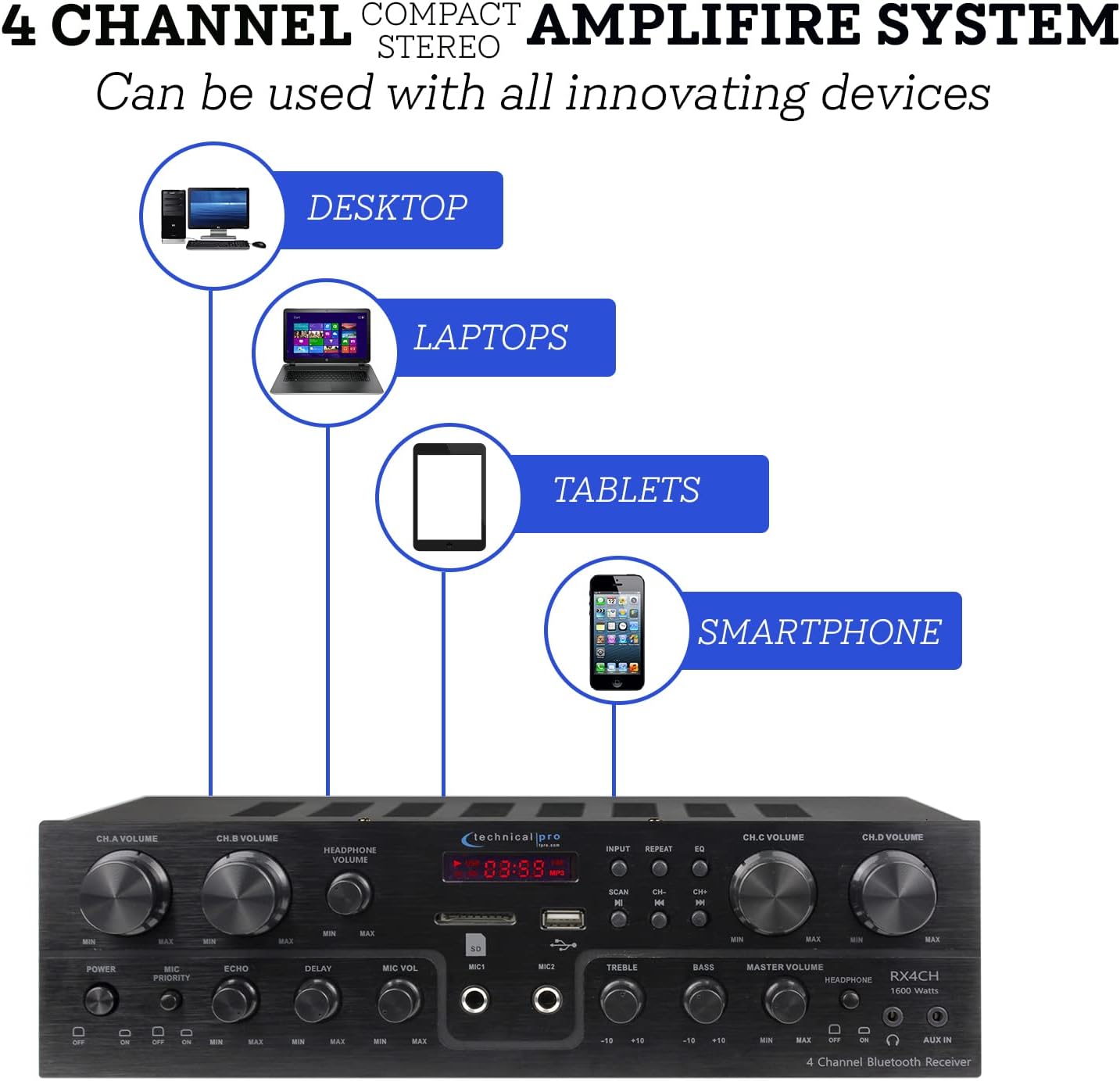
Figure 4.2: Device Connectivity Options
4.4 Menyambung Mikrofon
Plug 1/4" microphone cables into the 'MIC1' or 'MIC2' jacks on the front panel.
4.5 Sambungan Kuasa
Pastikan voltagpemilih e pada panel belakang ditetapkan kepada volum yang betultage for your region (110V/60Hz or 230V/50Hz). Connect the power cord to the AC inlet on the rear panel and then to a suitable power outlet.
5. Arahan Operasi
5.1 Menghidupkan/Mematikan
Press the 'POWER' button on the front panel to turn the unit on or off. The fluorescent display will illuminate when the unit is powered on.
5.2 Pemilihan Input
Use the 'INPUT' button on the front panel to cycle through available audio sources: Bluetooth, USB, SD, AUX, and RCA (DVD/LINE).
5.3 Volume and EQ Controls
- Channel Volume (CH.A, CH.B, CH.C, CH.D): Adjust the individual volume for each speaker channel using the dedicated rotary knobs.
- Jumlah Induk: Control the overall output volume of the system using the 'MASTER VOLUME' knob.
- Treble / Bass: Adjust the high and low frequency response using the 'TREBLE' and 'BASS' knobs to fine-tune your sound.
- Kelantangan Fon Kepala: Adjust the volume for connected headphones using the 'HEADPHONE VOLUME' knob.
5.4 Berpasangan Bluetooth
Select 'Bluetooth' as the input source. On your mobile device (smartphone, tablet, laptop), search for available Bluetooth devices and select 'Technical Pro' or similar from the list. Once paired, you can stream audio wirelessly to the receiver.
5.5 Main Semula USB/Kad SD
Masukkan pemacu USB atau kad SD dengan audio files into the respective slot. The receiver will automatically switch to USB/SD mode. Use the 'PLAY/PAUSE', 'PREVIOUS', and 'NEXT' buttons to control playback.
5.6 Microphone Functions (Karaoke)
- Kelantangan mikrofon: Adjust the volume of the connected microphones using the 'MIC VOL' knob.
- Echo/Delay: Use the 'ECHO' and 'DELAY' knobs to add effects to the microphone audio for a richer vocal performance.
- Keutamaan mikrofon: Activate the 'MIC PRIORITY' switch to automatically lower the background music volume when a microphone is in use, ensuring vocals are clear and prominent.

Figure 5.1: Built-in Microphone Talk-Over Function
Radio 5.7 AM/FM
Extend the FM antenna connected to the rear panel for better reception. Select 'Tuner' or 'Radio' as the input source. Use the 'SCAN' button to automatically search for and save radio stations. Use the 'CH-' and 'CH+' buttons to navigate through saved stations.
6. Penyelenggaraan
- Pembersihan: Use a soft, dry cloth to clean the exterior of the receiver. Do not use liquid cleaners or aerosols.
- Pengudaraan: Ensure the receiver is placed in a well-ventilated area to prevent overheating. Do not block the ventilation openings.
- Storan: Jika menyimpan unit untuk tempoh yang lama, putuskan sambungannya daripada kuasa dan simpan di tempat yang sejuk dan kering.
7. Penyelesaian masalah
| Masalah | Kemungkinan Punca | Penyelesaian |
|---|---|---|
| Tiada kuasa | Power cord not connected; Power outlet faulty; Unit fuse blown | Check power cord connection; Try a different outlet; Contact service for fuse replacement |
| Tiada keluaran bunyi | Incorrect input selected; Speaker wires loose/incorrectly connected; Volume too low; Mute activated | Select correct input; Check speaker connections and polarity; Increase Master Volume; Deactivate mute if applicable |
| Bunyi bising | Ground loop issue; Interference from other electronics; Faulty cable | Ensure proper grounding; Move unit away from other electronics; Try different audio cables |
| Bluetooth tidak bersambung | Device too far; Bluetooth not enabled on device; Receiver not in pairing mode | Move device closer to receiver; Enable Bluetooth on your device; Ensure receiver input is set to Bluetooth |
| Isu main balik USB/SD | Tidak disokong file format; rosak files; Pemacu/kad tidak dimasukkan dengan betul | pastikan files are in supported format (e.g., MP3); Reformat drive/card; Reinsert drive/card firmly |
8. Spesifikasi
| Ciri | Spesifikasi |
|---|---|
| Nombor Model | TPRX4CH |
| Output Kuasa Puncak | 1600 Watt |
| Output Kuasa RMS | 120 Watt |
| Saluran | 4 Channel (supports 8 speakers) |
| Teknologi Ketersambungan | Bluetooth, RCA, USB 2.0, SD Card, AUX |
| Julat Bluetooth | Sehingga 30 kaki |
| Input Mikrofon | 2 x 1/4" Jacks |
| Mod Keluaran Audio | Stereo |
| Ciri Khas | Equalizer, Fluorescent Display, Mic Priority |
| Dimensi Produk | 13 x 7.3 x 3.5 inci |
| Berat Barang | 1.54 paun |
| warna | Hitam |
| Pengeluar | Pro Teknikal |
| Tarikh Tersedia Pertama | 16 Jun 2022 |

Rajah 8.1: Dimensi Produk
9. Waranti dan Sokongan
For warranty information and technical support, please refer to the documentation included with your purchase or visit the official Technical Pro website. You may also contact Technical Pro customer service directly for assistance with product setup, operation, or troubleshooting beyond the scope of this manual.
Technical Pro Store: Lawati Kedai Technical Pro di Amazon


