1. Pengenalan
Produk Selesaiview
The Maxxima 3-Way/Single Pole Digital Dimmer Wall Light Switch is designed to provide versatile lighting control for your home or commercial space. It features a button-controlled dimmer with green LED indicator lights to display brightness levels. This switch is compatible with incandescent, halogen, and dimmable LED/CFL bulbs, offering a flexible solution for various lighting needs.
- Keserasian Serbaguna: Supports both 3-way and single-pole wiring configurations.
- Penunjuk Kecerahan: Green LED lights clearly show the current dimming level.
- Kapasiti Tinggi: Handles up to 600W for incandescent/halogen and 150W for dimmable LED/CFL.
- No Neutral Wire Required: Simplifies installation in many existing setups.
- Kawalan Tepat: Independent on/off button and dedicated dimming buttons for fine-tuning light levels.
- Sensitiviti boleh laras: Trim buttons allow for fine-tuning compatibility with various LED lamps.
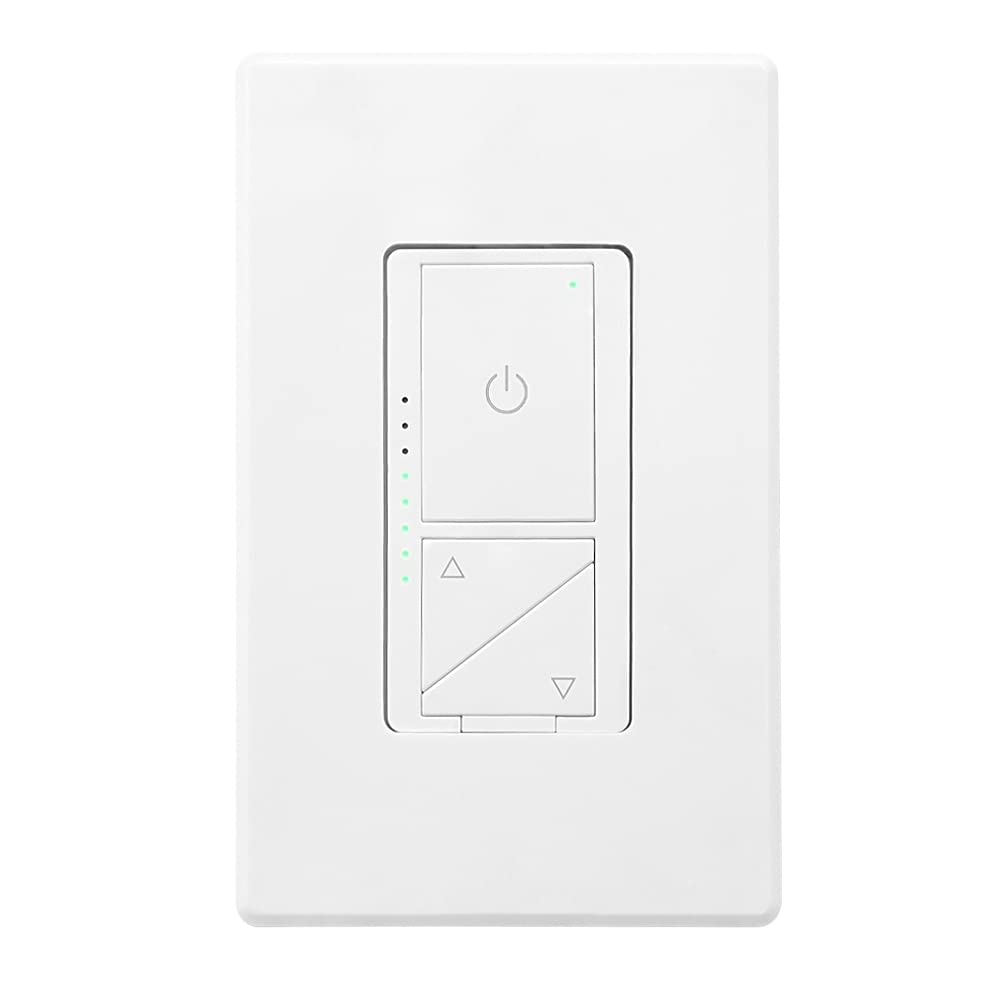
Rajah 1: Depan view of the Maxxima Digital Dimmer Wall Light Switch.
2. Persediaan dan Pemasangan
Sebelum Anda Bermula
AMARAN: To avoid fire, shock, or death, turn off power at the circuit breaker or fuse box and test that the power is off before wiring. Installation should be performed by a qualified electrician or a person with a thorough understanding of electrical wiring.
- Ensure the power is OFF at the circuit breaker before beginning installation.
- This dimmer is designed for use with 120VAC, 60Hz.
- Do NOT use with non-dimmable lighting or ceiling fans.
Alat Diperlukan
- Pemutar skru (Phillips dan Kepala Rata)
- Pelucut Kawat
- Pita Elektrik
- Voltage Penguji
Gambarajah Pendawaian
The Maxxima Digital Dimmer is compatible with both single-pole and 3-way wiring configurations. Refer to the detailed wiring instructions provided in the official installation manual for specific diagrams. The switch operates at 120VAC and does not require a neutral wire.

Rajah 2: Belakang view of the dimmer switch with wiring details.
Langkah Pemasangan
- Matikan Kuasa: Locate the circuit breaker controlling the switch location and turn it OFF. Verify power is off using a voltage penguji.
- Keluarkan Suis Lama: Tanggalkan plat dinding yang sedia ada dan suis dari kotak dinding dengan berhati-hati. Putuskan sambungan wayar.
- Wire the New Dimmer: Connect the wires from the wall box to the dimmer switch according to the wiring diagram in the full manual. Ensure all connections are secure.
- Pasang Dimmer: Gently push the wired dimmer into the wall box. Secure it with the provided screws.
- Pasang Plat Dinding: Snap the screwless wall plate onto the dimmer for a clean finish.
- Pulihkan Kuasa: HIDUPKAN semula kuasa pada pemutus litar.

Figure 3: Maxxima Digital Dimmer Switch installed on a wall.
3. Operasi
Kawalan Asas
The Maxxima Digital Dimmer features intuitive controls for easy light management:
- Butang Hidup/Mati: The large button with the power symbol (⏻) at the top controls the main power to the lights. Press once to turn lights ON or OFF.
- Dimming Buttons: The two triangular buttons below the power button control the brightness. The top triangle increases brightness, and the bottom triangle decreases brightness.
Figure 4: Controls of the Maxxima Digital Dimmer Switch.
Pelarasan Kecerahan
Untuk melaraskan tahap kecerahan:
- Peredupan Berterusan: Press and hold the up (▲) or down (▼) arrow button to smoothly increase or decrease the light intensity. Release the button when the desired brightness is reached.
- Preset Levels: Short-click the up (▲) or down (▼) arrow button to cycle through preset brightness levels.
- Lampu Penunjuk: The green LED lights on the left side of the switch illuminate to indicate the current brightness level. More lights mean brighter illumination.
Pelarasan Sensitiviti
For optimal performance with various LED lamps, the dimmer includes sensitivity adjustment trim buttons located below the cover plate. These allow you to fine-tune the dimmer's response to prevent flickering or ensure proper dimming range.

Figure 5: Trim buttons for sensitivity adjustment located under the cover plate.
4. Penyelenggaraan
The Maxxima Digital Dimmer Wall Light Switch requires minimal maintenance. Follow these guidelines to ensure its longevity and proper function:
- Pembersihan: To clean the switch and wall plate, gently wipe with a soft, damp cloth. Do NOT use abrasive cleaners, solvents, or chemical sprays, as these can damage the finish or internal components.
- Pemeriksaan: Periodically inspect the switch for any signs of damage, loose connections, or unusual operation. If any issues are observed, turn off power at the circuit breaker and consult a qualified electrician.
- Tiada Bahagian Boleh Diservis Pengguna: There are no user-serviceable parts inside the dimmer. Do not attempt to open or repair the unit yourself.
5. Penyelesaian masalah
If you experience issues with your Maxxima Digital Dimmer, refer to the table below for common problems and their solutions.
| Masalah | Kemungkinan Punca | Penyelesaian |
|---|---|---|
| Lampu tidak menyala. | No power to the switch; Loose wiring connection; Burnt-out bulb. | Check circuit breaker; Verify wiring connections are secure; Replace bulb. |
| Lampu tidak malap atau berkelip-kelip. | Non-dimmable bulbs; Incompatible LED/CFL bulbs; Sensitivity not adjusted. | Ensure dimmable bulbs are used; Adjust sensitivity using trim buttons (refer to Section 3); Try different brand/type of dimmable LED/CFL. |
| Dimmer adalah hangat untuk disentuh. | Normal operation; Overload. | Slight warmth is normal. If excessively hot, turn off power and check total wattage of connected bulbs. Do not exceed maximum capacity. |
| LED indicator lights are not working. | Kesalahan dalaman. | Contact Maxxima customer support for assistance. |
If the problem persists after attempting these solutions, please contact Maxxima customer support or a qualified electrician.
6. Spesifikasi
| Spesifikasi | Perincian |
|---|---|
| Nombor Model | MEW-DM680 |
| Dimensi Produk | 1.74” W x 4.14” L x 1.28” D (4 x 2 x 1 inches) |
| Berat badan | 5.29 auns |
| Input Voltage | 120VAC, 60Hz |
| Max. Incandescent/Halogen Load | 600W |
| Max. Dimmable LED/CFL Load | 150W |
| Jenis Pendawaian | Tiang Tunggal atau 3 Hala |
| Wayar Neutral Diperlukan | Tidak |
| Mod Operasi | Manual |
| Pensijilan | Tersenarai ETL |
| Termasuk Aksesori | Plat Dinding Tanpa Skru |
7. Waranti dan Sokongan
Maklumat Waranti
The Maxxima Digital Dimmer Wall Light Switch (Model: MEW-DM680) comes with a Waranti 2 tahun from the date of purchase. This warranty covers defects in materials and workmanship under normal use. It does not cover damage resulting from improper installation, misuse, abuse, or unauthorized modifications.
Sokongan Pelanggan
For technical assistance, troubleshooting, or warranty claims, please contact Maxxima customer support:
- Webtapak: Visit the official Maxxima webtapak untuk sumber sokongan dan maklumat hubungan.
- e-mel: Refer to your product packaging or the Maxxima weblaman web untuk emel khidmat pelanggan.
- telefon: Refer to your product packaging or the Maxxima weblaman web untuk nombor telefon khidmat pelanggan.
You can also find the official Installation Manual (PDF) for this product di sini.


