1. Produk Lebihview
The Baseus Metal Gleam Series 8-in-1 USB-C Hub is a versatile docking station designed to expand the connectivity of your USB-C enabled devices. It integrates multiple essential ports, including USB 3.0, HDMI, USB-C Power Delivery (PD), and microSD/SD card readers, into a single compact unit. This hub is ideal for enhancing productivity by connecting various peripherals, external displays, and charging your device simultaneously.

The Baseus Metal Gleam Series 8-in-1 USB-C Hub is presented in its retail box, showcasing the product and its key features on the packaging.
2. Ciri-ciri Utama
- Kesambungan 8-dalam-1: Provides comprehensive port expansion for modern USB-C devices.
- Triple USB 3.0 Ports: Offers high-speed data transfer up to 5Gbps for peripherals like external hard drives, keyboards, and mice.
- Dual HDMI Outputs: Supports dual-display ultra-clear expansion, enabling connection to two external monitors for enhanced multitasking.
- Penghantaran Kuasa USB-C (PD): Allows for fast charging of your host device with up to 100W power pass-through.
- MicroSD/SD Card Readers: Facilitates quick access to photos and videos from memory cards.
- Reka bentuk padat dan mudah alih: Metal gleam series design ensures durability and easy portability.
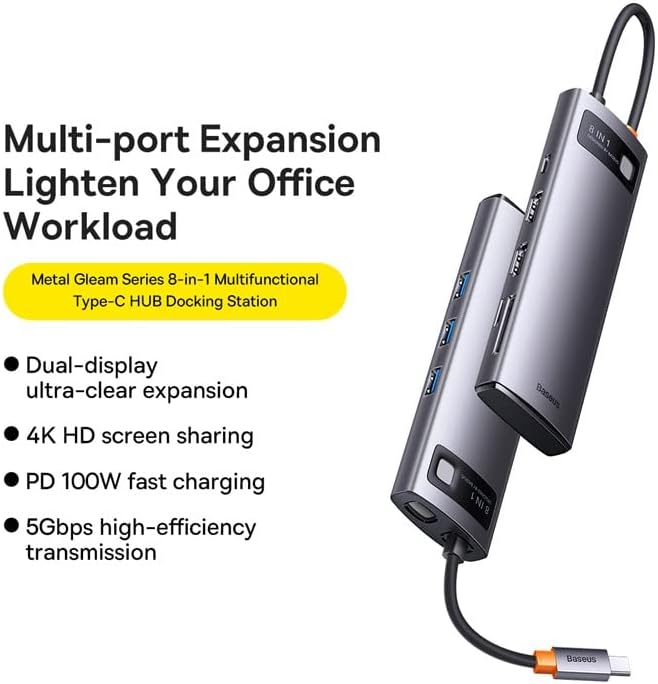
This graphic highlights the multi-port expansion capabilities of the Baseus Metal Gleam Series 8-in-1 USB-C Hub, emphasizing its ability to lighten office workload with features like dual-display, 4K HD screen sharing, PD 100W fast charging, and 5Gbps high-efficiency transmission.
3. Kandungan Pakej
- 1 x Baseus Metal Gleam Series 8-in-1 USB-C Hub
- 1 x Manual Pengguna
4. Arahan Persediaan
- Sambung ke Peranti Hos: Plug the USB-C connector of the hub into the USB-C port of your laptop, tablet, or smartphone. Ensure the connection is secure.
- Sambung Peranti: Connect your USB devices (e.g., mouse, keyboard, external hard drive) to the USB 3.0 ports on the hub.
- Sambungkan Paparan: Use HDMI cables to connect your external monitors to the HDMI ports on the hub.
- Penghantaran Kuasa (Pilihan): If your host device requires charging, connect your original USB-C power adapter to the USB-C PD port on the hub. This will charge your device while using the hub.
- Masukkan Kad Memori: Insert your microSD or SD cards into the corresponding slots for data access.

This image provides an angled perspective of the Baseus Metal Gleam Series 8-in-1 USB-C Hub, highlighting its sleek design and the three accessible USB 3.0 ports on its side.
5. Arahan Operasi
5.1. USB 3.0 Data Transfer
Connect USB devices such as flash drives, external hard drives, or other USB peripherals to the USB 3.0 ports. The hub supports data transfer speeds of up to 5Gbps.
5.2. HDMI Display Output
Connect your monitors using HDMI cables. The hub supports dual HDMI output. For optimal performance, ensure your display settings on your computer are configured correctly for extended or mirrored displays.
- Sistem Windows: Supports triple-display (A+B+C) at 1080P@60Hz in expansion mode, and (A+A+A) at 1080P@60Hz in mirroring mode.
- Apple OS Systems: Supports dual-display (A+B+B) at 4K@30Hz in expansion mode, and (A+A+A) at 4K@30Hz in mirroring mode.

This visual guide demonstrates the dual-display functionality of the Baseus Metal Gleam Series 8-in-1 USB-C Hub, showing both expansion and mirroring modes for Windows systems (1080P@60Hz) and Apple OS systems (4K@30Hz).
5.3. USB-C Power Delivery
The USB-C PD port allows you to charge your host device (laptop, tablet) while simultaneously using the hub's other functions. Connect your device's original USB-C power adapter to this port. The hub supports up to 100W power pass-through.
5.4. SD/MicroSD Card Reader
Insert your SD or microSD cards into the designated slots. The hub will allow your device to read and write data to these cards.
6. Penyelenggaraan
- Pembersihan: Use a soft, dry cloth to clean the surface of the hub. Avoid using liquid cleaners or abrasive materials.
- Storan: Simpan hab di tempat yang sejuk dan kering jauh dari cahaya matahari langsung dan suhu yang melampau.
- Pengendalian: Elakkan daripada menjatuhkan hab atau menyebabkannya terkena hentaman kuat. Jangan cuba membuka peranti.

An exploded diagram of the Baseus Metal Gleam Series 8-in-1 USB-C Hub illustrates its internal electronic components and sophisticated circuit board design.
7. Penyelesaian masalah
- Tiada Output Paparan:
- Ensure the HDMI cables are securely connected to both the hub and the monitor.
- Verify that your monitor input source is set to the correct HDMI port.
- Check your computer's display settings to ensure the external monitor is detected and configured.
- Cuba mulakan semula komputer anda.
- Devices Not Recognized (USB/SD/MicroSD):
- Pastikan penyambung USB-C hab dimasukkan sepenuhnya ke dalam peranti hos anda.
- Try connecting the device directly to your computer's USB port to confirm it functions independently.
- Mulakan semula komputer anda dan sambungkan semula hab.
- Tiada Penghantaran/Pengecasan Kuasa:
- Ensure your USB-C power adapter is connected to the hub's PD port and is functioning correctly.
- Sahkan bahawa peranti hos anda menyokong Penghantaran Kuasa USB-C.
- Sambungan Terputus-putus:
- Pastikan semua sambungan kukuh dan stabil.
- Elakkan meletakkan hab berhampiran sumber gangguan elektromagnet yang kuat.
8. Spesifikasi
| Atribut | Nilai |
|---|---|
| Dimensi Produk | 3.94 x 1.97 x 1.18 inci |
| Berat Barang | 5.3 auns |
| Nombor Model Item | WKWG050113 |
| Antara Muka Perkakasan | USB 3.0, HDMI, USB-C, SD, MicroSD |
| Ciri Khas | Mudah alih |
| Peranti Serasi | Peranti dengan port USB-C |
| Jumlah Port USB | 8 (3x USB 3.0, 2x HDMI, 1x USB-C PD, 1x MicroSD, 1x SD) |
| Resolusi HDMI | Up to 4K@30Hz (Apple OS), 1080P@60Hz (Windows) |
| Input PD USB-C | Sehingga 100W |
| Kelajuan Pemindahan Data | Sehingga 5Gbps (USB 3.0) |
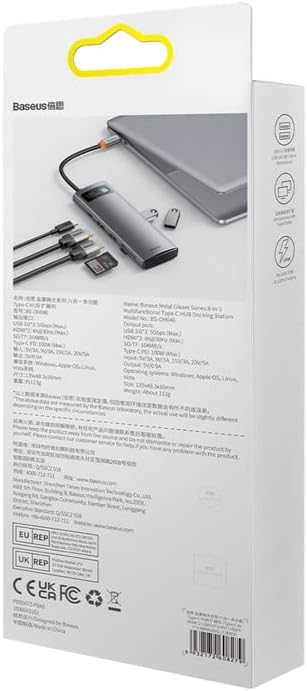
Bahagian belakang view of the product packaging displays detailed technical specifications and compliance information for the Baseus Metal Gleam Series 8-in-1 USB-C Hub.
9. Waranti dan Sokongan
For warranty information, technical support, or further inquiries, please visit the official Baseus webtapak atau hubungi perkhidmatan pelanggan mereka. Simpan resit pembelian anda untuk tuntutan waranti.
Baseus Rasmi Webtapak: www.baseus.com


