1. Pengenalan
Thank you for choosing the ErGear Height Adjustable Electric Standing Desk. This desk is designed to enhance your workspace with dependable, scientifically-designed ergonomic features, promoting a healthier and more productive work environment. It allows for seamless transitions between sitting and standing positions, offering optimal comfort and productivity throughout your day.
This manual provides essential information for the safe and efficient use of your new electric standing desk, including setup, operation, maintenance, and troubleshooting.
2. Maklumat Keselamatan
AMARAN: Sila baca semua arahan keselamatan dengan teliti sebelum pemasangan dan penggunaan. Kegagalan untuk mengikuti arahan ini boleh mengakibatkan kecederaan atau kerosakan pada produk.
- The desk has a maximum weight limit of 176 paun (80 kg). Do not exceed this weight capacity.
- Proper assembly is required for stability and safety. Ensure all screws and fasteners are securely tightened.
- If the desk is used in an environment with children, consider anchoring the desk to the wall to prevent tipping.
- Keep hands and objects clear of the lifting mechanism during operation to prevent pinching or damage.
- Ensure all cables connected to devices on the desk have sufficient slack to accommodate height adjustments.
- Jangan duduk atau berdiri di atas meja.
- Do not disassemble or modify the motor or control box. Contact customer support for any repairs.
3. Kandungan Pakej
Please verify that all components are present and undamaged. A detailed list of all parts and hardware is provided in the separate installation manual included with your purchase. Key components include:
- Desktop (Two-Piece)
- Tiang Pengangkat (Kaki)
- Kotak Kawalan
- Pengawal Telefon bimbit
- Penyesuai Kuasa dan Kabel
- Dual Cable Access Holes
- Cangkuk Penyimpanan
- Perkakasan dan Alat Pemasangan
4. Persediaan dan Pemasangan
The ErGear Electric Standing Desk is designed for straightforward assembly. Most users report an average assembly time of 30 minutes. For detailed, step-by-step instructions, please refer to the dedicated Installation Manual (PDF) provided with your product or available online via the link in the Support section.
Petua Pemasangan Utama:
- Susun atur semua komponen dan perkakasan sebelum memulakan.
- Follow the numbered steps in the installation manual precisely.
- Ensure all connections are secure before plugging in the desk.
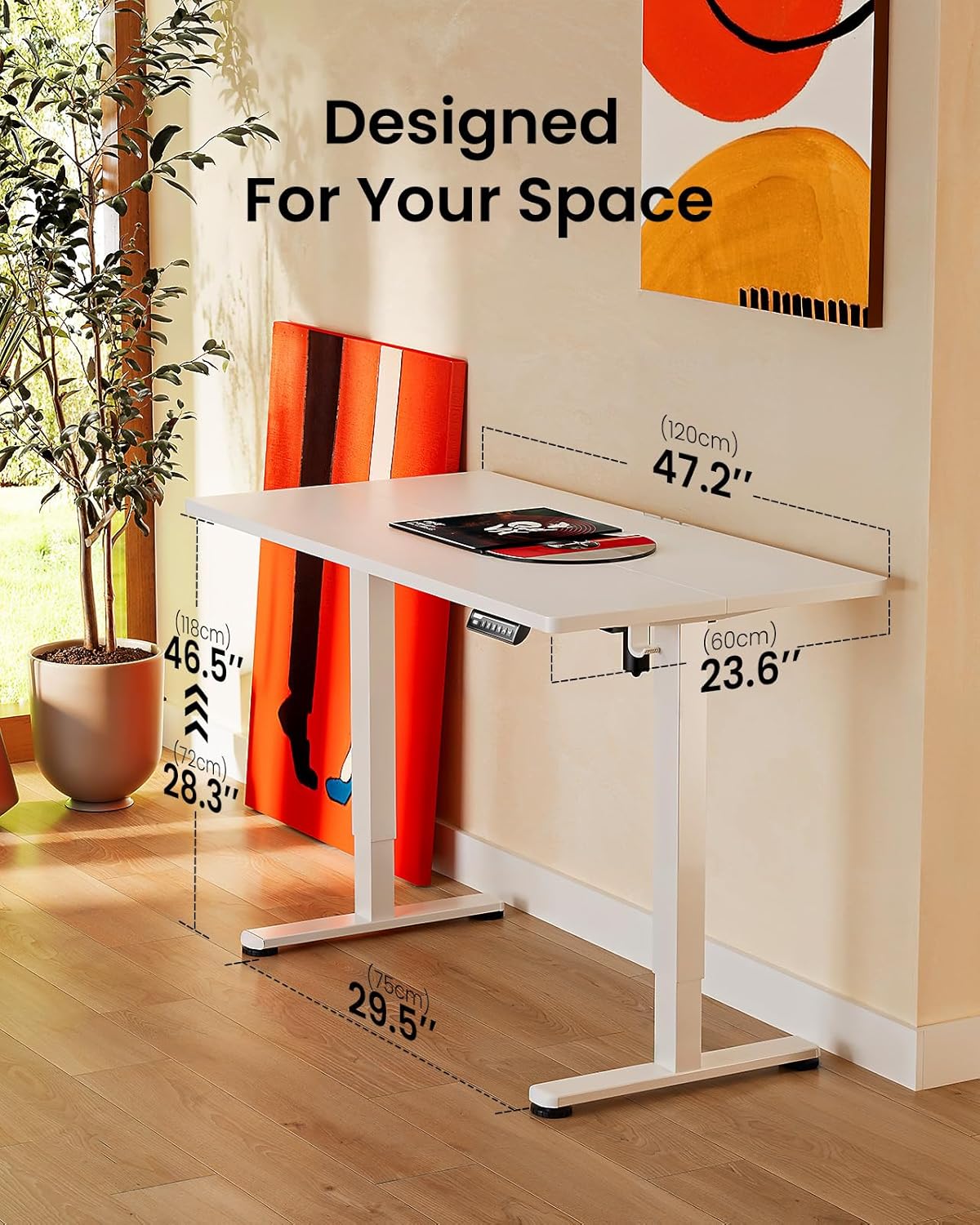
Image: ErGear standing desk with dimensions showing 47.2 inches width, 23.6 inches depth, and height adjustable from 28.3 to 46.5 inches. This illustrates how the desk is designed to fit various spaces.

Image: Diagram illustrating the simplified assembly process of the ErGear standing desk, highlighting an average assembly time of 30 minutes.
5. Arahan Operasi
Your ErGear Electric Standing Desk features an intuitive control panel for easy height adjustment and memory settings.
Pelarasan Ketinggian
The desk's height can be freely adjusted from 28.35 inches (72 cm) to 46.79 inches (118.8 cm). Use the up and down arrows on the control panel to manually adjust the desk to your desired height. The motor provides powerful and smooth lifting performance.
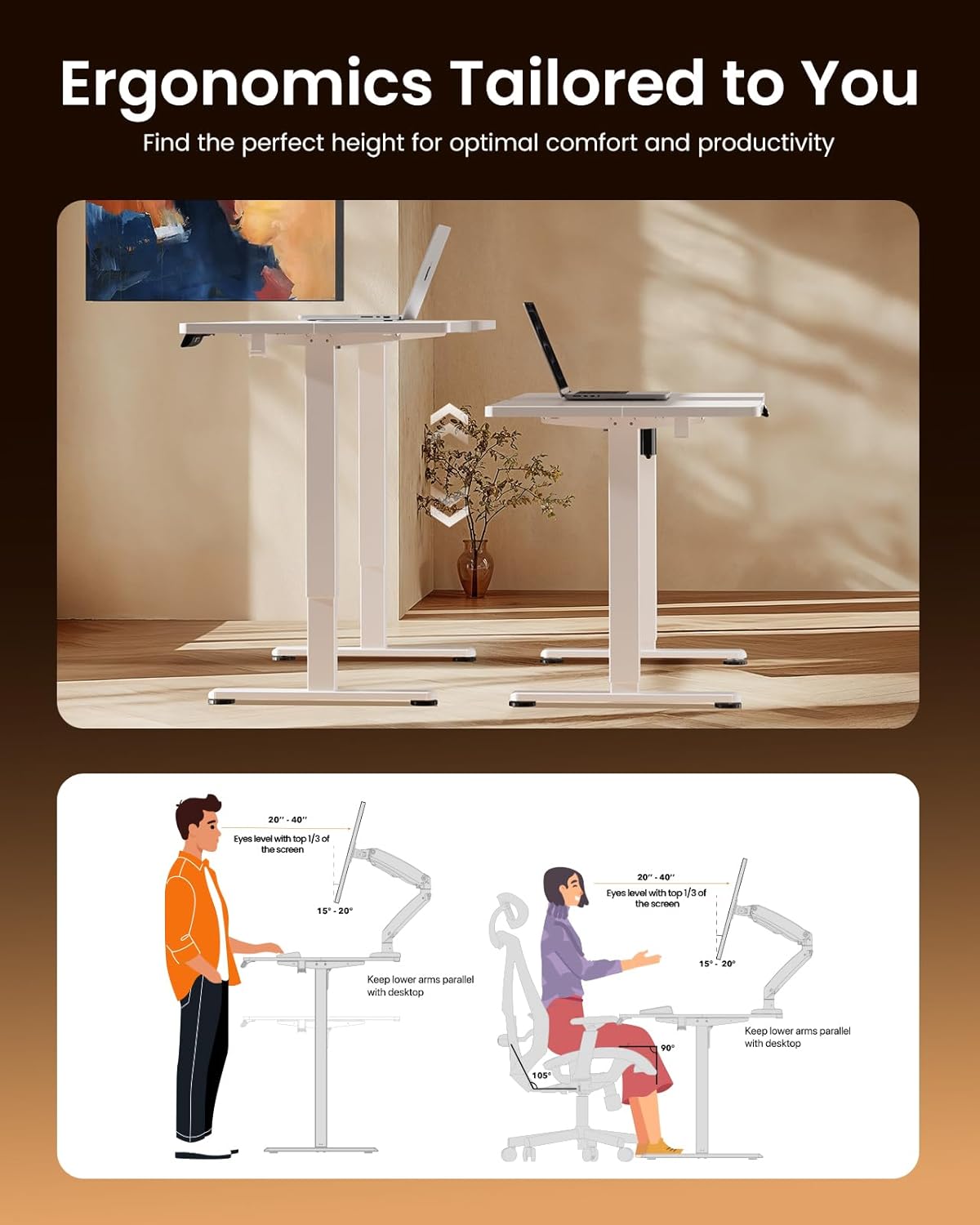
Image: Illustrations demonstrating proper ergonomic postures for both sitting and standing positions when using the ErGear desk, emphasizing ideal screen height and arm placement for comfort and productivity.
Pratetap Memori
The control panel includes three memory preset buttons (1, 2, and 3). These allow you to save your favorite sitting and standing heights for quick and convenient adjustment.
- Untuk Menjimatkan Ketinggian: Adjust the desk to your desired height using the up/down arrows. Press the 'M' button (or 'Set' button, if present) followed by the desired number button (1, 2, or 3). The display will confirm the setting is saved.
- Untuk Mengingat Ketinggian: Simply press the corresponding number button (1, 2, or 3). The desk will automatically move to the saved height.

Image: A person sitting on the edge of the ErGear standing desk, illustrating its robust construction and ability to smoothly lift loads up to 176 lbs with ease and reliability.
6. Penyelenggaraan
To ensure the longevity and optimal performance of your ErGear Electric Standing Desk, follow these simple maintenance guidelines:
- Pembersihan: The desk surface is easy to clean. Use a soft, damp cloth with a mild cleaner to wipe down the desktop and frame. Avoid abrasive cleaners or harsh chemicals that could damage the finish.
- Pemeriksaan biasa: Periksa semua skru dan pengikat secara berkala untuk memastikan ia kekal ketat. Ketatkan semula jika perlu.
- Pengurusan Kabel: Utilize the integrated cable access holes and storage hooks to keep cables organized and prevent tangling, especially during height adjustments.
- Penjagaan Motor: The uprated motor is designed for long-term operation (tested 50,033 times). No special maintenance is required for the motor itself, but avoid overloading the desk beyond its 176 lbs capacity.
7. Penyelesaian masalah
If you encounter any issues with your ErGear Electric Standing Desk, please refer to the following common troubleshooting tips:
- Meja Tidak Bergerak: Check if the power cable is securely plugged into both the desk and the wall outlet. Ensure there are no obstructions preventing the desk from moving freely.
- Uneven Movement/Wobbling: Verify that the desk is assembled correctly and all fasteners are tightened. Ensure the desk is placed on a flat, stable surface.
- Panel Kawalan Tidak Menjawab: Unplug the desk from the power outlet for 30 seconds, then plug it back in. This can reset the control system.
- Bunyi Luar Biasa: A slight humming sound during operation is normal. If you hear loud grinding or unusual noises, discontinue use and contact customer support. One user reported a loud coil whining noise from the power adapter; if this occurs, contact support for a replacement.
For more complex issues or if the problem persists, please contact ErGear Customer Support.
8. Spesifikasi
| Ciri | Spesifikasi |
|---|---|
| Jenama | ErGear |
| Dimensi Produk (D x W x H) | 24"D x 48"W x 28.35"H |
| warna | putih |
| Gaya | moden |
| Bahan Asas | Keluli Aloi |
| Jenis Selesai | Dilukis |
| Ciri Khas | Height adjustable electric standing desk |
| Jenis Bilik | Pejabat |
| Penggunaan yang Disyorkan | sedang bekerja |
| Jenis Pemasangan | Lantai Lantai |
| Penerangan Julat Umur | Dewasa |
| Gred Produk | baru |
| Pengeluar | ErGear |
| Ketinggian Item | 46.46 inci |
| Jenis Bahan Atas | Kayu Kejuruteraan |
| Bahan Kaki Perabot | Keluli Aloi |
| Mekanisme Mengangkat | Elektrik |
| Bilangan Kedudukan Ketinggian | 3 (Pratetap Memori) |
| bentuk | segi empat tepat |
| Reka Bentuk Meja | Meja Berdiri |
| Gaya Kaki | Rangka Keluli Pepejal |
| Warna Atas | putih |
| Warna Asas | putih |
| Ketebalan Atas Meja | 0.67 Inci |
| Ketinggian Maksimum | 46.46 Inci |
| Ketinggian Minimum | 28.35 Inci |
| Cadangan Berat Maksimum | 176 paun |
| Perhimpunan yang Diperlukan | ya |
9. Waranti dan Sokongan
ErGear stands behind the quality of its products. Your electric standing desk comes with the following warranty coverage:
- Perlindungan 5 Tahun: On desktop and desk frame.
- Perlindungan 2 Tahun: On motors and electrical components.
For any questions, technical assistance, or warranty claims, please contact ErGear Customer Support. You can also find additional resources, including the full installation manual, on the official ErGear brand store or by visiting the user guide link below:
Panduan Pengguna Rasmi (PDF): Muat Turun Di Sini
Visit the ErGear Store: ErGear Official Store


