1. Pengenalan
This manual provides essential information for the safe and efficient operation of your ONN 43-Inch Class 4K UHD (2160P) LED Smart TV. This television offers a 4K Ultra High Definition display, High Dynamic Range (HDR) compatibility, and integrated smart TV functionalities powered by Roku. It supports popular streaming services and voice assistants like Alexa and Google Assistant. Please read this manual thoroughly before using your television and retain it for future reference.

Image 1: ONN 43-Inch 4K UHD Smart TV in a typical living room environment.
2. Maklumat Keselamatan
Always follow basic safety precautions when using this product to reduce the risk of fire, electric shock, and injury. Keep this manual handy for reference.
- Sumber Kuasa: Sambungkan TV hanya kepada bekalan kuasa yang dinyatakan.
- Pengudaraan: Pastikan pengudaraan yang mencukupi di sekeliling TV. Jangan sekat bukaan pengudaraan.
- Air dan Kelembapan: Jangan dedahkan TV kepada hujan atau lembapan. Jangan letakkan objek yang diisi dengan cecair pada TV.
- Pembersihan: Cabut plag TV sebelum membersihkan. Gunakan kain lembut dan kering.
- Pemasangan Dinding: If wall mounting, ensure the mount is compatible with VESA 400x400 standards and installed by qualified personnel.
- Kanak-kanak: Awasi kanak-kanak untuk mengelakkan mereka daripada memanjat atau bermain dengan TV.
3. Kandungan Pakej
Sahkan bahawa semua barang ada di dalam bungkusan. Jika terdapat barang yang hilang atau rosak, hubungi peruncit anda.
- ONN 43-Inch Class 4K UHD LED Smart TV
- Alat Kawalan Jauh
- Wall Mount (Note: For renewed products, TV stands may not be included as a wall mount is provided for installation.)
- Kord Kuasa
- Panduan Mula Pantas (tidak disertakan dalam manual ini)

Image 2: The ONN 43-Inch 4K UHD Smart TV alongside its included wall mount.
4. Persediaan
4.1 Pemasangan Pemasangan Dinding
Your ONN 43-Inch Smart TV is designed for wall mounting using a VESA 400x400 compatible bracket. Follow these general steps for installation:
- Sediakan Dinding: Locate wall studs and ensure the mounting area can support the TV's weight (approximately 16.9 pounds) plus the mount.
- Attach Mount Brackets to TV: Secure the wall mount brackets to the VESA holes on the back of the TV using appropriate screws.
- Pasang Plat Dinding: Mount the wall plate securely to the wall studs according to the wall mount manufacturer's instructions.
- Gantungkan TV: Carefully lift the TV and attach it to the wall plate. Ensure it is securely locked in place.
Note: Always refer to the specific instructions provided with your wall mount for detailed installation steps. Professional installation is recommended.
4.2 Menyambung Peranti
TV menawarkan pelbagai port untuk menyambungkan peranti luaran:
- HDMI: 3 HDMI ports (including 1 eARC) for high-definition audio/video devices like Blu-ray players, gaming consoles, or cable boxes.
- USB: 1 port USB untuk main balik media daripada pemacu USB.
- LAN: 1 port Ethernet untuk sambungan internet berwayar.
- Optik: 1 Optical digital audio output for connecting to soundbars or home theater systems.
- Komposit: 1 Composite video input for older devices.
- Sepaksi/Kabel: 1 Coaxial input for antenna or cable TV connection.
- Fon kepala: 1 Headphone jack for private listening.
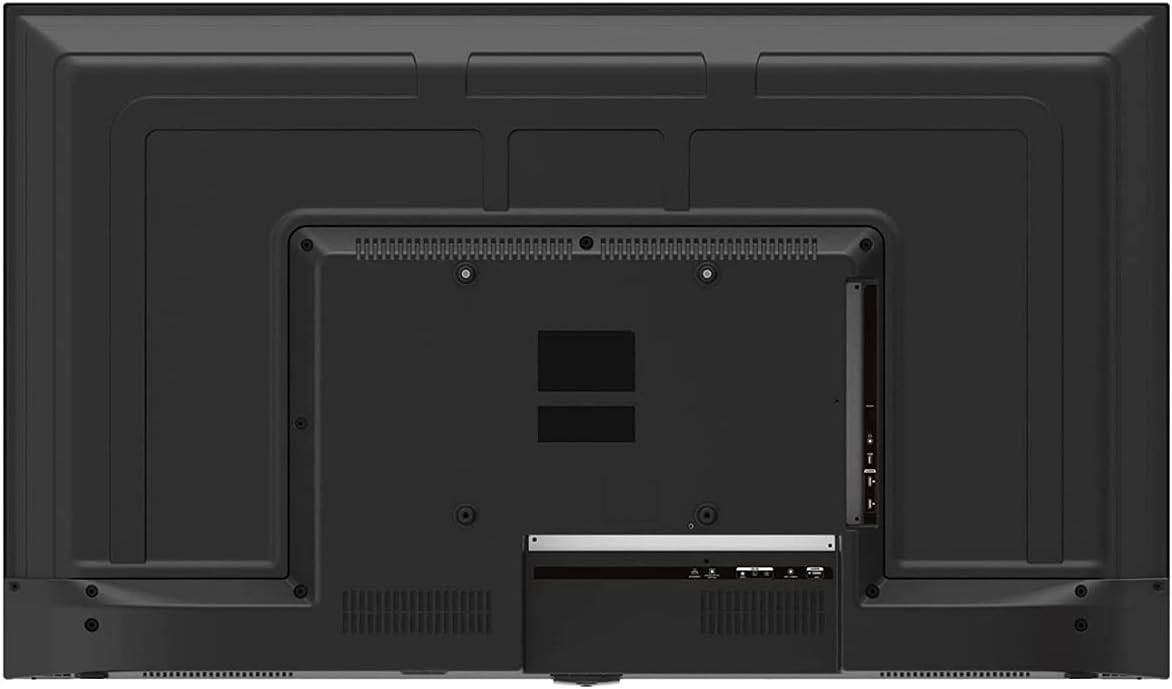
Image 3: Rear panel of the ONN 43-Inch Smart TV, highlighting the available connectivity ports.
4.3 Hidupkan Awal dan Persediaan Rangkaian
- Hidupkan kuasa: Connect the power cord to the TV and a power outlet. Press the power button on the remote control.
- Pemilihan Bahasa: Ikut gesaan pada skrin untuk memilih bahasa pilihan anda.
- Sambungan Rangkaian: Select your Wi-Fi network from the list and enter the password. Alternatively, connect an Ethernet cable for a wired connection.
- Persediaan Akaun Roku: Follow the instructions to create or sign in to your Roku account. This is necessary to access streaming channels and features.
5. Mengendalikan TV Anda
5.1 Alat Kawalan Jauh
The included remote control provides easy access to all TV functions and streaming services. It features dedicated buttons for popular streaming apps like Netflix, Apple TV+, Paramount+, and HBO Max.
5.2 Smart TV Interface (Roku TV)
The Roku TV home screen provides a centralized hub for all your entertainment. You can easily navigate through streaming channels, live TV inputs, and device connections.

Image 4: The Roku TV home screen on the ONN 43-Inch Smart TV, showing available streaming applications.

Imej 5: Bersudut view daripada TV Pintar 43-Inci ONN, rancangancasing the user interface from a different perspective.
- Rumah: Access the main Roku TV interface.
- TV langsung: Browse available live television channels.
- Kedai Penstriman: Discover and add new streaming channels.
- Aplikasi & Input: Select connected devices (e.g., HDMI 1, HDMI 2) or launch installed applications.
5.3 Integrasi Pembantu Suara
The TV is compatible with Alexa and Google Assistant. You can use a compatible voice assistant device (sold separately) or the Roku mobile app to control your TV with voice commands, such as turning it on/off, changing channels, or launching apps.
5.4 Tetapan Gambar
To adjust picture quality, navigate to Settings > Picture Settings on the Roku TV menu. Options typically include Brightness, Contrast, Color, Tint, Sharpness, and various picture modes (e.g., Movie, Sports, Vivid, Standard).
5.5 Tetapan Bunyi
To adjust audio settings, navigate to Settings > Audio Settings. Options may include Volume Mode, Audio Delay, and various sound modes (e.g., Standard, Theater, Music).
6. Penyelenggaraan
6.1 Membersihkan TV
- Sentiasa cabut plag TV sebelum membersihkan.
- Gunakan kain lembut yang tidak berbulu untuk mengelap skrin dan kabinet dengan perlahan.
- Untuk tanda degil, ringankan dampbilas kain dengan air atau pembersih skrin yang lembut dan tidak kasar. Jangan sekali-kali sembur pembersih terus ke skrin.
6.2 Kemas Kini Perisian
Your ONN Roku TV automatically receives software updates to improve performance and add new features. Ensure your TV is connected to the internet for these updates. You can manually check for updates via Tetapan > Sistem > Kemas Kini Sistem.
7. Penyelesaian masalah
Jika anda menghadapi masalah dengan TV anda, rujuk kepada penyelesaian biasa berikut:
| Masalah | Penyelesaian |
|---|---|
| Tiada Kuasa | Pastikan kord kuasa dipasang dengan selamat pada kedua-dua TV dan salur keluar elektrik yang berfungsi. Cuba kedai lain. |
| Tiada Gambar/Bunyi | Check all cable connections (HDMI, coaxial). Ensure the correct input source is selected on the TV. |
| Alat Jauh Tidak Berfungsi | Gantikan bateri dalam alat kawalan jauh. Pastikan tiada halangan antara alat kawalan jauh dan penderia IR TV. |
| Tidak Dapat Menyambung ke Wi-Fi | Verify your Wi-Fi password. Restart your router and modem. Move the TV closer to the router if possible. |
| Kualiti Gambar Lemah | Check the resolution settings of your connected device. Adjust picture settings on the TV. Ensure you are viewing 4K content for optimal resolution. |
8. Spesifikasi
| Ciri | Perincian |
|---|---|
| Saiz Skrin | 43 Inci |
| Teknologi Paparan | LED |
| Resolusi | 4K Ultra HD (2160p) |
| Keserasian HDR | ya |
| Platform TV Pintar | Roku TV |
| Sokongan Pembantu Suara | Alexa, Pembantu Google |
| Ketersambungan | 3 HDMI (1 eARC), 1 Composite, 1 USB, 1 LAN, 1 Optical, 1 Coaxial/Cable, 1 Headphone |
| Nisbah Aspek | 16:9 |
| Dimensi Produk (D x W x H) | 7" x 38" x 23" |
| Berat Barang | 16.9 paun |
| warna | Hitam |

Imej 6: Pro sampinganfile of the ONN 43-Inch Smart TV, illustrating its slim design.

Image 7: Energy Guide label providing estimated yearly energy cost and consumption for the television.
9. Waranti dan Sokongan
For warranty information and technical support, please refer to the documentation included with your product or visit the official ONN support website. As this is a renewed product, specific warranty terms may vary. Please consult the seller or product listing for details regarding the renewed product warranty.


