1. Pengenalan
Thank you for choosing the PRIXTON Cinema Mini Projector. This compact and versatile projector is designed to provide an immersive viewing experience for movies, games, and presentations. Its multiple connectivity options and portable design make it ideal for various environments. Please read this manual carefully before using the projector to ensure proper operation and to maximize its lifespan.
2. Maklumat Keselamatan
- Bekalan Kuasa: Gunakan hanya penyesuai kuasa yang ditentukan. Pastikan voltage serasi dengan wilayah anda.
- Pengudaraan: Jangan halang bukaan pengudaraan. Pastikan ruang yang mencukupi di sekeliling projektor untuk aliran udara yang betul bagi mengelakkan terlalu panas.
- Keselamatan Mata: Jangan lihat terus ke dalam kanta projektor apabila lamp sedang dihidupkan. Cahaya terang boleh menyebabkan kerosakan mata.
- Air dan Kelembapan: Jauhkan projektor daripada air, hujan dan kelembapan berlebihan. Jangan kendalikan dengan tangan yang basah.
- Pembersihan: Disconnect the power before cleaning. Use a soft, dry cloth. Avoid liquid cleaners.
- penempatan: Place the projector on a stable, flat surface. Avoid placing it in direct sunlight or near heat sources.
- Kanak-kanak: Keep the projector and its accessories out of reach of children.
3. Kandungan Pakej
Sila pastikan semua item ada dalam pakej anda:
- Projektor Mini Cinema PRIXTON
- Alat Kawalan Jauh
- Penyesuai Kuasa
- Manual Pengguna
4. Produk Lebihview
Familiarize yourself with the various parts of your PRIXTON Cinema Mini Projector.
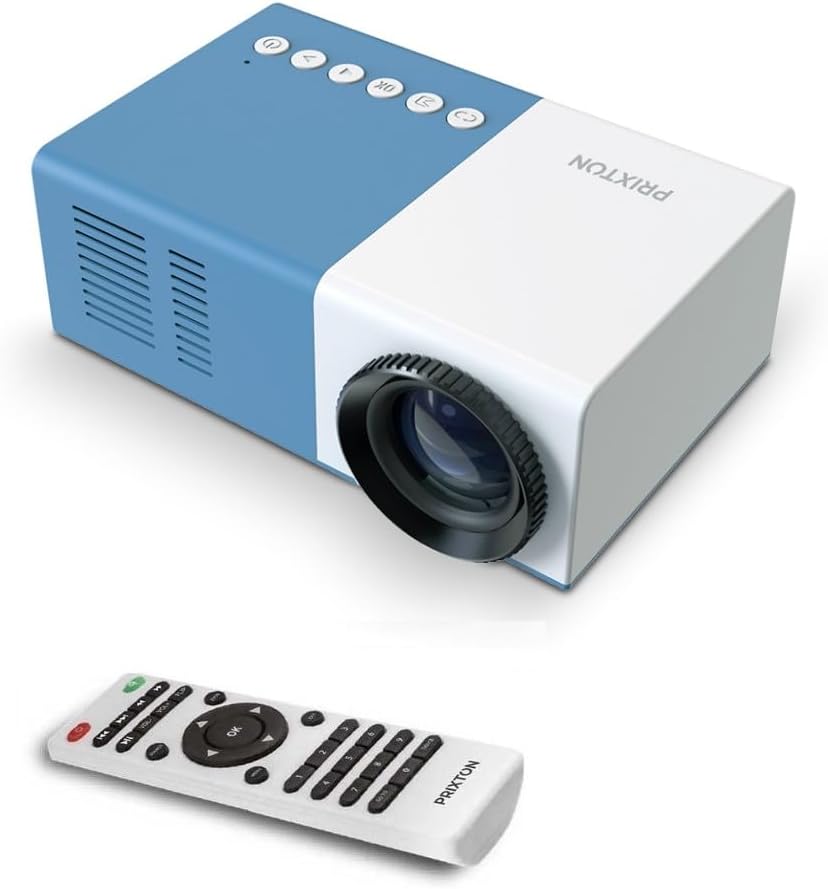
Rajah 4.1: Depan dan Atas View of the PRIXTON Cinema Mini Projector with its remote control. The projector is blue and white, showing the lens, control buttons, and the included remote.
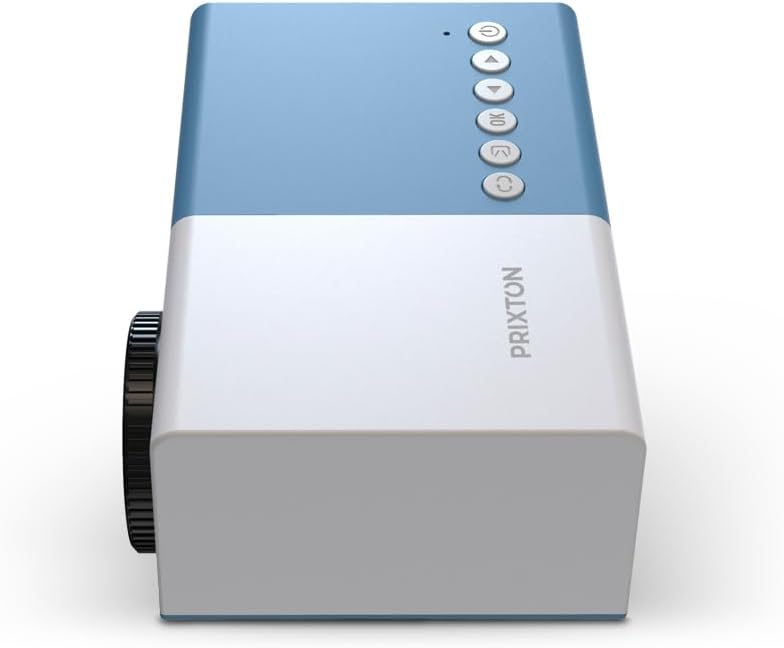
Rajah 4.2: Atas view of the projector, highlighting the control buttons (Power, Menu, OK, Navigation) and the focus wheel on the side.
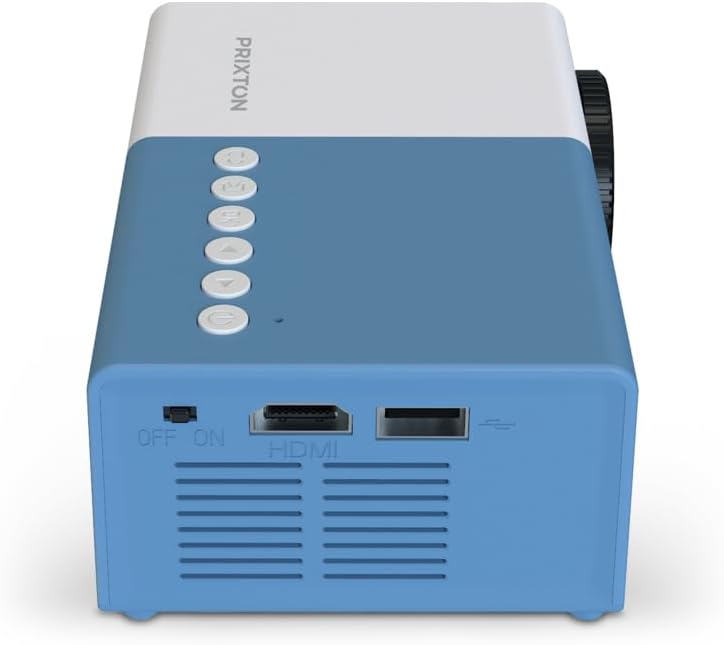
Rajah 4.3: belakang view of the projector, showing the power switch, HDMI port, USB port, and ventilation grilles.

Rajah 4.4: sebelah view of the projector, displaying the MicroSD card slot, AV In port, and additional ventilation.
Komponen:
- Kanta: Menayangkan imej ke skrin.
- Roda Fokus: Melaraskan kejelasan imej.
- Butang Kawalan: Power, Menu, OK, and navigation buttons for on-device control.
- Suis kuasa: Menghidupkan atau mematikan projektor.
- Port HDMI: Connects to devices like laptops, streaming sticks, and game consoles.
- Port USB: Untuk main balik media daripada pemacu USB.
- Slot MicroSD: For media playback from MicroSD cards.
- AV Dalam: Connects to older devices using an AV cable.
- Penceramah Bersepadu: Menyediakan output audio.
5. Persediaan
5.1 Sambungan Kuasa
- Sambungkan penyesuai kuasa ke port input kuasa projektor.
- Palamkan penyesuai kuasa ke salur keluar dinding.
- Flip the power switch on the projector to the 'ON' position. The power indicator light should illuminate.
5.2 Penempatan dan Unjuran
Place the projector on a stable surface, ensuring the lens is facing the projection surface (wall or screen).

Rajah 5.1: Illustration of projection distance and screen size. The projector can project images between 24 and 60 inches, with a maximum distance of 2 meters from the surface.
- For optimal image quality, ensure the room is dark.
- The projector can display images from 24 inches to 60 inches.
- The optimal projection distance is up to 2 meters (approximately 6.5 feet). Adjust the distance to achieve your desired screen size.
6. Beroperasi
6.1 Hidupkan/Mati Kuasa
- Untuk Menghidupkan: After connecting power, press the Power button on the projector or the remote control.
- Untuk Mematikan: Press the Power button again. Confirm shutdown if prompted.
6.2 Pelarasan Fokus
After powering on, the image may appear blurry. Use the focus wheel located on the side of the projector to sharpen the image until it is clear.
6.3 Pemilihan Sumber
To select an input source (HDMI, USB, MicroSD, AV):
- Press the 'Source' or 'Input' button on the remote control or the projector.
- Use the navigation buttons to highlight your desired input source.
- Tekan 'OK' untuk mengesahkan pilihan anda.
7. Ketersambungan
The PRIXTON Cinema Mini Projector offers multiple ways to connect your devices.
7.1 Sambungan HDMI
Connect devices such as laptops, streaming sticks (e.g., Chromecast, Fire TV Stick), game consoles, or Blu-ray players using an HDMI cable.
- Connect one end of the HDMI cable to your device and the other end to the HDMI port on the projector.
- Select 'HDMI' as the input source (refer to Section 6.3).
7.2 USB and MicroSD Playback
The projector supports direct media playback from USB drives and MicroSD cards.
- Insert your USB drive into the USB port or your MicroSD card into the MicroSD slot.
- Select 'USB' or 'MicroSD' as the input source.
- Navigasi melalui files using the remote control and select the media you wish to play.
7.3 AV In Connection
For older devices that use composite video and stereo audio (RCA), connect them via the AV In port.
- Connect the AV cable from your device to the AV In port on the projector.
- Select 'AV' as the input source.
8. Keluaran Audio
The projector features an integrated stereo speaker, providing audio for your content. Volume can be adjusted using the remote control.

Rajah 8.1: The PRIXTON Cinema Mini Projector in use, projecting content in a living room environment, demonstrating its portability and ease of setup for home entertainment.
9. Penyelenggaraan
9.1 Membersihkan Lensa
Gunakan kain lembut dan tidak berbulu yang direka khas untuk kanta optik. Jangan gunakan pembersih yang kasar atau daya yang berlebihan, kerana ini boleh menggaru kanta.
9.2 Membersihkan Badan Projektor
Wipe the exterior of the projector with a soft, dry cloth. Avoid using chemical cleaners that may damage the finish.
9.3 Pengudaraan
Regularly check that the ventilation grilles are free from dust and debris to ensure proper heat dissipation and prevent overheating.
9.4 Penyimpanan
When not in use, store the projector in a cool, dry place, away from direct sunlight and extreme temperatures. If possible, use the original packaging or a protective case.
10. Penyelesaian masalah
Jika anda menghadapi masalah dengan projektor anda, rujuk masalah dan penyelesaian biasa berikut.
| Masalah | Kemungkinan Punca | Penyelesaian |
|---|---|---|
| Tiada gambar di skrin | No power; Incorrect input source; Cable not connected. | Check power connection and switch; Select correct input source; Ensure HDMI/AV/USB cable is securely connected. |
| Imej kabur | Focus not adjusted; Projector too close/far. | Adjust the focus wheel; Adjust projection distance. |
| Tiada bunyi | Volume too low; Muted; Source device audio issue. | Increase volume; Unmute projector; Check audio settings on source device. |
| Alat kawalan jauh tidak berfungsi | Batteries low/dead; Obstruction; Remote not aimed at sensor. | Replace batteries; Remove obstructions; Aim remote directly at the projector's IR sensor. |
| Projektor terlalu panas dan mati | Blocked ventilation; Prolonged use. | Ensure vents are clear; Allow projector to cool down; Operate in a well-ventilated area. |
11. Spesifikasi
Technical specifications for the PRIXTON Cinema Mini Projector.
| Ciri | Spesifikasi |
|---|---|
| Jenama | Prixton |
| Nombor Model | Cinema Mini |
| warna | Biru |
| Teknologi Unjuran | LED |
| Resolusi Asli | QVGA 320 x 240 |
| Resolusi Disokong | Up to Full HD (1920 x 1080) |
| Kecerahan | 900 Lumen (15 ANSI Lumen) |
| Saiz Unjuran | 24" - 60" |
| Jarak Unjuran | Sehingga 2 meter |
| Ketersambungan | HDMI, USB, MicroSD, AV In |
| Output Audio | Pembesar Suara Stereo Bersepadu |
| Ciri Khas | Ringan, Mudah Alih |
| Komponen yang Disertakan | Alat Kawalan Jauh |
12. Waranti dan Sokongan
For warranty information, please refer to the documentation provided at the time of purchase or contact your retailer. Information regarding spare parts availability and software updates is not available in this manual. For further assistance or technical support, please visit the official PRIXTON webtapak atau hubungi perkhidmatan pelanggan mereka.


