1. Pengenalan
This manual provides detailed instructions for the installation, operation, and maintenance of your SOLIOM S800C-4G LTE Cellular Security Camera. Please read this manual thoroughly before using the product to ensure proper functionality and safety.
The SOLIOM S800C-4G is an outdoor security camera designed for locations without Wi-Fi or electrical power. It operates on 3G/4G LTE networks and is powered by a built-in rechargeable battery and an included solar panel.
2. Produk Lebihview
2.1 Kandungan Pakej
- S800C-4G Camera x 1
- 6W Solar Panel & 10ft cable x 1
- Camera mounting plate x 1
- Manual Pengguna x 1
- Panduan Pantas x 1
- Mounting screws and tools
2.2 Ciri-ciri Utama
- Kesambungan 4G LTE: Operates on 3G/4G LTE networks, eliminating the need for Wi-Fi.
- Berkuasa Suria: Integrated 6W solar panel and 14400mAh rechargeable battery for continuous operation.
- Fungsi Pan & Condongkan: 320° horizontal pan and 90° vertical tilt for wide area coverage.
- Video HD Penuh 1080P: High-definition video recording and live view.
- Penglihatan Malam Warna Sorotan: Provides clear color images at night up to 25ft.
- Pengesanan Gerakan PIR: Advanced motion sensor to minimize false alerts.
- Perbincangan Dua Hala: Built-in microphone and speaker for remote communication.
- Storan Fleksibel: Supports local storage via Micro SD card (up to 128GB, not included) and cloud storage (30-day trial).
- Tahan Cuaca: Penarafan IP65 untuk kegunaan luar.
3. Panduan Persediaan
3.1 Inserting SIM Card and Micro SD Card
Before mounting, ensure the SIM card and Micro SD card are correctly inserted.

Imej: Belakang view of the SOLIOM S800C-4G camera showing the SIM card and Micro SD card slots. The SIM card slot is labeled "SIM" and the Micro SD card slot is above it. A reset button is also visible.
- Locate the rubber cover on the back or bottom of the camera.
- Carefully open the cover to expose the SIM card and Micro SD card slots.
- Insert a Nano SIM card (included or compatible with AT&T, T-Mobile, Verizon 4G networks) into the SIM slot with the gold contacts facing down. Ensure it clicks into place.
- Insert a Micro SD card (up to 128GB, not included) into the Micro SD slot with the gold contacts facing down.
- Close the rubber cover firmly to ensure water resistance.
3.2 Mengecas Bateri
It is recommended to fully charge the camera's internal battery before initial use, especially if the solar panel will not receive direct sunlight immediately after installation.
- Connect the camera to a 5V/2A USB power adapter using the provided USB cable.
- Allow several hours for a full charge. The indicator light on the camera will show charging status.
3.3 Pemasangan Aplikasi dan Penggandingan Kamera
The SOLIOM+ app is required for camera setup and remote control.
- Download the "Soliom+" app from your smartphone's app store (iOS or Android).
- Daftar akaun dan log masuk.
- Tap the "+" icon in the app to add a new device.
- Select the appropriate camera model (S800C-4G).
- Follow the on-screen instructions to scan the QR code located on the camera body.
- Once scanned, the camera will connect to the app. Follow any further prompts to complete the pairing process.
3.4 Memasang Kamera dan Panel Suria
Choose a location that provides optimal sunlight for the solar panel and a clear view untuk kamera.

Image: The SOLIOM S800C-4G camera and its accompanying solar panel are mounted on a brick wall, illustrating a typical outdoor installation scenario. The solar panel is positioned above the camera to capture sunlight.
- Penempatan Kamera: Mount the camera at a height of 7-10 feet (2-3 meters) for optimal motion detection range and coverage. Ensure the camera has a clear line of sight to the area you wish to monitor.
- Peletakan Panel Suria: Position the solar panel in a location that receives direct sunlight for several hours each day. Avoid shaded areas.
- Use the provided mounting plate, screws, and anchors to securely attach the camera and solar panel to a wall or other stable surface.
- Sambungkan kabel panel solar ke port pengecasan kamera.
- Adjust the camera's angle and the solar panel's orientation as needed.
4. Arahan Operasi
4.1 Langsung View dan Kawalan Pan/Tilt
Access the live feed and control camera movement through the Soliom+ app.
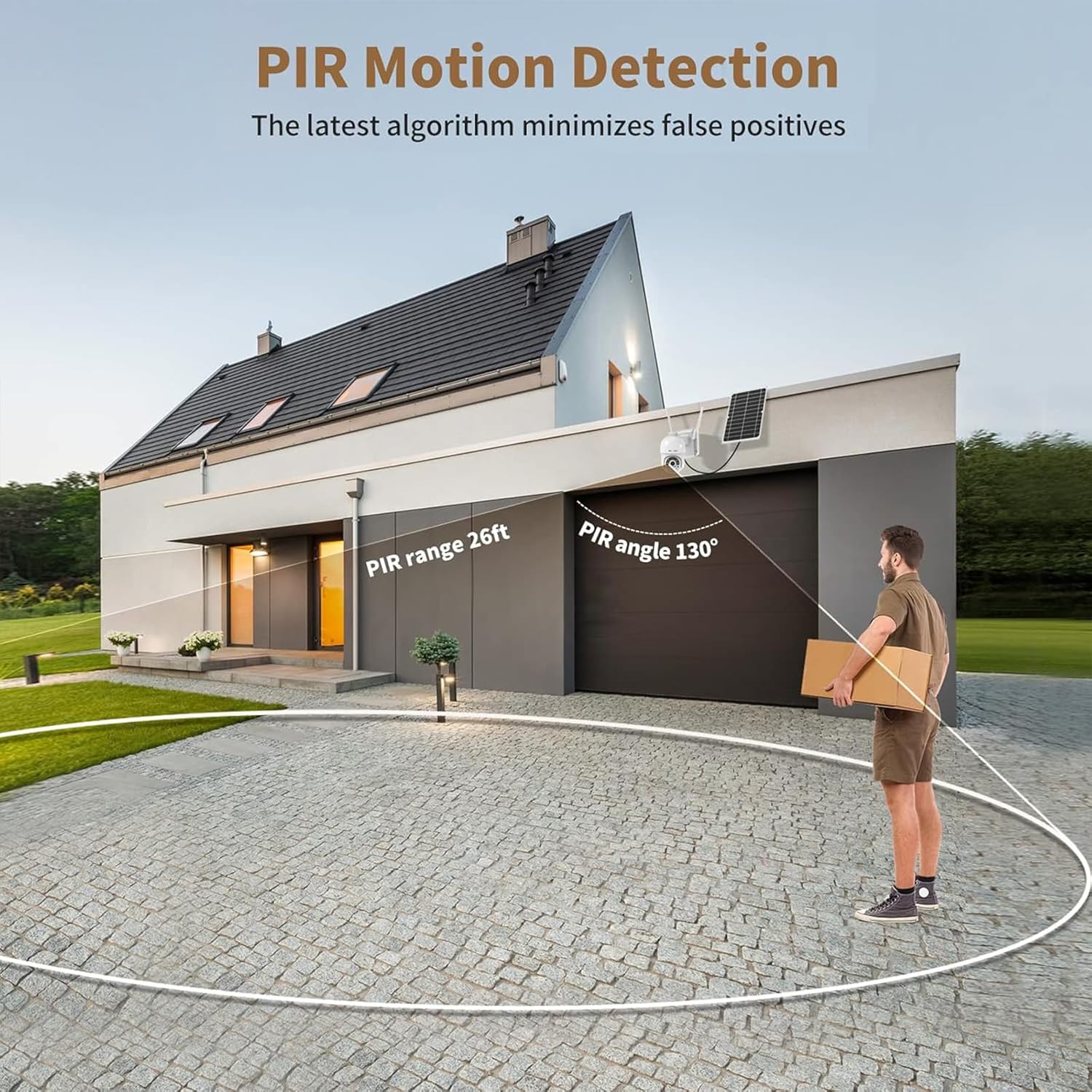
Image: The SOLIOM S800C-4G camera mounted on a wall, with arrows indicating its 355-degree pan and 90-degree tilt capabilities, demonstrating its wide range of motion.
- Open the Soliom+ app and select your camera from the device list.
- The live video feed will appear.
- Use the on-screen joystick or directional arrows to pan (rotate horizontally up to 320°) and tilt (move vertically up to 90°) the camera.
- Digital zoom (3X) can be activated by pinching the screen.
4.2 Pengesanan Gerakan dan Makluman
The camera uses PIR (Passive Infrared) motion detection to identify movement and send alerts.

Image: A SOLIOM S800C-4G camera mounted on a house, with a spotlight illuminating a person in the yard. Text indicates "Spotlight Color Night Vision and Motion Detection" and "Siren Alert," demonstrating its active security features.
- Enabling Motion Detection: In the app settings, navigate to "Motion Detection" and enable it.
- Pelarasan Sensitiviti: Adjust the PIR sensitivity level to minimize false alarms.
- Makluman: When motion is detected, the camera will record a video clip, activate the spotlight (if enabled), and send a notification to your smartphone.
- Siren Alert: The app allows you to manually trigger a siren or set it to activate automatically upon motion detection.
4.3 Penglihatan Malam
The camera offers both infrared (black and white) and color night vision modes.
- Kamera secara automatik bertukar kepada penglihatan malam dalam keadaan cahaya malap.
- Penglihatan Malam Warna Sorotan: When enabled, the built-in spotlight will illuminate the area upon motion detection at night, providing full-color video.
- Night vision range is up to 25 feet.
4.4 Ceramah Dua Hala
Communicate with visitors or deter intruders using the two-way talk feature.
- Semasa dalam live view, tap the microphone icon in the Soliom+ app.
- Speak into your smartphone's microphone to transmit audio through the camera's speaker.
- Release the microphone icon to listen through the camera's microphone.
4.5 Rakaman dan Penyimpanan Video
Video clips are recorded upon motion detection.
- Kad SD mikro: Recorded videos are saved to the inserted Micro SD card. The card will overwrite the oldest footage when full.
- Storan Awan: A 30-day free trial of cloud storage is available. After the trial, a subscription may be required to continue cloud services.
- Akses foo yang dirakamtage through the "Playback" section in the Soliom+ app.
5. Penyelenggaraan
- Pembersihan: Bersihkan kanta kamera dan panel solar secara berkala dengan kain lembutamp cloth to ensure clear images and efficient charging. Do not use harsh chemicals.
- Kesihatan Bateri: Ensure the solar panel receives adequate sunlight to maintain battery charge. In prolonged periods of low sunlight, consider manually charging the camera.
- Kemas kini Firmware: Check the Soliom+ app regularly for firmware updates to ensure optimal performance and security.
- SIM Card Data: Monitor your cellular data plan usage to avoid service interruptions.
6. Penyelesaian masalah
| Masalah | Kemungkinan Punca | Penyelesaian |
|---|---|---|
| Kamera tidak dihidupkan. | Low battery; power button off. | Charge the camera for several hours. Ensure the power button (if present) is in the ON position. |
| Tiada isyarat selular. | SIM card not inserted correctly; no network coverage; expired data plan. | Reinsert SIM card. Check network coverage in your area. Verify data plan status with your carrier. |
| Amaran gerakan tidak diterima. | Motion detection disabled; app notifications off; low PIR sensitivity. | Enable motion detection in the app. Check phone notification settings. Increase PIR sensitivity. |
| Panel solar tidak dicas. | Insufficient sunlight; dirty panel; faulty connection. | Relocate panel to a sunnier spot. Clean the solar panel surface. Check cable connection. |
| Tidak dapat bersambung ke aplikasi. | Incorrect pairing; camera offline. | Ensure camera has power and cellular signal. Re-attempt pairing process. Reset camera if necessary. |
7. Spesifikasi
- model: S800C-4G
- Resolusi Video: 1080p HD Penuh
- Sudut Pan: 320°
- Sudut Kecondongan: 90°
- Zum Digital: 3X
- Julat Penglihatan Malam: Up to 25 feet (Color Night Vision with spotlight)
- Kapasiti Bateri: 14400mAh (boleh dicas semula)
- Panel Suria: 6W
- Ketersambungan: 3G/4G LTE Cellular
- Storan: Micro SD card (up to 128GB, not included), Cloud Storage
- Rintangan Cuaca: IP65
- Vol Operasitage: 5 Volt (DC)
- Dimensi: 6.69 x 4.72 x 8.26 inci
- Berat Barang: 2 paun
8. Waranti dan Sokongan
For warranty information and technical support, please refer to the official SOLIOM website or contact SOLIOM customer service directly. Contact details are typically found in the Quick Guide or on the product packaging.
Online resources and FAQs may also be available on the SOLIOM support page.


