1. Pengenalan
Thank you for choosing the Fenge 48x24 Inch Electric Height Adjustable Standing Desk. This manual provides detailed instructions for assembly, operation, maintenance, and troubleshooting to ensure optimal performance and longevity of your desk. Please read this manual thoroughly before use and retain it for future reference.
2. Maklumat Keselamatan
- Pastikan semua komponen ada dan tidak rosak sebelum dipasang. Jangan gunakan jika ada bahagian yang hilang atau patah.
- Jauhkan kanak-kanak dan haiwan peliharaan dari meja semasa operasi untuk mengelakkan kecederaan.
- Jangan membebankan meja. Rujuk spesifikasi untuk kapasiti berat maksimum.
- Pastikan kord kuasa tidak tersepit atau rosak. Gunakan hanya penyesuai kuasa yang disediakan.
- Elakkan meletakkan cecair terus pada panel kawalan atau berhampiran komponen elektrik.
- Do not attempt to disassemble or repair the motor or control system yourself. Contact customer service for assistance.
- Letakkan meja di atas permukaan yang rata untuk memastikan kestabilan.
3. Kandungan Pakej
Sahkan bahawa semua komponen berikut disertakan dalam pakej anda:
- Desktop sections (pre-drilled)
- Desk legs and frame components
- Electric motor and control box
- Control panel with USB charging port
- Penyesuai kuasa dan kabel
- Perkakasan pemasangan (skru, pencuci, sepana Allen)
- Desk hook
- Manual Arahan
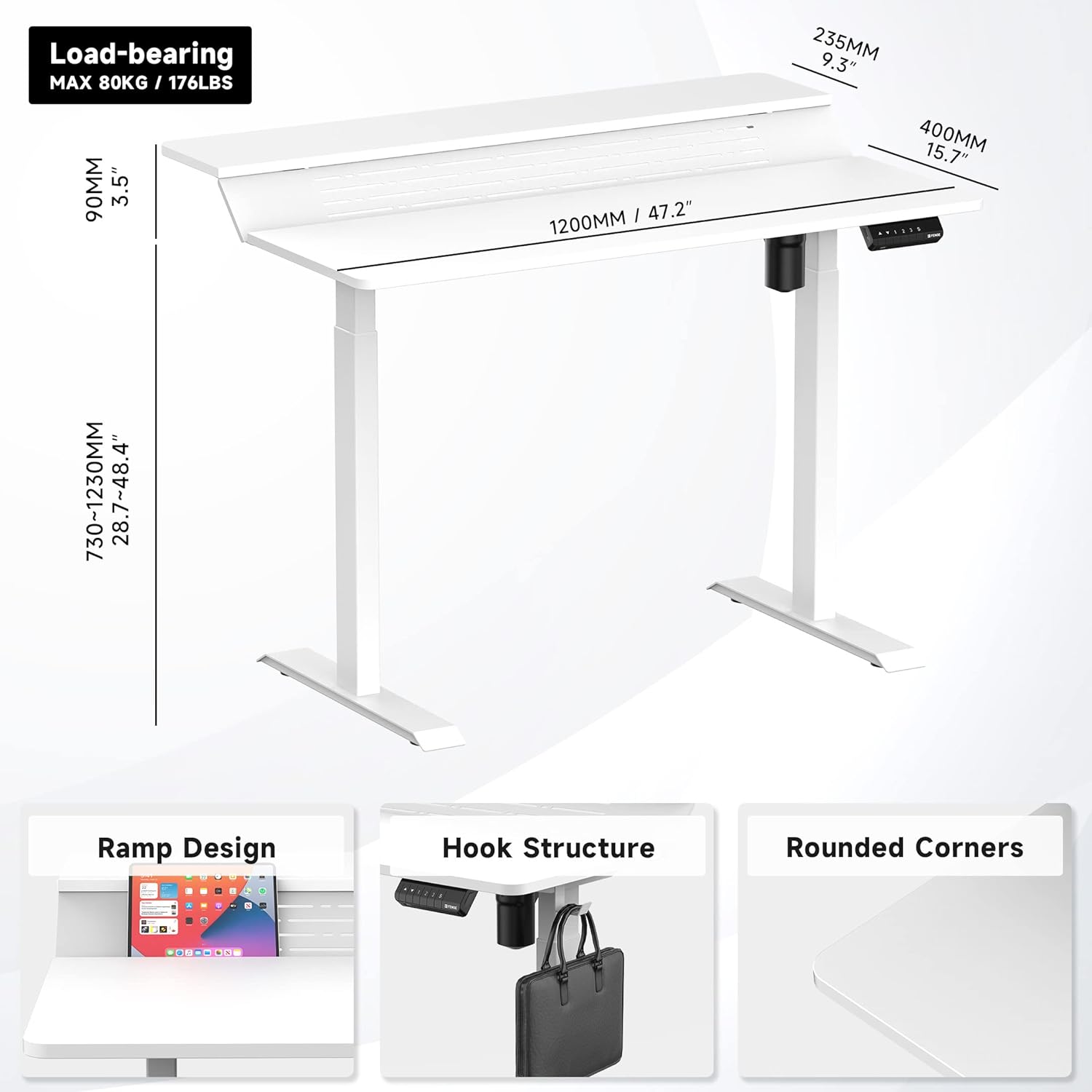
Gambar 1: Lebihview of desk components and key dimensions.
4. Persediaan dan Pemasangan
The Fenge Standing Desk is designed for simplified assembly. All parts are letter-coded, and the tabletop is pre-drilled. An Allen wrench is included; no additional power tools are required.
4.1 Langkah Perhimpunan
- Attach Feet to Legs: Secure the feet to the bottom of each desk leg using the provided screws.
- Sambungkan Palang Palang: Attach the crossbar between the two legs. Ensure the hexagonal rod is fully inserted into the motor and the limit ring is no longer visible.
- Install Side Brackets: Fasten the side brackets to the top of the legs.
- Mount Desktop Sections: Carefully place the pre-drilled desktop sections onto the assembled frame and secure them with screws.
- Install Control Panel and Power: Attach the control panel to the underside of the desk. Connect the power adapter to the control box and then to a power outlet.
- Attach Desk Hook: Install the desk hook on either side of the desk as desired.
Video 1: Detailed installation guide for the Fenge Standing Desk. This video demonstrates each step of the assembly process, from attaching the legs to connecting the electrical components and securing the desktop.
Video 2: Cepat selesaiview of the Fenge Standing Desk assembly process. This video highlights the ease of putting the desk together, showcasing the main steps involved in a concise format.
5. Arahan Operasi
Your Fenge Standing Desk features an electric height adjustment system with memory presets and a convenient USB charging port.
5.1 Pelarasan Ketinggian
- Gunakan Atas (▲) dan Bawah (▼) arrow buttons on the control panel to manually adjust the desk height.
- The desk height can be adjusted from 28.7 inches to 48.4 inches.
5.2 Pratetap Memori
The control panel allows you to save up to three preferred height settings:
- Laraskan meja pada ketinggian yang anda inginkan menggunakan anak panah Atas/Bawah.
- Tekan ke "S" button (Save).
- Immediately press one of the number buttons ("1", "2", atau "3") untuk menyimpan ketinggian semasa pada pratetap tersebut.
- Untuk mengingat semula ketinggian yang disimpan, hanya tekan butang nombor yang sepadan. Meja akan bergerak secara automatik ke kedudukan yang disimpan.
5.3 Port Pengecasan USB
The control panel includes a USB charging port to conveniently power your devices.

Figure 2: Close-up of the multifunction control panel, showing height adjustment buttons, memory presets (1, 2, 3, S), and the integrated USB charging port.

Figure 3: A closer look at the USB charging port located on the control panel, providing convenient power for your devices.
6. Ciri-ciri
The Fenge Standing Desk is designed with several features to enhance your workspace:
- 2-Tier Design with 135° Ramp: The unique two-tier desktop with a 135° ramp design provides an ergonomic setup, allowing for optimal monitor placement and increased workspace.
- Jalur LED: Integrated LED strips offer customizable lighting to suit your mood or task.
- Pengurusan Kabel: Strategically placed holes and a metal cable management tray (optional, may require separate purchase) help keep your cables organized and out of sight.
- Desk Hook: A convenient hook is included for hanging headphones, bags, or other accessories.
- Operasi senyap: The electric motor operates at less than 49 dB, ensuring a quiet adjustment experience.
- Ciri Anti-Perlanggaran: The desk is equipped with a rebound-on-resistance safety feature, stopping movement if an obstruction is detected.

Figure 4: The 135-degree ramp design of the desk, providing an elevated surface for monitors or other items, promoting ergonomic posture.

Figure 5: The Fenge Standing Desk in an ergonomic workspace setup, showcasing the integrated LED strips and ample space for dual monitors and a laptop.
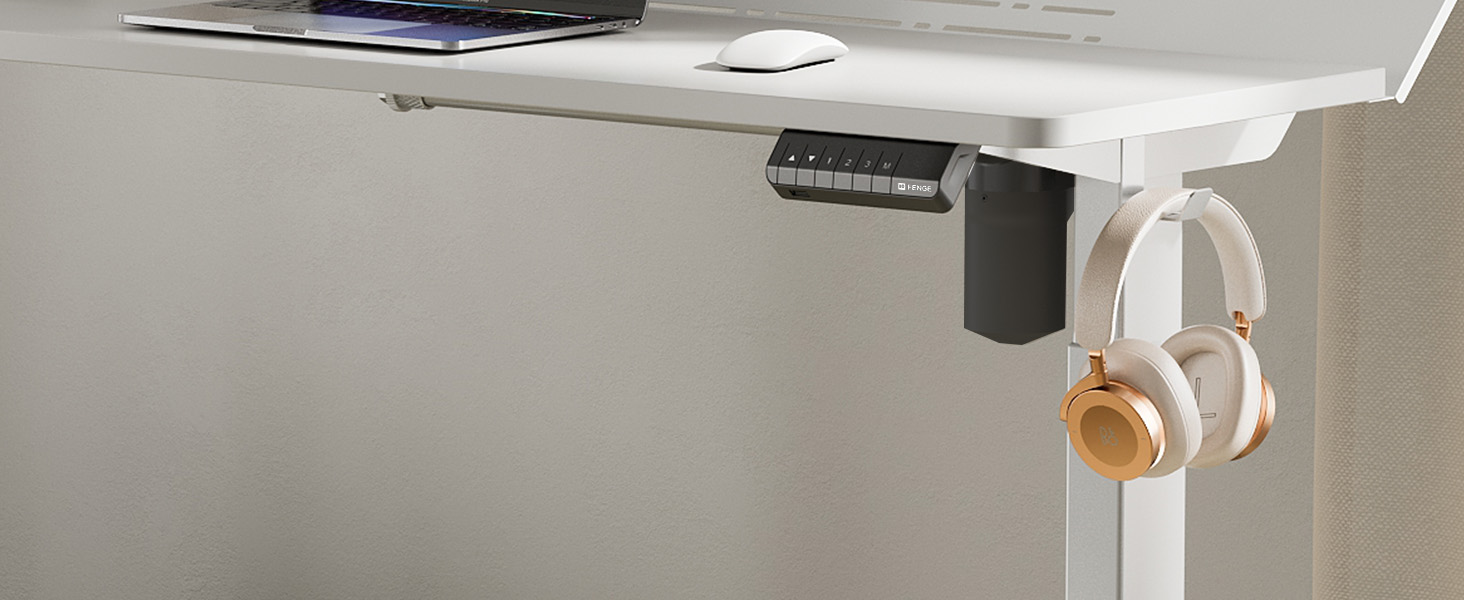
Figure 6: A close-up of the convenient desk hook, ideal for hanging headphones or other personal items, keeping your workspace tidy.
7. Penyelenggaraan
- Pembersihan: Lap permukaan meja dengan lembut, damp kain. Elakkan bahan kimia yang keras atau pembersih yang kasar.
- Pemeriksaan: Periksa semua skru dan sambungan secara berkala untuk memastikan ia ketat. Ketatkan semula jika perlu.
- Pengurusan Kabel: Regularly organize cables to prevent tangles and damage.
8. Penyelesaian masalah
If you encounter any issues with your Fenge Standing Desk, please refer to the following common problems and solutions:
| Masalah | Kemungkinan Punca | Penyelesaian |
|---|---|---|
| Meja tidak bergerak | Kabel kuasa terputus; ralat motor; beban lampau. | Check power connections. Unplug and replug the power for 10 seconds. Reduce weight on the desk. |
| Pelarasan ketinggian tidak sekata | Legs not properly aligned; obstruction. | Ensure all screws are tightened. Check for any obstructions under the desk. Perform a reset (refer to control panel instructions if available). |
| Bunyi bising semasa operasi | Skru longgar; masalah motor. | Tighten all assembly screws. If noise persists and is unusual, contact customer service. |
| Pratetap memori tidak berfungsi | Prosedur menyimpan yang salah. | Follow the memory preset saving instructions carefully (Section 5.2). |
If the problem persists after trying these solutions, please contact Fenge customer service.
9. Spesifikasi
| Ciri | Perincian |
|---|---|
| Jenama | Fenge |
| Model | B0B2JGPRNH |
| Dimensi Produk | 24"D x 48"W x 51.9"H |
| Ketinggian Minimum | 28.7 Inci |
| Ketinggian Maksimum | 48.4 Inci |
| Cadangan Berat Maksimum | 264 paun (120 kg) |
| Jenis Bahan | Aluminum alloy (Base), Metal (Top) |
| Mekanisme Mengangkat | Elektrik |
| Tahap Kebisingan | Di bawah 49 dB |
| Perhimpunan Diperlukan | Ya (Alat disertakan) |
| Ciri Khas | LED Strips, 2-Tier Design, Memory Presets, USB Charging Port |
10. Waranti dan Sokongan
Fenge provides the following warranty for your standing desk:
- Desk Frame: Waranti 3 tahun
- Motor: Waranti 5 tahun
This electric desk has obtained TUV, UL, CE, SGS, and other global certifications, ensuring high quality and safety standards.
For any product issues, questions, or warranty claims, please contact Fenge customer service. We are committed to providing prompt responses and practical solutions.
Visit the official Fenge Store for more information and products: Fenge Store on Amazon


