pengenalan
This manual provides essential instructions for the safe and efficient use of your ACEFAST A25 PD20W Dual Port Fast Charger. Please read this manual thoroughly before using the product and retain it for future reference.
Produk Selesaiview
The ACEFAST A25 is a compact and powerful dual-port wall charger designed for fast charging a wide range of mobile devices. It features both a USB-C port (PD20W) and a USB-A port (18W), supporting multiple fast charging protocols.
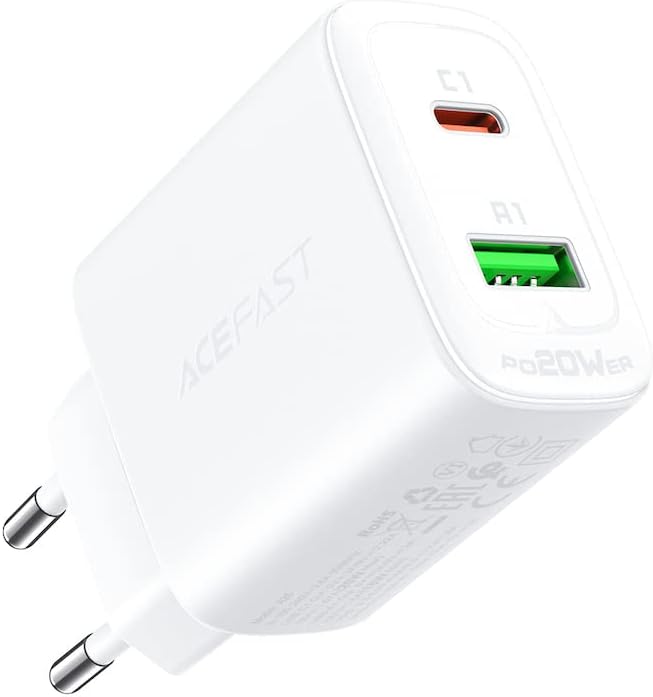
Figure 1: ACEFAST A25 Dual Port Fast Charger, front view showing USB-C and USB-A ports.
Spesifikasi
| Ciri | Perincian |
|---|---|
| Model | A25 |
| Input | AC 100-240V, 0.6A, 50/60Hz |
| Output USB-C | 20W Max (PD3.0, PPS, QC4.0, QC3.0, QC2.0, AFC, FCP, SCP, DCP1.5A, BC1.2) |
| Keluaran USB-A | 18W Max (QC3.0, QC2.0, AFC, FCP, SCP, DCP1.5A, BC1.2) |
| Total Output (USB-C + USB-A) | 5V / 3A (15W Max) |
| bahan | PC kalis api |
| Dimensi | 12 x 4 x 13 cm |
| Berat badan | 61 g |
| Ciri Khas | Pengecasan Pantas, Perlindungan Litar pintas |
Persediaan
Setting up your ACEFAST A25 charger is straightforward:
- Buka Pembungkusan Pengecas: Tanggalkan pengecas ACEFAST A25 dengan berhati-hati daripada pembungkusannya.
- Cari Outlet Kuasa: Find a standard AC wall outlet (100-240V) that is easily accessible.
- Pasangkan Pengecas: Insert the charger's prongs firmly into the wall outlet.
- Sambungkan Peranti Anda: Use a compatible charging cable (not included) to connect your device to either the USB-C or USB-A port on the charger.
Arahan Operasi
The ACEFAST A25 charger operates automatically once connected to a power source and a device.
- Pengecasan Port Tunggal: When using only the USB-C port, it can deliver up to 20W. When using only the USB-A port, it can deliver up to 18W.
- Pengecasan Dwi Port: When both USB-C and USB-A ports are used simultaneously, the total output is shared, with a maximum combined output of 15W (5V/3A). The charger intelligently distributes power based on the connected devices' requirements.
- Pengecasan Cepat: For optimal fast charging, ensure your device and charging cable support the relevant fast charging protocols (e.g., PD, QC3.0).

Figure 2: ACEFAST A25 charger providing PD20W fast charge to an iPhone, illustrating quick charging capability.
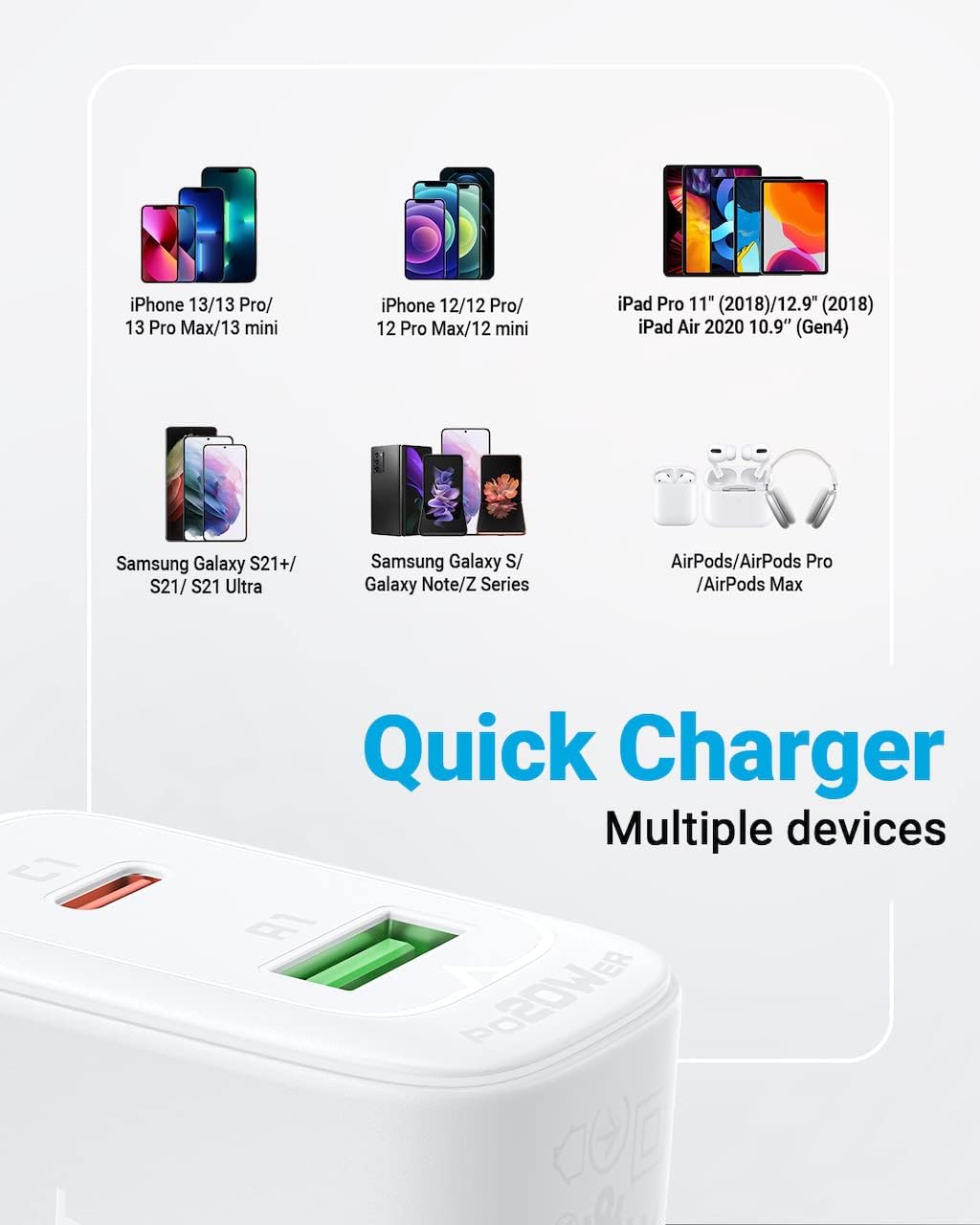
Figure 3: The ACEFAST A25 charger simultaneously charging an iPad and an iPhone, demonstrating its dual-port functionality and power distribution.
Keserasian
The ACEFAST A25 charger is compatible with a wide range of USB charging digital devices, including but not limited to:
- iPhone models (e.g., iPhone 13 series, iPhone 12 series)
- Samsung Galaxy smartphones (e.g., S21+, S21, S21 Ultra, S series, Note series)
- Xiaomi and Huawei smartphones
- iPad models (e.g., iPad Pro 11", iPad Air 2020 10.9")
- AirPods, AirPods Pro, AirPods Max
- Other devices supporting PD20W, PPS, QC3.0, AFC, FCP, QC2.0, SCP, DCP1.5A, BC1.2 charging protocols.
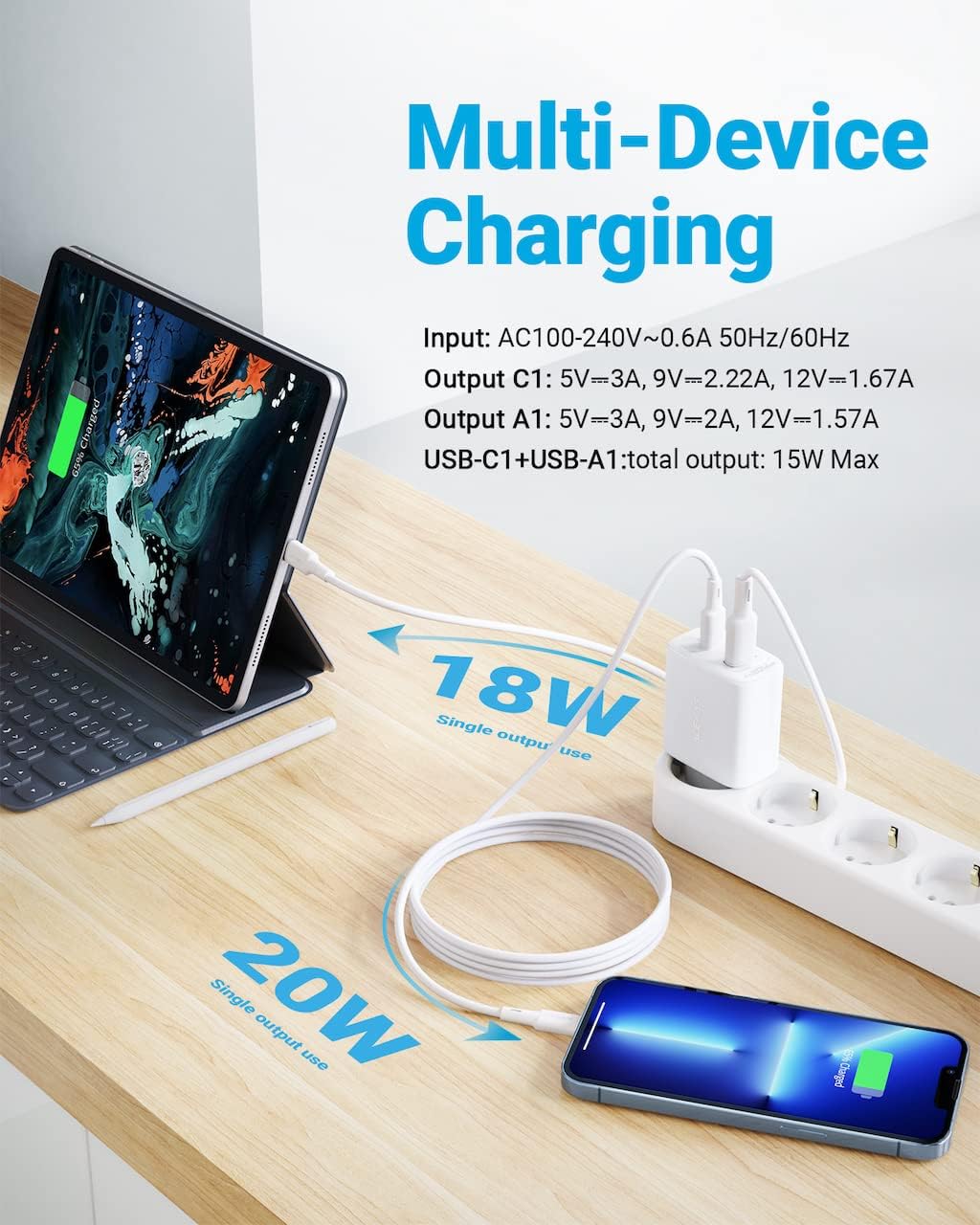
Figure 4: Visual guide displaying various compatible devices including iPhone, iPad, Samsung Galaxy, and AirPods, highlighting multi-device charging.
Maklumat Keselamatan
Untuk memastikan operasi yang selamat dan mengelakkan kerosakan, sila patuhi langkah berjaga-jaga keselamatan berikut:
- Jangan dedahkan pengecas kepada air, lembapan atau suhu yang melampau.
- Avoid dropping, impacting, or disassembling the charger.
- Jangan gunakan pengecas jika ia kelihatan rosak.
- Jauhkan daripada kanak-kanak.
- Ensure proper ventilation when in use; do not cover the charger.
- Gunakan hanya dengan peranti dan kabel yang serasi.
- Cabut palam pengecas daripada alur keluar dinding apabila tidak digunakan atau semasa ribut elektrik.
Penyelenggaraan
The ACEFAST A25 charger requires minimal maintenance.
- Pembersihan: Putuskan sambungan pengecas daripada salur keluar kuasa sebelum membersihkan. Gunakan kain lembut dan kering untuk mengelap permukaan. Jangan gunakan pembersih cecair atau aerosol.
- Storan: Simpan pengecas di tempat yang sejuk dan kering jauh dari cahaya matahari langsung dan suhu yang melampau.
Menyelesaikan masalah
Jika anda menghadapi masalah dengan pengecas anda, rujuk kepada masalah dan penyelesaian biasa berikut:
- Peranti tidak dicas:
- Pastikan pengecas dipasang dengan selamat pada salur keluar dinding yang berfungsi.
- Periksa sama ada kabel pengecasan disambungkan dengan betul kepada kedua-dua pengecas dan peranti anda.
- Cuba kabel pengecasan lain untuk mengetepikan kerosakan kabel.
- Uji pengecas dengan peranti lain untuk mengesahkan kefungsian pengecas.
- Pengecasan perlahan:
- Verify that your device and cable support fast charging protocols.
- If charging two devices simultaneously, the total output is shared, which may result in slower charging for each device compared to single-port use.
- Ensure the cable is not excessively long or damaged, as this can affect charging speed.
- Pengecas terasa hangat:
- It is normal for the charger to become slightly warm during operation, especially during fast charging.
- If the charger becomes excessively hot, unplug it immediately and discontinue use. Ensure it is not covered and has adequate ventilation.
Kandungan Pakej
The ACEFAST A25 package typically includes the following items:
- 1 x ACEFAST A25 PD20W Dual Port Fast Charger
- 1 x Quick Start Guide / Product Manual
Note: Charging cables are typically not included and must be purchased separately.

Figure 5: Image showing the ACEFAST A25 charger, its packaging box, and the included quick start guide/product manual, detailing package contents.
Waranti dan Sokongan
ACEFAST products are designed for reliability and performance. For warranty information or technical support, please refer to the warranty card included in your product packaging or visit the official ACEFAST website. Please have your product model number (A25) and purchase details ready when contacting support.


