pengenalan
This manual provides essential information for the setup, operation, and maintenance of your SteelSeries Apex 9 TKL Optical Gaming Keyboard. Please read these instructions carefully to ensure optimal performance and longevity of your device.
The SteelSeries Apex 9 TKL is a compact tenkeyless (TKL) gaming keyboard featuring OptiPoint optical switches, designed for high-speed performance and customization.
Kandungan Pakej
- SteelSeries Apex 9 TKL Keyboard
- Kabel USB-C ke USB-A yang boleh ditanggalkan
- Penarik Kekunci
- Penarik Suis
- Dokumentasi (manual ini)
Persediaan
1. Menyambung Papan Kekunci
- Cari kabel USB-C ke USB-A yang boleh ditanggalkan.
- Connect the USB-C end of the cable to the port on the back of the Apex 9 TKL keyboard.
- Sambungkan hujung kabel USB-A ke port USB yang tersedia pada komputer anda.
- Papan kekunci akan secara automatik dikesan dan dikonfigurasikan oleh sistem pengendalian anda.
2. Software Installation (SteelSeries GG)
For full customization options, including RGB lighting, key remapping, and actuation point adjustment, download and install the SteelSeries GG software from the official SteelSeries webtapak (steelseries.com/gg).
- Visit the SteelSeries website and navigate to the software download section.
- Download the SteelSeries GG installer for your operating system.
- Jalankan pemasang dan ikut arahan pada skrin.
- Once installed, launch SteelSeries GG to configure your Apex 9 TKL keyboard.

Image: The SteelSeries Apex 9 TKL keyboard, showcasing its compact design and vibrant RGB lighting, connected to a computer via its detachable USB-C cable.
Mengendalikan Papan Kekunci
Ciri dan Fungsi Utama
- OptiPoint Optical Switches: These switches utilize light for actuation, providing fast response times.
- 2-Point Actuation: Adjust the key actuation point between 1.0mm for rapid gaming inputs and 1.5mm for more deliberate typing. This setting is configurable via the SteelSeries GG software.
- Swappable Switches: The OptiPoint switches are hot-swappable, allowing for customization, replacement, or repair. Use the included switch puller for removal and installation.
- TKL Form Factor: The tenkeyless design removes the numeric keypad, providing more desk space for mouse movement.
- Kekunci PBT Double Shot: Durable keycaps designed for longevity and a consistent texture.
- Penyesuaian RGB: Per-key RGB lighting is fully customizable through the SteelSeries GG software.
- Rapid Tap: A feature that prioritizes the last key press in a selected pair for faster input, useful in competitive gaming scenarios. Requires the latest SteelSeries GG software update.

Image: Visual representation of the Apex 9 TKL's performance metrics, highlighting its 0.2ms response time and faster actuation compared to other optical keyboards.
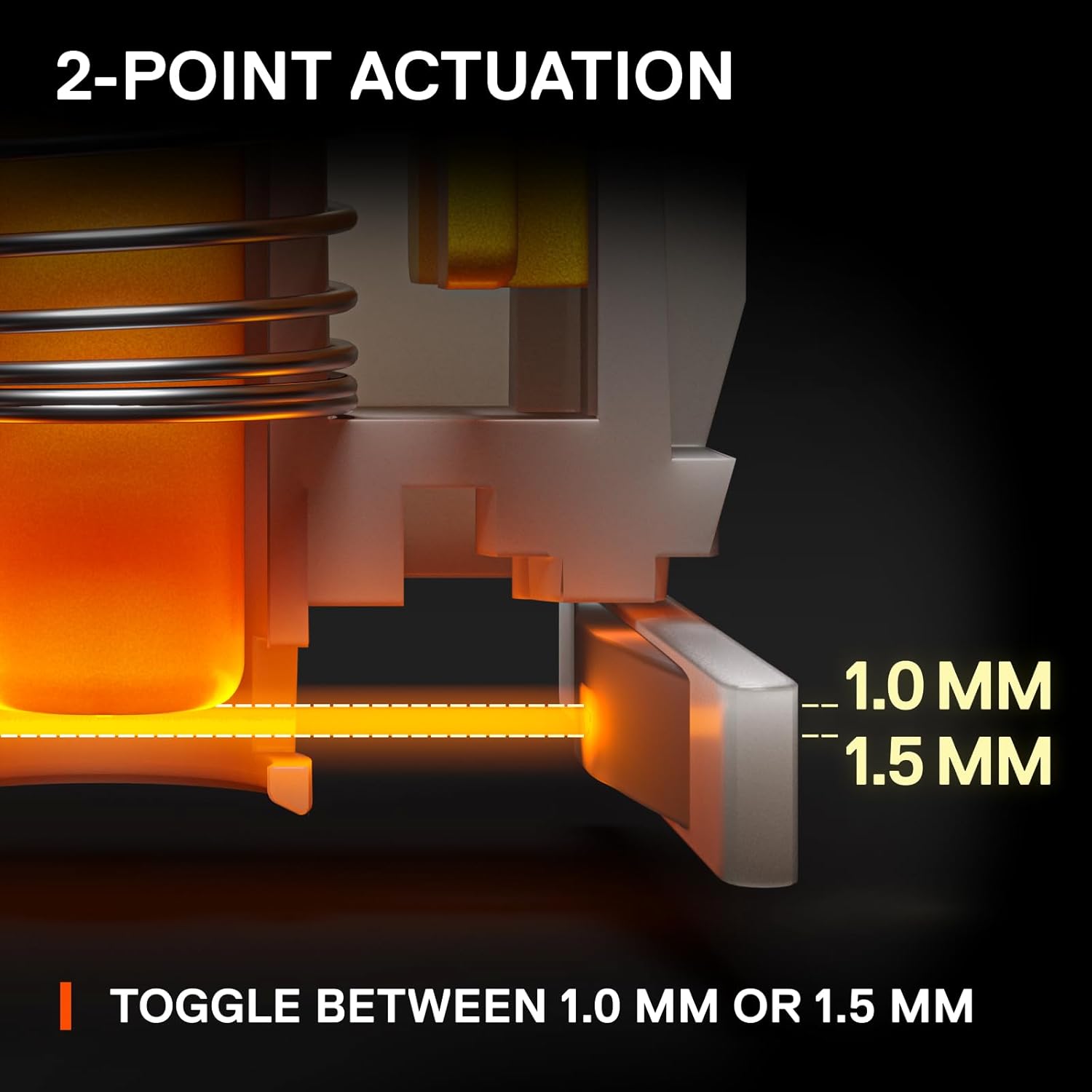
Image: An illustration detailing the adjustable 2-point actuation of the OptiPoint switches, allowing users to select between 1.0mm and 1.5mm actuation depths.

Imej: Dari dekat view of the keyboard illustrating the process of swapping OptiPoint switches, with a keycap and switch partially removed.

Image: A diagram explaining the 'Rapid Tap' feature, comparing standard input with Rapid Tap enabled, demonstrating how it enhances responsiveness by prioritizing the last key press.
Penyelenggaraan
Membersihkan Papan Kekunci
- Putuskan sambungan papan kekunci daripada komputer anda sebelum membersihkan.
- Gunakan tin udara termampat untuk mengeluarkan habuk dan serpihan dari antara penutup kekunci.
- For surface cleaning, gently wipe the keycaps and frame with a soft, damp kain. Elakkan menggunakan bahan kimia yang keras atau bahan yang melelas.
- Pastikan papan kekunci benar-benar kering sebelum menyambungkannya semula ke komputer anda.
Mengganti Cap Kekunci dan Suis
The Apex 9 TKL features swappable OptiPoint switches and standard keycaps, allowing for easy replacement.
- Pembuangan Papan Kekunci: Use the included keycap puller to gently lift keycaps straight up.
- Penyingkiran Tukar: After removing the keycap, use the included switch puller to carefully grip the switch and pull it straight up.
- Pemasangan: Align the new switch with the pins on the keyboard's PCB and press down firmly until it clicks into place. Then, press the new keycap onto the switch stem.

Imej: Meletup view illustrating the durable construction of double shot PBT keycaps, highlighting their two-layer design for fade resistance.
Menyelesaikan masalah
- Papan Kekunci Tidak Membalas:
- Pastikan kabel USB disambungkan dengan selamat ke kedua-dua papan kekunci dan komputer.
- Cuba sambungkan papan kekunci ke port USB lain pada komputer anda.
- Mulakan semula komputer anda.
- Check if the keyboard works on another computer to rule out a system-specific issue.
- Pencahayaan RGB Tidak Berfungsi/Salah:
- Ensure the SteelSeries GG software is installed and running.
- Check the lighting settings within the SteelSeries GG software.
- Update the keyboard firmware via SteelSeries GG.
- Kunci Tidak Mendaftar atau Menaip Dua Kali:
- This could indicate a faulty switch. Use the switch puller to remove the affected switch and inspect it. If necessary, replace it with a new OptiPoint switch.
- Pastikan suis dipasang sepenuhnya di dalam soketnya.
- Clean any debris around the switch area.
- Software Issues (SteelSeries GG):
- Ensure your SteelSeries GG software is up to date.
- Try reinstalling the SteelSeries GG software.
- Consult the SteelSeries support website for known issues or updates.
Spesifikasi
| Jenama | SteelSeries |
| Nombor Model | 64847 |
| Susun atur papan kekunci | Tenkeyless (TKL) |
| Jenis Suis | OptiPoint Optical Switches (Swappable) |
| Titik Penggerak | Adjustable 1.0mm / 1.5mm |
| Masa Tindak Balas | 0.2ms |
| Bahan Kekunci | PBT Tembakan Berganda |
| Ketersambungan | USB-C (Detachable Cable) |
| Pencahayaan latar | RGB per kekunci |
| Platform Perkakasan | PC |
| Dimensi (LxWxH) | 13.99 x 5.05 x 1.65 inci |
| Berat badan | 2.3 paun |
Maklumat Waranti
SteelSeries products are covered by a limited warranty. The specific terms and duration of the warranty may vary by region and product. For detailed warranty information, please refer to the official SteelSeries webtapak atau kad jaminan yang disertakan dengan produk anda.
Simpan bukti pembelian anda untuk tuntutan waranti.
Sokongan
Untuk bantuan lanjut, sokongan teknikal atau untuk mengakses pemacu dan kemas kini perisian tegar terkini, sila lawati sokongan rasmi SteelSeries. webtapak:
You can also find FAQs, troubleshooting guides, and community forums on the support page.


