1. Arahan Keselamatan Penting
Please read all instructions carefully before operating this product. Retain this manual for future reference.
- Jangan dedahkan perkakas ini kepada hujan atau lembapan.
- Jangan gunakan alat ini berhampiran air.
- Bersihkan hanya dengan kain kering.
- Jangan sekat sebarang bukaan pengudaraan. Pasang mengikut arahan pengilang.
- Jangan pasang berhampiran mana-mana sumber haba seperti radiator, daftar haba, dapur, atau radas lain (termasuk amppenghidup) yang menghasilkan haba.
- Lindungi kord kuasa daripada berjalan atau tersepit, terutamanya pada palam, bekas kemudahan dan tempat keluar dari radas.
- Hanya gunakan lampiran/aksesori yang ditentukan oleh pengilang.
- Cabut plag radas ini semasa ribut petir atau apabila tidak digunakan untuk jangka masa yang lama.
- Rujuk semua servis kepada kakitangan perkhidmatan yang berkelayakan. Servis diperlukan apabila radas telah rosak dalam apa jua cara, seperti kord bekalan kuasa atau palam rosak, cecair telah tertumpah atau objek jatuh ke dalam radas, radas telah terdedah kepada hujan atau lembapan, tidak beroperasi seperti biasa. , atau telah digugurkan.
2. Kandungan Pakej
Sahkan bahawa semua item terdapat dalam pakej anda:
- Technical Pro TPPLIT8 Loudspeaker
- Alat Kawalan Jauh
- Kabel Pengecas USB
- Manual Pengguna

Image: Included accessories and user manual cover.
3. Produk Lebihview
3.1 Panel Depan
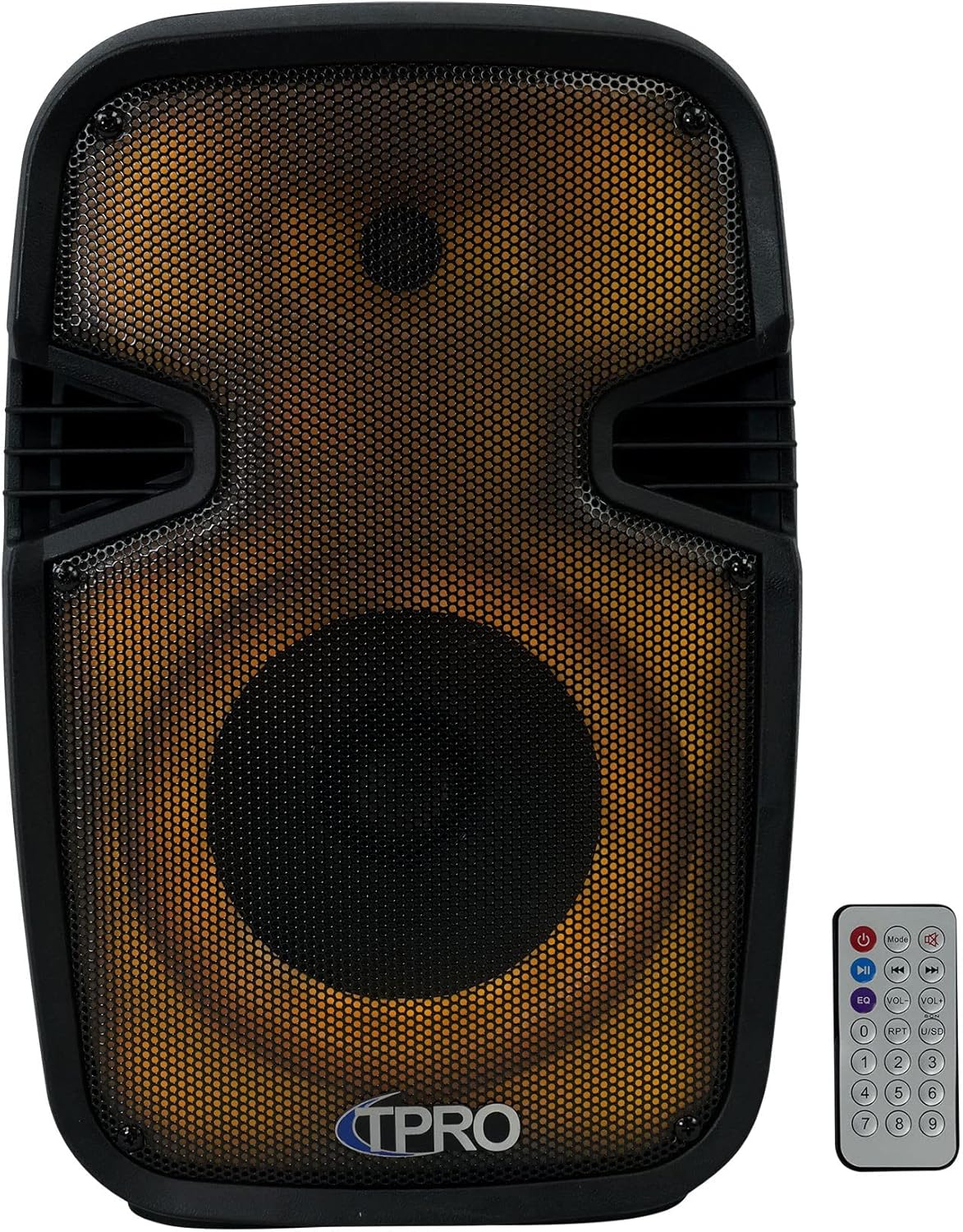
Imej: Depan view of the loudspeaker, showcasing the speaker grille and integrated LED lighting. The remote control is also visible.
3.2 Panel Kawalan Belakang

Imej: Belakang view of the loudspeaker, detailing the control panel. This includes volume controls, input selectors, USB and SD card slots, microphone input, AUX input, and power switch.
3.3 Bahagian View and Portability

Imej: Sisi view of the loudspeaker, illustrating the robust carry handle designed for easy transport.
3.4 Gambarajah Ciri-ciri Utama

Image: A visual diagram highlighting the main functionalities of the loudspeaker, including various connectivity options and lighting effects.
3.5 Dimensi

Image: A diagram providing the physical measurements of the loudspeaker for placement and transport planning.
4. Persediaan
4.1 Pengecasan Awal
Before first use, fully charge the loudspeaker's built-in rechargeable battery. Connect the provided USB charging cable to the speaker's charging port and a compatible USB power adapter (not included). The charging indicator light will typically show red while charging and turn off or change color when fully charged.
4.2 Hidupkan/Mati Kuasa
Locate the power switch on the rear control panel. Flip the switch to the 'ON' position to power on the loudspeaker. Flip it to 'OFF' to power off the unit.
5. Arahan Operasi
5.1 Berpasangan Bluetooth
- Power on the loudspeaker. It will automatically enter Bluetooth pairing mode, indicated by an audible prompt or flashing LED.
- Pada peranti mudah alih anda (telefon pintar, tablet, dll.), dayakan Bluetooth dan cari peranti yang tersedia.
- Select 'TPRO PLIT8' from the list of devices.
- Once paired, the loudspeaker will confirm with an audible sound. You can now stream audio wirelessly.
5.2 Main Semula USB/Kad SD
- Insert a USB flash drive or SD card (with pre-loaded MP3 audio files) into the respective slot on the rear control panel.
- The loudspeaker should automatically detect the media and begin playback. If not, press the 'Mode' button to switch to USB/SD mode.
- Use the playback controls (Play/Pause, Next, Previous) on the loudspeaker or remote control to manage your music.
5.3 Input Mikrofon
- Connect a wired microphone (not included) to the 'MIC IN' jack on the rear control panel.
- Laraskan tombol 'MIC VOL' untuk mengawal kelantangan mikrofon.
- Use the 'ECHO' knob to add an echo effect to the microphone audio.
5.4 Input AUX
- Connect an external audio source (e.g., MP3 player, laptop) to the 'AUX IN' jack on the rear control panel using a 3.5mm audio cable (not included).
- Press the 'Mode' button to switch the loudspeaker to AUX input mode.
- Control the volume from both the external device and the loudspeaker's master volume knob.
5.5 TWS (Stereo Wayarles Sejati) Berpasangan
To achieve true wireless stereo sound, you can pair two TPPLIT8 loudspeakers together:
- Ensure both loudspeakers are powered on and in Bluetooth mode, but not yet paired to any device.
- On one of the loudspeakers, press and hold the 'TWS' button (or a designated TWS pairing button, refer to the remote control section).
- The two speakers will attempt to connect to each other. Once connected, an audible prompt will confirm the TWS pairing.
- Now, connect your mobile device to the primary loudspeaker via Bluetooth (as described in section 5.1). Audio will play through both speakers in stereo.

Image: Two loudspeakers demonstrating a True Wireless Stereo setup for enhanced audio experience.
5.6 Radio FM
- Tekan butang 'Mod' untuk beralih ke mod Radio FM.
- Press the 'Play/Pause' button to initiate an automatic scan for available FM stations. The speaker will save detected stations.
- Gunakan butang 'Seterusnya' dan 'Sebelumnya' untuk menavigasi stesen yang disimpan.
5.7 LED Lights Control
The loudspeaker features multi-color flashing disco LED party lights. Use the dedicated LED control button on the remote or the unit (if available) to cycle through different lighting modes or turn them off.
5.8 Fungsi Kawalan Jauh
Alat kawalan jauh yang disertakan menyediakan akses mudah kepada pelbagai fungsi:

Image: The remote control unit, showing buttons for power, mode selection, playback, volume adjustment, equalizer presets, and a numeric keypad.
- Butang Kuasa: Menghidupkan / mematikan unit.
- Butang Mod: Beralih melalui mod input (Bluetooth, USB, SD, FM, AUX).
- Main/Jeda: Memainkan atau menjeda audio semasa.
- Sebelumnya/Seterusnya: Melangkau ke trek/stesen sebelumnya atau seterusnya.
- Kelantangan Naik/Turun: Melaraskan kelantangan induk.
- EQ: Kitaran melalui pratetap penyamaan.
- RPT (Ulang): Mengulang trek semasa atau semua trek.
- USB/SD: Directly selects USB or SD card mode.
- Pad berangka (0-9): For direct track selection in USB/SD mode or FM station input.
6. Penyelenggaraan
6.1 Pembersihan
Wipe the exterior of the loudspeaker with a soft, dry cloth. Do not use abrasive cleaners, waxes, or solvents as they may damage the finish. Ensure no liquids enter the unit.
6.2 Penyimpanan
When not in use for extended periods, store the loudspeaker in a cool, dry place, away from direct sunlight and extreme temperatures. It is recommended to charge the battery periodically to maintain its lifespan.
7. Penyelesaian masalah
| Masalah | Kemungkinan Punca | Penyelesaian |
|---|---|---|
| Tiada kuasa | Battery discharged; Power switch off | Charge the battery; Turn the power switch to 'ON' |
| Tiada bunyi | Kelantangan terlalu rendah; Mod input salah; Peranti tidak disambungkan | Increase volume; Select correct input mode; Ensure device is properly connected/paired |
| Bluetooth tidak bersambung | Speaker not in pairing mode; Device Bluetooth off; Too far from speaker | Ensure speaker is in Bluetooth pairing mode; Enable Bluetooth on device; Move device closer to speaker (within 30 feet) |
| Gandingan TWS gagal | Speakers already paired to a device; Incorrect pairing procedure | Ensure both speakers are unpaired from other devices; Follow TWS pairing steps carefully |
8. Spesifikasi
| Ciri | Spesifikasi |
|---|---|
| Nama Model | PLIT8 |
| Jenis Pembesar Suara | Sistem Pembesar Suara |
| Saiz Pembesar Suara | 8 Inci |
| Diameter Woofer | 8 Inci |
| Kuasa Output Maksimum Pembesar Suara | 1200 Watt (Puncak) |
| Teknologi Ketersambungan | Bluetooth |
| Teknologi Komunikasi Tanpa Wayar | Bluetooth |
| Julat Bluetooth | 30 Kaki |
| Sumber Kuasa | Dikuasakan Bateri |
| Impedans | 3 Ohm |
| Respons Kekerapan | 18 KHz |
| Mod Keluaran Audio | Stereo |
| Dimensi Produk | 8"D x 9"W x 16"H |
| Berat Barang | 6 paun |
| bahan | plastik |
| Ciri Khas | LED Power Switch, Dazzling LED Glow Wall |
| Komponen yang Disertakan | PA System, Remote Control, USB Cable, User Manual |
| UPC | 817802018269 |
9. Waranti dan Sokongan
This product comes with a Limited Warranty. For specific warranty details, please refer to the documentation included with your purchase or contact Technical Pro customer support.
For questions, comments, or technical support, please contact:
- telefon: 888-842-6277
- e-mel: info@tpro.com


