Produk Selesaiview
The Mesqool Digital Alarm Clock is a versatile device designed to enhance your living space with its multi-functional display and convenient features. It provides accurate time, date, temperature, and humidity readings, along with dual alarm capabilities and charging ports for your electronic devices.

Figure 1: Mesqool Digital Alarm Clock with charging capabilities.
Apa yang ada dalam Kotak
- Jam Penggera Digital Kayu
- US AC Power Adapter
- Kabel pengecasan
- Manual kertas

Rajah 2: Kandungan Pakej.
Ciri-ciri Utama
- Paparan Besar: An 8.7-inch screen clearly displays time, date, and day of the week.
- Pemantauan Suhu dan Kelembapan: Assists in monitoring indoor environment conditions.
- Loud Alarm with Snooze: Adjustable alarm volume from 65dB to 120dB with a 9-minute snooze function.
- Multiple Alarm Settings: Four alarm modes available: Every day, Weekend, Weekdays, or One Time Alarm. Supports dual alarm settings.
- USB and Type-C Charging Ports: Equipped with both USB and Type-C ports to charge two electronic devices simultaneously.
- 5 Levels Dimmer: Easily adjust display brightness with five levels to suit various lighting conditions.
- Reka Bentuk Bergaya: Features a wood grain pattern and metal buttons for a modern aesthetic.
- Power Cord Operated with Battery Backup: Primarily AC powered, with 2x AAA batteries (not included) for memory backup during power outages.
Video 1: Selesaiview of Mesqool Digital Alarm Clock features, including dual alarm, adjustable brightness, charging ports, and environmental monitoring.
Persediaan
1. Sambungan Kuasa
Connect the provided AC power adapter to the clock's power input port and plug it into a standard wall outlet. The clock is primarily AC powered.

Figure 3: Power connection and battery backup.
2. Pemasangan Sandaran Bateri
For memory backup during power outages, install 2x AAA batteries (not included) into the battery compartment located at the back of the clock. This ensures that time and alarm settings are retained.
Arahan Operasi
1. Menetapkan Masa dan Tarikh
- Tekan ke TARIKH button to cycle through date display modes (e.g., MM-DD-YYYY).
- Tekan ke TIME 12/24H butang untuk bertukar antara format masa 12 jam dan 24 jam.
- Untuk menetapkan masa, tekan dan tahan butang TIME 12/24H button until the hour digits flash. Use the +HOUR dan -MIN buttons to adjust the hour and minute. Press TUNDA/OK untuk mengesahkan setiap tetapan.
- To set the date, press and hold the TARIKH button until the year digits flash. Use the +HOUR dan -MIN buttons to adjust the year, month, and day. Press TUNDA/OK untuk mengesahkan setiap tetapan.

Figure 4: Multiple display styles and unit switching.
2. Menetapkan Penggera
The clock supports dual alarms (ALM1 and ALM2).
- Tekan ke ALM1 or ALM2 button to select the alarm you wish to set.
- Press and hold the selected alarm button (e.g., ALM1) until the alarm time flashes. Use +HOUR dan -MIN to set the desired alarm time. Press TUNDA/OK untuk mengesahkan.
- After setting the time, the alarm mode will flash. Use +HOUR or -MIN to select one of the four alarm modes:
- Isnin-Ahad: Bunyi penggera setiap hari.
- Isnin-Jumaat: Bunyi penggera hanya pada hari bekerja sahaja.
- Sabtu-Ahad: Bunyi penggera hanya pada hujung minggu.
- Satu kali: Alarm sounds once.
- To turn an alarm ON/OFF, short press the corresponding ALM1 or ALM2 butang. Ikon penggera akan muncul/hilang pada paparan.

Figure 5: Dual alarm settings and modes.
3. Adjusting Brightness (Dimmer)
Tekan ke DIMMER button to cycle through 5 levels of display brightness. Select the level that best suits your environment and preference.

Figure 6: Display brightness adjustment.
4. Adjusting Alarm Volume
Tekan ke VOL DST button to adjust the alarm volume. The volume can be set between 65dB and 120dB across 5 levels.

Figure 7: Alarm volume adjustment and snooze button.
5. Fungsi Tunda
Apabila penggera berbunyi, tekan besar TUNDA/OK butang di atas jam untuk mengaktifkan fungsi tunda. Penggera akan berhenti seketika selama 9 minit dan kemudian berbunyi semula.
6. Paparan Suhu dan Kelembapan
The clock displays indoor temperature and humidity. Press the °F/°C button to switch between Fahrenheit and Celsius temperature units.
7. Mengecas Peranti Elektronik
Utilize the USB and Type-C charging ports located at the back of the clock to charge your smartphones, tablets, or other compatible electronic devices.

Figure 8: USB and Type-C charging ports in use.
Penyelenggaraan
- Bersihkan jam dengan kain lembut dan kering. Jangan gunakan pembersih atau pelarut yang melelas.
- Elakkan daripada mendedahkan jam kepada suhu yang melampau, cahaya matahari langsung atau kelembapan yang tinggi.
- Ensure proper ventilation around the clock, especially if using the charging ports for extended periods.
Menyelesaikan masalah
| Masalah | Kemungkinan Punca | Penyelesaian |
|---|---|---|
| Paparan kosong atau malap. | Tiada kuasa, kuasa outage, or brightness set too low. | Check power adapter connection. Ensure batteries are installed for backup. Press the DIMMER butang untuk meningkatkan kecerahan. |
| Penggera tidak berbunyi. | Alarm is off, volume is too low, or incorrect alarm mode. | Ensure the alarm is activated (icon visible). Increase alarm volume using VOL DST. Verify the alarm mode (Mon-Sun, Mon-Fri, etc.) is correctly set. |
| Masa/Tarikh tidak betul. | Not set correctly or power interruption without battery backup. | Follow the "Setting Time and Date" instructions to reset. Install fresh AAA batteries for backup. |
| Peranti tidak dicas. | Incorrect cable, device not compatible, or clock not powered. | Ensure correct USB/Type-C cable is used. Verify the clock is powered on. Check device compatibility. |
Spesifikasi
- Jenama: Mesqool
- Nombor Model: MQL-CR1019
- Jenis Paparan: digital
- Dimensi Produk: 8.07"W x 3.62"H
- Sumber Kuasa: Corded Electric (AC Adapter included)
- Bateri tambahan: 2 x bateri AAA (tidak termasuk)
- Kelantangan Penggera: 65dB - 120dB (5 levels)
- Kecerahan Paparan: 5 tahap boleh laras
- Port Pengecasan: 1 x USB, 1 x Type-C
- Bahan: Plastic (wood grain finish)
- Ciri Khas: Calendar Display, Temperature Display, Humidity Display, Dual Alarm, Large Screen Display, Snooze
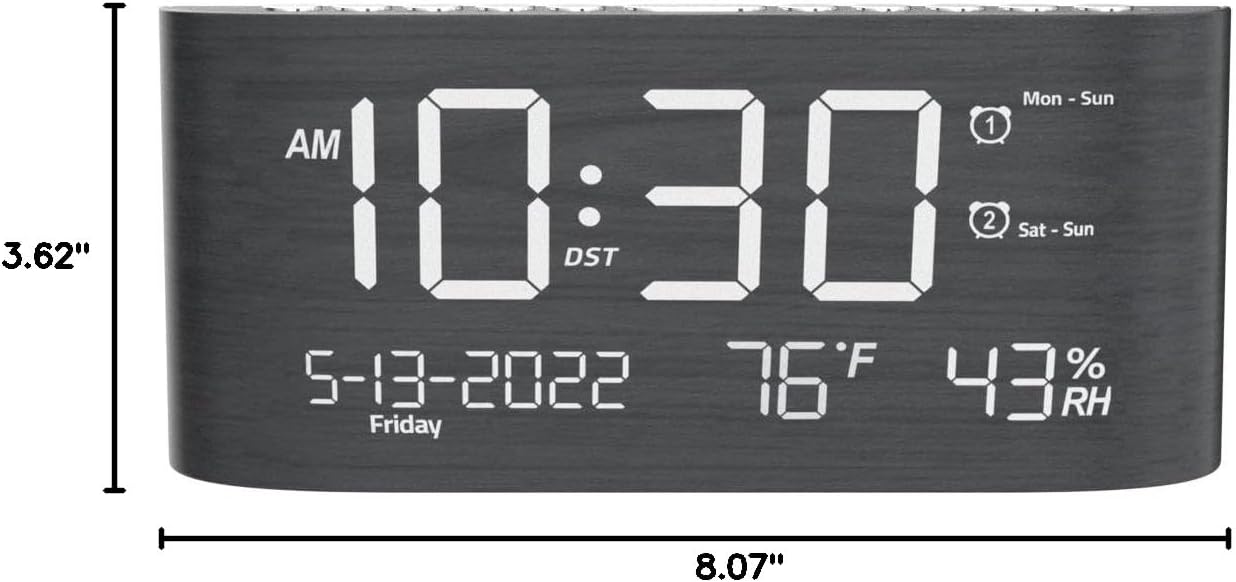
Rajah 9: Dimensi Produk.
Waranti dan Sokongan
This Mesqool product comes with a 2 Years Exchange Warranty. For any support inquiries, troubleshooting assistance, or warranty claims, please refer to the official Mesqool webtapak atau hubungi perkhidmatan pelanggan mereka secara langsung.
Versi elektronik manual pengguna ini boleh dimuat turun: Muat turun Manual Pengguna (PDF)


