pengenalan
This manual provides detailed instructions for the assembly, operation, and maintenance of your COSTWAY Dual Motor Electric Standing Desk Frame. This ergonomic desk frame is designed to support flexible working postures, allowing users to switch between sitting and standing positions. It features a powerful dual-motor system for smooth height adjustments, an intelligent controller with memory presets, and advanced anti-collision technology for enhanced safety.

Image: The COSTWAY Dual Motor Electric Standing Desk Frame in a typical office setup, demonstrating its use.

Image: Illustration of the ergonomic height adjustable design, showing the desk in both sitting (minimum 27.5 inches) and standing (maximum 45 inches) modes.
Persediaan dan Perhimpunan
The COSTWAY Electric Standing Desk Frame requires assembly. Please ensure all components are present before beginning. The frame's width is adjustable, allowing compatibility with various tabletop sizes. A detailed instruction manual is included in the package to guide you through the assembly process.
Tabletop Compatibility
The desk frame's width can be adjusted from 43 inches to 67 inches, accommodating a wide range of tabletop dimensions. This allows for customization to suit your specific workspace needs.

Image: Visual representation of the desk frame's adjustable width, illustrating how it can accommodate different tabletop sizes.
Key Structural Components
The desk frame is constructed from heavy-duty steel, featuring sturdy T-shaped steel legs, a solid double beam for support, and adjustable foot pads for stability on uneven surfaces. Integrated cable management ties help organize wires.

Imej: Jarak dekat views of the desk frame's structural features, including cable management, leg design, foot pads, and the double beam.
Arahan Operasi
The desk frame is controlled by an intelligent LED digital controller, providing easy and precise height adjustments.
Pelarasan Ketinggian
Gunakan Up dan Bawah arrow buttons on the controller to raise or lower the desk to your desired height. The current height is displayed on the LED screen.
Pratetap Memori
The controller allows you to store up to three preferred height settings for quick recall:
- Laraskan meja pada ketinggian yang diingini menggunakan butang Atas/Bawah.
- Press the 'S' button. The LED display will show 'S-'.
- Press one of the number buttons (1, 2, or 3) within 5 seconds to save the current height to that preset. The display will show 'S-1', 'S-2', or 'S-3' to confirm.
- To recall a saved height, simply press the corresponding number button (1, 2, or 3). The desk will automatically move to the stored position.
Sistem Anti-Perlanggaran
The desk frame is equipped with an advanced anti-collision technology. If the desk encounters an obstruction during movement, it will automatically stop and reverse slightly to prevent damage or injury.
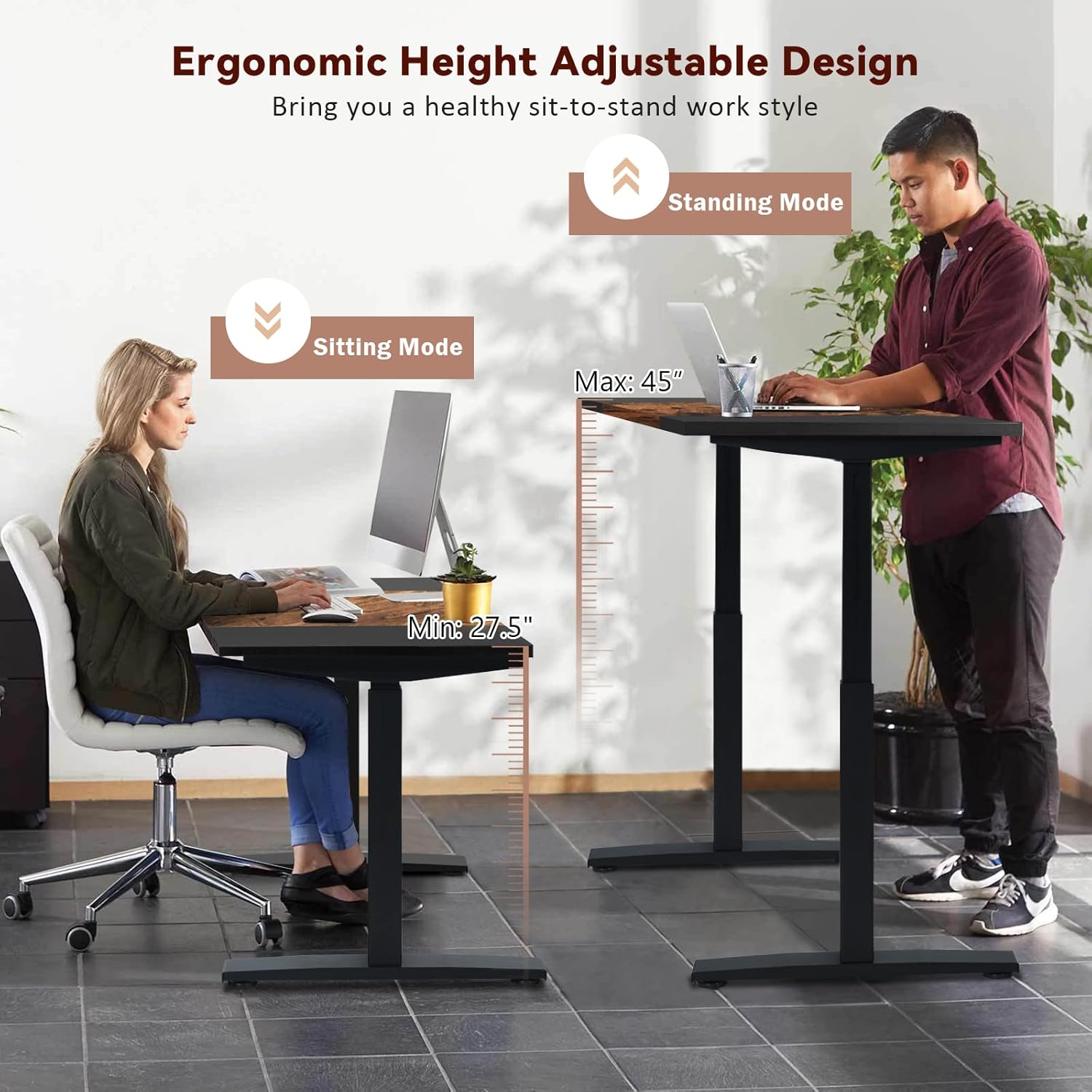
Image: The intelligent controller, highlighting its features for height adjustment and memory presets.
Penjagaan dan Penyelenggaraan
To maintain the appearance and functionality of your COSTWAY Electric Standing Desk Frame, follow these simple care instructions:
- Pembersihan: Wipe the steel surfaces with a dry cloth. Avoid using abrasive cleaners or harsh chemicals that may damage the finish.
- Pemeriksaan: Periodically check all screws and connections to ensure they are secure. Tighten if necessary.
- Pengurusan Kabel: Ensure cables are neatly organized and not interfering with the desk's movement.
Panduan Penyelesaian Masalah
If you encounter any issues with your standing desk frame, please refer to the following common troubleshooting steps:
- Meja tidak bergerak: Check if the power cord is securely plugged into both the desk frame and a working power outlet. Ensure no obstructions are blocking the desk's path.
- Pergerakan tidak sekata: Verify that the desk is placed on a level surface and that the adjustable foot levelers are properly adjusted.
- Pengawal tidak bertindak balas: Unplug the desk from the power source for 10-15 seconds, then plug it back in to perform a soft reset.
- Kod ralat: If an error code appears on the LED display, consult the detailed instruction manual provided with your product for specific solutions or contact customer support.
Spesifikasi Produk
Below are the technical specifications for the COSTWAY Dual Motor Electric Standing Desk Frame:
| Ciri | Spesifikasi |
|---|---|
| Nombor Model | 66719US-WH |
| bahan | Keluli |
| Dimensi Keseluruhan (L x W x H) | 43-67" x 27" x 27.5-45" |
| Julat Ketinggian Boleh Laras | 27.5" - 45" |
| Julat Lebar Boleh Laras | 43" - 67" |
| Kelajuan Mengangkat | 1.5"/second |
| Kapasiti Berat | 220 paun |
| Tahap Kebisingan | ≤40db |
| Input Kuasa | 120V, 60Hz |
| Berat Bersih | 86.5 paun |

Image: Detailed product dimension diagram, indicating adjustable height and width ranges.

Image: Illustration of the dual motor system, highlighting its performance specifications such as lifting speed, noise level, and load capacity.
Maklumat Waranti
This COSTWAY Dual Motor Electric Standing Desk Frame comes with a limited warranty. Please refer to the warranty card included in your product packaging for specific terms, conditions, and duration of coverage. Keep your proof of purchase for any warranty claims.
Sokongan Pelanggan
For further assistance, technical support, or inquiries regarding your COSTWAY Electric Standing Desk Frame, please contact COSTWAY customer service. Contact information can typically be found on the product packaging, the included warranty card, or the official COSTWAY webtapak.


