pengenalan
This manual provides comprehensive instructions for the FANTECH MAXFIT61 RGB 60% Mechanical Keyboard. It covers setup, operation, maintenance, and troubleshooting to ensure optimal performance and user experience.

Image: The FANTECH MAXFIT61 RGB 60% Mechanical Keyboard, showcasinreka bentuknya yang padat dan lampu latar RGB yang bertenaga.
Apa yang ada dalam Kotak
Sahkan bahawa semua item terdapat dalam pembungkusan:
- Papan Kekunci Mekanikal FANTECH MAXFIT61
- Penarik Suis
- Penarik Kekunci
- Kabel Jenis-C boleh tanggal
- Manual Arahan
- Kad Waranti

Image: All components included with the FANTECH MAXFIT61 keyboard: the keyboard itself, a switch puller, a keycap puller, a detachable Type-C cable, and documentation.
Persediaan
- Sambungkan Papan Kekunci: Use the provided detachable Type-C cable to connect the keyboard to an available USB port on your computer.
- Pemasangan Pemandu: The keyboard is plug-and-play. For advanced customization, download the MAXFIT61 software from the official FANTECH webtapak.
- penempatan: Position the keyboard comfortably on your desk. The 60% layout is designed to maximize desk space for mouse movement.

Imej: A terperinci view of the detachable Type-C cable connection point on the keyboard, highlighting its secure design. Also shown is a graphical user interface for the MAXFIT61 software, indicating customization options for button assignments and macros.
Arahan Operasi
Fungsi Asas
The FANTECH MAXFIT61 is a 60% keyboard, meaning some functions are accessed via the FN key in combination with other keys. Refer to the keycap legends for secondary functions.
Lampu latar RGB
The keyboard features 18 RGB backlight modes. Adjust brightness and flowing modes using the FN key combinations. Specific key combinations for lighting control are detailed in the included instruction manual.

Image: The FANTECH MAXFIT61 keyboard showcasing its RGB lighting capabilities, with icons indicating lighting control, detachable Type-C cable, and hot-swappable switches.
Suis Boleh Tukar Panas
The MAXFIT61 is designed with universal hot-swappable Outemu switches, supporting both 5-pin and 3-pin switches from various brands. This allows for easy customization of your typing experience.

Image: A FANTECH MAXFIT61 keyboard with several keycaps and switches removed, illustrating the hot-swappable switch design. Loose keycaps and switches are scattered around the keyboard.
Magic FN Key
The Magic FN key provides quick access to multimedia controls, home functions, and custom key assignments. Press FN + CAPS to activate these features.
Penyelenggaraan
- Pembersihan: Use a soft, dry cloth to clean the keyboard surface. For deeper cleaning, remove keycaps using the provided keycap puller and use compressed air to clear debris.
- Penggantian Suis: To replace a switch, gently remove the keycap with the keycap puller. Then, use the switch puller to carefully extract the switch. Align the pins of the new switch with the sockets on the PCB and press firmly until it clicks into place.
Menyelesaikan masalah
- Papan Kekunci Tidak Membalas:
- Pastikan kabel Jenis-C disambungkan dengan selamat pada papan kekunci dan komputer.
- Cuba sambungkan papan kekunci ke port USB lain.
- Mulakan semula komputer anda.
- Lampu RGB Tidak Berfungsi:
- Periksa kombinasi kekunci FN untuk kawalan pencahayaan.
- Ensure the MAXFIT61 software is installed and running correctly.
- Kunci Tidak Mendaftar:
- Remove the keycap and switch for the affected key.
- Inspect the switch for any damage or debris. Replace the switch if necessary.
- Ensure the switch is properly seated in its socket.
Spesifikasi
| Jenama | FANTECH |
| Nama Model | MAXFIT61 |
| Nombor Model | MK857 |
| Bilangan Kunci | 61 Kekunci |
| Jenis Suis | Mechanical (Outemu Red Switch) |
| Ketersambungan | Berwayar (USB-C) |
| Pencahayaan latar | RGB (18 modes) |
| Panas-Boleh Tukar | Yes (5-pin and 3-pin compatible) |
| Jenis Bahan | Akrilonitril Butadiena Stirena |
| Peranti Serasi | PC |
| Sistem Operasi | Windows 10 |
| Dimensi (L x W x H) | 294 x 103 x 42 mm |
| Berat badan | 566g |
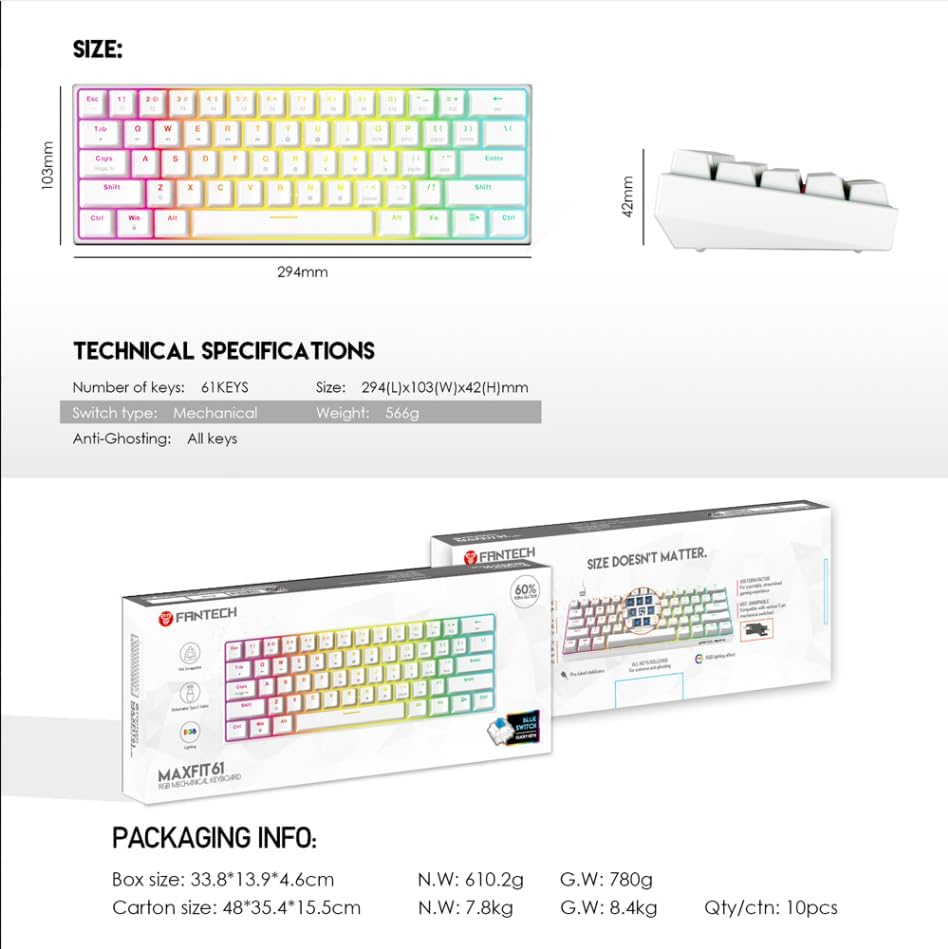
Image: A visual representation of the FANTECH MAXFIT61 keyboard's dimensions and a table listing its technical specifications, including number of keys, switch type, size, and weight.
Waranti dan Sokongan
The FANTECH MAXFIT61 Mechanical Keyboard comes with a Waranti 1 tahun dari tarikh pembelian. Sila simpan bukti pembelian anda untuk tuntutan waranti.
For technical support, troubleshooting assistance, or warranty inquiries, please visit the official FANTECH website or contact their customer service department. Contact information can be found on the warranty card included in your product packaging.


