1. Pengenalan
Thank you for choosing the LIPOWER G1000 Portable Power Station with 100W Solar Panel. This manual provides essential information for the safe and efficient operation, maintenance, and troubleshooting of your device. Please read it thoroughly before use and retain it for future reference.
The LIPOWER G1000 is a versatile power solution designed for various applications, including camping, emergency backup, and off-grid power supply. It features a 1075Wh LiFePO4 battery, multiple output ports, and supports various charging methods, including solar.
2. Arahan Keselamatan
- Jangan membongkar, memperbaiki atau mengubah unit.
- Jauhkan unit daripada api atau suhu yang melampau.
- Do not expose the unit to liquids or immerse it in water.
- Elakkan daripada menjatuhkan atau menyebabkan unit ini terkena hentaman kuat.
- Jauhkan daripada kanak-kanak dan haiwan peliharaan.
- Gunakan hanya aksesori asli atau yang diperakui.
- Pastikan pengudaraan yang betul semasa penggunaan dan pengecasan.
- Jangan sekat bukaan pengudaraan.
3. Kandungan Pakej
Sahkan bahawa semua item terdapat dalam pakej anda:
- LIPOWER G1000 Portable Power Station
- AC Adapter (for wall charging)
- Kabel Pengecas Kereta
- Panel Suria 100W
- Manual Pengguna (dokumen ini)
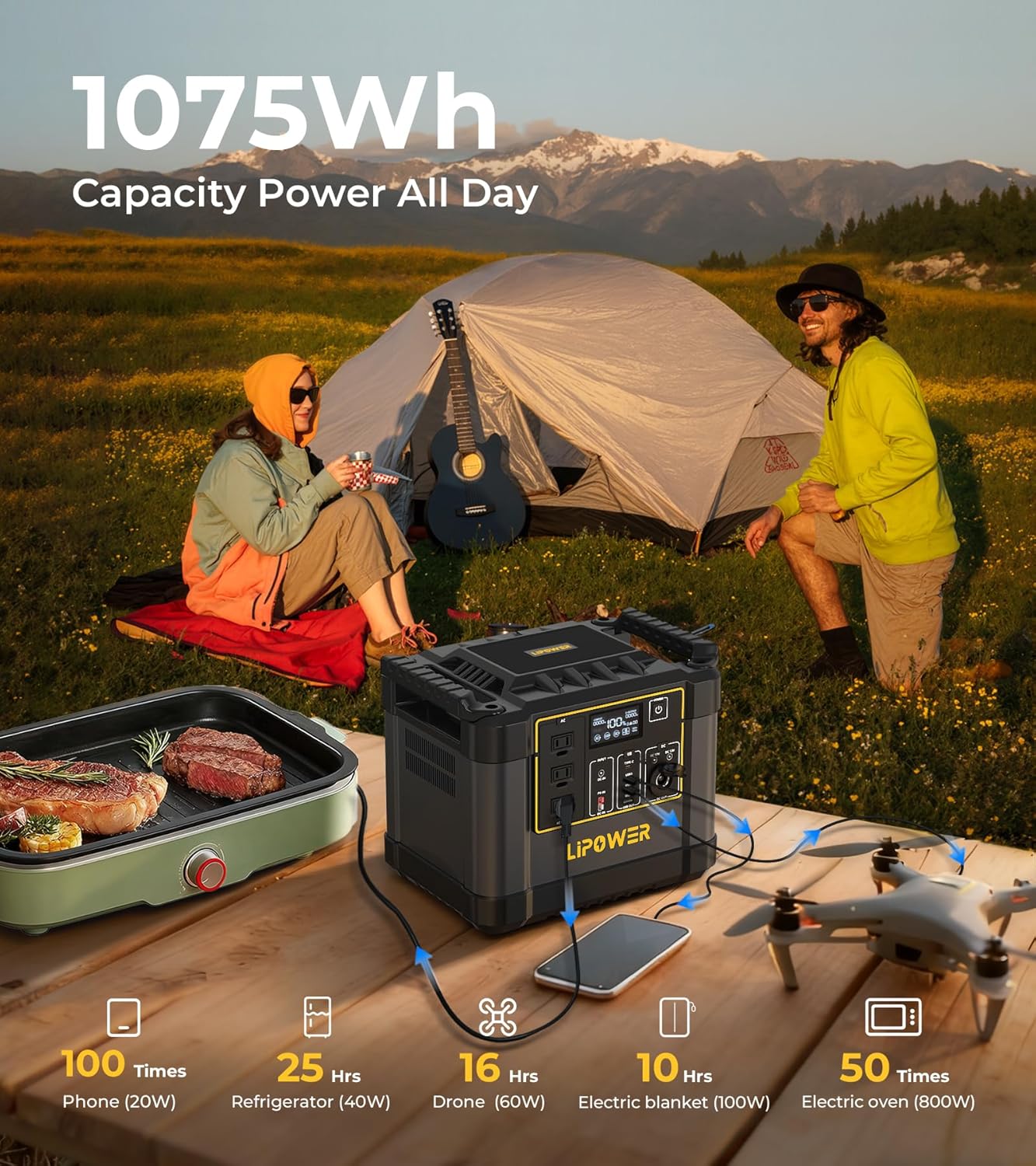
Image: LIPOWER G1000 Portable Power Station with included 100W Solar Panel and accessories.
4. Produk Lebihview
The LIPOWER G1000 features a robust design with multiple input and output options. Familiarize yourself with the ports and display before operation.
4.1. Panel Hadapan dan Paparan
- Paparan LCD: Menunjukkan paras bateri, wat input/outputtage, and error indicators.
- Cawangan AC (x3): 1200W rated (2000W peak) pure sine wave output for household appliances.
- Port USB-A (x3): For charging smartphones, tablets, and other USB-powered devices. Includes QC3.0 fast charging.
- USB-C PD100W Port (x1): For fast charging compatible laptops and devices.
- DC Output Ports (x2): Untuk peranti 12V DC.
- Cigarette Lighter Port (x1): Untuk aksesori kereta 12V.
- Butang Kuasa: To turn the unit on/off and activate specific output sections.

Imej: Selesaiview of the LIPOWER G1000's front panel, highlighting various output ports and their applications.
5. Persediaan dan Pengecasan Awal
5.1. Membuka kotak dan Pemeriksaan
Carefully remove the power station and solar panel from their packaging. Inspect for any signs of damage. If any components are missing or damaged, contact customer support immediately.
5.2. Pengecasan Awal
Before first use, it is recommended to fully charge the LIPOWER G1000. The unit supports three primary charging methods:
- Pengecasan Soket Dinding AC:
Connect the provided AC adapter to the AC input port on the power station and then plug it into a standard wall outlet. The LCD display will indicate charging status. A full charge from 0-100% typically takes approximately 1.5 hours, with 0-80% achievable in about 58 minutes.
- Pengecasan Panel Suria:
Unfold the 100W solar panel and position it in direct sunlight. Connect the solar panel to the DC input port on the power station using the appropriate cable. The LCD display will show solar input wattage. Charging time varies based on sunlight intensity and panel orientation. For optimal performance, adjust the solar panel angle (0-70°) to maximize sun exposure. Charging from 0-100% with a 200W solar input can take 3-5 hours.

Image: The LIPOWER G1000 Power Station connected to a solar panel for charging in an outdoor setting.
- Car Charger Charging:
Connect the car charging cable to the DC input port on the power station and plug the other end into your vehicle's 12V/24V cigarette lighter socket. Charging time from 0-100% typically takes 4-6 hours.

Image: Diagram illustrating the various charging methods for the LIPOWER G1000, including AC, solar, and car charging.
6. Arahan Operasi
6.1. Menghidupkan/Mematikan
Tekan dan tahan butang kuasa utama selama beberapa saat untuk menghidupkan atau mematikan unit. Paparan LCD akan menyala setelah diaktifkan.
6.2. Menggunakan Port Output
To use a specific output port (AC, USB, DC), press the corresponding button next to the port section. The indicator light for that section will turn on, signifying it is active. Connect your devices to the appropriate ports.
- Cawangan AC: Suitable for devices requiring up to 1200W continuous power (2000W peak). Ensure the total wattage of connected devices does not exceed this limit.
- Port USB: Use for charging mobile phones, tablets, and other small electronics. The USB-C PD100W port offers rapid charging for compatible devices.
- DC/Cigarette Lighter Ports: Ideal for 12V DC appliances like car refrigerators or portable air compressors.
6.3. Fungsi Bekalan Kuasa Tidak Terganggu (UPS)
The LIPOWER G1000 features a <10ms UPS function. When the power station is connected to an AC wall outlet and has devices plugged into its AC output, it can automatically switch to battery power within 10 milliseconds during a power outage. This protects sensitive electronics from data loss or interruption.

Image: The LIPOWER G1000 Power Station connected to a computer, demonstrating its Uninterruptible Power Supply (UPS) capability during a simulated power outage.
7. Penyelenggaraan dan Penyimpanan
7.1. Penyelenggaraan Am
- Pastikan unit bersih dan kering. Lap dengan kain lembut dan kering.
- Pastikan bukaan pengudaraan bebas daripada habuk dan serpihan.
- Avoid exposing the unit to direct sunlight or heat sources for prolonged periods.
7.2. Penjagaan dan Penyimpanan Bateri
The LIPOWER G1000 uses a durable LiFePO4 battery, designed for over 4000 charge cycles to 80% capacity. To prolong battery lifespan:
- For long-term storage, charge the unit to approximately 50-80% every two months.
- Store the unit in a cool, dry place, away from direct sunlight and extreme temperatures (ideally between 0°C to 40°C / 32°F to 104°F).
- Avoid completely draining the battery before recharging, though the LiFePO4 chemistry is more tolerant than other battery types.

Imej: Dalaman view of the LIPOWER G1000, illustrating the LiFePO4 battery and BMS protection for enhanced durability and safety.
8. Penyelesaian masalah
If you encounter issues with your LIPOWER G1000, refer to the following common problems and solutions:
| Masalah | Kemungkinan Punca | Penyelesaian |
|---|---|---|
| Unit tidak dihidupkan. | Bateri telah kehabisan sepenuhnya. | Sambungkan kepada kuasa AC untuk cas awal. |
| No output from ports. | Output section not activated; device power draw too high. | Press the corresponding output button. Check device wattage against unit's limits. |
| Unit not charging (e.g., Error Code 13). | Overcharge protection activated; faulty charging cable/source. | Disconnect and reconnect charging cable. Try a different charging method or outlet. If error persists, contact support. |
| Solar panel not charging effectively. | Insufficient sunlight; incorrect panel angle; dirty panel; faulty connection. | Ensure direct sunlight and optimal angle. Clean panel surface. Check cable connections. |
If the problem persists after attempting these solutions, please contact LIPOWER customer support.
9. Spesifikasi
| Ciri | Perincian |
|---|---|
| Nama Model | G1000 |
| Kapasiti Bateri | 1075Wj |
| Jenis Bateri | LiFePO4 (Litium Besi Fosfat) |
| Output AC | 3 x 120V AC, 1200W (2000W Peak) Pure Sine Wave |
| Keluaran USB-A | 3 Ports (including QC3.0) |
| Output USB-C | 1 x PD100W Port |
| Keluaran DC | 2 x 12V DC Ports |
| Output Pelabuhan Kereta | Port Pemetik Rokok 1 x 12V |
| Pengecasan Input AC | 600W Max (0-80% in 58 minutes) |
| Pengecasan Input Suria | 200W Max (3-5 hours for 0-100% with 200W solar) |
| Pengecasan Input Kereta | 12V/24V (4-6 hours for 0-100%) |
| Fungsi UPS | <10ms Switchover |
| Dimensi (L x W x H) | 12.6" x 11.02" x 9.06" |
| Berat badan | 57.2 paun (26 kg) |
| Suhu Operasi | 0°C hingga 40°C (32°F hingga 104°F) |
| Pensijilan | UL, CE, FCC, RoHS, UN38.3 |
10. Waranti dan Sokongan
10.1. Maklumat Waranti
The LIPOWER G1000 Portable Power Station comes with a Waranti 48 bulan (4 tahun). dari tarikh pembelian. Waranti ini meliputi kecacatan pembuatan dan memastikan produk memenuhi prestasi yang dinyatakan. Sila simpan bukti pembelian anda untuk tuntutan waranti.
The warranty does not cover damage caused by misuse, unauthorized modifications, accidents, or natural disasters. For detailed warranty terms and conditions, please refer to the official LIPOWER webtapak atau hubungi sokongan pelanggan.
10.2. Sokongan Pelanggan
For technical assistance, warranty claims, or any questions regarding your LIPOWER G1000, please contact our customer support team:
- e-mel: support@lipower.com
- Webtapak: www.lipower.com/support
- telefon: (Toll-Free) 1-800-XXX-XXXX (Placeholder, please refer to official website for current number)
When contacting support, please have your model number (G1000) and purchase date ready.


