pengenalan
This manual provides comprehensive instructions for the safe and effective use of your TBPHP P20RL Electric Derma Pen. Please read this manual thoroughly before operating the device and retain it for future reference. The TBPHP P20RL is designed for personal skin care, featuring adjustable needle depth, multiple speed settings, and integrated LED light therapy.
Maklumat Keselamatan
Langkah-langkah Keselamatan Penting:
- Do not use on irritated, infected, or broken skin.
- Consult a dermatologist before use if you have any underlying skin conditions or concerns.
- Always use new, sterile, individually packaged needle cartridges for each treatment.
- Jauhkan daripada kanak-kanak.
- Do not share needle cartridges with others.
- Clean and disinfect the device body before and after each use.
- Elakkan terkena mata dan selaput lendir.
- Discontinue use immediately if you experience excessive pain, irritation, or adverse reactions.
- Simpan peranti di tempat yang sejuk dan kering.
Kandungan Pakej
Sahkan bahawa semua item terdapat dalam pakej anda:
- 1 x TBPHP P20RL Electric Derma Pen
- 25 x Replacement Needle Cartridges (various types including Nano, 12-needle, 24-needle, 36-needle, 42-needle)
- 2 x Bateri Litium-ion Boleh Dicas semula
- 1 x Kabel Pengecas USB
- 1 x Manual Pengguna (dokumen ini)

Image: The TBPHP P20RL Electric Derma Pen, shown alongside a selection of 25 needle cartridges and two rechargeable battery units.
Produk Selesaiview
Familiarize yourself with the components of your TBPHP P20RL Derma Pen:

Image: A detailed diagram labeling the key components of the derma pen, including the needle cartridge, adjustable dial, scale mark, switch button, power supply port, color switch button, and LCD display showing speed levels 1 through 8.
- Needle Cartridge: Disposable, sterile cartridges for microneedling.
- Dail Boleh Laras: Used to set the needle depth from 0mm to 3mm.
- Tanda Skala: Indicates the selected needle depth.
- Switch Button (Power/Speed): Controls power on/off and adjusts speed levels.
- Color Switch Button (LED Light): Activates and cycles through the four LED light modes.
- Paparan LCD: Shows the current speed level (1-8).
- Port Bekalan Kuasa: For connecting the USB charging cable for wired operation or charging.
Persediaan
1. Mengecas Peranti
The TBPHP P20RL can be operated wirelessly using its rechargeable batteries or directly via a power cable. Ensure the device is fully charged before first use.
- Insert one of the rechargeable lithium-ion batteries into the base of the derma pen.
- Connect the USB charging cable to the power supply port on the device and plug the other end into a compatible USB power adapter (not always included) or a computer USB port.
- The LCD display may indicate charging status. A full charge typically takes 3-6 hours and provides 3-6 hours of continuous use.

Image: Illustration showing the 500mAh battery capacity and how to insert a rechargeable battery into the derma pen.
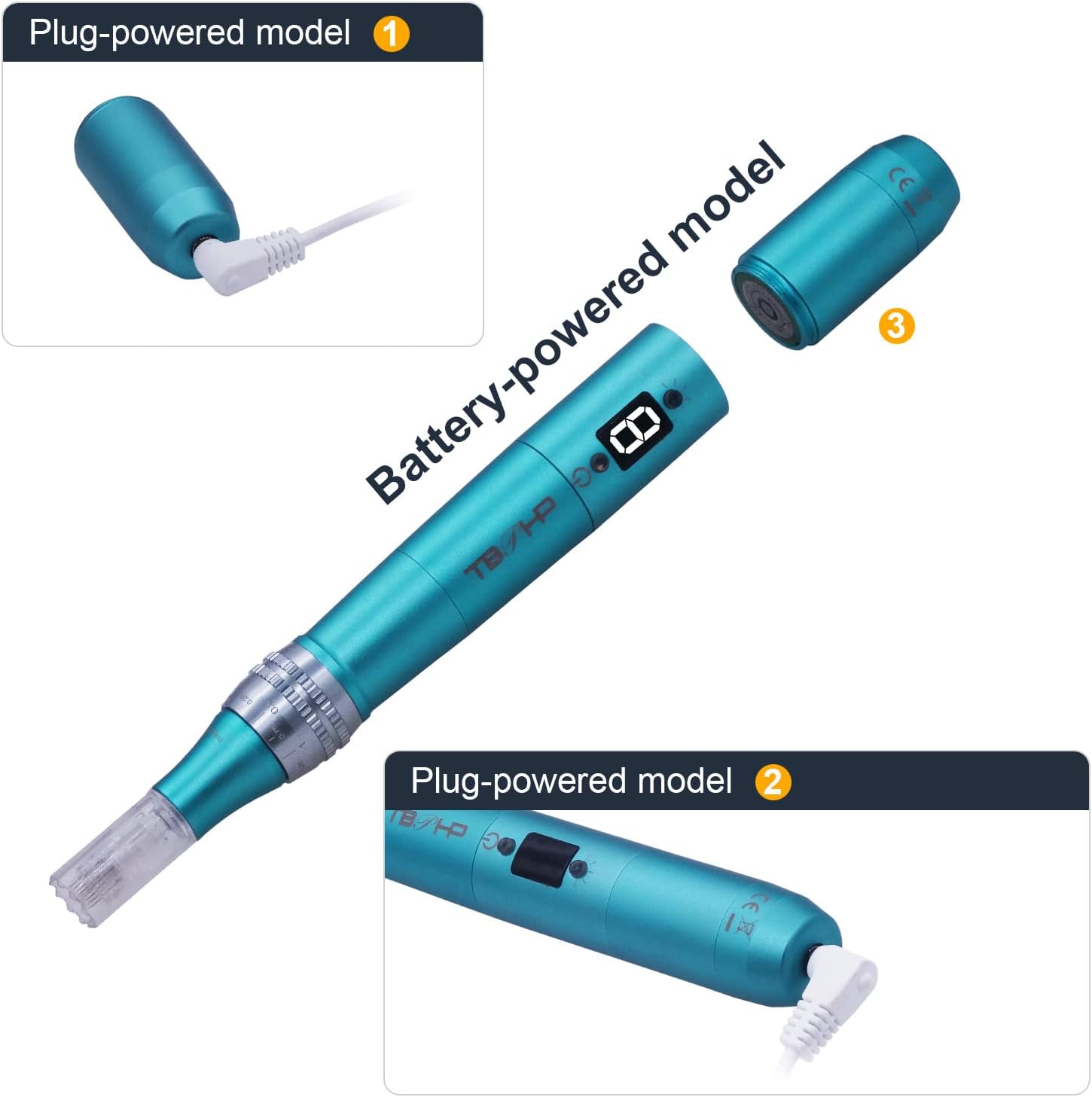
Image: Demonstrates the dual power modes of the derma pen: plug-powered (wired operation) and battery-powered (wireless operation) by inserting the battery.
2. Attaching a Needle Cartridge
- Pastikan peranti dimatikan.
- Remove a new, sterile needle cartridge from its individual packaging.
- Align the cartridge with the pen head and twist clockwise until it clicks securely into place. Do not force it.
- To remove, twist counter-clockwise and pull off. Dispose of used cartridges safely.

Image: An illustration showing the various types of replacement needle cartridges (Nano, 12-needle, 24-needle, 36-needle, 42-needle) and their dimensions, along with an arrow indicating the twisting motion for attachment/detachment.
Arahan Operasi
1. Menghidupkan/Mematikan dan Melaraskan Kelajuan
- Untuk menghidupkan peranti, tekan dan tahan butang Butang Tukar (power/speed button) for approximately 1 second. The LCD display will illuminate, showing the current speed level.
- To adjust the speed, short press the Butang Tukar. The device has 8 speed levels, ranging from 6,000 to 26,000 RPM. Each press will cycle through the speeds.
- Untuk mematikan peranti, tekan dan tahan butang Butang Tukar for approximately 1 second until the display turns off.
2. Adjusting Needle Depth
The needle depth can be adjusted from 0mm to 3mm to suit different skin areas and treatment goals.
- Putar Dail boleh laras located on the body of the pen, just below the needle cartridge.
- Align the desired depth with the Scale Mark. Start with a shallower depth (e.g., 0.25mm - 0.5mm) for sensitive areas or initial treatments, and gradually increase as needed.

Imej: Dari dekat view of the adjustable dial on the derma pen, showing the depth settings from 0 to 3.0mm, allowing precise control over needle penetration.
3. Changing LED Light Mode
The device features four different LED light colors, each with specific benefits:
- Tekan ke Butang Suis Warna (light button) to activate the LED light.
- Each subsequent press will cycle through the available colors: Blue, Green, White, Orange.
- Tekan sekali lagi untuk mematikan lampu LED.

Image: Visual representation of the four LED light colors (Blue, Green, White, Orange) and their respective effects on the skin, illustrating the light therapy feature of the derma pen.
| warna | Fungsi |
|---|---|
| Cahaya Biru | Anti-acne properties. |
| Lampu Hijau | Promotes overall skin balance. |
| Cahaya Putih | Aids in reducing redness. |
| Orange Light | Supports anti-aging effects. |
4. Garis Panduan Penggunaan
Before treatment, ensure your skin is clean and free of makeup. Apply a suitable serum or topical product to the treatment area.
- Gently glide the derma pen over the skin in small sections, using light pressure.
- Move the pen in a cross-hatch pattern (vertical, horizontal, and diagonal strokes) to ensure even coverage.
- Avoid dragging the pen across the skin. Lift and re-apply for each new section.
- Do not apply excessive pressure, especially with longer needle depths.
- Treatment duration and frequency depend on individual skin sensitivity and desired results. Typically, treatments are performed every 1-2 weeks.
- After treatment, apply a soothing and hydrating product. Avoid direct sun exposure and use sunscreen.

Image: An illustrative cross-section of skin showing the micro-channels created by the derma pen needles, facilitating product absorption.
Penyelenggaraan
1. Membersihkan Peranti
- After each use, ensure the device is turned off and unplugged.
- Remove and safely dispose of the used needle cartridge.
- Wipe the body of the derma pen with an alcohol wipe or a cloth dampened with disinfectant solution.
- Jangan rendam peranti dalam air atau sebarang cecair.
- Allow the device to air dry completely before storing.
2. Penyimpanan
Store the TBPHP P20RL in its original packaging or a clean, dry place away from direct sunlight and extreme temperatures.
Menyelesaikan masalah
| Masalah | Kemungkinan Punca | Penyelesaian |
|---|---|---|
| Peranti tidak dihidupkan. | Low battery or no battery inserted. Device not properly connected to power (if wired). | Ensure a charged battery is inserted or connect the device to a power source using the USB cable. Charge the battery if needed. |
| Needle cartridge not moving. | Cartridge not securely attached. Device malfunction. | Ensure the needle cartridge is twisted securely into place. If the issue persists, contact customer support. |
| Inconsistent needle depth. | Adjustable dial not set correctly. Worn-out cartridge. | Verify the adjustable dial is set to the desired depth. Replace the needle cartridge with a new one. |
| Lampu LED tidak berfungsi. | Light button not pressed. Device malfunction. | Press the Color Switch Button to activate the LED lights. If they still do not work, contact customer support. |
Spesifikasi
| Ciri | Perincian |
|---|---|
| Model | P20RL |
| Jenama | TBPHP |
| Tahap Kelajuan | 8 (6,000 - 26,000 RPM) |
| Kedalaman Jarum | Adjustable 0mm - 3mm |
| Warna Cahaya LED | Blue, Green, White, Orange |
| Jenis Bateri | Rechargeable Lithium-ion (500 mAh) |
| Hayat Bateri | 3-6 hours continuous use (fully charged) |
| Bekalan Kuasa | Wired (USB) or Wireless (Battery) |
| Dimensi (L x W x H) | 18.1 x 2.55 x 2.55 cm (7.13 x 1.00 x 1.00 inci) |
| Berat badan | 97.8 gram (0.22 lbs) |
| bahan | logam |
| warna | Biru |
| Negara Asal | China |

Image: A technical drawing illustrating the dimensions of the TBPHP P20RL Derma Pen, showing its length of 7.09 inches and width of 0.90 inches.
Waranti dan Sokongan
Your TBPHP P20RL Electric Derma Pen comes with a 30-day refund or replacement guarantee and 365 days of technical support. For any questions, concerns, or warranty claims, please contact the seller or manufacturer directly through your purchase platform.
