pengenalan
This manual provides comprehensive instructions for the assembly, operation, maintenance, and troubleshooting of your FLEXISPOT EC5 Standing Desk. Please read this manual thoroughly before use to ensure proper setup and safe operation.

Figure 1: FLEXISPOT EC5 Standing Desk with a black tabletop and black frame, set up in an office environment.
The FLEXISPOT EC5 is an electric height-adjustable desk designed to promote a healthier work environment by allowing seamless transitions between sitting and standing positions. It features a robust dual-motor system, a smart control panel with memory presets, and a durable construction.
Ciri-ciri Utama:
- Three-tier frame for height adjustment from 60.5cm to 125cm.
- Supports heavy loads up to 125kg (or 160kg with upgraded design).
- Smooth and quiet lifting speed of 38mm/second.
- Programmable digital memory with 3 preset options for customized heights.
- Collision protection system for enhanced safety.
- Durable MDF tabletop with scratch-resistant laminate.
Persediaan dan Perhimpunan
The FLEXISPOT EC5 Standing Desk is designed for straightforward assembly. All necessary tools are included, and detailed instructions are provided to guide you through the process, typically taking 20-25 minutes.
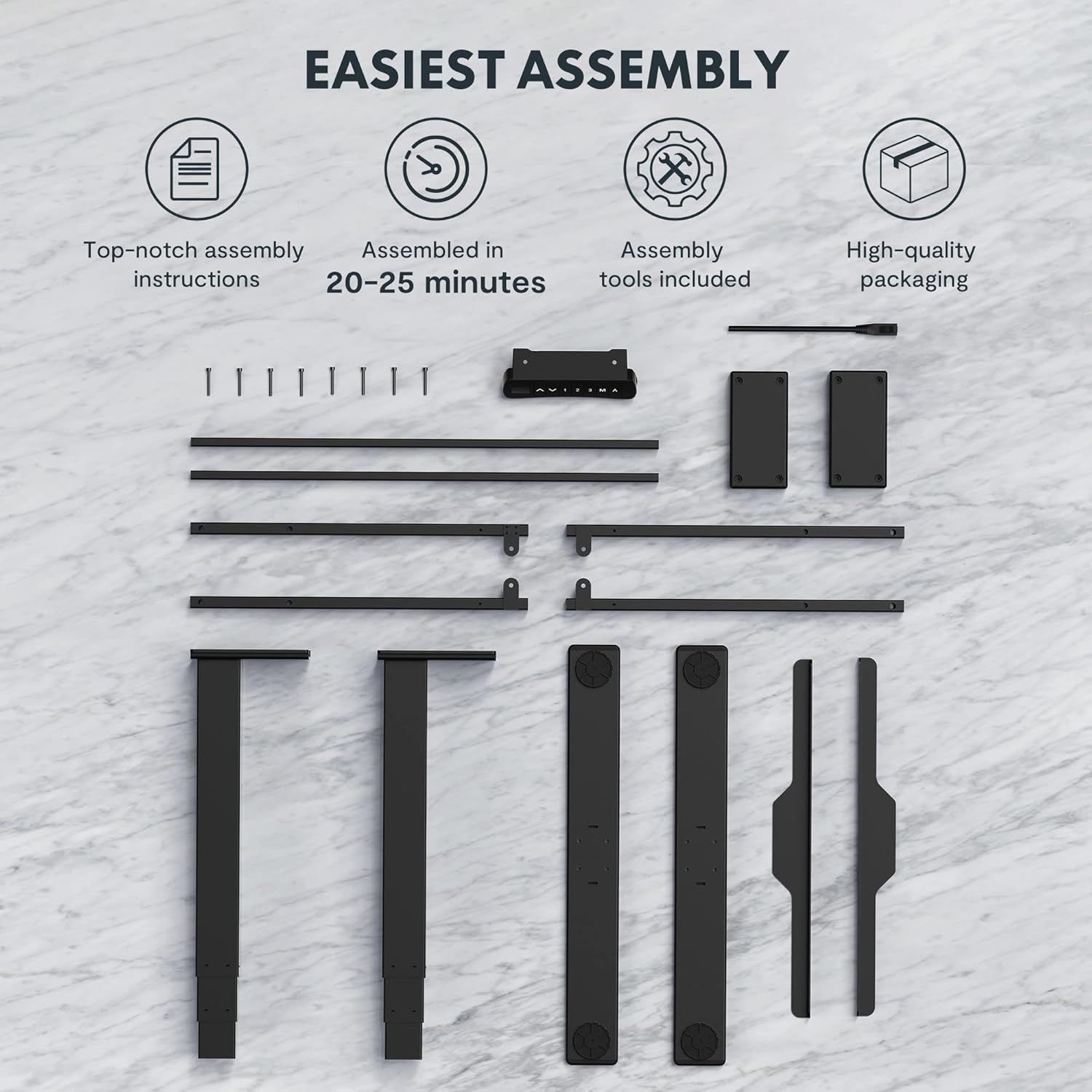
Figure 2: All components and tools required for assembling the FLEXISPOT EC5 Standing Desk.
Kandungan Pakej:
- Desk Frame (legs, crossbars)
- Tabletop (if included in package)
- Control Panel with Cable
- Penyesuai Kuasa dan Kabel
- Assembly Hardware (screws, bolts)
- Alat Pemasangan (cth., sepana Allen)
- Manual Arahan
Langkah-langkah Perhimpunan (Amview):
- Buka bungkusan semua komponen dan sahkan terhadap senarai bahagian.
- Assemble the desk legs to the crossbars, ensuring all connections are secure.
- Attach the assembled frame to the tabletop using the provided screws.
- Mount the control panel to the underside of the tabletop in an accessible location.
- Connect all cables (motor cables to control box, control panel cable to control box, power cable to control box).
- Ensure all cables are neatly managed and secured to prevent snagging.
- Letakkan meja di lokasi yang dikehendaki, pastikan ia berada di atas permukaan yang rata.
For detailed, step-by-step assembly instructions, please refer to the separate assembly guide included in your product packaging.
Arahan Operasi
The FLEXISPOT EC5 Standing Desk features an intuitive control panel for easy height adjustment and memory functions.

Figure 3: The EC5 control panel, featuring height display, up/down buttons, and memory presets.
Operasi asas:
- Menyelaraskan Tinggi: Gunakan ▲ dan ▼ arrows on the control panel to raise or lower the desk to your desired height. The current height will be displayed on the digital screen.
- Julat Ketinggian: The desk can be adjusted from a minimum height of 60.5 cm (23.8 inches) to a maximum height of 125 cm (49.2 inches).
Pratetap Memori:
The EC5 desk allows you to save up to three preferred height settings for quick adjustments.
- Menyimpan Pratetap:
- Laraskan meja mengikut ketinggian yang anda inginkan.
- Tekan ke "M" butang. Paparan akan menunjukkan "S-".
- Within 3 seconds, press the desired number button ("1", "2", atau "3") to save the current height to that preset. The display will show "S-1", "S-2", or "S-3" to confirm.
- Mengimbas semula Pratetap:
- Hanya tekan butang nombor yang sepadan ("1", "2", atau "3"Meja akan bergerak secara automatik ke ketinggian yang disimpan.
Ciri Anti-Perlanggaran:
The desk is equipped with an anti-collision system. If the desk encounters an obstacle while moving up or down, it will automatically stop and reverse slightly to prevent damage. Ensure the area around the desk is clear during operation.
Penyelenggaraan
Regular maintenance ensures the longevity and optimal performance of your FLEXISPOT EC5 Standing Desk.
- Pembersihan: Lap permukaan meja dan bingkai dengan lembut, damp kain. Elakkan pembersih yang melelas atau bahan kimia keras yang boleh merosakkan kemasan.
- Pengurusan Kabel: Periodically check that all cables are securely connected and neatly organized to prevent tangling or damage.
- Pengikat: Occasionally check all screws and bolts to ensure they are tight. Retighten if necessary, but do not overtighten.
- Kapasiti Berat: Do not exceed the maximum weight capacity of 125kg (or 160kg for upgraded models) to prevent damage to the motors and frame.
- Persekitaran: Use the desk in a dry indoor environment. Avoid exposure to extreme temperatures or high humidity.
Menyelesaikan masalah
If you encounter issues with your FLEXISPOT EC5 Standing Desk, refer to the following common problems and solutions:
| Masalah | Kemungkinan Punca | Penyelesaian |
|---|---|---|
| Meja tidak bergerak. | Kabel kuasa diputuskan, kabel motor longgar, beban berlebihan. | Check all cable connections. Ensure power is supplied. Reduce weight on desk if overloaded. |
| Meja bergerak tidak sekata atau mengeluarkan bunyi yang luar biasa. | Uneven load, loose fasteners, obstruction. | Distribute weight evenly. Check and tighten all fasteners. Clear any obstructions. |
| Paparan digital menunjukkan kod ralat. | Kerosakan sistem, masalah sensor. | Refer to the full troubleshooting guide in your product manual for specific error codes. Try unplugging the desk for 10 seconds and plugging it back in to reset. |
| Anti-collision feature is too sensitive or not working. | Sensor calibration needed, obstruction. | Ensure no constant obstructions. Consult the full manual for anti-collision sensitivity adjustment or reset procedures. |
Jika masalah berterusan selepas mencuba penyelesaian ini, sila hubungi khidmat pelanggan FLEXISPOT.
Spesifikasi Produk
Detailed technical specifications for the FLEXISPOT EC5 Standing Desk:
| Ciri | Spesifikasi |
|---|---|
| Jenama | FLEXISPOT |
| Nombor Model | EC5B-EU3+PR1206-Black |
| UPC | 810072812643 |
| Julat Pelarasan Tinggi | 60.5 sm - 125 sm (23.8" - 49.2") |
| Kelajuan Mengangkat | 38 mm/saat |
| Kapasiti Berat Maksimum | 125 kg (275 lbs) - Upgraded models may support up to 160 kg |
| Bilangan Motor | 2 |
| Bingkai Stages | 3 |
| Panel Kawalan | Digital display with 3 memory presets |
| Tabletop Dimensions (H x W x D) | 2.5 x 140 x 70 sm (0.98"P x 55.12"L x 27.56"T) |
| Bahan Atas Meja | MDF with high pressure scratch resistant laminate |
| Bahan Asas | Engineered Wood (for tabletop), Metal (for frame) |
| warna | Hitam |
| Perhimpunan Diperlukan | ya |
| Jenis Waranti | Terhad |

Figure 4: The EC5 desk frame is designed for stability and can support significant weight, with some models supporting up to 160KG.
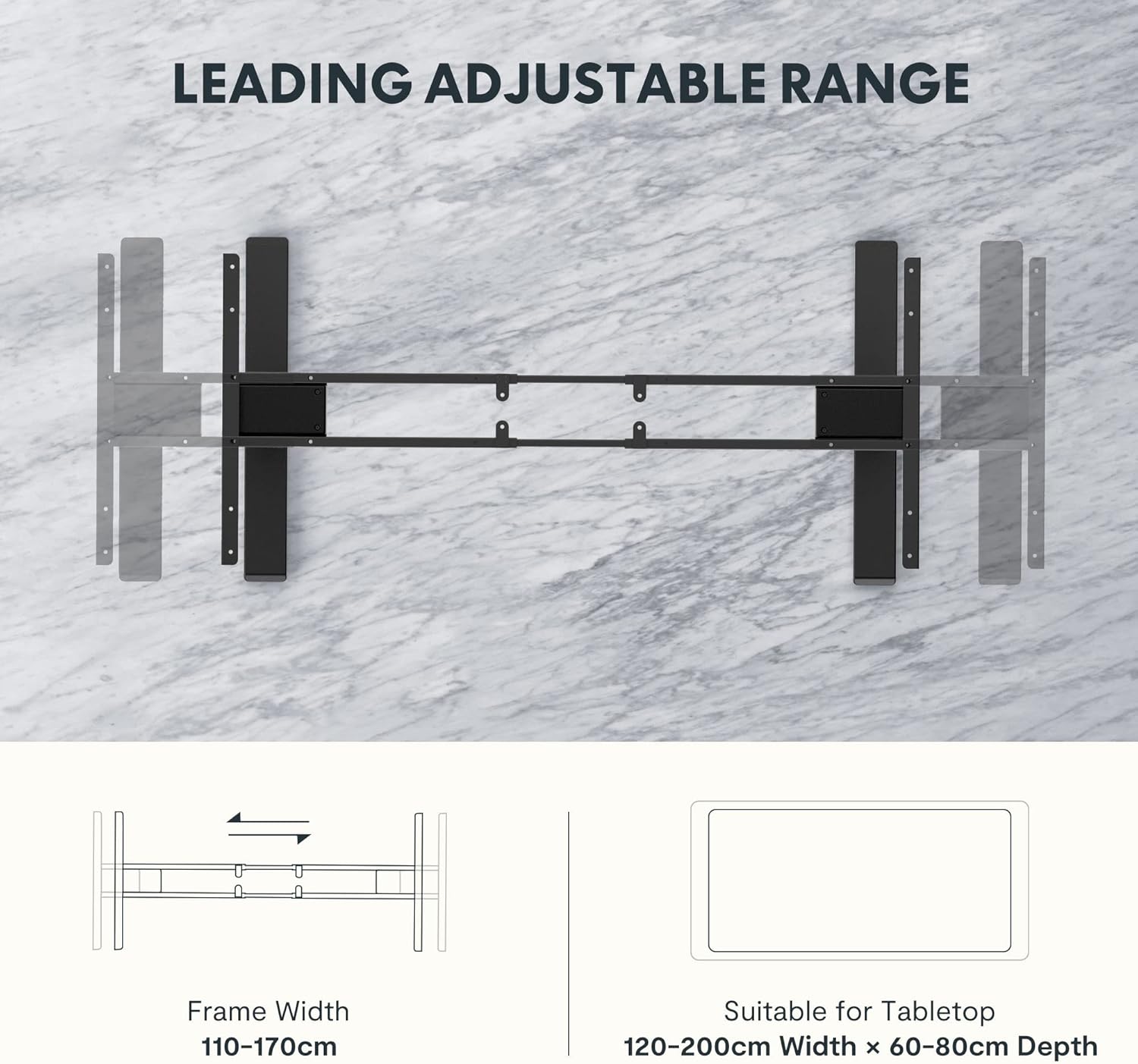
Figure 5: The adjustable frame accommodates various tabletop sizes, offering flexibility for different workspace needs.
Waranti dan Sokongan
Maklumat Waranti:
The FLEXISPOT EC5 Standing Desk comes with a Waranti Terhad. Please refer to the warranty card included with your product for specific terms, conditions, and duration of coverage. This warranty typically covers manufacturing defects in materials and workmanship under normal use.
Sokongan Pelanggan:
For technical assistance, warranty claims, or any questions regarding your FLEXISPOT EC5 Standing Desk, please contact FLEXISPOT customer support. You can typically find contact information on the FLEXISPOT official webtapak atau pada pembungkusan produk anda.
When contacting support, please have your model number (EC5B-EU3+PR1206-Black) and proof of purchase readily available.


