1. Pengenalan
The Audizio Metz Stereo System is a versatile micro-set designed to provide a rich audio experience through various sources. It features DAB+ and FM radio for digital and analog broadcasts, Bluetooth connectivity for wireless streaming, a CD player for your disc collection, and a USB port for MP3 playback. Equipped with two Hi-Fi speakers featuring a bass-reflex system, it delivers clear and powerful sound. The included remote control offers convenient operation, and additional features like a headphone jack, AUX input, alarm, and sleep timer enhance its functionality for any room in your home.
2. Arahan Keselamatan Penting
Please read these safety instructions carefully before operating the unit and retain them for future reference. Incorrect use may result in electric shock, fire, or other hazards.
- Sumber Kuasa: Pastikan bekalan kuasa voltage matches the rating label on the unit. Only use the provided power adapter.
- Air dan Kelembapan: Jangan dedahkan unit kepada hujan, lembapan, titisan atau percikan. Jangan letakkan objek yang diisi dengan cecair, seperti pasu, pada unit.
- Pengudaraan: Ensure adequate ventilation. Do not block any ventilation openings. Maintain a minimum distance around the unit for sufficient ventilation.
- haba: Jangan letakkan unit berhampiran sumber haba seperti radiator, daftar haba, dapur, atau radas lain (termasuk amppenghidup) yang menghasilkan haba.
- Pembersihan: Cabut plag unit daripada soket dinding sebelum membersihkan. Gunakan kain lembut dan kering sahaja. Jangan gunakan pembersih cecair atau pembersih aerosol.
- Servis: Jangan cuba servis produk ini sendiri. Rujuk semua perkhidmatan kepada pegawai perkhidmatan yang berkelayakan.
- penempatan: Place the unit on a stable, flat surface. Avoid placing it in direct sunlight or in environments with extreme temperatures or humidity.
3. Kandungan Pakej
Carefully unpack your Audizio Metz Stereo System and ensure all items are present and in good condition:
- Audizio Metz Main Unit
- 2 x Hi-Fi Speakers
- Alat Kawalan Jauh
- Penyesuai Kuasa
- Manual Pengguna (dokumen ini)
4. Produk Lebihview
Familiarize yourself with the components and controls of your Audizio Metz Stereo System.

Imej 4.1: The Audizio Metz Stereo System, including the main unit, two speakers, and the remote control.
4.1. Main Unit Front Panel

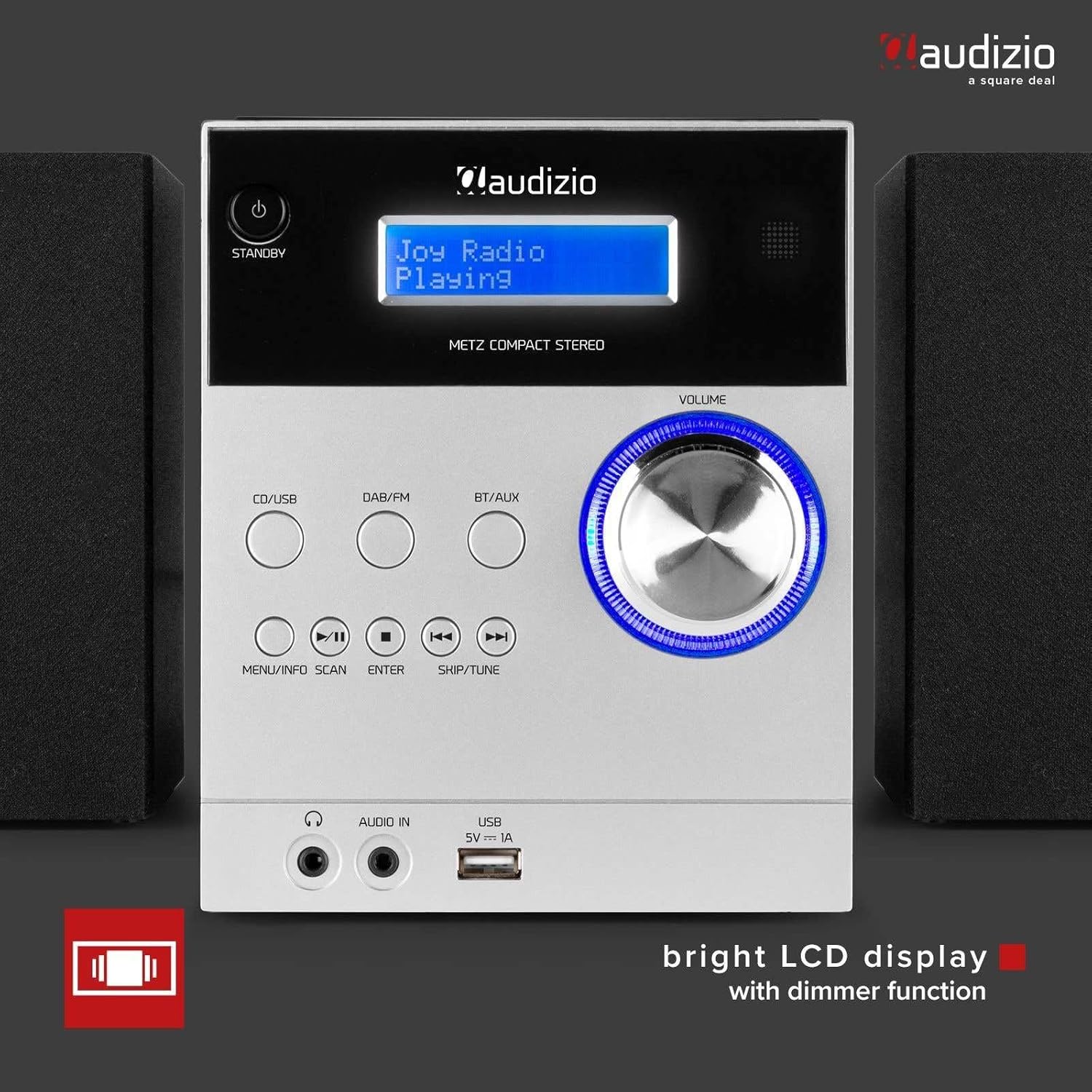
Imej 4.2: Front panel of the main unit, showing the bright LCD display and control buttons.
- Butang STANDY: Menghidupkan atau mematikan unit.
- CD/USB Button: Selects CD or USB source.
- Butang DAB/FM: Selects DAB+ or FM radio source.
- BT/AUX Button: Selects Bluetooth or AUX input source.
- MENU/INFO/SCAN Button: Accesses menu, displays information, or initiates scan.
- Butang ENTER: Mengesahkan pilihan.
- SKIP/TUNE Buttons (◀◀ / ▶▶): Navigates tracks/stations or tunes frequency.
- PLAY/PAUSE Button (▶/██): Memainkan atau menjeda main balik.
- STOP Button (█): Menghentikan main balik.
- Tombol VOLUME: Melaraskan tahap kelantangan.
- Paparan LCD: Shows current status, track information, radio station, etc.
- Bicu FON FON: Output 3.5mm untuk fon kepala.
- AUDIO IN (AUX) Jack: Input 3.5mm untuk peranti audio luaran.
- Port USB: Untuk menyambungkan peranti storan USB bagi main balik MP3.
4.2. Main Unit Rear Panel & Connections
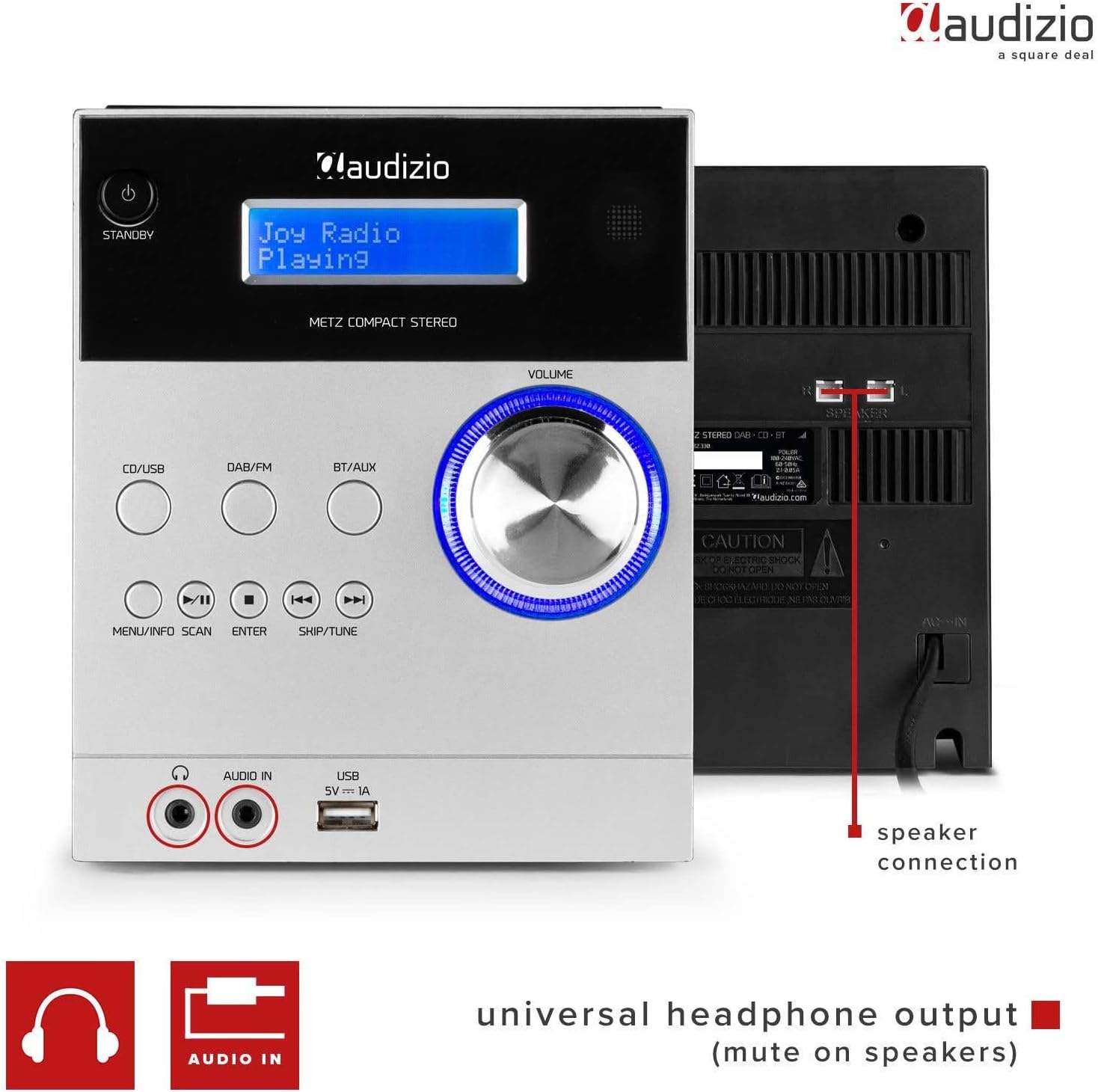
Imej 4.3: Rear panel showing speaker connections and power input, along with front panel ports.
- SPEAKER Terminals: Connect the included Hi-Fi speakers.
- Input KUASA: Sambungkan penyesuai kuasa yang disediakan.
4.3. Top-Loading CD Player

Imej 4.4: The top-loading CD compartment for disc playback.
The CD player is located on the top of the main unit. Gently open the lid to insert or remove a CD.
4.4. Alat Kawalan Jauh
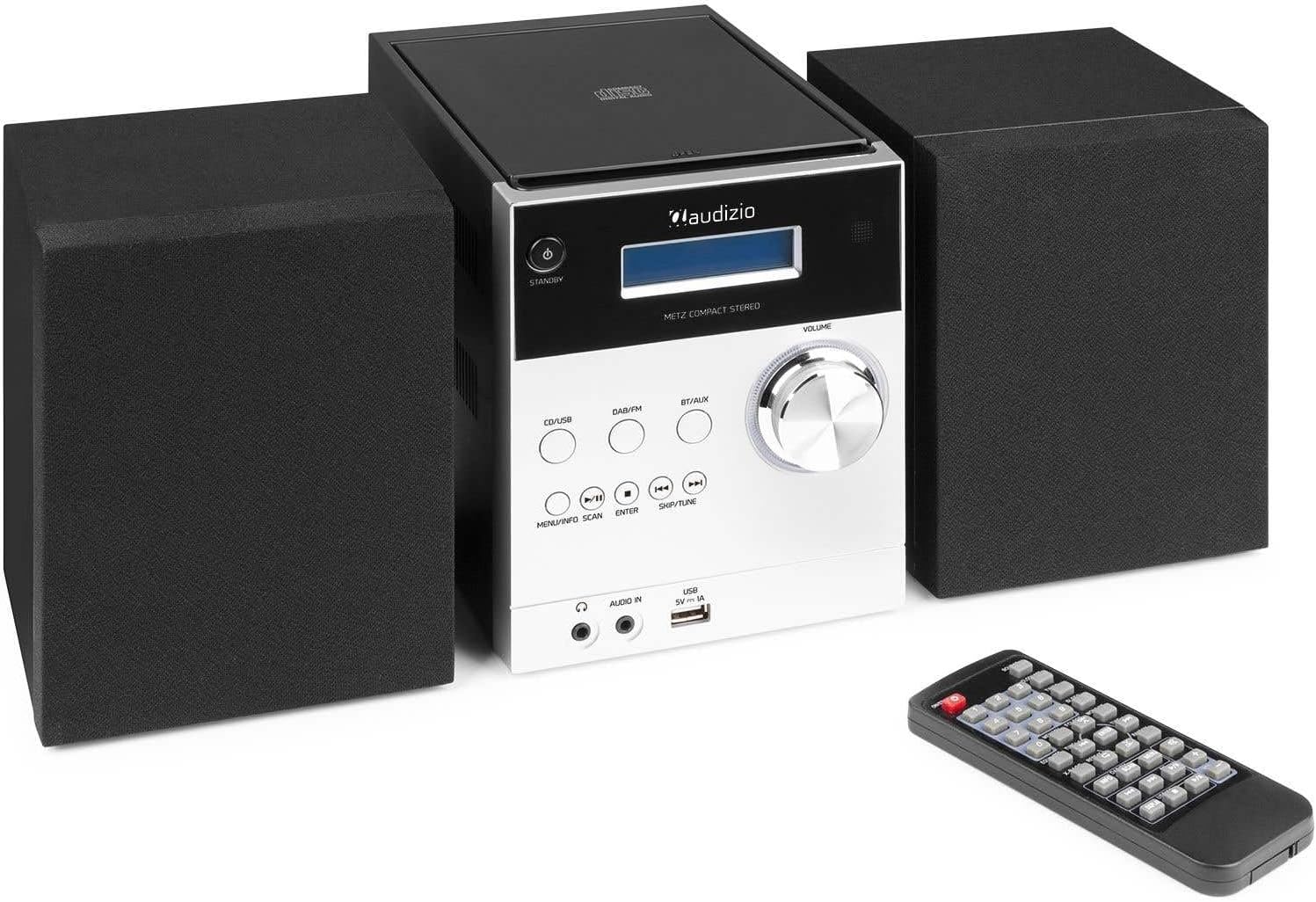
Imej 4.5: The remote control for convenient operation of the stereo system.
The remote control provides full functionality for operating the stereo system from a distance. Refer to the remote control diagram in the quick start guide for specific button functions.
5. Persediaan
Follow these steps to set up your Audizio Metz Stereo System:
- penempatan: Place the main unit and speakers on a stable, flat surface. For optimal stereo sound, position the speakers to the left and right of the main unit, facing the listening area.
- Sambungan Pembesar Suara: Connect the speaker wires from each speaker to the corresponding SPEAKER terminals on the rear of the main unit. Ensure correct polarity (+ to + and - to -).
- Sambungan Antena: For optimal DAB+ and FM radio reception, extend the telescopic antenna fully. If reception is poor, try repositioning the antenna or the unit.
- Sambungan Kuasa: Connect the power adapter to the DC IN port on the rear of the main unit, then plug the adapter into a wall outlet.
- Kuasa Awal Hidup: Tekan ke STANDBY button on the front panel or remote control to turn on the unit. The LCD display will light up.
6. Arahan Operasi
6.1. Operasi Am
- Hidupkan/Mati Kuasa: Tekan ke STANDBY butang.
- Pelarasan Kelantangan: Putar JILID tombol atau gunakan VOL +/- butang pada alat kawalan jauh.
- Pemilihan Sumber: Tekan CD / USB, DAB / FM, atau BT/AUX buttons on the front panel or remote to switch between input sources.
6.2. Radio DAB+
- Tekan ke DAB / FM butang untuk memilih mod DAB+.
- The unit will automatically scan for available DAB+ stations upon first use. To initiate a manual scan, press and hold the IMBAS butang (atau MENU/INFO/SCAN).
- Gunakan SKIP/TUNE buttons to navigate through the list of available stations.
- Tekan MASUK untuk memilih stesen.
- Menyimpan Pratetap: Tune to your desired station, then press and hold the MEMORI button on the remote. Use the SKIP/TUNE buttons to select a preset number (1-10), then press MASUK untuk mengesahkan.
- Pratetap Mengingat: Dalam mod DAB+, tekan butang PRESET button on the remote, then use the number buttons or SKIP/TUNE untuk memilih pratetap yang anda inginkan.
6.3. Radio FM
- Tekan ke DAB / FM butang berulang kali untuk memilih mod FM.
- Imbasan Auto: Tekan dan tahan butang IMBAS butang (atau MENU/INFO/SCAN) to automatically scan and store available FM stations.
- Penalaan Manual: Tekan ke SKIP/TUNE buttons briefly to fine-tune the frequency. Press and hold to auto-seek the next strong station.
- Menyimpan Pratetap: Tune to your desired station, then press and hold the MEMORI button on the remote. Use the SKIP/TUNE buttons to select a preset number (1-10), then press MASUK untuk mengesahkan.
- Pratetap Mengingat: Dalam mod FM, tekan butang PRESET button on the remote, then use the number buttons or SKIP/TUNE untuk memilih pratetap yang anda inginkan.
6.4. Mod Bluetooth

Imej 6.1: The system ready for Bluetooth streaming from a mobile device.
- Tekan ke BT/AUX button repeatedly to select Bluetooth mode. The display will show "Bluetooth" or "BT Pairing".
- On your mobile device (smartphone, tablet, etc.), enable Bluetooth and search for new devices.
- Select "Audizio Metz" from the list of available devices.
- Once paired, the unit will confirm the connection. You can now play music from your device, and it will stream wirelessly to the stereo system.
- Use your device or the system's controls (Play/Pause, Skip) to manage playback.
6.5. Pemain CD
- Tekan ke CD / USB button repeatedly to select CD mode.
- Gently open the CD compartment lid on top of the main unit.
- Place a CD (label side up) onto the spindle and close the lid. The unit will read the CD.
- Main semula biasanya akan bermula secara automatik. Jika tidak, tekan butang MAIN/JEDA butang.
- Gunakan SKIP/TUNE butang untuk melangkau trek.
- Tekan MAIN/JEDA to pause, and BERHENTI untuk menghentikan main balik.
- Repeat/Random: Use the corresponding buttons on the remote control to activate repeat (single track/all) or random playback modes.
6.6. USB MP3 Player
- Masukkan pemacu kilat USB yang mengandungi MP3 files ke dalam port USB pada panel hadapan.
- Tekan ke CD / USB button repeatedly to select USB mode. The unit will automatically scan and begin playing MP3 files.
- Gunakan SKIP/TUNE butang untuk menavigasi antara trek.
- Tekan MAIN/JEDA to pause, and BERHENTI untuk menghentikan main balik.
- Navigasi Folder: If your USB drive has folders, use the FOLDER buttons on the remote to navigate between them.
6.7. Input AUX
- Sambungkan peranti audio luaran (cth., telefon pintar, pemain MP3) ke AUDIO DALAM (AUX) jack on the front panel using a 3.5mm audio cable (not included).
- Tekan ke BT/AUX butang berulang kali untuk memilih mod AUX.
- Start playback on your external device. The audio will be routed through the stereo system.
- Adjust the volume using the system's JILID knob or the external device's volume control.
6.8. Output Fon Kepala
Sambungkan fon kepala ke Fon kepala jack on the front panel. When headphones are connected, the speakers will automatically mute, allowing for private listening.
6.9. Clock, Sleep Timer & Alarm Function
Imej 6.2: The system displaying clock information, indicating alarm and sleep timer capabilities.
- Menetapkan Jam: Refer to the detailed instructions in the full manual for setting the time. This is typically done via the MENU butang.
- Pemasa Tidur: Tekan ke TIDUR button on the remote repeatedly to cycle through sleep timer options (e.g., 15, 30, 60, 90 minutes, OFF). The unit will automatically turn off after the selected duration.
- Fungsi Penggera: The unit features an alarm function. Consult the full manual for detailed steps on setting and activating the alarm, including alarm source (radio/buzzer) and volume.
7. Penyelenggaraan
7.1. Membersihkan Unit
- Sentiasa cabut plag unit daripada salur keluar kuasa sebelum membersihkan.
- Gunakan kain lembut, kering dan tidak berbulu untuk mengelap permukaan luar.
- Jangan gunakan pembersih, lilin atau pelarut yang melelas kerana ia boleh merosakkan kemasan.
7.2. CD Lens Care
If the CD player experiences reading errors, the lens may be dirty. Use a commercially available CD lens cleaner disc to clean the lens. Do not touch the lens directly.
8. Penyelesaian masalah
If you encounter any issues with your Audizio Metz Stereo System, please refer to the following table for common problems and solutions.
| Masalah | Kemungkinan Punca | Penyelesaian |
|---|---|---|
| Tiada kuasa | Penyesuai kuasa tidak disambungkan; Salur keluar kuasa tidak berfungsi. | Ensure the power adapter is securely connected to the unit and a working wall outlet. |
| Tiada bunyi | Volume too low; Speakers not connected; Headphones connected; Incorrect source selected. | Increase volume; Check speaker connections; Disconnect headphones; Select the correct input source. |
| Penerimaan radio yang lemah (DAB+/FM) | Antena tidak dilanjutkan; Isyarat lemah; Gangguan. | Extend the telescopic antenna fully; Try repositioning the unit or antenna; Move away from other electronic devices. |
| Kegagalan berpasangan Bluetooth | Bluetooth tidak didayakan pada peranti; Unit tidak dalam mod berpasangan; Peranti terlalu jauh. | Ensure Bluetooth is enabled on your device; Select BT mode on the unit; Keep devices within 10 meters. |
| CD/USB tidak dimainkan | CD inserted incorrectly/dirty/scratched; USB format not supported; USB drive corrupted. | Reinsert CD correctly, clean it; Ensure USB is FAT32 format and contains MP3 files; Try a different USB drive. |
| Alat kawalan jauh tidak berfungsi | Batteries depleted; Obstruction between remote and unit; Remote not pointed at sensor. | Replace remote control batteries; Remove any obstructions; Point remote directly at the unit's sensor. |
9. Spesifikasi
| Jenama | Audizio |
| Model | Metz |
| warna | aluminium |
| Output Kuasa | 30W |
| DAB+ Presets | 10 |
| Pratetap FM | 10 |
| Versi Bluetooth | Yes (Bluetooth compatible) |
| Keserasian CD | CD, CD-R, CD-RW |
| Main Balik USB | Sokongan format MP3 |
| Bicu Fon Kepala | 3.5mm |
| Input Talian AUX | 3.5mm |
| Bekalan Kuasa | 230Vac/50Hz |
| Dimensi Unit Utama (L x T x D) | 140 x 210 x 175mm |
| Speaker Dimensions (per speaker, W x H x D) | 130 x 125 x 175mm |
| Total Weight (set) | 2.5kg |
10. Waranti dan Sokongan
The Audizio Metz Stereo System comes with a standard manufacturer's warranty. For specific warranty terms and conditions, please refer to the warranty card included with your product or visit the official Audizio website. For technical support, troubleshooting assistance beyond this manual, or spare parts inquiries, please contact your retailer or the Audizio customer service department.
Ketersediaan Alat Ganti: 2 Tahun


