1. Pengenalan
The Nokia Comfort Earbuds TWS-411-WH are designed to provide a balanced audio experience with a focus on comfort and durability. These wireless Bluetooth earbuds feature 10mm drivers for clear sound and are built to withstand daily use with IPX5 water and sweat resistance. This manual provides instructions for setting up, operating, maintaining, and troubleshooting your earbuds.
1.1. Apa yang ada di dalam Kotak
- Earbud Keselesaan Nokia
- 3 pairs of ear tips (Small, Medium & Large)
- Kes pengecasan
- Kabel USB Jenis-C
- Panduan permulaan cepat

Image 1.1: The Nokia Comfort Earbuds, charging case, three pairs of ear tips, USB-C cable, and quick start guide.
2. Persediaan
2.1. Mengecas Fon Telinga dan Sarung
Before first use, fully charge the earbuds and the charging case. Place the earbuds into the charging case. Connect the USB Type-C cable to the charging port on the case and to a power source. The indicator light on the case will show the charging status. A full charge provides up to 9.5 hours of listening time for the earbuds, with the charging case offering an additional 19.5 hours, totaling up to 29 hours of playback.

Image 2.1: The Nokia Comfort Earbuds inside their charging case, illustrating the charging contacts and compact design.
2.2. Berpasangan dengan Peranti
- Pastikan fon telinga dicas.
- Buka bekas pengecas. Fon telinga akan memasuki mod berpasangan secara automatik.
- On your device (phone, laptop, tablet), enable Bluetooth.
- Cari untuk available Bluetooth devices and select "Nokia Comfort Earbuds" from the list.
- Once connected, a confirmation sound will play, and the earbuds are ready for use.
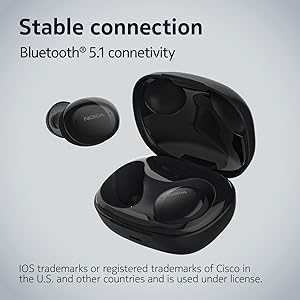
Image 2.2: The earbuds and charging case, highlighting the stable Bluetooth 5.1 connectivity.
3. Mengendalikan Fon Telinga
3.1. Memakai Earbud
Select the ear tips that provide the most comfortable and secure fit. Gently insert the earbuds into your ears and twist slightly to ensure a snug seal. The natural ergonomic form and unique comfort ring are designed for a secure fit.
3.2. Kawalan Sentuh
The Nokia Comfort Earbuds feature touch controls for easy management of audio and calls. Refer to the quick start guide for specific tap gestures for functions such as play/pause, skip tracks, answer/end calls, and activate voice assistant.
3.3. Pengurusan Panggilan
The earbuds support easy automatic switching between using one or both earbuds for phone calls, providing flexibility during conversations.

Image 3.1: A user wearing the Nokia Comfort Earbuds, demonstrating comfortable usage during daily activities.
4. Penyelenggaraan
4.1. Pembersihan
Regularly clean your earbuds and charging case to ensure optimal performance and hygiene. Use a soft, dry, lint-free cloth to wipe the surfaces. For ear tips, remove them from the earbuds and clean with a mild soap solution, then rinse and dry thoroughly before reattaching.
4.2. Water and Sweat Resistance
The Nokia Comfort Earbuds are rated IPX5 for water and sweat resistance. This means they are protected against low-pressure water jets from any direction. They are suitable for workouts and light rain but should not be submerged in water. Ensure the earbuds are dry before placing them back in the charging case to prevent damage.

Image 4.1: The Nokia Comfort Earbuds demonstrating their IPX5 water and sweat resistance.
5. Penyelesaian masalah
5.1. Isu dan Penyelesaian Biasa
- Fon telinga tidak berpasangan: Pastikan kedua-dua fon telinga berada dalam bekas pengecasan, kemudian buka penutup untuk mengaktifkan mod berpasangan. Semak tetapan Bluetooth peranti anda dan cuba sambungkan semula.
- Tiada bunyi atau kelantangan rendah: Periksa tahap kelantangan pada kedua-dua peranti dan fon telinga anda. Pastikan fon telinga dipasang dengan betul di telinga anda.
- Sambungan terputus-putus: Move closer to your connected device. Avoid obstacles that may interfere with the Bluetooth signal.
- Fon telinga tidak dicas: Ensure the charging cable is securely connected to both the case and the power source. Verify that the charging contacts on the earbuds and inside the case are clean and free of debris.
6. Spesifikasi
| Ciri | Perincian |
|---|---|
| Nama Model | Earbud Wayarles Benar |
| Nombor Model | TWS-411 WH |
| Teknologi Ketersambungan | Wayarles (Bluetooth 5.1) |
| Jenis Pemacu Audio | Pemandu Dinamik |
| Saiz Pemandu | 10 mm |
| Hayat Bateri (Earbud) | Sehingga 9.5 jam |
| Jumlah Masa Main (dengan Kes) | Sehingga 29 jam |
| Tahan Air | IPX5 (Waterproof, Sweatproof) |
| Kaedah Kawalan | Sentuh |
| Mikrofon | ya |
| Faktor Bentuk | Dalam telinga |
| bahan | plastik |
| Berat Barang | 48.17 Gram |
| Dimensi Produk | 10 x 10 x 4.9 cm |
| Tahun Model | 2022 |

Image 6.1: Detailed dimensions of the Nokia Comfort Earbuds and their charging case.
7. Waranti dan Sokongan
7.1. Maklumat Waranti
This product comes with a standard brand warranty. For detailed information regarding the warranty period, coverage, and terms, please refer to the warranty card included in the product packaging or visit the official Nokia support webtapak.
7.2. Sokongan Pelanggan
For further assistance, technical support, or service inquiries, please contact Nokia customer support through their official channels. Contact details can typically be found on the Nokia webtapak atau dalam dokumentasi produk.
8. Produk Lebihview Video
Video 8.1: Seorang pegawai tamatview of the Nokia Comfort Earbuds, showcasing their design, features, and key benefits such as ergonomic fit, sound balance, and water resistance.


