1. Pengenalan
Welcome to the user manual for your new NEC LAVIE Direct N15(S) 15.6-inch laptop. This guide provides essential information to help you set up, operate, maintain, and troubleshoot your device. Please read this manual thoroughly to ensure optimal performance and longevity of your laptop.

Rajah 1.1: Depan view of the NEC LAVIE Direct N15(S) laptop.
2. Produk Lebihview
The NEC LAVIE Direct N15(S) is a versatile 15.6-inch laptop designed for everyday computing. It features a powerful Intel Core i7-1165G7 processor, 8GB of RAM, and a dual storage solution with a 256GB SSD for fast boot times and a 1TB HDD for ample storage capacity. The laptop comes pre-installed with Windows 11 Home and Microsoft Office Home & Business 2021.
2.1 Ciri-ciri Utama
- Sistem pengendalian: Windows 11 Home
- Pemproses: Intel Core i7-1165G7 (up to 4.70GHz)
- Ingatan: 8GB DDR4 (4GB onboard + 4GB, dual channel)
- Storan: 256GB SSD (PCIe) + 1TB HDD (5400rpm)
- paparan: 15.6-inch Wide LED LCD (Full HD, 1920x1080 pixels) with non-glare finish
- Pemacu optik: DVD Super Multi Drive (supports DVD-R/+R 2-layer recording)
- Kesambungan Tanpa Wayar: Wi-Fi 5 (IEEE802.11ac/a/b/g/n) and Bluetooth
- Kesambungan Berwayar: 1000BASE-T/100BASE-TX/10BASE-T Ethernet
- Audio: Dolby Audio untuk bunyi yang mengasyikkan
- Webcam: Bersepadu webcam with physical privacy shutter
- Hayat Bateri: Approximately 8.8 hours (JEITA 2.0 standard)
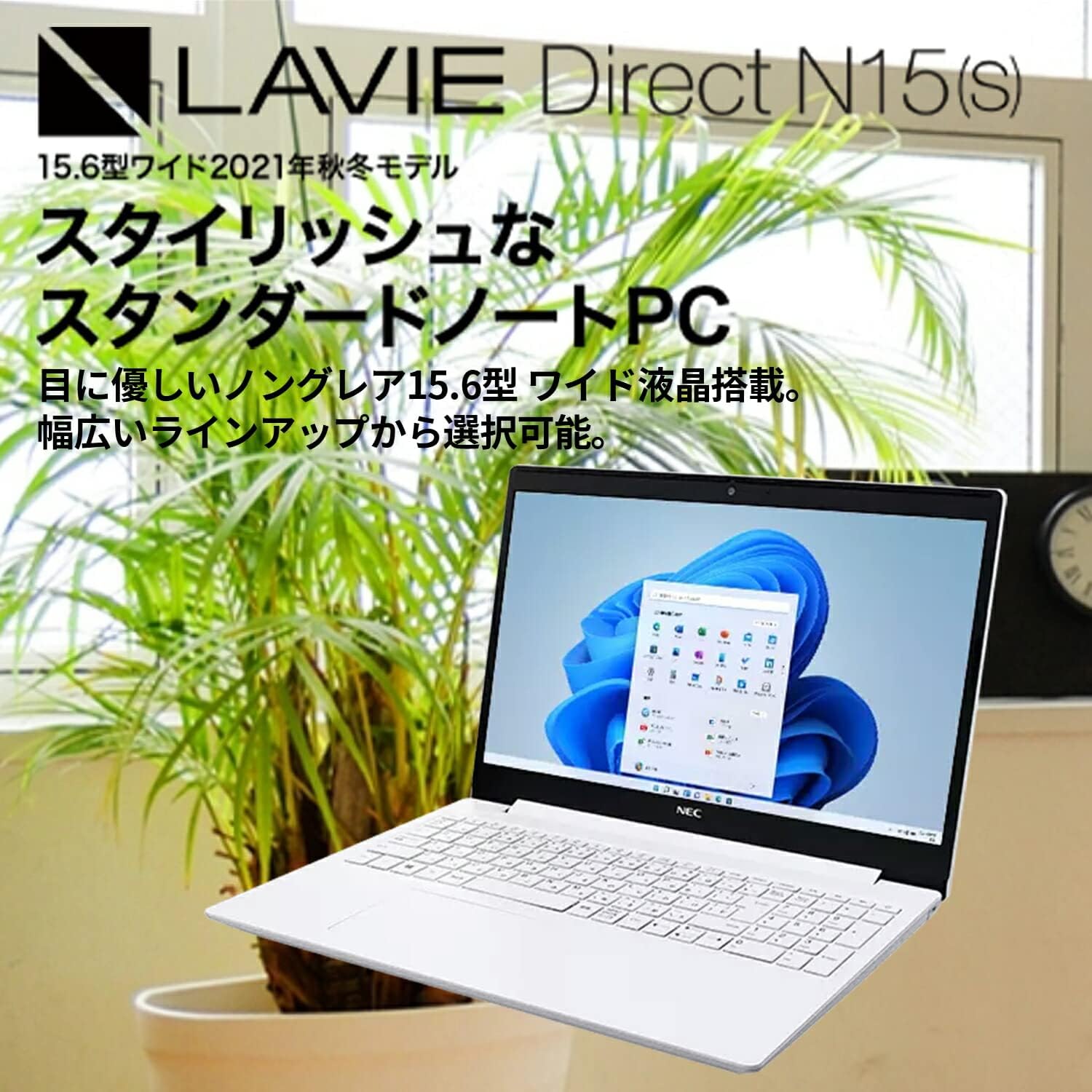
Figure 2.1: The LAVIE Direct N15(S) laptop featuring a 15.6-inch wide display.
2.2 Windows 11 Interface
The laptop comes with Windows 11 Home, offering a refreshed user interface with a redesigned Start menu and icons. It includes features like chat integration, widgets for quick information access, and improved multi-app screen management for enhanced productivity. Advanced security and network management functions are also integrated.

Figure 2.2: Windows 11 Start menu and taskbar.
2.3 Pilihan Pemproses
The LAVIE Direct N15(S) is equipped with an 11th Generation Intel Core processor, providing efficient performance for various tasks. While this model features an Intel Core i7-1165G7, other configurations with Intel Core i5 or Intel Celeron processors may be available, catering to different performance needs from high-resolution photo/video editing to general internet browsing.

Figure 2.3: Intel Core processor options.
2.4 Fast Storage and Responsive Keyboard
Experience rapid boot times and accelerated application loading thanks to the 256GB PCIe SSD. This model also includes a 1TB HDD for extensive data storage. The keyboard is designed for comfortable operation, featuring convenient hotkeys and function keys for quick access to features like webcam and microphone on/off toggles. The keyboard area is slightly lowered, contributing to the laptop's sleek design.

Figure 2.4: Laptop keyboard and fast storage capabilities.
2.5 Integrated Optical Drive
The slim body of the laptop integrates a DVD Super Multi Drive, allowing you to play commercial video titles, back up your video and photo data, and easily transfer files. This feature provides convenient data management and entertainment options.

Figure 2.5: Optical disc drive for backups and media playback.
2.6 Display and Design
The 15.6-inch wide LED LCD features a non-glare finish, which is gentle on the eyes. Its narrow bezels on two sides contribute to a compact and stylish body. The laptop's slim profile allows it to fit neatly into various spaces. The main body is available in elegant colors, including Calm White, reflecting a focus on refined aesthetics.

Figure 2.6: Stylish body with narrow bezels and non-glare display.
2.7 Immersive Audio with Dolby Audio
Enjoy an immersive sound experience for movies, music, and games with integrated Dolby Audio. The system includes preset sound settings optimized for different content types, such as 'Movie', 'Music', and 'Game', allowing you to easily enjoy rich, lifelike audio.

Figure 2.7: Enhanced audio experience with Dolby Audio.
2.8 Privacy Shutter and Connectivity
Yang bersepadu webcam features a physical privacy shutter, allowing you to cover the camera lens when not in use to prevent unintended recording and enhance your privacy. For connectivity, the laptop is equipped with versatile ports including a USB Type-C port (not for video output), USB 3.0 Type-A ports, an HDMI output terminal, and a headphone/microphone jack. The reversible design of the USB Type-C port allows for easy connection without concern for orientation.

Rajah 2.8: Webcam privacy shutter and available ports.
3. Persediaan
3.1 Hidupkan Kuasa Awal
- Buka bungkusan komputer riba dan semua aksesori anda.
- Sambungkan penyesuai AC ke port kuasa komputer riba dan kemudian ke soket kuasa.
- Buka penutup komputer riba dan tekan butang kuasa.
- Ikut arahan pada skrin untuk melengkapkan persediaan awal Windows 11, termasuk bahasa, rantau, sambungan rangkaian dan penciptaan akaun pengguna.
3.2 Menyambung Peranti
- Peranti USB: Connect USB mice, keyboards, external drives, or other peripherals to the available USB 3.0 Type-A or USB 3.0 Type-C ports.
- Paparan luaran: Use the HDMI output port to connect an external monitor or projector.
- Peranti Audio: Plug headphones or external speakers into the headphone/microphone jack.
- Rangkaian Berwayar: Connect an Ethernet cable to the LAN port for a wired internet connection.
4. Arahan Operasi
4.1 Penggunaan Asas
- papan kekunci: Utilize the full-size keyboard for typing. Function keys (F1-F12) often have secondary functions (e.g., volume control, screen brightness) accessible by pressing the Fn key simultaneously.
- Pad sentuh: Use the integrated touchpad for cursor control and gestures. Refer to Windows settings for touchpad customization.
- Pengurusan tenaga: To shut down, restart, or put the laptop to sleep, click the Start button, then the Power icon.
4.2 Using the Optical Drive
- Tekan butang eject pada pemacu optik untuk membuka dulang.
- Carefully place a CD or DVD onto the tray, ensuring it is centered.
- Gently push the tray back into the laptop until it clicks shut.
- The operating system will typically prompt you with options for playing or viewing the disc content.
4.3 Menyambung ke Wi-Fi
- Click the Network icon (Wi-Fi or Ethernet) in the taskbar.
- Pilih rangkaian Wi-Fi yang dikehendaki daripada senarai rangkaian yang tersedia.
- Masukkan kunci keselamatan rangkaian (kata laluan) jika digesa.
- Klik 'Sambung'.
4.4 Webkamera Pengatup Privasi
Untuk memastikan privasi, luncurkan pengatup fizikal yang terletak di atas webcam lens to cover or uncover the camera as needed. This provides a clear visual indication of the webcam's status.
4.5 Audio Settings (Dolby Audio)
Access the Dolby Audio settings through the Windows sound control panel or a dedicated Dolby application (if installed). Here you can select preset sound profiles (e.g., Movie, Music, Game) or customize settings to optimize your audio experience.
5. Penyelenggaraan
5.1 Membersihkan Komputer Riba
- Sentiasa matikan komputer riba dan cabut penyesuai AC sebelum membersihkannya.
- Gunakan kain lembut dan tidak berbulu sedikit dampened with water or a specialized screen cleaner to clean the display.
- For the keyboard and chassis, use a soft cloth. A can of compressed air can help remove dust from crevices.
- Elakkan menggunakan bahan kimia yang keras, bahan pelelas atau pelarut.
5.2 Penjagaan Bateri
- Untuk memanjangkan hayat bateri, elakkan daripada menyahcas sepenuhnya bateri dengan kerap.
- Simpan komputer riba di tempat yang sejuk dan kering apabila tidak digunakan untuk tempoh yang lama.
- Jika menyimpan untuk jangka masa yang lama, pastikan bateri dicas sekitar 50-60%.
5.3 Kemas Kini Perisian
Regularly check for and install Windows updates and driver updates from the NEC support website to ensure optimal performance, security, and compatibility.
6. Penyelesaian masalah
This section addresses common issues you might encounter. For more detailed troubleshooting, refer to the NEC support webtapak atau hubungi perkhidmatan pelanggan.
6.1 Komputer Riba Tidak Dihidupkan
- Pastikan penyesuai AC disambungkan dengan selamat pada kedua-dua komputer riba dan salur keluar kuasa yang berfungsi.
- Periksa sama ada alur keluar kuasa berfungsi dengan memasang peranti lain.
- Jika bateri telah habis sepenuhnya, ia mungkin mengambil masa beberapa minit untuk mengecas sebelum komputer riba boleh dihidupkan.
6.2 Tiada Sambungan Wi-Fi
- Sahkan bahawa Wi-Fi didayakan dalam tetapan Windows.
- Periksa sama ada penghala Wi-Fi anda dihidupkan dan berfungsi dengan betul.
- Pastikan anda telah memasukkan kata laluan Wi-Fi yang betul.
- Try restarting your laptop and your Wi-Fi router.
6.3 Prestasi Perlahan
- Tutup aplikasi yang tidak perlu berjalan di latar belakang.
- Semak dan pasang sebarang kemas kini Windows yang belum selesai.
- Ensure your storage drives (SSD and HDD) have sufficient free space.
- Jalankan imbasan virus untuk memeriksa perisian hasad.
7. Spesifikasi
| Ciri | Spesifikasi |
|---|---|
| Jenama | NEC |
| Nama Model | LAVIE Direct N15S (YS-NS78-N15S) |
| Sistem Operasi | Windows 11 Home |
| Pemproses | Intel Core i7-1165G7 (sehingga 4.7 GHz) |
| Memori RAM | 8 GB (SODIMM, 4GB onboard + 4GB dual channel) |
| Penyimpanan | 256 GB SSD + 1 TB HDD (5400 rpm) |
| Saiz Paparan | 15.6 inci |
| Resolusi Paparan | Full HD (1920x1080 pixels) |
| Kad Grafik | Grafik Intel Bersepadu |
| Pemacu Optik | DVD Super Multi |
| Jenis Wayarles | Wi-Fi 5 (802.11ac/a/b/g/n), Bluetooth |
| Format Komunikasi | Bluetooth |
| Pelabuhan | USB 3.0 Type-C, USB 3.0 Type-A, HDMI Output, Headphone/Microphone Jack |
| Output Audio | Fon kepala |
| warna | Calm White |
| Dimensi Produk | 25.5 x 36.3 x 2.29 cm |
| Berat Barang | 2.2 Kilogram |
8. Waranti dan Sokongan
8.1 Maklumat Waranti
Your NEC LAVIE Direct N15(S) laptop comes with a 1-year manufacturer's warranty. This warranty covers defects in materials and workmanship under normal use. Please retain your proof of purchase for warranty claims.
8.2 Sokongan Pelanggan
For technical assistance, warranty service, or additional information, please visit the official NEC support website or contact their customer service department. You can typically find contact details and support resources on the manufacturer's website by searching for your specific model number (YS-NS78-N15S).