1. Pengenalan
Terima kasih kerana membeliasing the Top Tech Audio Spike-4 Bluetooth Speaker. This manual provides important information regarding the setup, operation, maintenance, and troubleshooting of your new speaker. Please read this manual thoroughly before using the product to ensure proper and safe operation.
2. Maklumat Keselamatan
Arahan Keselamatan Penting:
- Jangan dedahkan pembesar suara kepada suhu, kelembapan atau cahaya matahari langsung yang melampau.
- Do not immerse the speaker in water or other liquids. This product is not waterproof.
- Do not attempt to disassemble, repair, or modify the speaker. Refer all servicing to qualified personnel.
- Gunakan hanya kord kuasa yang dibekalkan bersama pembesar suara.
- Jauhkan pembesar suara daripada sumber haba seperti radiator, daftar haba, dapur atau peralatan lain (termasuk amppenghidup) yang menghasilkan haba.
- Bersihkan hanya dengan kain kering.
- Pastikan pengudaraan yang betul dan jangan menghalang sebarang bukaan pengudaraan.
- Elakkan mendengar pada tahap kelantangan tinggi untuk tempoh yang lama untuk mengelakkan kerosakan pendengaran.
3. Kandungan Pakej
Sila semak kandungan pakej untuk memastikan semua item ada:
- 1 x AL-802 Party Speaker (Top Tech Audio Spike-4 Bluetooth Speaker)
- 1 x Mikrofon
- 1 x Kuasa Kuasa
4. Produk Lebihview dan Ciri
The Top Tech Audio Spike-4 is a portable Bluetooth speaker designed to deliver powerful sound with dynamic light displays, suitable for both indoor and outdoor use.
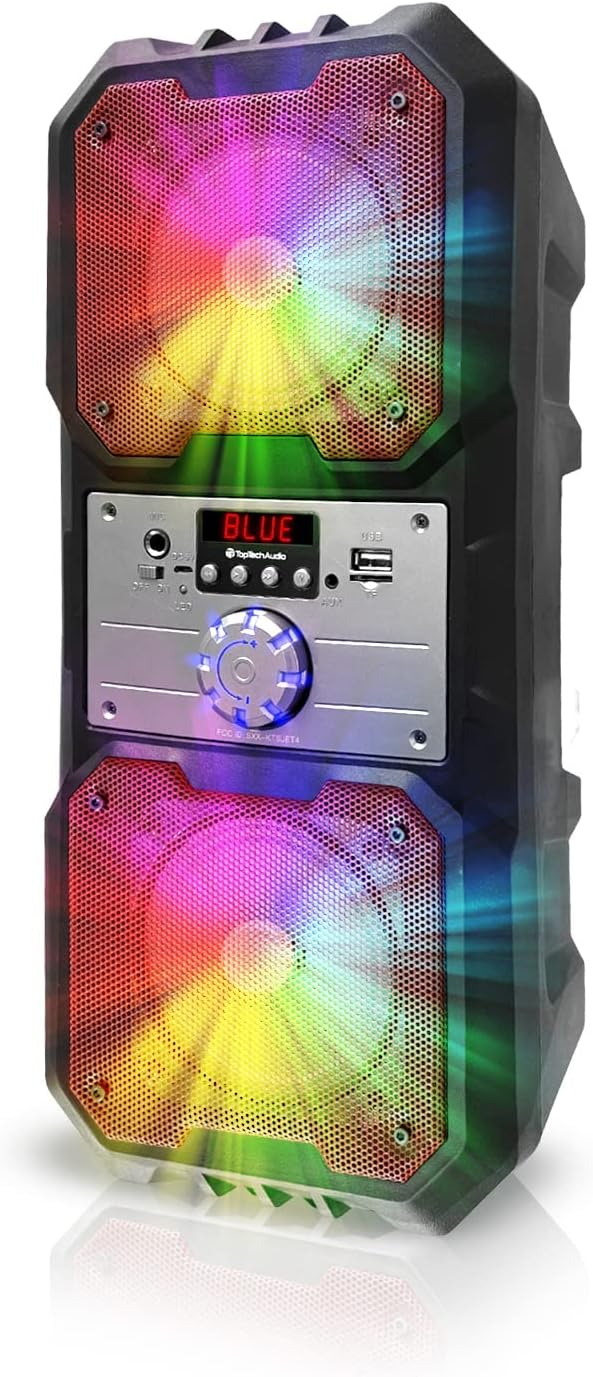
Rajah 4.1: Depan view of the Top Tech Audio Spike-4 speaker, showcasing its dual 4-inch woofers with vibrant, multi-color LED lighting effects. The central control panel is visible between the two speaker grilles.

Rajah 4.2: Berakhirview of the speaker's connectivity options and features, including Easy Portable design, USB Port, TF Card Port, Mic Port, AUX Port, and Bluetooth Wireless capability. These features are indicated by clear icons around the speaker.

Rajah 4.3: Illustration of the speaker's dynamic lighting features, including Multicolor Gradation where lights move with the rhythm, and Reactive Color Show where colors change and rotate slowly, enhancing the audio experience.
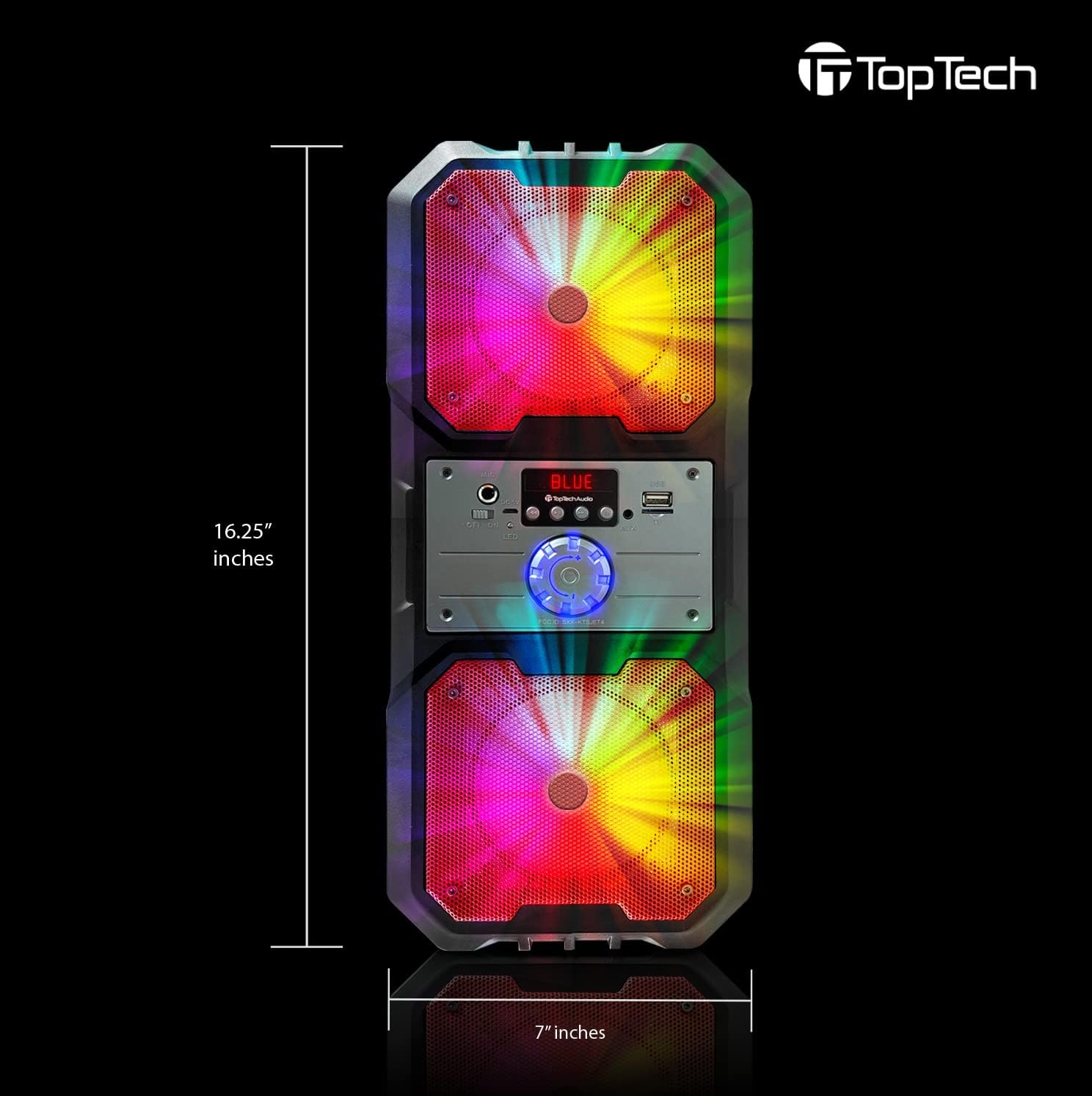
Rajah 4.4: Dimensions of the Top Tech Audio Spike-4 speaker, showing a height of 16.25 inches and a width of 7 inches, emphasizing its compact yet powerful design.
Ciri-ciri Utama:
- Bunyi Kuat: Dual 4-inch woofers deliver full-range audio with deep bass and vibrant highs.
- Rhythmic Disco Lights: Built-in LED lighting effects synchronize with your music for a dynamic visual experience.
- Penstriman Bluetooth Tanpa Wayar: Easily connect your smartphone or tablet with up to 33ft (10 meters) wireless range.
- Berbilang Mod Main Semula: Supports USB, TF card, AUX input, and FM radio for versatile listening options.
- Built-in Karaoke Function: Includes a microphone input and a microphone for sing-alongs and parties.
- Reka Bentuk Mudah Alih: Equipped with a handle for easy transport.
5. Persediaan
5.1 Pengecasan Awal
Before first use, fully charge the speaker. Connect the supplied power cord to the speaker's charging port and plug the other end into a standard wall outlet. The charging indicator light will illuminate. Once fully charged, the light may change color or turn off, depending on the model.
5.2 Menghidupkan/Mematikan
To power on the speaker, locate the power button, usually on the control panel, and press and hold it for a few seconds until you hear an audible prompt or see the display light up. To power off, repeat the process.
5.3 Berpasangan Bluetooth
- Ensure the speaker is powered on and in Bluetooth mode. If not, press the "Mode" button to switch to Bluetooth. The display will show "BLUE" or a similar indicator, and you may hear a pairing prompt.
- Pada peranti mudah alih anda (telefon pintar, tablet, dll.), dayakan Bluetooth dan cari peranti yang tersedia.
- Select "Spike-4" or "TOPTECH" from the list of found devices.
- Once paired, the speaker will indicate a successful connection, usually with an audible tone.
- Anda kini boleh memainkan audio daripada peranti anda melalui pembesar suara.
5.4 Menyambungkan Sumber Audio Lain
- Input AUX: Connect an external audio device (e.g., MP3 player, computer) to the speaker's AUX port using a 3.5mm audio cable (not included). Press the "Mode" button to switch to AUX mode.
- Main balik USB: Masukkan pemacu kilat USB yang mengandungi audio MP3 files into the USB port. The speaker will automatically switch to USB mode and begin playing.
- Main balik Kad TF: Masukkan kad TF (microSD) yang mengandungi audio MP3 files into the TF card slot. The speaker will automatically switch to TF card mode and begin playing.
5.5 Sambungan Mikrofon
Plug the supplied microphone into the speaker's microphone input port. The microphone is ready for use in any mode, allowing for karaoke or public address functions.
6. Arahan Operasi
6.1 Kawalan Kelantangan
Adjust the master volume using the large rotary knob on the control panel. Turn clockwise to increase volume, counter-clockwise to decrease.
6.2 Pemilihan Mod
Press the "Mode" button repeatedly to cycle through available input modes: Bluetooth, FM Radio, AUX, USB, and TF Card. The current mode will be indicated on the display.
6.3 Mod Cahaya
The speaker features dynamic LED lights. There may be a dedicated button (e.g., "Light" or "LED") to cycle through different light patterns or to turn the lights on/off. Refer to the control panel for specific button functions.
6.4 Operasi Radio FM
- Switch the speaker to FM Radio mode using the "Mode" button.
- Press the "Play/Pause" button (often labeled with a play symbol) to initiate an automatic scan for available FM stations. The speaker will save detected stations.
- Use the "Previous/Next Track" buttons (often labeled with arrow symbols) to navigate between saved stations.
6.5 Fungsi Karaoke
With the microphone connected, simply speak or sing into the microphone. The speaker will amplify your voice. Adjust the microphone volume (if available) and echo effects (if available) using dedicated knobs or buttons on the control panel.
7. Penyelenggaraan
7.1 Pembersihan
Lap bahagian luar pembesar suara dengan kain lembut dan kering. Jangan gunakan pembersih, lilin atau pelarut yang kasar. Pastikan tiada cecair memasuki bukaan pembesar suara.
7.2 Penyimpanan
When not in use for extended periods, store the speaker in a cool, dry place, away from direct sunlight and extreme temperatures. It is recommended to partially charge the battery before storing to prolong its lifespan.
7.3 Penjagaan Bateri
The speaker contains a rechargeable battery. To maximize battery life:
- Elakkan menyahcas sepenuhnya bateri dengan kerap.
- Cas pembesar suara secara berkala, walaupun tidak kerap digunakan.
- Do not expose the speaker to temperatures above 45°C (113°F) or below 0°C (32°F).
8. Penyelesaian masalah
| Masalah | Kemungkinan Punca | Penyelesaian |
|---|---|---|
| Speaker tidak dihidupkan. | Bateri habis. | Sambungkan pembesar suara ke sumber kuasa dan casnya. |
| Tiada bunyi dari pembesar suara. | Volume is too low; Incorrect mode selected; Device not connected properly. | Increase volume; Ensure correct input mode (Bluetooth, AUX, USB, TF); Reconnect device. |
| Gandingan Bluetooth gagal. | Pembesar suara tidak dalam mod berpasangan; Bluetooth peranti dimatikan; Terlalu jauh dari pembesar suara. | Ensure speaker is in Bluetooth pairing mode; Turn on Bluetooth on your device; Move device closer to speaker (within 10 meters). |
| Mikrofon tidak berfungsi. | Mikrofon tidak dipasang dengan betul; Kelantangan mikrofon terlalu rendah. | Ensure microphone is fully inserted into the mic port; Adjust microphone volume knob if available. |
| Radio FM statik. | Isyarat lemah; Gangguan. | Relocate the speaker to an area with better reception; Perform an auto-scan again. |
9. Spesifikasi
| Ciri | Perincian |
|---|---|
| Nama Model | Spike-4 |
| Jenama | TOPTECH |
| Jenis Pembesar Suara | Outdoor / Portable |
| Saiz Pembesar Suara | Dual 4 Inches (Woofers) |
| Teknologi Ketersambungan | Bluetooth, USB, AUX |
| Teknologi Komunikasi Tanpa Wayar | Bluetooth |
| Julat Bluetooth | 10 Meter (33 kaki) |
| Sumber Kuasa | Dikuasakan Bateri |
| Hayat Bateri | Sehingga 5 Jam |
| Komponen yang Disertakan | AL-802 Party Speaker, Microphone, Power Cord |
| warna | Hitam |
| UPC | 752574407043 |
| Dimensi (Anggaran) | 16.25 inci (Tinggi) x 7 inci (Lebar) |
10. Waranti dan Sokongan
The Top Tech Audio Spike-4 Bluetooth Speaker comes with a Limited Warranty. Please retain your proof of purchase for warranty claims.
For technical support, warranty inquiries, or replacement parts, please contact Top Tech Audio customer service. Refer to the contact information provided with your product packaging or visit the official Top Tech Audio webtapak.
Pengeluar: Top Tech Audio


