1. Pengenalan
Terima kasih kerana membeliasing the ZEBRONICS Zeb-PIXAPLAY 11 Portable LED Projector. This manual provides essential information for setting up, operating, and maintaining your projector. Please read it thoroughly before use to ensure proper functionality and to maximize your viewpengalaman dalam.
The Zeb-PIXAPLAY 11 is designed for home entertainment, offering FHD 1080p support, multiple connectivity options, and a compact design for portability. Enjoy movies, TV shows, and gaming on a large screen up to 381cm (150 inches).
2. Maklumat Keselamatan
- Jangan lihat terus ke dalam kanta projektor apabila lamp sedang aktif.
- Pastikan pengudaraan yang betul di sekeliling projektor untuk mengelakkan terlalu panas.
- Use only the provided power adapter or a compatible 5V DC, 3A USB power source.
- Jauhkan projektor daripada air, kelembapan dan suhu yang melampau.
- Jangan cuba membuka atau membaiki projektor sendiri. Hubungi kakitangan servis yang berkelayakan.
- Bersihkan kanta dan bolong dengan kerap untuk mengekalkan prestasi optimum.
3. Kandungan Pakej
Sahkan bahawa semua item yang disenaraikan di bawah disertakan dalam pakej anda:
- Projektor (1 unit)
- Alat kawalan jauh (1 unit)
- Penyesuai Kuasa (1 unit)
- AV Cable (1 unit)
- Kabel HDMI (1 unit)
- Manual Pengguna

Rajah 3.1: Projector and Included Accessories
This image displays the ZEBRONICS Zeb-PIXAPLAY 11 projector along with its complete set of accessories: a remote control, a power adapter, an AV cable, an HDMI cable, and a QR code for the user manual. These items are typically found in the product packaging.
4. Produk Lebihview
Familiarize yourself with the projector's components and controls.

Rajah 4.1: Depan dan Atas View of the Projector with Remote
This image shows the ZEBRONICS Zeb-PIXAPLAY 11 portable LED projector from a front and slightly top-down angle, with its accompanying remote control placed beside it. The projector features a two-tone design, with the lens visible at the front.
4.1 Kawalan Panel Atas

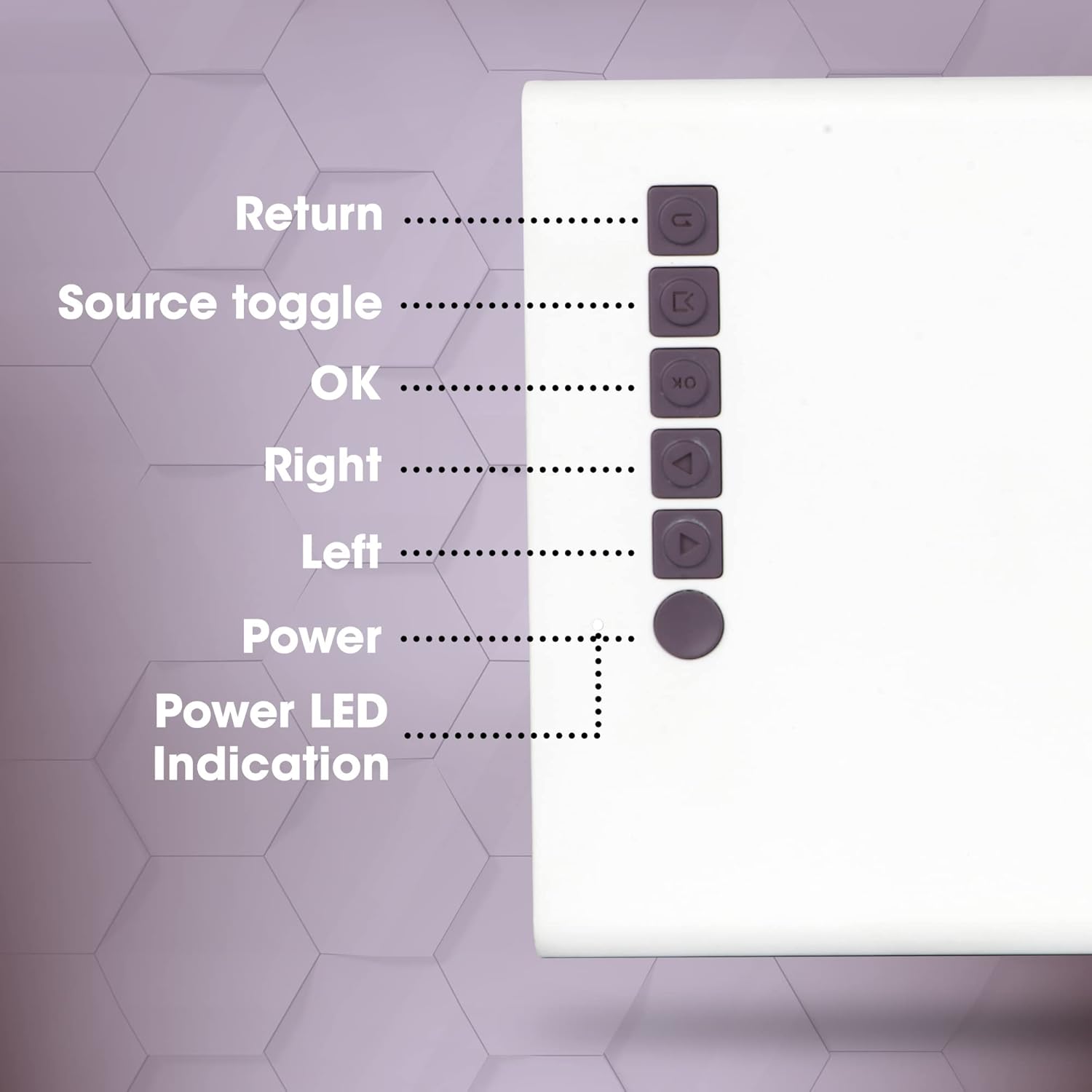
Rajah 4.2: Kawalan Panel Atas
This close-up image highlights the control buttons located on the top panel of the ZEBRONICS Zeb-PIXAPLAY 11 projector. The buttons are labeled for their functions: Return, Source toggle, OK, Right, Left, Power, and Power LED Indication.
- kembali: Navigates back in menus.
- Source toggle: Switches between input sources (HDMI, USB, mSD, AV).
- OK: Mengesahkan pilihan.
- Kanan/Kiri: Navigates menu options.
- Kuasa: Menghidupkan/mematikan projektor.
- Petunjuk LED Kuasa: Menunjukkan status kuasa.
4.2 Rear and Side Ports
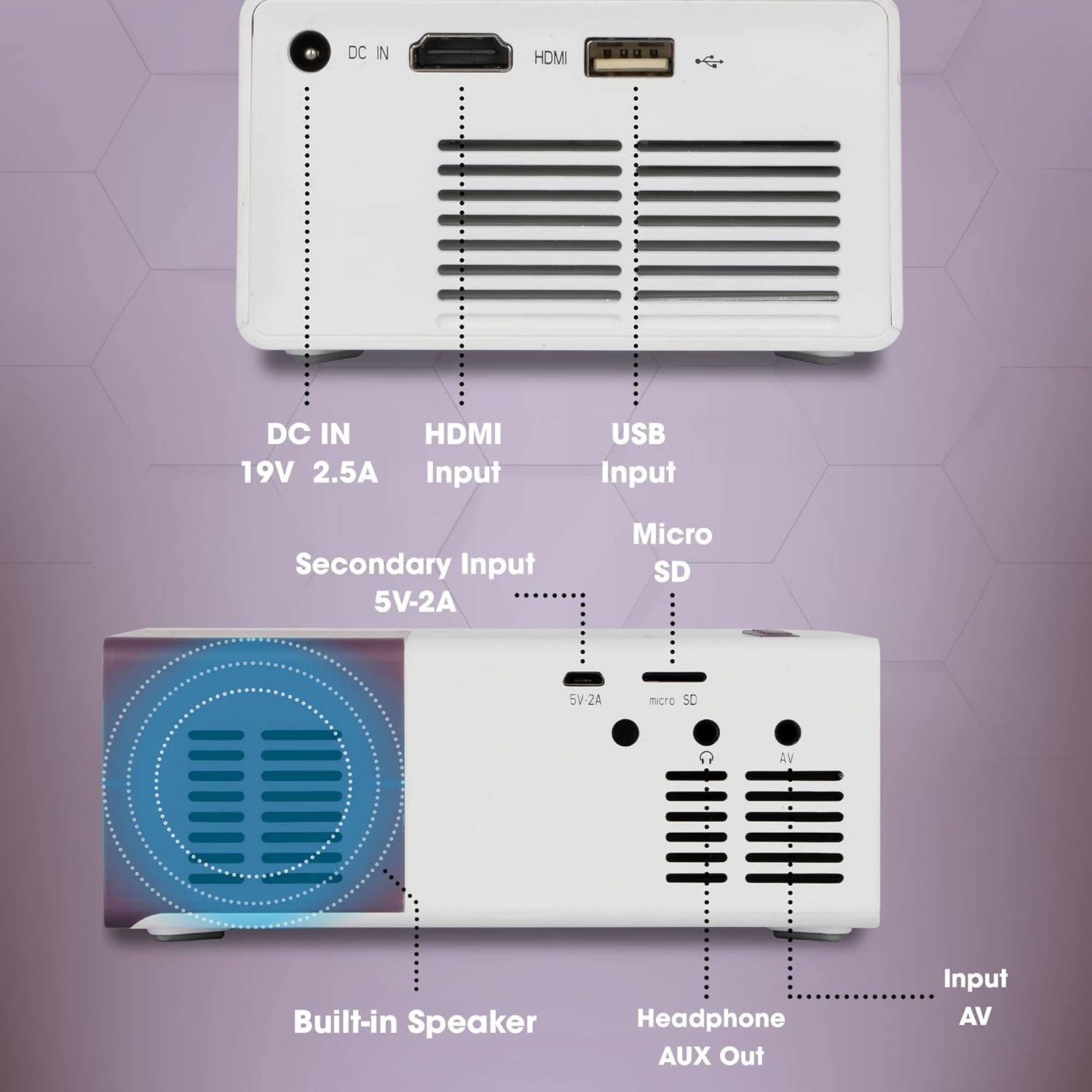
Rajah 4.3: Rear and Side Connectivity Ports
Imej ini memberikan yang terperinci view of the connectivity ports located on the rear and side of the ZEBRONICS Zeb-PIXAPLAY 11 projector. Labels indicate the functions of each port: DC IN (19V 2.5A), HDMI Input, USB Input, Micro SD slot, Secondary Input (5V-2A), Built-in Speaker, Headphone AUX Out, and Input AV.
- DC IN (19V 2.5A): Main power input.
- Secondary Input (5V-2A): Alternative power input via USB (e.g., power bank).
- Input HDMI: Connects to devices like laptops, gaming consoles, TV boxes.
- Input USB: Connects to USB flash drives for media playback.
- Micro SD: Slot for Micro SD cards for media playback.
- Input AV: Connects to devices using the included AV cable.
- Headphone AUX Out: Menyambung kepada pembesar suara luaran atau fon kepala.
- Pembesar Suara Terbina dalam: Output audio bersepadu.
5. Persediaan
5.1 Sambungan Kuasa
- Sambungkan penyesuai kuasa yang disediakan kepada DC IN (19V 2.5A) port on the projector and then to a power outlet.
- Alternatively, for portable use, connect a 5V DC, 3A USB power source (e.g., a power bank) to the Secondary Input (5V-2A) pelabuhan.
Rajah 5.1: Dual Power Input Capability
This image illustrates the ZEBRONICS Zeb-PIXAPLAY 11 projector's compatibility with both a standard adapter and a 5V power bank, highlighting its portability for outdoor use. Children are shown enjoying a movie projected onto a screen in a garden setting.
5.2 Placement and Screen Size
- Letakkan projektor di atas permukaan yang stabil dan rata.
- Position the projector at an appropriate distance from the projection surface (wall or screen) to achieve the desired screen size. The projector supports a maximum screen size of 381cm (150 inches).
- Ensure the projection path is clear of obstructions.

Rajah 5.2: Large Screen Projection and Picture Clarity
This image demonstrates the ZEBRONICS Zeb-PIXAPLAY 11 projector's capability to project a large screen size of up to 381cm (150 inches) with FHD 1080p support, emphasizing the stunning picture clarity it delivers.
5.3 Pelarasan Fokus
Locate the focus ring near the projector lens. Rotate it until the projected image appears sharp and clear on the screen.
6. Arahan Operasi
6.1 Menghidupkan/Mematikan
- Tekan ke kuasa button on the projector or the remote control to turn the unit on. The Power LED will illuminate.
- Tekan ke kuasa butang sekali lagi untuk mematikan unit.
6.2 Memilih Sumber Input
After powering on, use the Source toggle button on the projector or the remote control to cycle through available input sources: HDMI, USB, mSD, and AV.
6.3 Menyambung Peranti
- HDMI: Connect an HDMI cable from your laptop, gaming console, or TV box to the projector's HDMI input port. Select HDMI as the input source.
- USB: Insert a USB flash drive into the USB input port. Select USB as the input source and navigate through your media files using the remote or top panel controls.
- Micro SD: Insert a Micro SD card into the Micro SD slot. Select mSD as the input source and browse your media.
- DARI: Use the included AV cable to connect older devices (e.g., DVD players) to the AV input port. Select AV as the input source.
6.4 Keluaran Audio
- Projektor ini mempunyai pembesar suara terbina dalam untuk main balik audio.
- For enhanced audio, connect external speakers or headphones to the Headphone AUX Out port menggunakan kabel audio 3.5mm.
6.5 Format Media yang Disokong
The projector supports various video file formats including 3GP, AVI, DIVX, H264, MOV, MP4, MPEG1, MPEG2, MKV, and VOB.
7. Penyelenggaraan
- Pembersihan Kanta: Gently wipe the projector lens with a soft, lint-free cloth. Avoid using abrasive cleaners.
- Pembersihan Bolong: Periodically clean the ventilation openings to ensure proper airflow and prevent dust buildup. Use a soft brush or compressed air.
- Storan: Apabila tidak digunakan, simpan projektor di tempat yang sejuk dan kering, jauh dari cahaya matahari langsung dan suhu yang melampau.
- Lamp Jangka hayat: LED lamp mempunyai jangka hayat anggaran 30,000 jam.

Rajah 7.1: Projector Brightness and Lamp Jangka hayat
This image visually represents the ZEBRONICS Zeb-PIXAPLAY 11 projector's key specifications: 1500 lumens of brightness and a long-lasting LED lamp with a lifespan of 30,000 hours.
8. Penyelesaian masalah
Jika anda menghadapi masalah dengan projektor anda, rujuk kepada masalah dan penyelesaian biasa berikut:
| Masalah | Kemungkinan Punca | Penyelesaian |
|---|---|---|
| Tiada kuasa | Kabel kuasa tidak disambungkan; Salur keluar kuasa rosak | Ensure power adapter is securely connected; Try a different power outlet. |
| Tiada imej | Incorrect input source; Cable not connected; Device not outputting signal | Select correct input source; Check cable connections; Ensure source device is on and configured to output. |
| Imej kabur | Fokus tidak dilaraskan; Projektor terlalu dekat/jauh | Adjust the focus ring; Reposition the projector for optimal distance. |
| Tiada bunyi | Volume too low; External speakers not connected; Source device audio issue | Increase projector volume; Connect external speakers via AUX out; Check audio settings on source device. |
9. Spesifikasi
| Ciri | Spesifikasi |
|---|---|
| Jenama | ZEBRONIK |
| Nombor Model | GC-RB-2725 |
| Resolusi Paparan | 1280 x 720 (Native HD), 1080p FHD Support |
| Kecerahan | 1500 Lumen |
| Lamp Jangka hayat | 30,000 Hours (LED) |
| Saiz Skrin Maks | 381 cm (150 inci) |
| Teknologi Ketersambungan | HDMI, USB, Micro SD, AV In, AUX Out |
| Jenis Pembesar Suara | Terbina Dalam |
| Input Kuasa | DC 19V 2.5A (Primary), 5V 3A USB (Secondary) |
| Berat Barang | 1.85 paun |
| Dimensi Produk | 5.79 x 4.02 x 0.98 inci |
10. Waranti dan Sokongan
This product is covered by a manufacturer's warranty. Please refer to the warranty card included in your package for specific terms and conditions. For technical support, service, or further inquiries, please visit the official ZEBRONICS webtapak atau hubungi perkhidmatan pelanggan mereka.
You can also access the digital user manual and support resources by scanning the QR code provided in the package or by visiting: https://l.ead.me/zebpp11