pengenalan
This manual provides instructions for the safe and efficient operation of your KitchenAid Professional 600 Series Stand Mixer, model KP26M9PCER. This appliance is designed for mixing, kneading, and beating ingredients in various culinary applications.
The mixer features a durable DC motor, a 5.7-liter (6-quart) stainless steel bowl, and 10 speed settings for precise control. Its bowl-lift design allows for easy attachment and removal of the mixing bowl.

Image: The KitchenAid Professional 600 Series Stand Mixer in Empire Red, featuring its robust design and stainless steel bowl.
Arahan Keselamatan Penting
Apabila menggunakan peralatan elektrik, langkah berjaga-jaga keselamatan asas hendaklah sentiasa dipatuhi, termasuk yang berikut:
- Baca semua arahan sebelum mengendalikan pengadun.
- To protect against risk of electrical shock, do not immerse the mixer base in water or other liquid.
- Pengawasan rapi diperlukan apabila sebarang perkakas digunakan oleh atau berhampiran kanak-kanak.
- Cabut plag dari soket apabila tidak digunakan, sebelum memakai atau menanggalkan bahagian, dan sebelum membersihkan.
- Elakkan sentuhan dengan bahagian yang bergerak. Jauhkan tangan, rambut dan pakaian, serta spatula dan perkakas lain dari pemukul semasa operasi untuk mengurangkan risiko kecederaan kepada orang dan/atau kerosakan pada pengadun.
- Jangan kendalikan sebarang perkakas dengan kord atau palam yang rosak, atau selepas perkakas tidak berfungsi atau terjatuh atau rosak dalam apa jua cara.
- Penggunaan lampiran yang tidak disyorkan atau dijual oleh KitchenAid boleh menyebabkan kebakaran, kejutan elektrik atau kecederaan.
- Jangan gunakan perkakas di luar rumah.
- Jangan biarkan kord tergantung di tepi meja atau kaunter.
- Jangan biarkan kord menyentuh permukaan panas, termasuk dapur.
Kandungan Pakej
Your KitchenAid Professional 600 Series Stand Mixer package includes the following items:
- Stand Mixer Base (Empire Red)
- 5.7-liter (6-quart) Stainless Steel Bowl
- Polished Metal Flat Beater
- PowerKnead Spiral Dough Hook
- Balloon Whisk (Wire Whip)
- Bowl Whisk with Flexible Edge (if included in specific model variant)
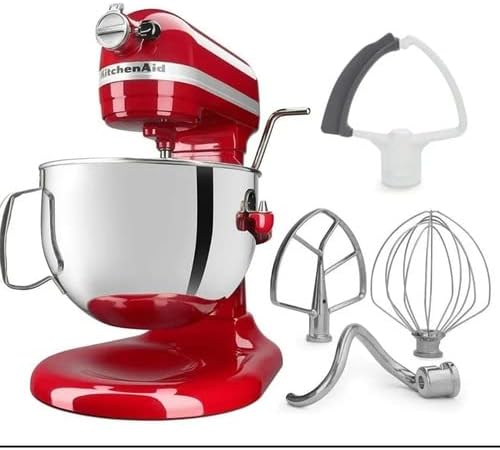
Image: The KitchenAid stand mixer shown with its standard attachments, including the flat beater, dough hook, wire whip, and a flex edge beater.

Imej: Dari dekat view of the three primary attachments: the spiral dough hook, the flat beater, and the wire whip.
Persediaan
- penempatan: Letakkan pengadun pada permukaan yang kering, rata dan stabil. Pastikan terdapat ruang yang mencukupi di sekeliling pengadun untuk operasi dan pengudaraan.
- Memasang Mangkuk:
- Lift the bowl lift handle to the down position.
- Letakkan penyokong mangkuk di atas pin pengesan pada tapak pengadun.
- Tekan ke bawah pada bahagian belakang mangkuk sehingga pin mangkuk tersepit ke dalam selak spring.
- Lower the bowl lift handle to the up position to secure the bowl.
- Memasang Aksesori:
- Pastikan pengadun dicabut plag dan kawalan kelajuan ditetapkan kepada "OFF".
- Slide the accessory onto the beater shaft and push upward as far as possible.
- Rotate the accessory to the right, hooking the accessory over the pin on the shaft.
- Sambungan Kuasa: Plug the mixer into a grounded 120 Volt, 60 Hz electrical outlet.

Image: The KitchenAid stand mixer with its bowl in the lifted position, demonstrating the bowl-lift mechanism.
Arahan Operasi
- Menambah Bahan: With the mixer unplugged and the bowl in the down position, add your ingredients to the mixing bowl.
- Securing the Bowl: Lift the bowl lift handle to the up position to secure the bowl for mixing.
- Memilih Kelajuan: Turn the speed control lever to the desired speed setting (1-10). Start at a lower speed and gradually increase as needed to prevent splashing.
- Pencampuran: Allow the mixer to operate until ingredients are thoroughly combined or processed as required by your recipe.
- Menghentikan Pengadun: Turn the speed control lever to "OFF" to stop the mixer.
- Removing Bowl and Accessory:
- Cabut plag pengadun.
- Lower the bowl lift handle to the down position.
- Remove the accessory by pushing it upward and rotating it to the left, then pulling it off the shaft.
- Remove the mixing bowl by lifting it off the locating pins.

Imej: Sebelah view of the mixer highlighting the speed control dial and the bowl lift handle for operational adjustments.

Imej: Dari dekat view inside the mixing bowl, showing sugar and butter being creamed by the flat beater attachment.
Attachments and Their Usage
The KitchenAid Professional 600 Series Stand Mixer comes with several attachments, each designed for specific tasks:
- Pemukul Leper: Ideal for normal to heavy mixtures such as cakes, cookies, pastries, quick breads, mashed potatoes, and pie crusts.
- Cangkuk Doh Lingkaran: Used for mixing and kneading yeast doughs such as bread, pizza dough, and pasta dough.
- Balloon Whisk (Wire Whip): Incorporates air into ingredients. Best for mixtures that need air, such as eggs, egg whites, heavy cream, boiled frostings, and mayonnaise.
- Flex Edge Beater (Optional/Included in some models): Features a flexible edge that scrapes the sides of the bowl while mixing, reducing the need to stop and scrape manually. Suitable for most mixtures that use the flat beater.
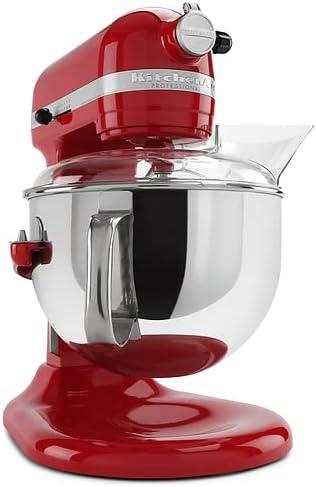
Image: The stand mixer equipped with a clear pouring shield, which helps prevent splashes and allows for easy addition of ingredients during mixing.
Pembersihan dan Penyelenggaraan
Pembersihan dan penyelenggaraan yang betul akan memastikan jangka hayat dan prestasi optimum pengadun anda.
- Sentiasa cabut plag pengadun sebelum membersihkan.
- Asas Pengadun: Wipe the mixer base with a damp kain. Jangan gunakan pembersih yang melelas atau rendamkan pengadun di dalam air.
- Mangkuk Keluli Tahan Karat: The stainless steel bowl is dishwasher-safe. Alternatively, wash with warm, soapy water and rinse thoroughly.
- Lampiran (Pemukul Leper, Cangkuk Doh, Cambuk Dawai):
- The polished metal flat beater and spiral dough hook are generally dishwasher-safe (top rack recommended) or can be hand-washed.
- The wire whip should be hand-washed in warm, soapy water and dried immediately to prevent tarnishing.
- Refer to the specific care instructions for any optional attachments you may own.
- Kord Kuasa: Inspect the power cord regularly for any signs of damage. If damaged, contact KitchenAid service for replacement.
Menyelesaikan masalah
If your mixer experiences issues, consult the following common troubleshooting steps:
| Masalah | Kemungkinan Punca | Penyelesaian |
|---|---|---|
| Pengadun tidak bermula. | Not plugged in; power outlet not functioning; speed control not set to "OFF" before plugging in. | Ensure mixer is securely plugged into a working outlet. Turn speed control to "OFF" then back to desired speed. |
| Bahan pelekat terkena dasar mangkuk atau tidak sampai ke bahan-bahan. | Pelepasan pemukul ke mangkuk memerlukan pelarasan. | Refer to the KitchenAid service manual or contact customer support for beater-to-bowl clearance adjustment instructions. This is typically a screw adjustment on the mixer head. |
| Pengadun berhenti semasa operasi. | Overload protection activated; thermal overload. | Turn the speed control to "OFF" and unplug the mixer. Let it cool for 10-15 minutes. Reduce the load if possible, then plug in and restart. |
| Bunyi atau bau yang luar biasa. | Normal operation for heavy loads; potential mechanical issue. | A slight humming or gear noise is normal, especially with heavy doughs. If the noise is excessive or accompanied by a burning smell, discontinue use and contact KitchenAid service. |
For issues not covered here, please contact KitchenAid Customer Service.
Spesifikasi
| model: | KP26M9PCER |
| Jenama: | KitchenAid |
| kapasiti: | 5.7 liters (6 Quarts) |
| Voltage: | 120 Volt |
| Kekerapan: | 60 Hz |
| Bilangan Kelajuan: | 10 |
| Bahan: | Stainless Steel (Bowl), Metal (Motor/Housing) |
| Berat Barang: | 6 kg (kira-kira 13.2 lbs) |
| Dimensi Bungkusan: | 49 x 43 x 34 cm (kira-kira 19.3 x 16.9 x 13.4 inci) |
Waranti dan Sokongan
Produk KitchenAid dihasilkan mengikut piawaian berkualiti tinggi. Untuk maklumat jaminan terperinci, sila rujuk kad jaminan yang disertakan dengan produk anda atau lawati KitchenAid rasmi webtapak.
For customer support, service, or to purchase additional attachments, please visit the Kedai KitchenAid or contact KitchenAid Customer Service directly.


