1. Pengenalan
This manual provides instructions for the assembly, operation, maintenance, and troubleshooting of your Vonesse CVN200 Gaming Chair. Please read this manual thoroughly before use to ensure proper function and longevity of your product.

Figure 1: Vonesse CVN200 Gaming Chair (White/Black)
The Vonesse CVN200 Gaming Chair features an ergonomic design with a footrest, reclining function, and massage lumbar support, designed for extended periods of sitting.
2. Maklumat Keselamatan Penting
Please observe the following safety guidelines to prevent injury and ensure safe operation:
- This chair has a maximum weight recommendation of 300 paun. Exceeding this limit may cause damage to the chair or personal injury.
- Improper use of adjustable features can lead to injury; follow instructions carefully.
- For extended use, take regular breaks to maintain good posture and prevent discomfort.
- Ensure safe assembly by following the provided instructions precisely.
3. Kandungan Pakej
Sahkan bahawa semua komponen ada di dalam pakej sebelum memulakan pemasangan:
- Gaming Chair Components
- Kastor (Roda)
- Installation Hardware (Screws, Allen wrench, etc.)
- Manual Pengguna (Dokumen ini)
4. Arahan Perhimpunan
For detailed, step-by-step assembly instructions, please refer to the official Installation Manual (PDF) provided by Vonesse. This document contains visual guides and specific instructions for each step of the assembly process.
Muat turun Manual Pemasangan (PDF)
Ensure all parts are correctly aligned and tightened according to the manual to guarantee stability and safety.
5. Ciri-ciri Produk
The Vonesse CVN200 Gaming Chair is equipped with several features designed for comfort and adaptability:

Figure 2: Multifunction Features Overview
This image illustrates the integrated padded headrest, thickened cushion, linkage armrests, retractable padded footrest, adjustable massage lumbar cushion, and 360-degree swivel casters.
5.1. Adjustable Recline and Swivel
The chair features a reclining mechanism that allows the backrest to be locked at any position between 90° (upright for work) and 160° (for resting). The 360-degree swivel casters provide smooth and quiet movement.
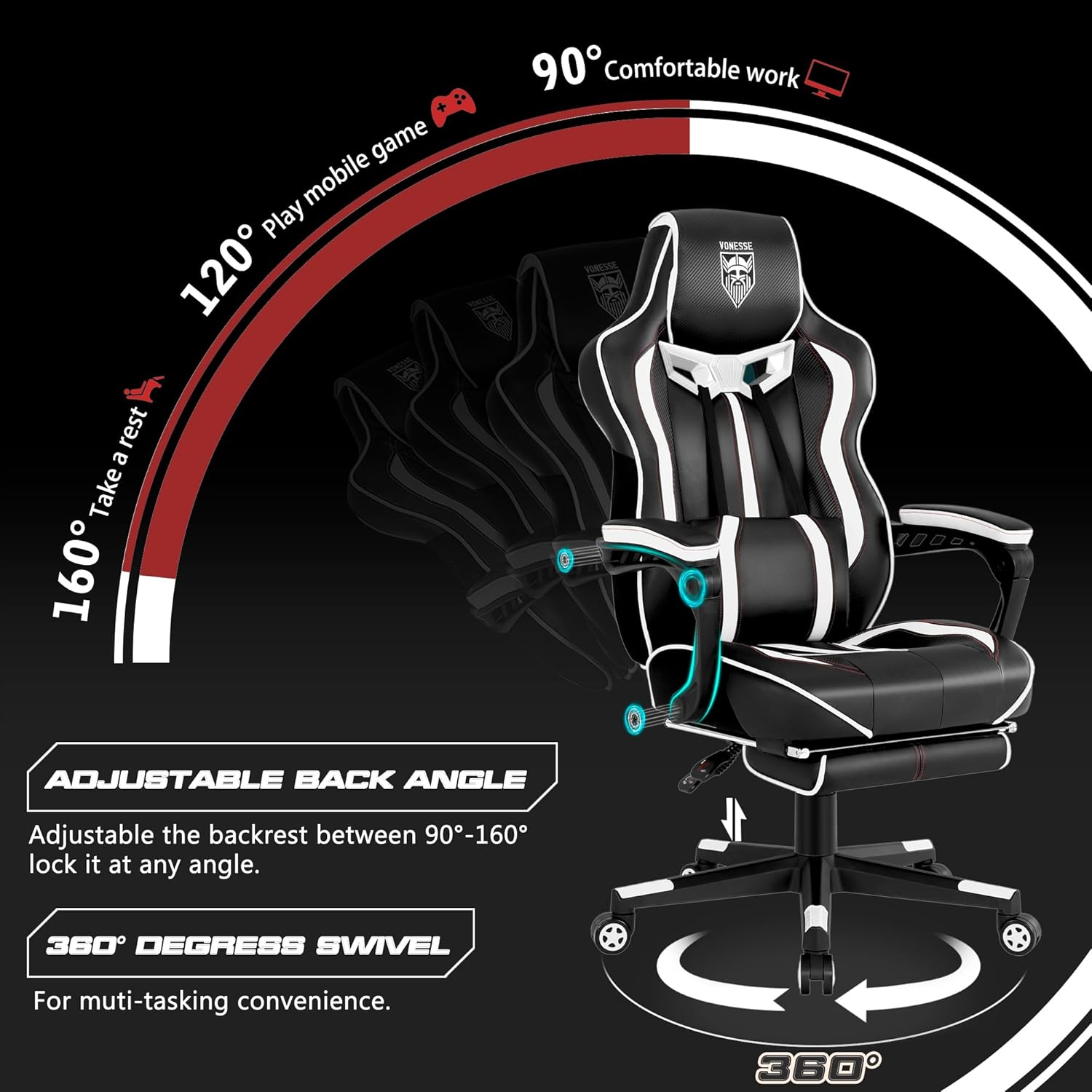
Figure 3: Adjustable Back Angle and 360-Degree Swivel
This diagram shows the range of backrest recline and the chair's full rotational capability.
5.2. Ketinggian Boleh Laras
The chair's height can be adjusted to accommodate users of various heights, ensuring ergonomic alignment with your desk or workstation.
5.3. Lumbar Support with Massage Function
A detachable lumbar support cushion is included, featuring a built-in massage mode to enhance comfort during prolonged sitting.
5.4. Tempat Letak Kaki Boleh Ditarik Balik
An integrated, retractable footrest provides additional comfort, allowing users to extend their legs and relax.
5.5. Integrated Padded Headrest
The chair includes an integrated padded headrest for enhanced neck and head support.
5.6. Tempat Letak Tangan Penghubung
The armrests are designed to move in conjunction with the chair's recline, providing continuous arm support.
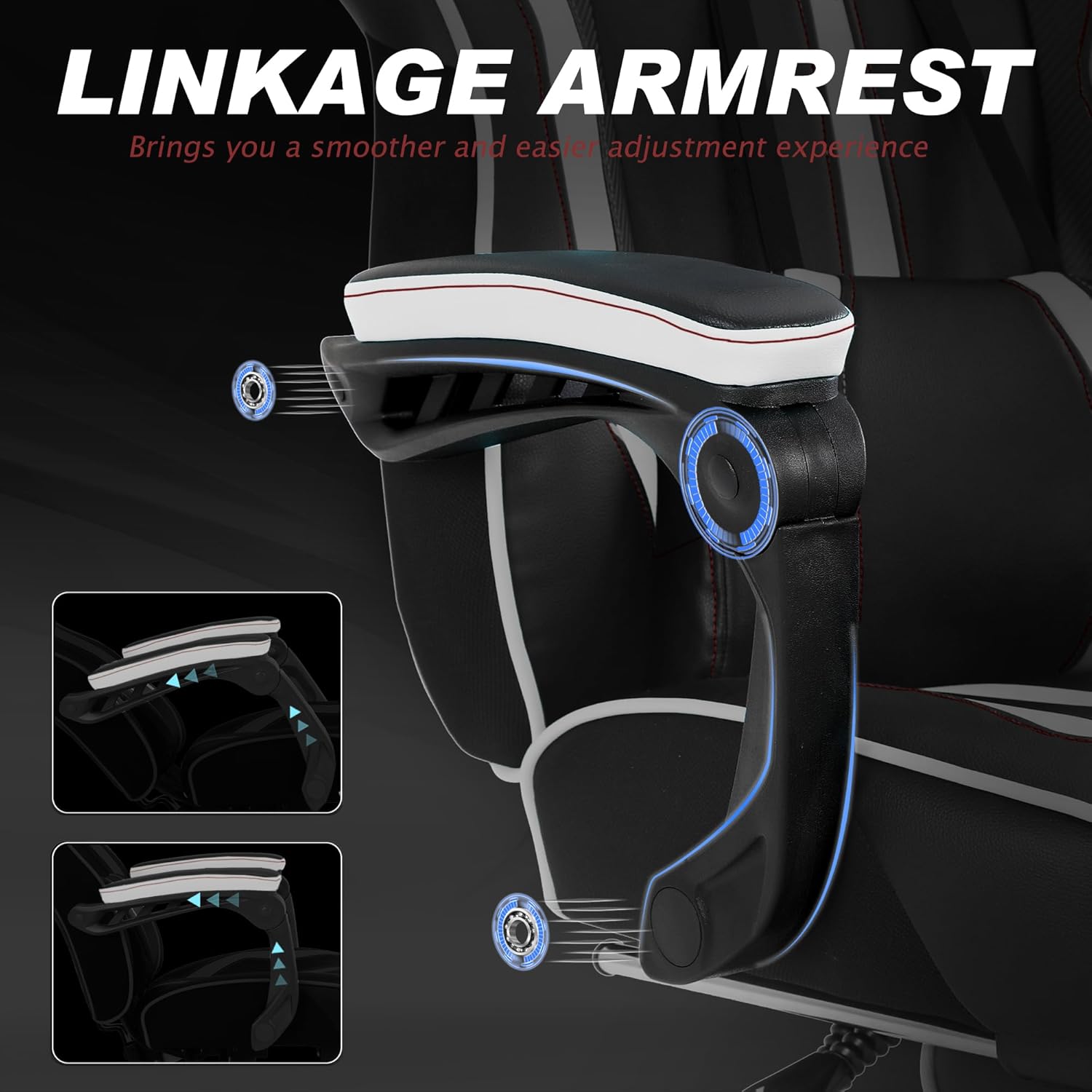
Figure 4: Linkage Armrest Mechanism
This image demonstrates how the armrests adjust with the chair's recline for consistent support.
5.7. Advanced Cushion Technology
The seat cushion incorporates advanced pocket spring technology for enhanced comfort and durability. The chair's wingless seat design offers ample sitting space.

Figure 5: Elastic Comfort Pocket Spring Cushion
Potongan view revealing the internal pocket spring structure of the seat cushion, designed for elastic comfort.

Figure 6: Wingless Widened Cushion and PU Leather
This image highlights the spacious, wingless design of the seat cushion and the durable, easy-to-clean PU leather material.
5.8. Durable Materials
The chair is constructed with high-quality PU and carbon fiber leather, which have undergone a 25,000 Martindale rub test, indicating high tensile strength, wear resistance, and excellent color fastness. High-density resilient sponge ensures durability.
6. Operasi
6.1. Melaraskan Ketinggian Kerusi
- To raise the chair: While seated, lift the lever located under the seat on the right side. The chair will rise. Release the lever at the desired height.
- To lower the chair: While seated, pull the lever located under the seat on the right side. The chair will lower. Release the lever at the desired height.
6.2. Adjusting Backrest Recline
- Locate the recline lever on the right side of the chair, below the seat.
- Pull the lever upwards to unlock the backrest.
- Lean back or forward to achieve the desired angle (between 90° and 160°).
- Lepaskan tuil untuk mengunci penyandar belakang pada kedudukannya.
6.3. Using the Retractable Footrest
- To extend the footrest: Pull the footrest handle located under the front of the seat outwards.
- To retract the footrest: Push the footrest back under the seat until it is fully stored.
6.4. Activating Lumbar Massage
The detachable lumbar support cushion includes a massage function. Connect the USB cable from the cushion to a compatible USB power source (e.g., computer USB port, USB wall adapter) to activate the vibration massage.
7. Penyelenggaraan dan Penjagaan
7.1. Pembersihan
The chair's PU and carbon fiber leather surfaces can be cleaned by wiping with a damp kain. Elakkan menggunakan bahan kimia yang keras atau pembersih yang kasar, kerana ini boleh merosakkan bahan.
7.2. Penjagaan Am
- Periksa dan ketatkan semua skru dan bolt secara berkala untuk memastikan kestabilan.
- Avoid exposing the chair to direct sunlight or extreme temperatures for prolonged periods, as this can cause material degradation.
- Keep sharp objects away from the chair's upholstery to prevent punctures or tears.
8. Penyelesaian masalah
If you encounter issues with your Vonesse CVN200 Gaming Chair, consider the following common solutions:
8.1. Chair Does Not Adjust Height
- Pastikan tuil lif gas disambungkan sepenuhnya atau ditanggalkan mengikut keperluan.
- Check if the gas lift cylinder is properly installed and not damaged.
8.2. Backrest Does Not Recline or Lock
- Verify that the recline lever is functioning correctly and not obstructed.
- Inspect the reclining mechanism for any visible damage or loose connections.
8.3. Bunyi Berdecit
- Tighten all assembly bolts.
- Apply a small amount of silicone lubricant to moving parts or joints if necessary.
If these steps do not resolve the issue, please contact Vonesse customer support.
9. Spesifikasi
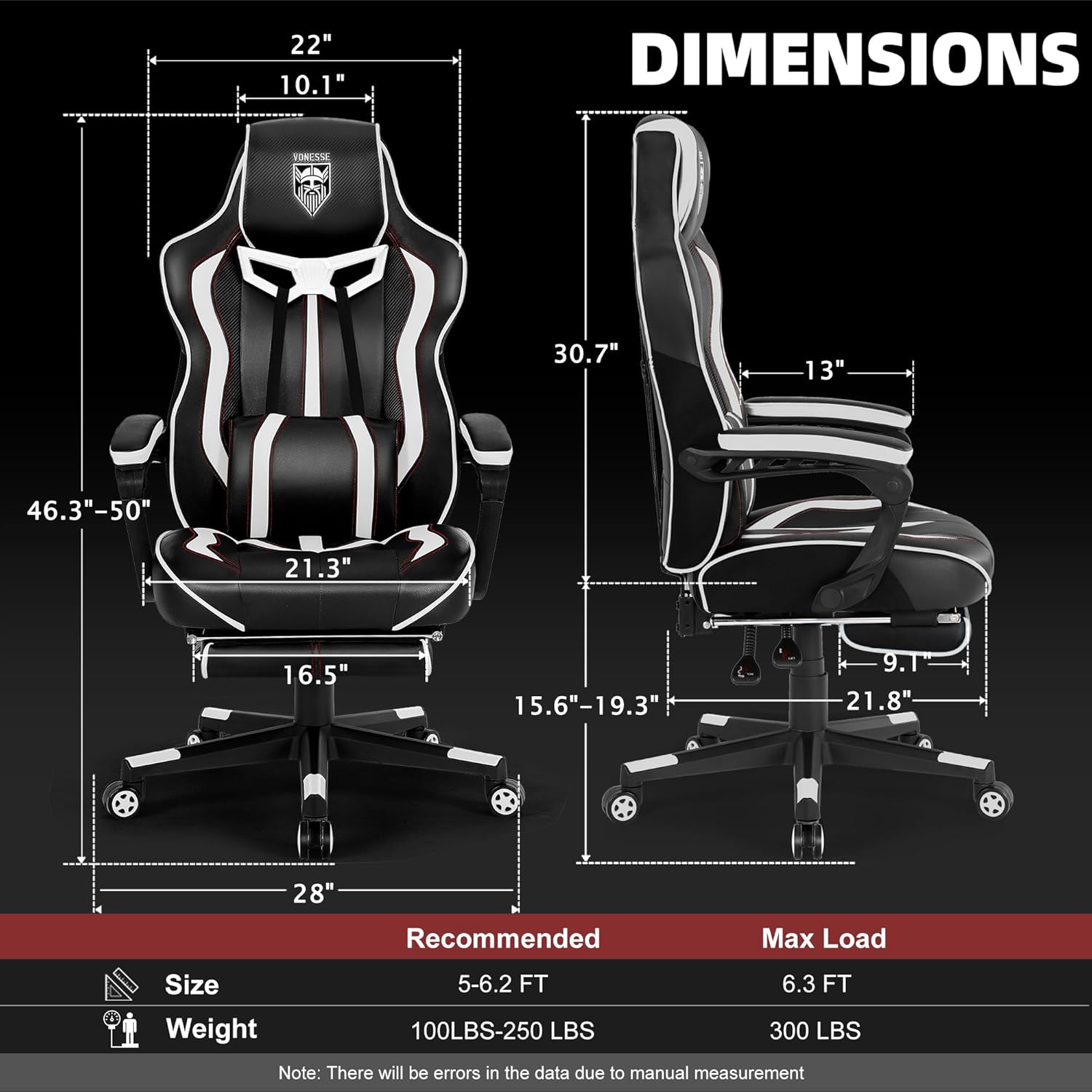
Figure 7: Product Dimensions and Load Capacity
This image provides a visual representation of the chair's key measurements and recommended user specifications.
| Ciri | Perincian |
|---|---|
| Nama Model | CVN200 |
| Jenama | Vonesse |
| warna | Putih/Hitam |
| Dimensi Produk (D x W x H) | 21"D x 28"W x 46"H |
| Kapasiti Beban Maks | 300 paun |
| Gaya Belakang | Punggung Pejal |
| Ciri Khas | Adjustable Height, Ergonomic, Foot Rest, Massage, Reclining |
| Arahan Penjagaan Produk | Lap bersih |
| Penggunaan yang Disyorkan | Permainan, Pejabat |
| bahan | PU and Carbon Fibre Leather, High-density Sponge |
| Sudut Berbaring | 90° hingga 160° |
| Pusing | 360 darjah |
| Berat Barang | 45.7 paun |
10. Waranti dan Sokongan Pelanggan
Vonesse is committed to customer satisfaction. Your CVN200 Gaming Chair comes with the following:
- 30-Day Replacement Policy: If you encounter any issues within 30 days of purchase, a replacement may be provided.
- 1-Year Repair Service: The chair is covered by a 1-year repair service for manufacturing defects.
For any questions, concerns, or to utilize your warranty, please contact Vonesse customer service. Our team is available to provide efficient and timely after-sales support.
You can visit the official Vonesse store for more information: Vonesse Store

