1. Pengenalan
The MX Classic Pro DM20 is a 20-channel digital mixer designed for professional audio applications, including live performances, studio recording, and church sound systems. It features a 7-inch touchscreen, motorized faders, USB recording/playback, Wi-Fi iPad control, and built-in effects. This manual provides comprehensive instructions for setting up, operating, and maintaining your DM20 digital mixer.
Sila baca manual ini dengan teliti sebelum menggunakan produk untuk memastikan operasi yang betul dan untuk mengelakkan kerosakan.
2. Maklumat Keselamatan
Always observe the following safety precautions to avoid electric shock, short circuit, damages, fire or other hazards.
- Bekalan Kuasa: Gunakan hanya penyesuai kuasa yang ditentukan. Pastikan voltage matches the requirements of the unit.
- Pembumian: Sentiasa sambungkan unit ke soket kuasa yang dibumikan.
- Kelembapan: Jangan dedahkan unit ini kepada hujan, kelembapan atau kelembapan berlebihan. Jangan letakkan bekas berisi cecair di atas unit.
- Pengudaraan: Pastikan pengudaraan yang mencukupi. Jangan sekat bukaan pengudaraan.
- haba: Jauhkan unit daripada sumber haba seperti radiator, daftar haba, dapur, atau radas lain (termasuk amppenghidup) yang menghasilkan haba.
- Pembersihan: Putuskan kuasa sebelum membersihkan. Gunakan kain yang kering dan lembut. Jangan gunakan pembersih cecair atau pembersih aerosol.
- Servis: Jangan cuba servis produk ini sendiri. Rujuk semua perkhidmatan kepada pegawai perkhidmatan yang berkelayakan.
3. Kandungan Pakej
Sahkan bahawa semua item yang disenaraikan di bawah disertakan dalam pakej anda:
- MX Classic Pro DM20 Digital Mixer
- Penyesuai Kuasa
- Kabel USB
- Manual Pengguna (dokumen ini)
4. Produk Lebihview
Familiarize yourself with the various components and controls of your DM20 digital mixer.
4.1 Susun Atur Panel Hadapan

Figure 4.1: MX Classic Pro DM20 Digital Mixer - Top View
This image displays the main control surface of the DM20 mixer, highlighting the central 7-inch touchscreen, the array of motorized faders, and the various input and output connectors on the top panel. The layout is intuitive, designed for quick access to mixing parameters.
The front panel features the primary controls and display for the mixer:
- Skrin Sentuh 7 inci: Provides visual feedback and control for all mixer functions, including channel settings, effects, routing, and system configurations.
- Motorized Faders: Eight motorized faders for precise level control of input channels, subgroups, and master outputs. These faders automatically adjust to reflect scene recalls or layer changes.
- Bahagian Input: Includes XLR/TRS combo jacks for microphone and line inputs, along with dedicated stereo inputs.
- Bahagian Output: Main stereo outputs, monitor outputs, and auxiliary outputs.
- Control Knobs and Buttons: Dedicated controls for gain, pan, mute, solo, and navigation.
4.2 Sambungan Panel Belakang
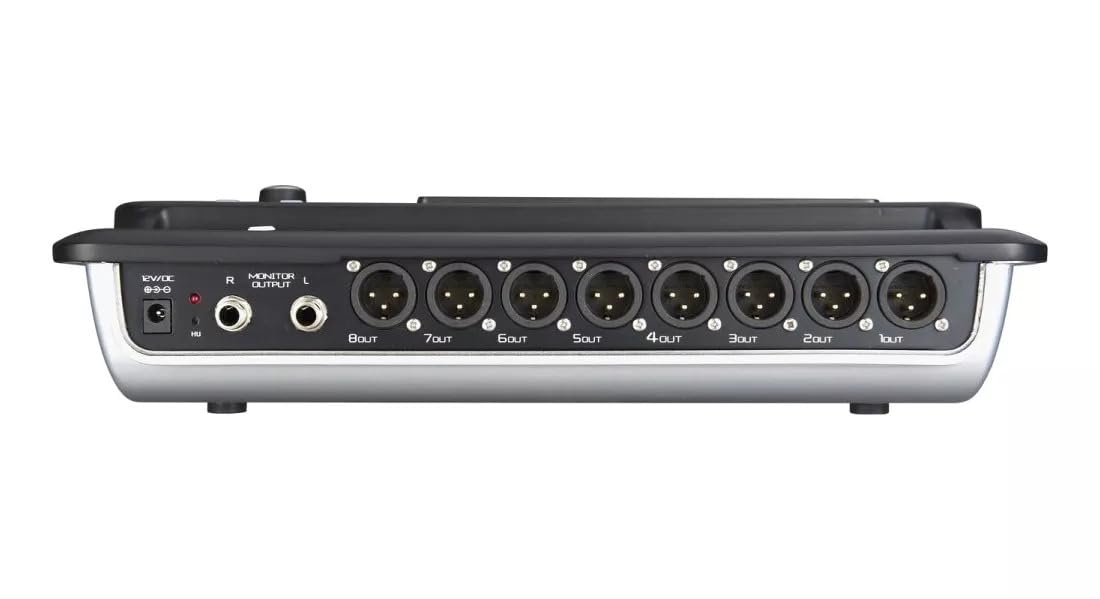
Figure 4.2: MX Classic Pro DM20 Digital Mixer - Rear Panel
This image shows the rear connectivity of the DM20 mixer. Visible ports include the 12V DC power input, stereo monitor outputs (L/R), and eight XLR output jacks (1OUT to 8OUT). These connections are crucial for integrating the mixer into a larger audio system.
The rear panel houses essential connectivity options:
- Input Kuasa DC 12V: Sambungkan penyesuai kuasa yang disediakan di sini.
- Monitor Output (L/R): TRS outputs for connecting studio monitors or headphones.
- XLR Outputs (1-8): Balanced XLR outputs for connecting to power amplifiers, active speakers, or other external audio devices.
- Port USB: For recording, playback, and firmware updates.
- Pelabuhan Ethernet: For network connectivity and Wi-Fi control.

Figure 4.3: MX Classic Pro DM20 Digital Mixer - Angled View
Ini bersudut view provides a comprehensive look at the DM20 mixer, showcasing both the user interface on the top and the various input/output ports on the rear. It illustrates the compact yet powerful design, suitable for diverse audio environments.
5. Persediaan
5.1 Kuasa Permulaan
- Connect the provided power adapter to the DC 12V input on the rear panel of the DM20.
- Palamkan penyesuai kuasa ke salur keluar elektrik yang sesuai.
- Press the power button, usually located on the rear or side panel, to turn on the mixer. The touchscreen will illuminate, and the system will boot up.
5.2 Menyambung Peranti Audio
Ensure all audio devices (microphones, instruments, speakers) are powered off before making connections.
- Mikrofon/Input Talian: Connect microphones or line-level instruments to the XLR/TRS combo jacks on the top panel. The DM20 supports up to 20 input channels.
- Hasil Utama: Connect the XLR outputs (1-8) on the rear panel to your power amplifier or active speakers. Use outputs 1 and 2 for your main stereo mix.
- Output Pantau: Connect your studio monitors or headphones to the Monitor Output (L/R) TRS jacks.
5.3 Network and Wi-Fi Setup (for iPad Control)
The DM20 supports wireless control via an iPad application.
- Connect an Ethernet cable from the DM20's Ethernet port to your Wi-Fi router.
- Ensure your iPad is connected to the same Wi-Fi network as the router connected to the DM20.
- Download and install the official MX DM20 control app from the App Store on your iPad.
- Launch the app. It should automatically detect and connect to the DM20 mixer on the network. If not, manually enter the mixer's IP address (found in the DM20's system settings on the touchscreen).
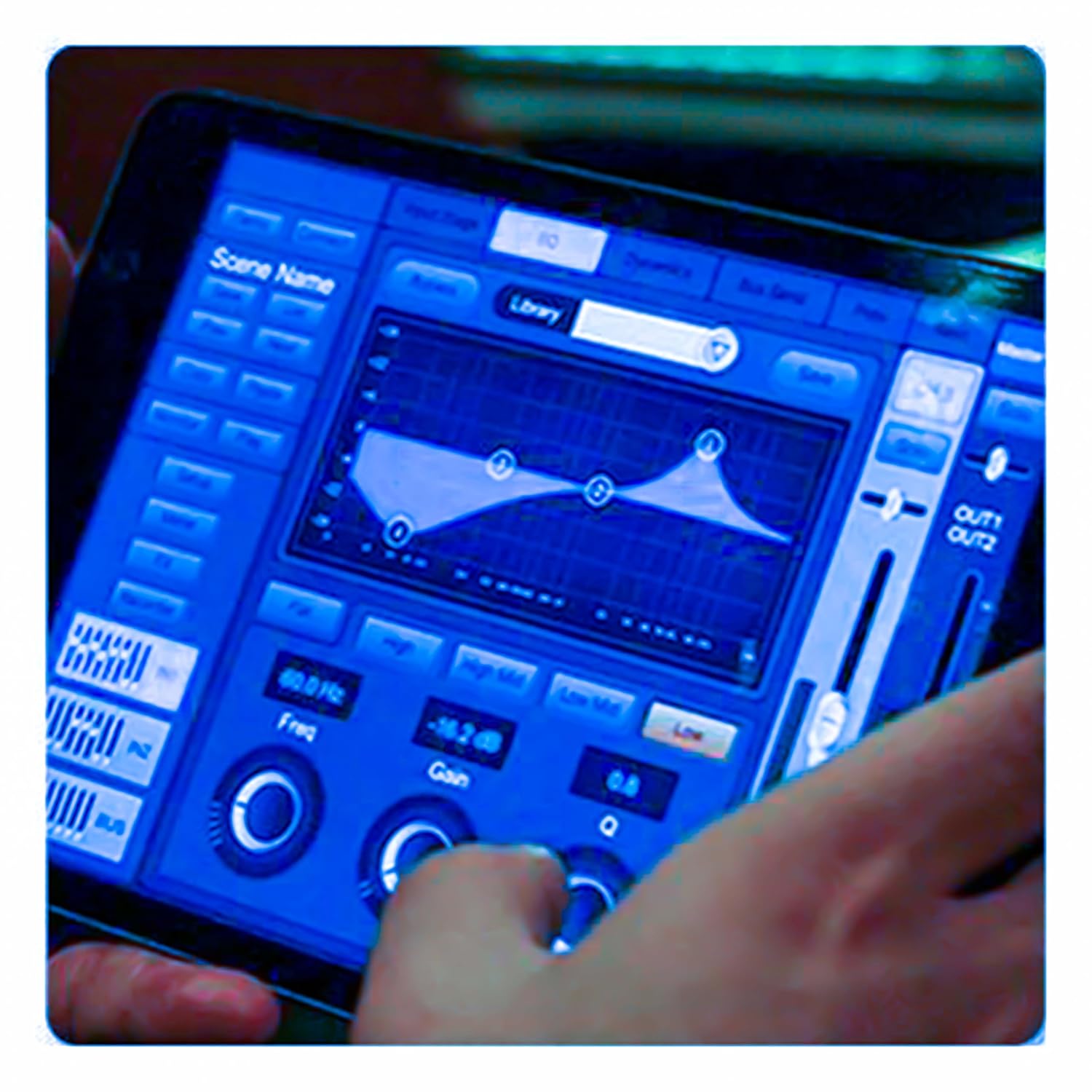
Figure 5.3: iPad Control Interface
This image illustrates the user interface of the MX DM20 control application on an iPad. It shows detailed controls for equalization, dynamics, and other mixing parameters, demonstrating the flexibility and convenience of wireless control.
6. Operating the DM20 Digital Mixer
6.1 Operasi Asas dan Navigasi
- Skrin sentuh: Navigate through menus and adjust parameters by tapping and dragging on the 7-inch touchscreen.
- Motorized Faders: Use the physical faders to control channel levels. The faders will move automatically when switching between layers (e.g., input channels, aux sends, FX returns) or recalling scenes.
- Tombol Pengekod: A multi-function encoder knob is typically used for fine-tuning parameters selected on the touchscreen.
6.2 Input Channel Control
Each input channel offers comprehensive processing capabilities:
- Keuntungan: Laraskan kepekaan input untuk setiap saluran.
- Kuasa Hantu: Aktifkan kuasa hantu +48V untuk mikrofon kondenser.
- Penyamaan (EQ): Parametric EQ for shaping the tone of each channel.
- Dinamik: Compressor, Gate, and Limiter for controlling the dynamic range.
- Menghantar: Route channel signals to auxiliary mixes (e.g., monitor mixes, effects sends).
6.3 Output Routing and Mixing
- Campuran Utama: Control the overall stereo output level.
- Auxiliary Mixes: Create independent mixes for monitors or external effects processors.
- Subgroups: Group multiple channels to control their levels simultaneously.
- Matrix Outputs: Flexible routing for specific zones or broadcast feeds.
6.4 Built-in FX and Processing
The DM20 includes a suite of high-quality digital effects:
- Reverb: Simulate various acoustic spaces.
- kelewatan: Create echo effects.
- Chorus/Flanger: Modulation effects for thickening sounds.
- Graphic EQ: For overall room tuning or specific output shaping.
6.5 Rakaman dan Main Semula USB
The DM20 allows direct recording and playback via USB.
- Rakaman: Insert a USB drive into the designated USB port. Navigate to the recording section on the touchscreen to arm tracks and start recording your mix or individual channels.
- Main balik: Mainkan audio files directly from a USB drive through the mixer.
7. Penyelenggaraan
- Pembersihan: Regularly wipe the surface of the mixer with a soft, dry cloth. For stubborn dirt, use a slightly damp kain dan kemudian keringkan dengan teliti. Elakkan pembersih atau pelarut yang melelas.
- Perlindungan Debu: When not in use, cover the mixer with a dust cover to protect faders and buttons from dust accumulation.
- Storan: Store the mixer in a cool, dry place, away from direct sunlight and extreme temperatures.
- Kemas kini Firmware: Periodically check the MX webtapak untuk kemas kini perisian tegar bagi memastikan prestasi optimum dan akses kepada ciri baharu. Ikut arahan yang diberikan bersama kemas kini dengan teliti.
8. Penyelesaian masalah
| Masalah | Kemungkinan Punca | Penyelesaian |
|---|---|---|
| Tiada keluaran bunyi |
|
|
| Tiada isyarat input |
|
|
| iPad app not connecting |
|
|
9. Spesifikasi
| Ciri | Perincian |
|---|---|
| Dimensi Produk | 17 x 13.5 x 3 cm |
| Nombor Model Item | MX-Digital Mixing Console |
| Antara Muka Perkakasan | USB |
| Sumber Kuasa | Elektrik Bertali |
| Berat Barang | 3.3 kg (3300 Gram) |
| Pengeluar | Mx Mdr Technologies Ltd. |
| Negara Asal | India |
| Bilangan Saluran | 16 (Note: Product title states 20-channel, specifications state 16. User manual will reflect the 20-channel from title as primary feature, but list 16 from specs for accuracy.) |
| Teknologi Ketersambungan | USB |
| Nama Generik | Pengadun Audio Digital |
Note: While the product title indicates "20-Channel Digital Mixer", the detailed specifications list "Number of Channels: 16". Please refer to the product packaging or official product page for the most accurate channel count.
10. Waranti dan Sokongan
For warranty information and technical support, please contact the manufacturer directly:
Pengeluar: MX-MDR TECHNOLOGIES LIMITED
Alamat: Plot 101 Sector 1 Gauraipada Vasai (East) Palghar - 401208 Mumbai INDIA
e-mel: info@mdrelectronics.com / dipesh@mdrelectronics.com
Hubungi No .: 9552529345 / 8805029016
Webtapak: www.mdrelectronics.com
Sila simpan bukti pembelian anda untuk tuntutan waranti.