1. Produk Lebihview
The JJC Slide and Film Digitizing Adapter Kit is designed for re-photographing 35mm negatives and slides using compatible macro lenses. This kit facilitates the conversion of physical film media into digital images, serving as an alternative to traditional film scanners. It is compatible with various Canon, Nikon, and Sony cameras when used with specific macro lenses.

The process involves capturing high-resolution images of your film using your camera, which can then be post-processed for optimal quality. This method offers flexibility and control over the final digital output.

2. Kandungan Pakej
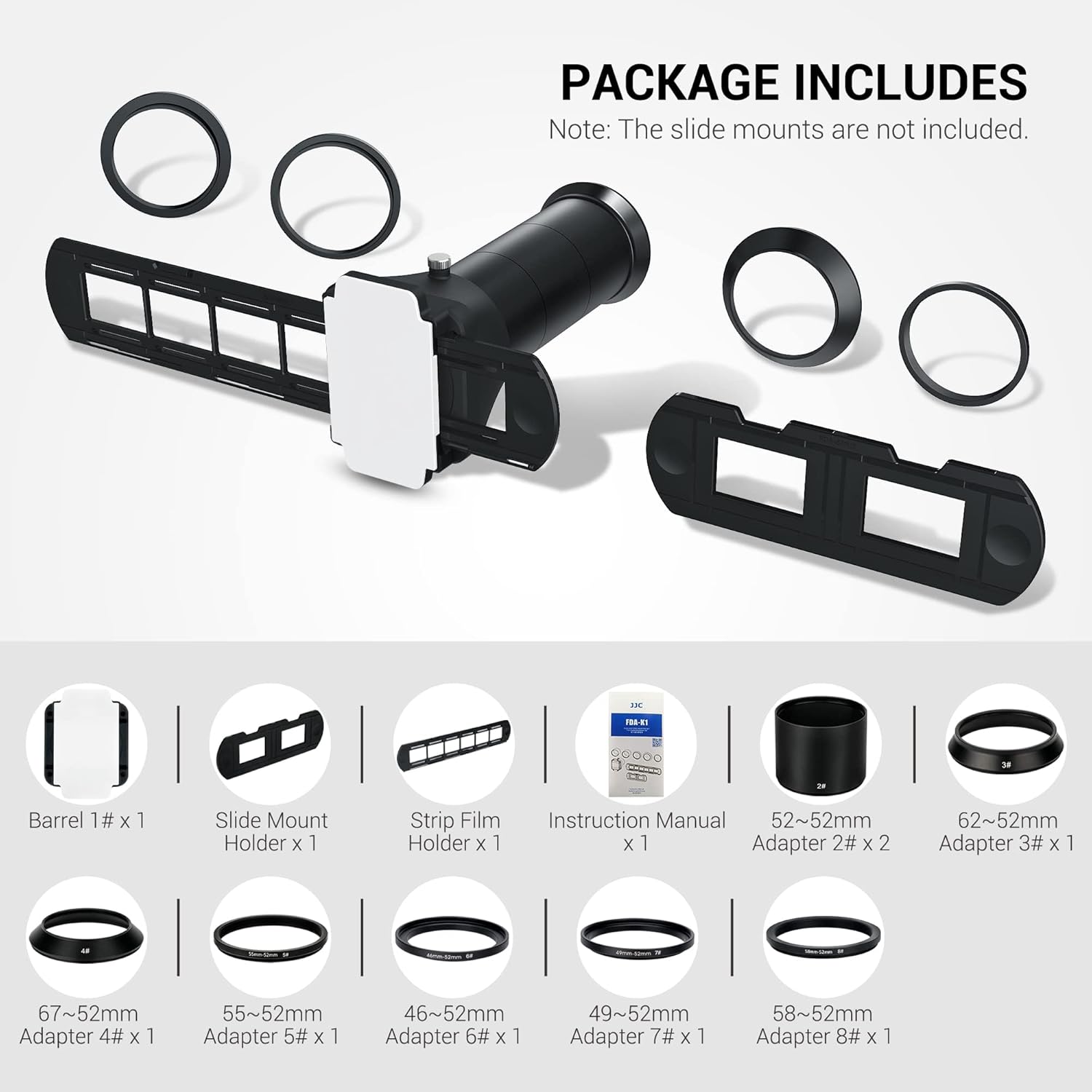
Verify that all components are present in your kit:
- 1x Barrel (1#)
- 2 x 52-52mm Adapter (2#)
- 1 x 62-52mm Adapter (3#)
- 1 x 67mm-52mm Adapter (4#)
- 1 x 55mm-52mm Adapter (5#)
- 1 x 46-52mm Adapter (6#)
- 1 x 49-52mm Adapter (7#)
- 1 x 58-52mm Adapter (8#)
- 1 x Slide Mount Holder
- 1 x Strip Film Holder
3. Keserasian
This digitizing adapter kit is designed for use with specific macro lenses from Canon, Nikon, and Sony. The included lens adapters ensure broad compatibility. Refer to the list below for confirmed compatible lenses:
- Canon EF 100mm f/2.8L Macro IS USM Lens
- Canon RF 100mm f/2.8L Macro IS USM Lens
- Canon EF-S 60mm f/2.8 USM Lens
- Nikon AF Micro-NIKKOR 60mm f/2.8D Lens
- Nikon AF-S DX Micro NIKKOR 40mm f/2.8G Lens
- Kanta Makro Nikon NIKKOR Z MC 50mm f/2.8
- Nikon NIKKOR Z MC 105mm f/2.8 VR S Macro Lens
- Sony FE 50mm f/2.8 Macro Lens
- Sony FE 90mm f/2.8 Macro G OSS Lens
- Laowa 50mm f/2.8 2X Ultra Macro APO Lens
- Laowa 60mm f/2.8 2X Ultra-Macro Lens
- Laowa 65mm f/2.8 2X Ultra Macro APO Lens
- Laowa 85mm f/5.6 2x Ultra Macro APO Lens
- Laowa 100mm f/2.8 2X Ultra Macro APO Lens
- Olympus M.Zuiko Digital ED 60mm f/2.8 Makro
The kit includes various adapter rings to match different lens filter thread sizes to the digitizer barrel.

4. Arahan Persediaan
Follow these steps to properly attach the digitizing adapter kit to your camera and macro lens:
- Sediakan Kanta Anda: Before attaching, remove any lens hoods, filters, or other accessories from your macro lens.
- Attach Adapter Ring: Select the appropriate adapter ring (e.g., 52-52mm, 62-52mm, etc.) that matches your macro lens's filter thread size. Screw this adapter ring onto the front of your macro lens.
- Connect Barrel: Attach the main barrel component (1#) to the adapter ring. Ensure it is securely fastened.
- Insert Film Holder: Slide either the Strip Film Holder (for film strips) or the Slide Mount Holder (for mounted slides) into the slot on the barrel.

5. Arahan Operasi
5.1 Loading Film/Slides
- Untuk Jalur Filem: Open the Strip Film Holder and carefully place a strip of 35mm negatives into the designated grooves. Close the holder to secure the film.
- Untuk Slaid Terpasang: Insert up to two mounted 35mm slides into the Slide Mount Holder.

5.2 Positioning and Capture
- Sumber Cahaya: Position a suitable light source behind the film holder. Refer to Section 6 for recommendations.
- Tetapan Kamera: Set your camera to manual focus. Adjust aperture, shutter speed, and ISO for proper exposure.
- Memfokuskan: Use your camera's live view to achieve precise focus on the film grain.
- Tangkap Imej: Once focused and exposed correctly, capture the image.
- Filem Lanjutan: For film strips, gently slide the holder to advance to the next frame. For slides, replace the mounted slide with the next one.

5.3 Melaraskan View Angle and Tilt
The digitizer features a view angle adjustment ring on the barrel. This allows for fine-tuning the angle of view and tilt:
- Putar Cincin: Rotate the adjustment ring to modify the tilt of the film holder relative to the lens.
- Slide In/Out: Slide the ring in or out along the barrel to adjust the angle of view, which can help in framing the film precisely.

6. Light Source Recommendations
The quality of your digital conversions heavily depends on the light source used. Consider the following:
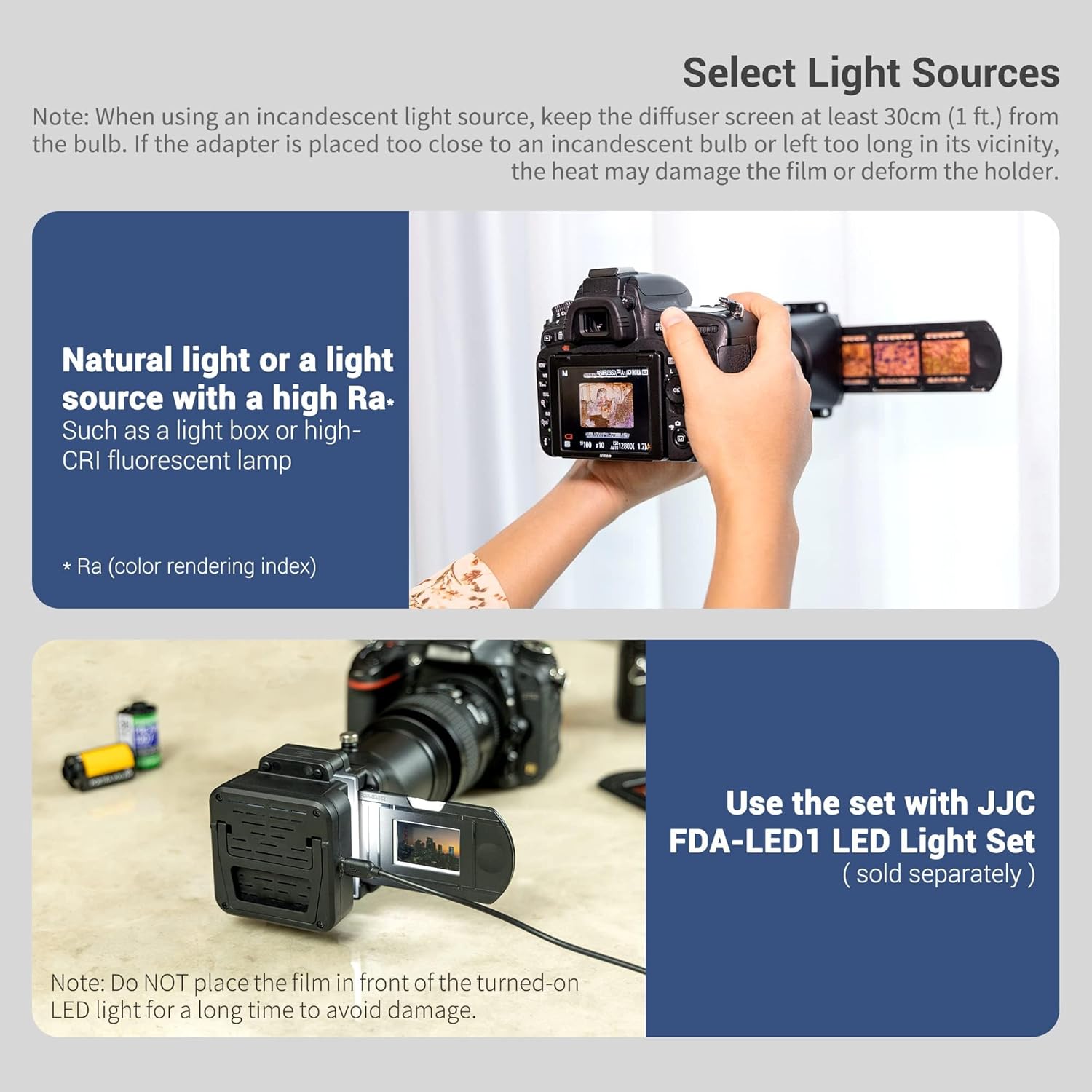
- Cahaya Semulajadi: A natural light source, such as diffused daylight, is highly recommended for accurate color reproduction.
- High-CRI Fluorescent Lamp: A light source with a high Color Rendering Index (CRI) fluorescent lamp or a dedicated light box provides consistent and color-accurate illumination.
- JJC Film Negative LED Light: For optimal results and convenience, consider using the JJC Film Negative LED Light (sold separately).
Awas:
- When using an incandescent light source, keep the adapter at least 30cm (1 ft.) away from the bulb.
- Avoid prolonged exposure of the film and holder to incandescent light to prevent heat damage or deformation.
7. Penyelenggaraan
To ensure the longevity and optimal performance of your digitizing adapter kit, follow these maintenance guidelines:
- Pembersihan: Use a soft, lint-free cloth to gently wipe the surfaces of the barrel and holders. For stubborn dust, a lens blower can be used. Avoid abrasive cleaners or solvents.
- Film Holders: Keep the film and slide holders free of dust and fingerprints, as these can appear in your digitized images.
- Storan: Store the kit in a clean, dry place away from direct sunlight and extreme temperatures when not in use.
- Pengendalian: Handle all components with care to prevent scratches or damage, especially to the optical surfaces if any.
8. Penyelesaian masalah
If you encounter issues while using the digitizing adapter kit, consider the following:
- Unsharp Images: Ensure your camera is set to manual focus and that you are focusing precisely on the film grain. Check that the lens is clean and free of smudges.
- Color Casts: Verify that your light source has a high CRI. Adjust your camera's white balance settings to match the light source. Post-processing software can correct color casts.
- Dust/Scratches on Images: Clean the film, slide holder, and lens thoroughly before each use. Use a blower brush to remove dust.
- Film Holder Wobble: Ensure all connections are tightened. While some minor play might be inherent, excessive wobble can affect image sharpness. Stabilize the setup if necessary.
- Incompatible Lens: Confirm your macro lens is listed in the compatibility section. Lenses with different focal lengths or minimum focus distances may not achieve proper magnification or focus.
9. Spesifikasi
| Model | FDA-K1 (Negative Digitizer Only) |
| Dimensi Pakej | 12.13 x 5.43 x 3.35 inci |
| Berat Barang | 15.8 auns |
| Jenis Filem Serasi | 35mm negatives (strip film), 35mm mounted slides |
| Pemasangan yang Serasi | Canon EF, Canon EF-S, Canon RF (with specific macro lenses) |
| Pengeluar | JJC |
10. Waranti dan Sokongan
JJC products are manufactured to high-quality standards. For specific warranty information, please refer to the documentation included with your purchase or visit the official JJC website. For technical support or inquiries, please contact JJC customer service through their official channels.
11. Video Produk
Watch this video for a visual guide on using the JJC Slide and Film Digitizing Adapter Kit.
Demonstration of the JJC Slide and Film Digitizing Adapter Kit in use.


