1. Pengenalan
The Veanic Mini Digital Hygrometer Thermometer Gauge (Model GCM0802) is a compact device designed to accurately monitor both temperature and humidity. Featuring an external probe and an LCD display, this unit provides essential environmental data for various applications, including reptile terrariums, plant greenhouses, incubators, and humidors. This manual provides comprehensive instructions for the proper setup, operation, and maintenance of your device.
2. Produk Lebihview
The Veanic Mini Digital Hygrometer Thermometer Gauge consists of a main display unit and a remote sensor probe. The display shows real-time temperature in Fahrenheit and relative humidity percentage. The external probe allows for precise measurements in specific locations while the main unit remains easily viewmampu.

Image 1: Two Veanic Mini Digital Hygrometer Thermometer Gauges, showing the main display unit and the wired sensor probe.

Image 2: Diagram illustrating the 2-in-1 functionality, displaying temperature and humidity ranges.
3. Spesifikasi
| Model | GCM0802 |
| Jenis Paparan | LCD |
| Dimensi (Unit Utama) | 1.89 x 1.13 x 0.6 inci (48 x 28.6 x 15.2 mm) |
| Panjang Kabel | 59 inci (1.5 meter) |
| Julat Pengukuran Suhu | -58℉ hingga 158℉ (-50℃ hingga 70℃) |
| Ketepatan Pengukuran Suhu | ±2℉ (±1℃) |
| Julat Pengukuran Kelembapan | 10% hingga 99% RH |
| Ketepatan Pengukuran Kelembapan | ±5% RH |
| Kelembapan Sampling Tempoh | 10 saat |
| Sumber Kuasa | 2 x LR44 button cells (included) |
| bahan | plastik |
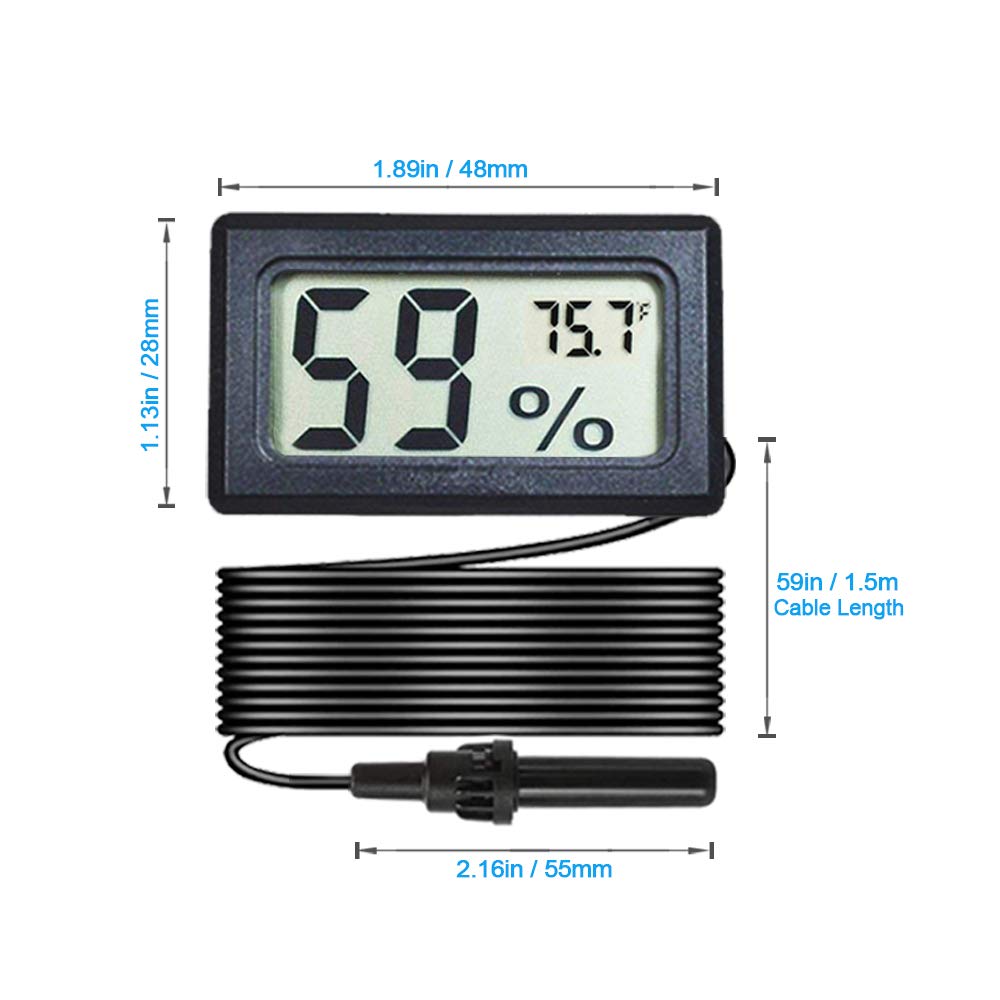
Image 3: Detailed dimensions of the main unit and cable length.
4. Persediaan dan Pemasangan
- Pemasangan Bateri: The device comes with 2 LR44 button cell batteries pre-installed. If the display is blank or dim, replace the batteries. To do this, locate the battery compartment on the back of the main unit, open it, and insert new LR44 batteries, ensuring correct polarity.
- Placement of Main Unit: Position the main display unit in a location where it can be easily read.
- Penempatan Probe: Extend the wired sensor probe into the environment you wish to monitor (e.g., terrarium, incubator, humidor). Ensure the probe tip is positioned to accurately reflect the conditions of that specific area.
- Nota Penting: The sensor probe is tidak kalis air. Do not immerse the probe in water or use it in aquatic environments such as fish tanks. Exposure to water will damage the sensor.

Imej 4: Cthample of the remote sensor probe installed in a reptile terrarium, highlighting its independent placement.
5. Operasi
Once the batteries are installed and the probe is placed, the device will automatically begin displaying the current temperature and humidity readings on its LCD screen. The temperature is displayed in Fahrenheit (℉), and the humidity is shown as a percentage (%). The device updates its readings approximately every 10 seconds.

Image 5: Various applications for the hygrometer, including humidors, incubators, reptile terrariums, and plant terrariums.
6. Penyelenggaraan
- Pembersihan: To clean the device, gently wipe the main unit and probe with a soft, dry cloth. Do not use abrasive cleaners or immerse the unit in water.
- Penggantian Bateri: When the display becomes dim or stops functioning, replace the LR44 button cell batteries as described in the Setup section.
- Storan: Jika menyimpan peranti untuk tempoh yang lama, tanggalkan bateri untuk mengelakkan kebocoran dan simpan di tempat yang sejuk dan kering.
7. Penyelesaian masalah
- Paparan Kosong: If the display is blank, check if the batteries are correctly installed and have sufficient charge. Replace batteries if necessary.
- Bacaan Tidak Tepat: Ensure the probe is positioned correctly and not obstructed. Allow sufficient time (at least 15-30 minutes) for the readings to stabilize after initial setup or significant environmental changes.
- No Reading from Probe: Verify that the probe cable is securely connected to the main unit.
8. Maklumat Keselamatan
- Jauhkan bateri daripada kanak-kanak. Jika tertelan, dapatkan rawatan perubatan segera.
- Do not expose the device or probe to extreme temperatures or direct sunlight for prolonged periods.
- As noted, the probe is not waterproof. Avoid contact with liquids to prevent damage and ensure accurate readings.
- Buang bateri terpakai mengikut peraturan tempatan.
9. Waranti dan Sokongan
For warranty information or technical support, please contact Veanic customer service through the retailer where the product was purchased. Please have your model number (GCM0802) and purchase details available when contacting support.