1. Pengenalan dan Lebihview
The Wemo Smart Video Doorbell is designed for seamless integration with Apple HomeKit Secure Video, providing a convenient and secure method to monitor your home and communicate with visitors. This device offers a wide field of view and high-definition video quality, ensuring comprehensive coverage of your doorstep. It leverages your existing iCloud subscription for secure storage of motion-based recordings within the Apple Home App.
Key features include face recognition, dual-band Wi-Fi connectivity for reliable performance, and infrared technology for clear night vision. This doorbell is compatible exclusively with wired 16-24V AC doorbell systems.
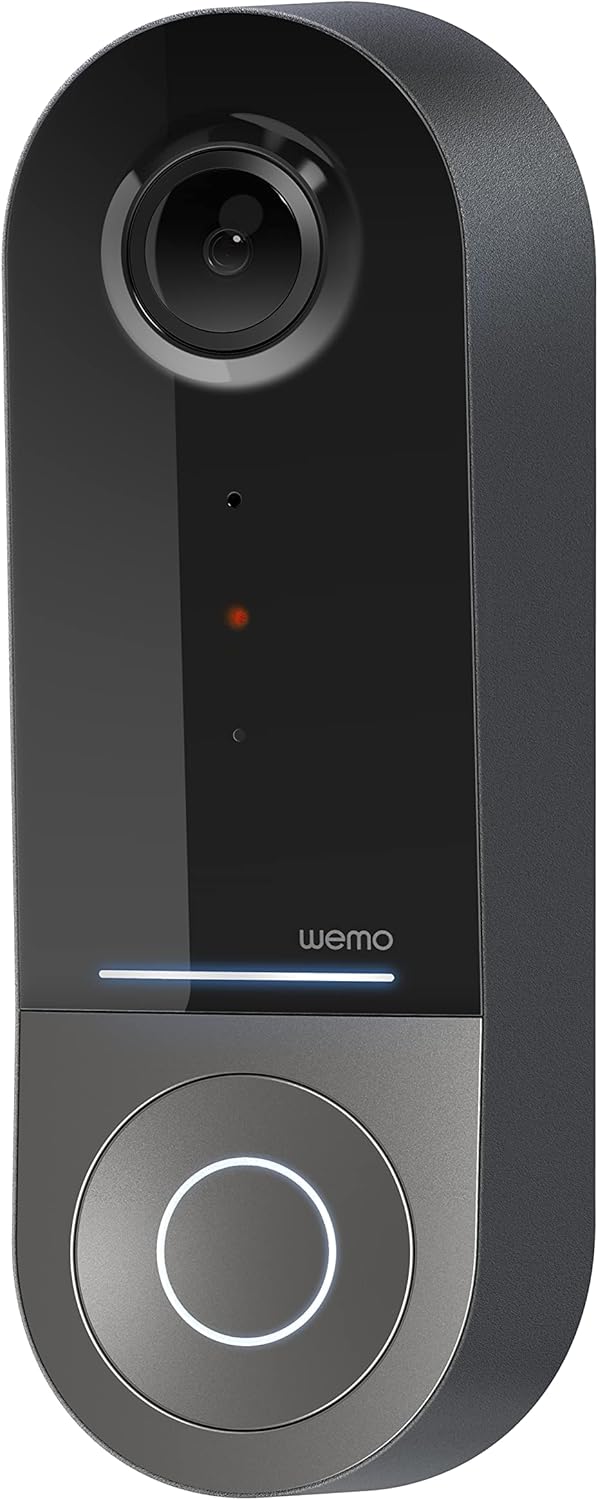
Figure 1: Wemo Smart Video Doorbell
2. Persediaan dan Pemasangan
2.1 Senarai Semak Prapemasangan
- Ensure you have a wired doorbell system with 16-24V AC power.
- Download the Apple Home App on your iOS device.
- Confirm strong 2.4GHz and 5GHz Wi-Fi signal at your doorbell location.
2.2 Pemasangan Fizikal
- Matikan kuasa: Before beginning installation, turn off power to your existing doorbell system at the circuit breaker.
- Remove old doorbell: Carefully remove your existing doorbell button.
- Pasang pendakap pelekap: Use the provided screws and screwdriver to securely attach the mounting bracket to your wall. If needed, use the left/right wedges to adjust the viewsudut ing.
- Connect power kit: Follow the instructions in the included Setup Guide to properly install the Power Kit with Connectors into your existing chime box. This is crucial for correct operation.
- Wire the Wemo Doorbell: Connect the existing doorbell wires to the terminals on the back of the Wemo Smart Video Doorbell.
- Pasang loceng pintu: Secure the Wemo Smart Video Doorbell onto the mounting bracket.
- Pulihkan kuasa: Hidupkan semula kuasa pada pemutus litar.
2.3 Persediaan Apl
- Open the Apple Home App on your iOS device.
- Tap the '+' icon to add a new accessory.
- Scan the HomeKit setup code provided with your Wemo Smart Video Doorbell.
- Follow the on-screen prompts to name your doorbell, assign it to a room, and configure HomeKit Secure Video settings, including motion detection and face recognition preferences.
3. Arahan Operasi
3.1 Langsung View dan Pemberitahuan
- Access live video feed directly from the Apple Home App on your iPhone, iPad, or HomePod.
- Receive instant notifications on your iOS device when motion is detected or the doorbell is pressed.
- Utilize face recognition to receive specific alerts for known individuals.

Figure 2: Face Recognition with HomeKit Secure Video
3.2 Rakaman dan Penyimpanan Video
- HomeKit Secure Video stores 10 days of motion-based recording history in your iCloud account.
- Review recorded events directly within the Apple Home App.

Figure 3: iCloud Recording via Apple Home App
3.3 Audio Dua Hala
- Engage in real-time two-way conversations with visitors through the Apple Home App.
3.4 Advanced Video Features
- Bidang Luas View: The camera offers a 178° vertical, 140° horizontal, and 223° diagonal field of view for extensive coverage.
- HD Resolution with HDR: Enjoy crystal clear 1200x1600 resolution video with HDR for optimal image quality in varying light conditions.
- Penglihatan Malam yang Dipertingkatkan: Infrared technology provides clear video even in low-light conditions.

Figure 4: Enhanced Night Vision
3.5 Dual-Band Wi-Fi Connectivity
- The doorbell utilizes both 2.4GHz and 5GHz Wi-Fi bands.
- The 2.4GHz band offers a longer range and better penetration through walls.
- The 5GHz band provides higher speeds for closer proximity connections.

Rajah 5: Kesambungan Wi-Fi Dwi-Jalur
4. Penyelenggaraan dan Penyelesaian Masalah
4.1 Penjagaan Am
- Bersihkan lensa kamera dengan kerap dengan lembut, damp cloth to ensure clear video quality.
- Ensure the doorbell is free from obstructions that might block its field of view or microphone.
Pemecahan masalah 4.2
- Isu Ketersambungan: If the doorbell frequently disconnects, ensure your Wi-Fi signal is strong at the installation location. Consider adjusting your router's band (2.4GHz for range, 5GHz for speed) or adding a Wi-Fi extender.
- Masalah kuasa: Verify that your wired doorbell system provides the required 16-24V AC. Insufficient voltage can lead to intermittent operation or device resets. Consult a qualified electrician if you suspect voltage isu.
- App Responsiveness: If the Apple Home App is slow to connect or display the live feed, ensure your iOS device and HomeKit hub (e.g., Apple TV, HomePod) are updated and have a stable internet connection. Restarting the doorbell or your HomeKit hub may resolve temporary glitches.
5. Spesifikasi
| Penggunaan Dalaman/Luar | Luar |
| Peranti Serasi | HomePod, iPad, iPhone |
| Sumber Kuasa | Corded Electric (16-24V AC) |
| Protokol Ketersambungan | Wi-Fi (2.4GHz & 5GHz) |
| Jenis Pengawal | Apple HomeKit |
| Jenis Pemasangan | Lekap di dinding |
| Resolusi Tangkapan Video | 1200x1600 (HD, HDR-enabled) |
| warna | Hitam |
| Dimensi Item L x W x H | 2.1 x 1.8 x 5 inci |
| Berat Barang | 13.7 auns |
| Ciri Khas | HD Resolution, Image Sensor, Night Vision, HDR |
6. Apa yang ada di dalam Kotak
- Loceng Pintu Video Pintar
- Panduan Persediaan
- Pendakap Pemasangan
- Left/Right Wedge
- Skru dan Pemutar Skru
- Power Kit with Connectors
7. Video Produk Rasmi
Video 1: Official Wemo Video Doorbell overview, tunjukkancasinciri dan reka bentuk g.
8. Waranti dan Sokongan
For warranty information and technical support, please refer to the official WeMo webtapak atau hubungi perkhidmatan pelanggan mereka secara langsung. Simpan resit pembelian anda untuk tuntutan waranti.


