pengenalan
Thank you for choosing the Inateck KB02017 AZERTY Keyboard. This manual provides detailed instructions for setting up, operating, and maintaining your keyboard to ensure optimal performance and longevity. Please read this manual thoroughly before use.
Keserasian
The Inateck KB02017 keyboard is compatible with the following iPad models:
- iPad 10.2-inch (9th Generation, 2021)
- iPad 10.2-inch (8th Generation, 2020)
- iPad 10.2-inch (7th Generation, 2019)
- iPad Air 3 (10.5-inch, 2019)
- iPad Pro 10.5 inci

This image illustrates the compatible iPad models and how to locate your iPad's model number for verification.
Kandungan Pakej
Sila semak pakej untuk item berikut:
- Inateck KB02017 Magnetic Detachable Keyboard
- Kes Pelindung
- Kabel Pengecas USB
- Manual Pengguna
Ciri-ciri Produk
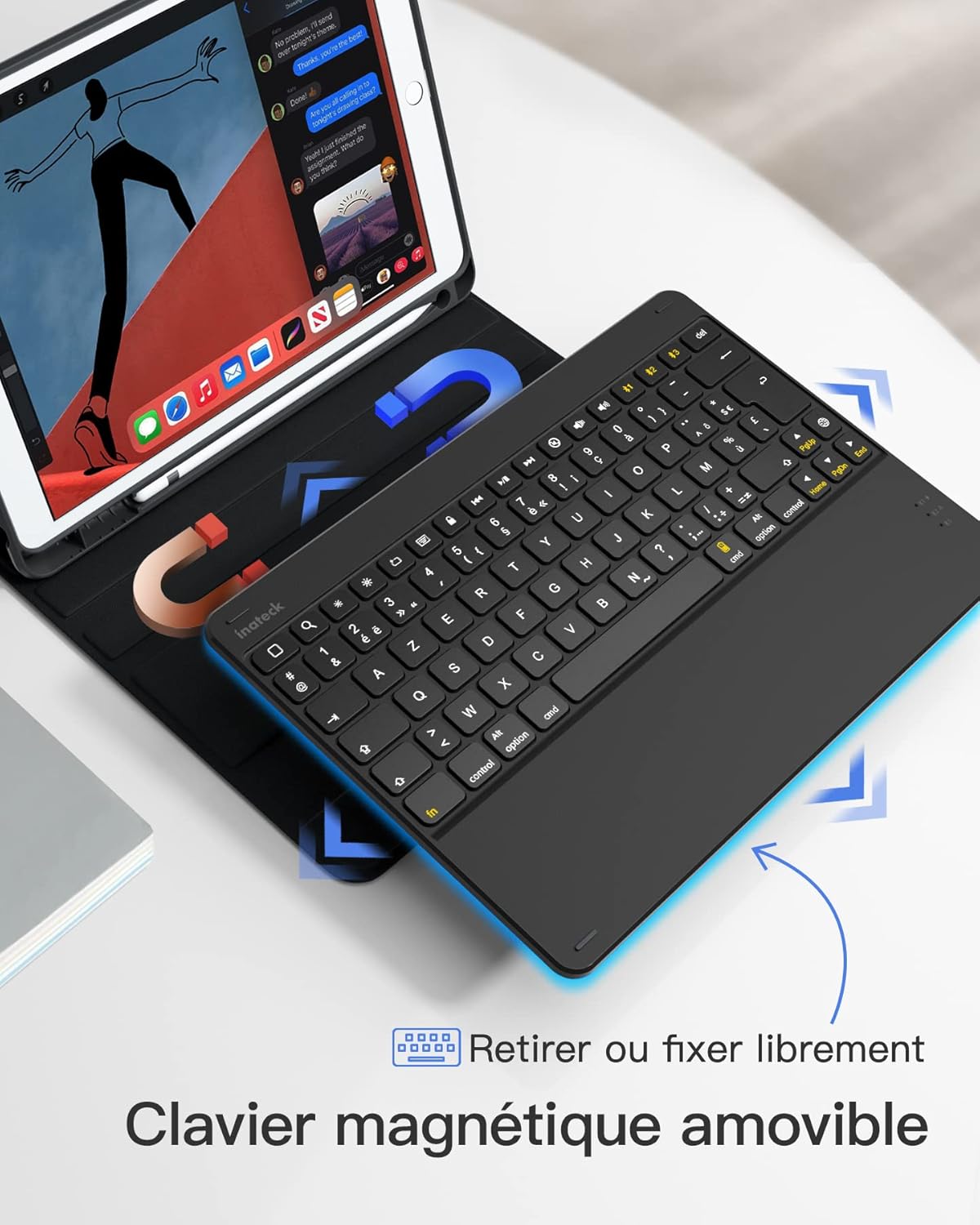
- Reka Bentuk Boleh Tanggal Magnetik: The keyboard can be easily detached from the protective case, offering flexibility and portability. This allows you to use the iPad with or without the keyboard.
- True French AZERTY Layout: Designed with a genuine French AZERTY keyboard layout for comfortable and familiar typing.
- Berbilang Viewsudut: The case supports three adjustable viewing angles, allowing you to find the most comfortable position for typing, viewmelukis, atau melukis.
- Independent iOS Shortcut Keys: A dedicated row of shortcut keys provides quick access to various iOS functions, enhancing productivity.
- Perlindungan Penuh: The flexible and shock-resistant protective case safeguards your iPad from daily bumps and scratches.
- Hayat Bateri yang Panjang: Enjoy up to 100 hours of continuous operation or 50 days of standby time on a single charge.

The keyboard features a magnetic detachable design for versatile use.

The keyboard features a true French AZERTY layout.

Boleh laras viewing angles provide ergonomic comfort.
Persediaan
1. Mengecas Papan Kekunci
Before first use, fully charge the keyboard. Connect the provided USB charging cable to the keyboard's charging port and a USB power source. The charging indicator light will show the charging status.
2. Berpasangan Bluetooth
- Pastikan papan kekunci dicas dan dihidupkan.
- Pada iPad anda, pergi ke tetapan > Bluetooth dan hidupkan Bluetooth.
- Tekan dan tahan butang Fn + C keys simultaneously on the keyboard for 3 seconds. The Bluetooth indicator light will start flashing, indicating the keyboard is in pairing mode.
- On your iPad, look for "Inateck KB02017" (or similar name) in the list of available devices and tap to connect.
- Once connected, the Bluetooth indicator light on the keyboard will stop flashing and remain solid for a few seconds, then turn off.
The keyboard connects to your iPad via Bluetooth.
Arahan Operasi
Using Shortcut Keys
The top row of the keyboard features dedicated iOS shortcut keys for quick access to various functions. These keys allow you to control your iPad efficiently without touching the screen.
| Ikon Utama | Fungsi |
|---|---|
| Rumah | Kembali ke skrin Utama |
| Cari | Activate Spotlight Search |
| Kecerahan Turun | Kurangkan kecerahan skrin |
| Kecerahan Naik | Tingkatkan kecerahan skrin |
| Keyboard Hide/Show | Hide or show the on-screen keyboard |
| Trek Sebelumnya | Pergi ke trek media sebelumnya |
| Main/Jeda | Play or pause media playback |
| Trek Seterusnya | Pergi ke trek media seterusnya |
| bisu | Redamkan atau nyahredamkan audio |
| Kelantangan Kurang | Kurangkan volum |
| Kelantangan Naik | Tingkatkan kelantangan |
| Kunci Skrin | Lock the iPad screen |

Dedicated shortcut keys for iOS functions.
Penyelenggaraan
Pembersihan
Untuk membersihkan papan kekunci, lap permukaannya dengan lembut menggunakan kain lembutamp cloth. Avoid using harsh chemicals or abrasive materials. Ensure no liquid enters the keyboard's internal components.
Penjagaan Bateri
The keyboard is powered by a rechargeable battery. To prolong battery life:
- Charge the keyboard regularly, even if not in frequent use.
- Elakkan daripada mendedahkan papan kekunci kepada suhu yang melampau.
- Jika menyimpan untuk tempoh yang lama, cas bateri sehingga kira-kira 50% sebelum penyimpanan.

The keyboard offers long battery life for extended use.
Menyelesaikan masalah
Keyboard Fails to Connect via Bluetooth
- Clear the paired device history for "Inateck KB02017" on your iPad.
- Deactivate and then reactivate the keyboard's Bluetooth.
- Tekan dan tahan butang Fn + C keys for 3 seconds to enter Bluetooth pairing mode.
- Tap on "Inateck KB02017" in your iPad's Bluetooth device list to pair.
Some Keys Transmit Incorrect Values
If keys are not producing the expected characters (e.g., 'A' instead of 'Q' for AZERTY layout), ensure the correct keyboard layout is selected on your iPad:
- Pergi ke tetapan > Umum > papan kekunci.
- Ketik pada Papan kekunci, kemudian Add New Keyboard... if 'French (AZERTY)' is not listed.
- Di bawah Papan Kekunci Perkakasan, ensure the correct 'French (AZERTY)' layout is selected for your Inateck KB02017.

Common troubleshooting steps for connectivity and key input issues.
Spesifikasi
| Ciri | Perincian |
|---|---|
| Jenama | Inateck |
| Nombor Model | KB02017 |
| warna | Kelabu Gelap |
| Teknologi Ketersambungan | Bluetooth |
| Jenis Kuasa | Dikuasakan Bateri |
| Penerangan Papan Kekunci | Berdiri sendiri |
| Peranti Serasi | iPad 2021/2020/2019 (9th/8th/7th Generation), iPad Air 3, iPad Pro 10.5 |
| Dimensi Item (L x W x H) | 25.5 x 19.8 x 1.8 cm |
| Berat Produk | 0.65 kg (1.43 lbs) |
| Ciri Khas | Ringan |
| bahan | Aluminum, Polycarbonate, PBT |
Waranti dan Sokongan
For warranty information or technical support, please refer to the documentation included with your purchase or visit the official Inateck website. Contact details for customer service can typically be found on the product packaging or the brand's support page.


