1. Pengenalan
Thank you for choosing the Omega OM0520WB 1600 dpi Wireless Optical Mouse. This manual provides detailed instructions for setting up, operating, maintaining, and troubleshooting your new device. Please read this manual carefully before use to ensure optimal performance and longevity of your mouse.
2. Kandungan Pakej
Sila semak pakej untuk item berikut:
- Omega OM0520WB Wireless Optical Mouse
- Manual Pengguna
- 1 x AA Battery (may be pre-installed or included separately)
3. Produk Lebihview
Familiarize yourself with the components of your Omega OM0520WB mouse:
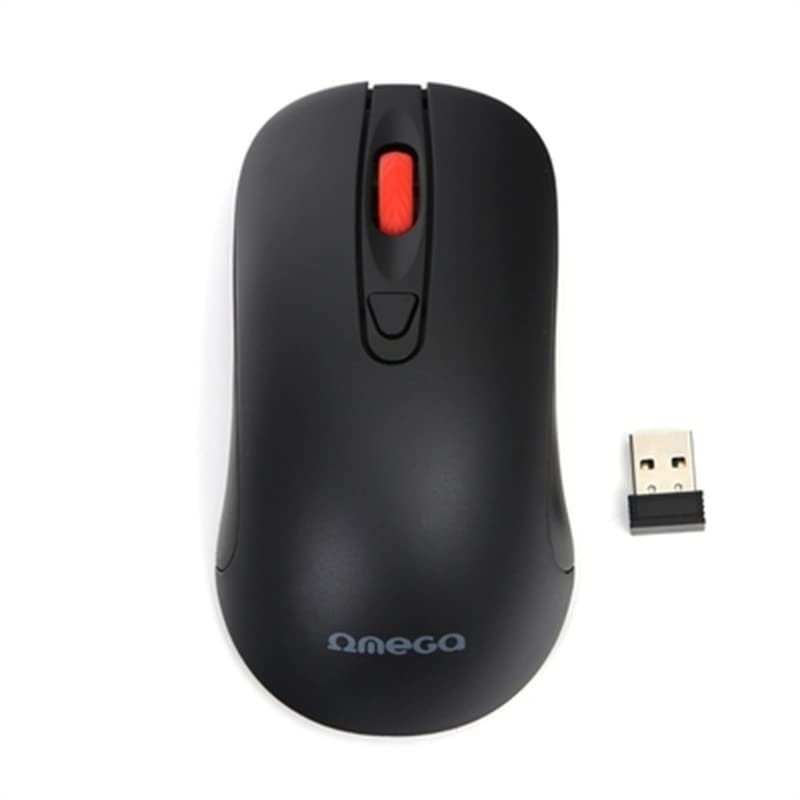
Image: The Omega OM0520WB Wireless Optical Mouse, shown in black. It features a sleek, ergonomic design with standard left and right click buttons, a scroll wheel, and a smooth finish.
- Butang Klik Kiri: Fungsi klik utama standard.
- Butang Klik Kanan: Fungsi klik sekunder standard.
- Roda Tatal: Untuk fungsi tatal menegak dan klik tengah.
- Sensor Optik: Located on the underside, for precise tracking.
- Petak Bateri: Located on the underside, for inserting the AA battery.
- Suis kuasa: On/Off switch, usually on the underside of the mouse.
4. Arahan Persediaan
Follow these steps to set up your Omega OM0520WB mouse:
- Pasang Bateri: Open the battery compartment cover on the underside of the mouse. Insert one AA battery, ensuring the polarity (+/-) matches the diagram inside the compartment. Close the cover securely.
- Turn On Mouse: Cari suis kuasa di bahagian bawah tetikus dan luncurkannya ke kedudukan 'ON'.
- Sambung melalui Bluetooth:
- On your computer or laptop, navigate to the Bluetooth settings.
- Pastikan Bluetooth diaktifkan.
- Cari untuk new devices. The mouse should appear as 'Omega OM0520WB' or similar.
- Select the mouse to pair. Once paired, your mouse is ready for use.
5. Arahan Operasi
Your Omega OM0520WB mouse is designed for intuitive use:
- Navigasi Asas: Move the mouse on a flat surface to control the cursor on your screen.
- Mengklik: Use the left button for primary clicks (e.g., selecting items) and the right button for secondary clicks (e.g., opening context menus).
- Menatal: Gulung roda skrol ke atas atau ke bawah untuk menavigasi dokumen dan web pages. Press the scroll wheel for a middle-click function, if supported by your application.
- Tetapan DPI: The mouse operates at a fixed 1600 dpi, providing a balance of speed and precision for most tasks.
- Reka Bentuk Ambidextrous: The symmetrical design allows comfortable use for both left-handed and right-handed users.
6. Penyelenggaraan
Untuk memastikan ketahanan dan prestasi optimum tetikus anda, ikuti garis panduan penyelenggaraan ini:
- Pembersihan: Gunakan kain lembut dan kering untuk mengelap permukaan tetikus. Untuk kotoran degil, sedikit dampen kain dengan air. Elakkan menggunakan bahan kimia yang keras atau pembersih yang kasar.
- Sensor Optik: Pastikan sensor optik di bahagian bawah bersih dan bebas daripada habuk atau serpihan.
- Penggantian Bateri: When the mouse performance degrades or it stops responding, replace the AA battery. Always use a fresh, high-quality battery.
- Storan: When not in use for extended periods, turn off the mouse using the power switch to conserve battery life. Store it in a cool, dry place.
7. Penyelesaian masalah
If you encounter issues with your Omega OM0520WB mouse, refer to the following solutions:
- Tetikus Tidak Menjawab:
- Pastikan tetikus dihidupkan.
- Periksa bateri. Gantikannya jika perlu.
- Verify that Bluetooth is enabled on your computer and the mouse is paired. Try re-pairing the mouse.
- Move the mouse closer to your computer to ensure a strong Bluetooth signal.
- Pergerakan Kursor Tidak Menentu:
- Bersihkan sensor optik di bahagian bawah tetikus.
- Use the mouse on a clean, non-reflective, and uniform surface. Mouse pads are recommended.
- Isu Sambungan:
- Mulakan semula komputer anda dan cuba sambungkan semula.
- Remove the mouse from your computer's Bluetooth device list and then re-pair it.
- Ensure there are no other devices interfering with the Bluetooth signal.
8. Spesifikasi
| Nama Model | OM0520WB |
| Teknologi Ketersambungan | Wayarles (Bluetooth) |
| Teknologi Pengesanan Pergerakan | Optik |
| DPI | 1600 dpi |
| Bilangan Butang | 3 (Kiri, Kanan, Roda Tatal) |
| Orientasi Tangan | Ambidextrous |
| Sumber Kuasa | 1 x AA Lithium-ion battery (required) |
| Peranti Serasi | Komputer Peribadi, Komputer Riba |
| Berat badan | Kira-kira 73 g |
| warna | Hitam |
9. Waranti dan Sokongan
Omega products are designed for reliability and performance. For information regarding warranty coverage, technical support, or service, please refer to the warranty card included with your product or visit the official Omega webtapak. Simpan resit pembelian anda sebagai bukti pembelian.