pengenalan
Thank you for choosing the Xtorm XP300U Portable Power Station. This device is designed to provide reliable and portable power for various applications, from home use to outdoor camping. With a 300W output and multiple charging options, it ensures your devices stay powered wherever you are. This manual provides essential information on the safe operation, setup, maintenance, and troubleshooting of your power station.
Maklumat Keselamatan
Sila baca semua amaran dan arahan keselamatan sebelum menggunakan produk ini untuk memastikan operasi yang selamat dan mengelakkan kerosakan. Simpan manual ini untuk rujukan masa hadapan.
- Do not disassemble, repair, or modify the unit. Incorrect reassembly may cause fire or injury.
- Jangan dedahkan unit kepada api atau suhu tinggi (melebihi 60°C/140°F).
- Jangan gunakan atau simpan unit dalam cahaya matahari langsung atau dalam persekitaran yang panas.
- Jangan gunakan atau simpan unit di dalam bilik mandi atau di kawasan yang terdedah kepada air atau lembapan.
- Jangan jatuhkan, pukul atau tundukkan unit kepada impak yang kuat.
- Jauhkan daripada kanak-kanak.
- Gunakan hanya kabel dan penyesuai pengecasan asal atau yang diperakui.
- Pastikan pengudaraan yang betul semasa penggunaan dan pengecasan. Jangan tutup unit.
- In case of leakage from the battery, do not allow the liquid to come into contact with skin or eyes. If contact occurs, wash with plenty of water and seek medical advice.

Image: Safety features of the Xtorm XP300U, highlighting Pure Sine Wave, Short Circuit Protection, Temperature Control, Overcharge Protection, APM Chip, A-Class Batteries, and High Efficiency.
Kandungan Pakej
Sila semak kandungan bungkusan semasa dibuka. Jika ada barang yang hilang atau rosak, hubungi peruncit anda.
- Xtorm XP300U Portable Power Station
- Pengecas Dinding AC
- Kabel Pengecas Kereta
- MC4 to DC Cable (for solar panel connection, solar panel not included)
- Manual Pengguna

Image: The Xtorm XP300U Portable Power Station displayed with its included accessories: AC wall charger, car charger cable, and MC4 to DC cable.
Produk Selesaiview
Familiarize yourself with the different parts of your Xtorm XP300U Power Station.
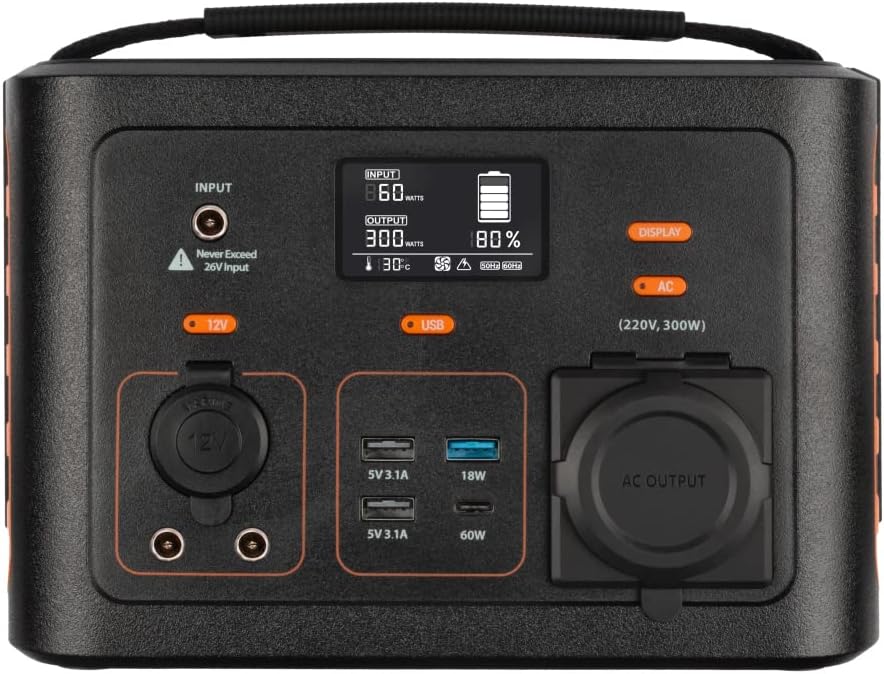
Imej: Jarak dekat view of the Xtorm XP300U's front panel, showing the digital display, input port, 12V DC output, USB-A and USB-C ports, and AC output socket.
Ciri-ciri Panel Depan:
- Paparan LCD: Shows battery level, input/output power, and status indicators.
- Port Input: Untuk mengecas stesen janakuasa melalui penyesuai AC, pengecas kereta atau panel solar.
- Output DC 12V: Untuk menguasakan peranti 12V.
- Port USB-A: Multiple USB-A outputs for charging various devices (e.g., 5V 3.1A, 18W Quick Charge).
- Port PD USB-C: High-speed USB-C Power Delivery output (up to 60W).
- Soket Output AC: Standard AC outlet for powering household appliances (220V, 300W).
- Butang Kawalan: Buttons for turning on/off specific outputs (e.g., AC, DC, USB).

Imej: Atas view of the Xtorm XP300U, highlighting its integrated carrying handle for portability.

Imej: Belakang view of the Xtorm XP300U, featuring the Xtorm brand logo and "Portable Power Station 300" text.
Persediaan
Before first use, it is recommended to fully charge your Xtorm XP300U Power Station.
- Bongkar: Keluarkan stesen janakuasa dan semua aksesori dari pembungkusan dengan berhati-hati.
- Initial Charge (AC Wall Charger):
- Connect the AC wall charger to the input port on the power station.
- Plug the AC wall charger into a standard wall outlet.
- The LCD display will show the charging status. Charge until the battery indicator shows 100%.
- penempatan: Letakkan stesen janakuasa di atas permukaan yang stabil dan rata di kawasan yang mempunyai pengudaraan yang baik, jauh daripada cahaya matahari langsung atau sumber haba.
Arahan Operasi
The Xtorm XP300U offers multiple ways to charge and power your devices.
Mengecas Stesen Janakuasa:
The XP300U can be recharged using four different methods:
Image: Visual representation of the four charging methods for the Xtorm XP300U: via wall socket, USB-C PD, solar panel (not included), and 12V car charger.
- Via Wall Socket (AC Charger): Connect the included AC wall charger to the input port and a wall outlet.
- Via USB-C PD: Use a compatible USB-C Power Delivery charger (not included) to charge the unit via its USB-C port.
- Melalui Panel Suria: Connect a compatible solar panel (not included) to the input port using the provided MC4 to DC cable. Ensure the solar panel is placed in direct sunlight for optimal charging.
- Via 12V Car Charger: Connect the included car charger cable to the input port and your vehicle's 12V cigarette lighter socket.
Paparan LCD akan menunjukkan input wattage and battery charge status during charging. You can use the outputs even while the power station is charging (pass-through charging).
Using the Outputs:
The XP300U provides various output ports to power different types of devices.

Image: The Xtorm XP300U demonstrating its universal compatibility with icons representing various devices and output types: 1x AC 300W/220V, 1x USB-C PD 60W, 2x DC 5.5mm 60W, 2x USB QC3.0 18W, 1x USB 18W, and 1x 12V Car 120W.
- AC Output (220V, 300W):
- Press the "AC" button to activate the AC output. The AC indicator on the display will light up.
- Plug your device's power cord into the AC outlet.
- Ensure your device's power consumption does not exceed 300W.
- Press the "AC" button again to turn off the AC output when not in use.
- Output DC (12V):
- Press the "12V" button to activate the DC output. The DC indicator will light up.
- Connect your 12V device to the DC port.
- Press the "12V" button again to turn off the DC output.
- USB Outputs (USB-A, USB-C PD):
- The USB outputs are typically always active when the unit is on.
- Connect your USB-powered devices to the appropriate USB-A or USB-C PD ports.
- The display will show the output wattage untuk peranti yang disambungkan.
The power station can provide power for extended periods, depending on the connected devices' power consumption.

Imej: Cthamples of device runtimes with the Xtorm XP300U: 17.5 hours for a 10W LED light, 5.5 hours for a 30W small TV, 4 hours for a 40W small coolbox, and 6 hours for a 40W small coolbox (via 12V carplug output).
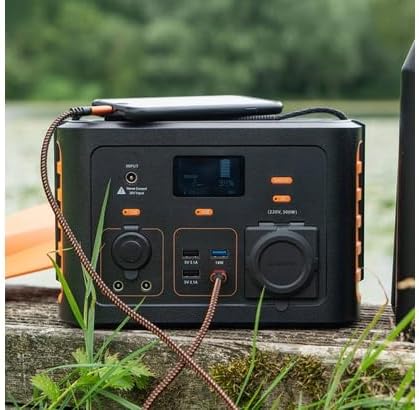
Image: The Xtorm XP300U Portable Power Station being used outdoors on a wooden surface, charging a smartphone, demonstrating its portability and utility in various environments.
Penyelenggaraan
Penyelenggaraan yang betul memastikan jangka hayat dan prestasi optimum stesen janakuasa anda.
- Pembersihan: Gunakan kain lembut dan kering untuk membersihkan bahagian luar unit. Jangan gunakan pembersih atau pelarut yang melelas.
- Storan:
- Simpan stesen janakuasa di tempat yang sejuk dan kering, jauh daripada cahaya matahari langsung dan suhu yang melampau.
- Untuk penyimpanan jangka panjang, cas unit kepada kira-kira 50-80% setiap 3-6 bulan untuk mengekalkan kesihatan bateri.
- Elakkan menyimpan dalam persekitaran yang mempunyai kelembapan yang tinggi.
- Penjagaan Bateri: Do not fully discharge the battery frequently, as this can reduce its lifespan. Recharge promptly when the battery level is low.
Menyelesaikan masalah
If you encounter issues with your Xtorm XP300U, refer to the following common problems and solutions.
| Masalah | Kemungkinan Punca | Penyelesaian |
|---|---|---|
| Unit tidak dihidupkan. | Bateri dinyahcas sepenuhnya. | Connect the power station to an AC wall outlet and charge it for at least 30 minutes. |
| Output AC tidak berfungsi. | AC output not activated; device exceeds 300W; overheating. | Tekan butang "AC" untuk mengaktifkan. Periksa kuasa perantitage. Allow unit to cool down if overheated. |
| Port USB tidak dicas. | Device not compatible; cable faulty. | Ensure device is compatible. Try a different USB cable. |
| Pengecasan perlahan. | Using a low-power charger; environmental factors (e.g., cloudy for solar). | Use the original AC charger or a higher wattage USB-C PD charger. Optimize solar panel placement. |
If the problem persists, please contact Xtorm customer support.
Spesifikasi
Detailed technical specifications for the Xtorm XP300U Portable Power Station.
| Ciri | Perincian |
|---|---|
| Nama Model | XP300U |
| Jenama | Xtorm |
| Kuasa Keluaran | 300 Watts (AC) |
| Input Voltage | 12 Volt (DC) |
| Sumber Kuasa | AC Wall, USB-C PD, Solar, Car Charger |
| Penggunaan yang Disyorkan | Home, Camping |
| Berat badan | 3300 Gram (3.3 kg) |
| warna | Jingga |
| Komponen yang Disertakan | 1 package (Power Station, AC Charger, Car Charger, MC4 to DC Cable) |

Image: Dimensions of the Xtorm XP300U Portable Power Station (240mm x 154mm x 142mm) and its weight (3.3 kg), highlighting its convenient travel size.
Waranti dan Sokongan
Xtorm products come with a standard warranty. Please refer to the warranty card included in your package or visit the official Xtorm webtapak untuk terma dan syarat jaminan terperinci.
For technical support, troubleshooting assistance, or warranty claims, please contact Xtorm customer service:
- Webtapak: www.xtorm.eu (Check for support contact information)
- e-mel: Refer to the Xtorm webtapak untuk alamat e-mel sokongan tertentu.
- telefon: Refer to the Xtorm webtapak untuk nombor telefon sokongan serantau.
When contacting support, please have your product model (XP300U) and purchase details ready.


