1. Pengenalan
The TrueLife Oximeter X5 Bluetooth is a compact, robust device designed for non-invasive measurement of blood oxygen saturation (SpO2), pulse rate (PR), and perfusion index (PI). It is suitable for use by individuals with respiratory or cardiac conditions, as well as athletes. The device features a clear OLED display and Bluetooth connectivity for data tracking via a compatible mobile application.
This manual provides essential information for the safe and effective operation of your TrueLife Oximeter X5. Please read it thoroughly before first use and keep it for future reference.
2. Kandungan Pakej
Selepas membongkar, sila sahkan bahawa semua item yang disenaraikan di bawah ada dan tidak rosak:
- TrueLife Oximeter X5
- 2x Bateri AAA
- Kantung Pelindung
- Lanyard
- Manual Pengguna

Image: TrueLife Oximeter X5 with its packaging and included protective pouch.
3. Produk Lebihview
Familiarize yourself with the components of your TrueLife Oximeter X5:
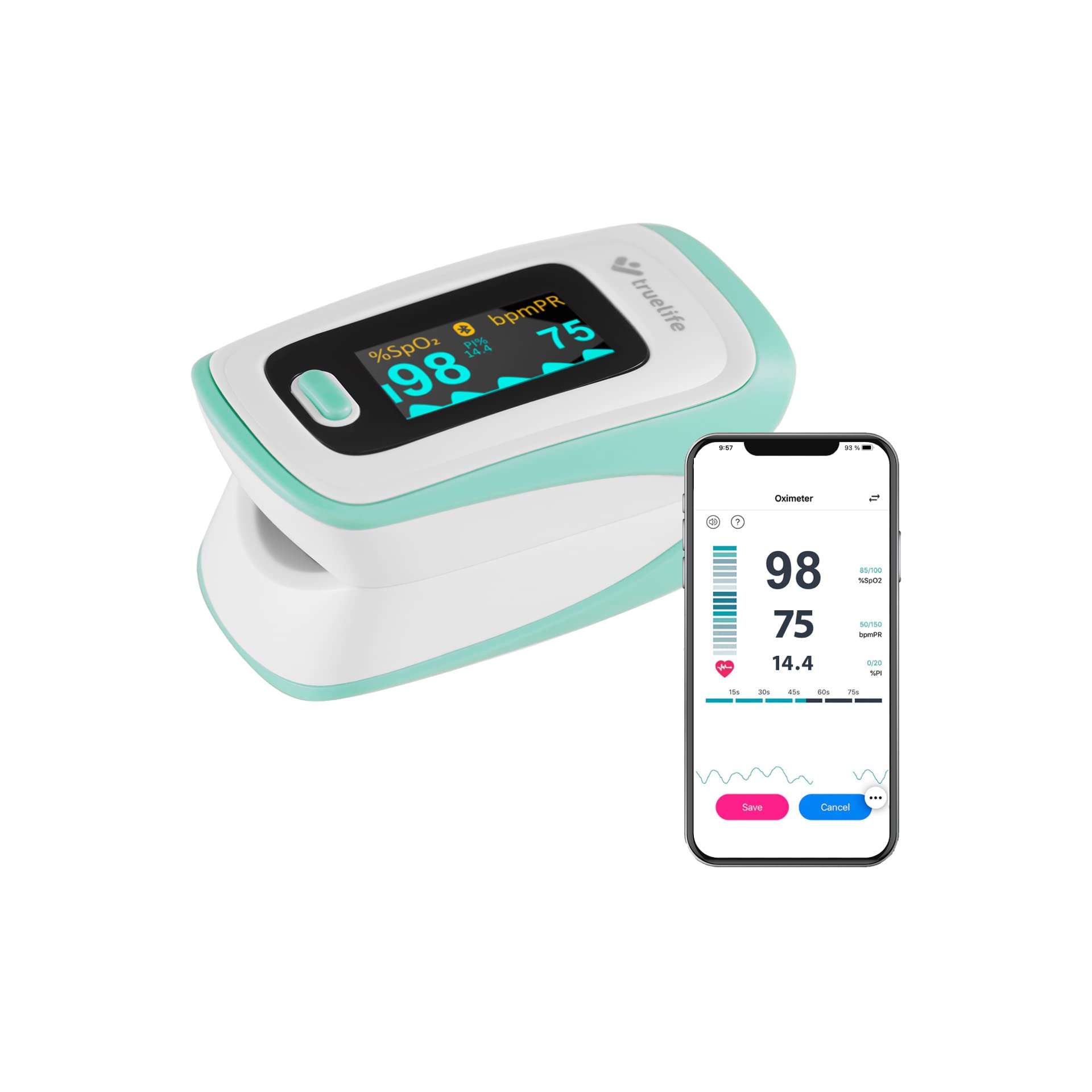
Imej: Selesaiview of the TrueLife Oximeter X5 highlighting its main features.

Imej: Terperinci view of the Oximeter X5 display and its indicators.
- paparan: OLED screen showing SpO2, PR, PI, and pulse waveform.
- Butang Kawalan: For power on/off and changing display modes.
- Finger Clamp: Area where the finger is inserted for measurement.
- Petak Bateri: Located at the rear for AAA batteries.
4. Persediaan
4.1 Pemasangan Bateri
- Buka penutup petak bateri di belakang peranti.
- Insert the two AAA batteries according to the polarity indicators (+ and -) inside the compartment.
- Tutup penutup petak bateri dengan selamat.
The device is designed for low power consumption, providing up to 32 hours of operation with intelligent power management and automatic shutdown.
4.2 Mobile Application Download and Pairing
The TrueLife Oximeter X5 can connect to a compatible mobile application for data tracking and analysis. Cari untuk the recommended application (e.g., "JUMPER Health" or similar as indicated in the product packaging) on your smartphone's app store.
- Muat turun dan pasang aplikasi.
- Pastikan Bluetooth didayakan pada telefon pintar anda.
- Turn on the Oximeter X5.
- Ikut arahan dalam apl untuk memasangkan peranti anda.

Image: Oximeter X5 demonstrating Bluetooth connectivity with a smartphone app.
5. Arahan Operasi
5.1 Mengambil Pengukuran
The Oximeter X5 provides immediate and accurate measurements:
- Open the finger clamp.
- Insert one of your fingers (preferably the index finger) into the rubber opening of the oximeter, ensuring the nail is facing upwards towards the display. The universal-sized finger hole is made of hypoallergenic silicone, suitable for both children and adults.
- Lepaskan clamp. The device will automatically power on and begin measurement.
- Keep your hand still during the measurement. Results will appear on the OLED display within seconds.

Image: Proper finger placement for measurement.

Imej: Cthample of measurement results on the display.
5.2 Memahami Paparan
The OLED display shows the following key parameters:
- SpO2 (%): Blood Oxygen Saturation. Indicates the percentage hemoglobin dalam darah anda yang tepu dengan oksigen.
- PR (bpm): Pulse Rate. Your heart rate in beats per minute.
- PI (%): Perfusion Index. Indicates the strength of the pulse signal. It shows how much oxygenated blood arrives with each new heartbeat relative to the total blood already present in the limb.
- Pulse Waveform: Perwakilan grafik denyutan nadi anda.
- Battery Status Symbol: Menunjukkan baki hayat bateri.
5.3 Adjusting Display Modes and Settings
The Oximeter X5 offers 6 options for displaying readings. Press the control button briefly to cycle through the different display orientations and layouts. You can also adjust brightness, sound settings, or the audible pulse signal through the device's menu or the connected mobile application.

Image: Various display modes available on the OLED screen.
5.4 Using the Mobile Application
Once paired, the mobile application allows you to:
- View real-time measurements.
- Track historical data in clear graphs.
- Urus pengguna profiles.
- Laraskan tetapan peranti.

Image: Screenshots of the mobile application interface for data monitoring.
6. Penyelenggaraan
6.1 Pembersihan
- Bersihkan permukaan oksimeter dengan kain lembutampened with medical alcohol (70% ethanol or isopropanol).
- Do not immerse the device in water or any other cleaning solution.
- Ensure the device is dry before reuse.
6.2 Penyimpanan
- Store the oximeter in its protective pouch in a cool, dry place, away from direct sunlight and extreme temperatures.
- Tanggalkan bateri jika peranti tidak akan digunakan untuk tempoh yang lama untuk mengelakkan kebocoran.
7. Penyelesaian masalah
If you encounter issues with your TrueLife Oximeter X5, refer to the following common problems and solutions:
| Masalah | Kemungkinan Punca | Penyelesaian |
|---|---|---|
| Peranti tidak dihidupkan | Bateri rendah atau mati; pemasangan bateri yang salah. | Gantikan bateri; memastikan polariti yang betul. |
| No reading or unstable reading | Finger not inserted correctly; excessive movement; cold fingers; nail polish. | Reinsert finger properly; remain still; warm hands; remove nail polish. |
| Sambungan Bluetooth gagal | Bluetooth not enabled on phone; device too far; app issues. | Ensure Bluetooth is on; keep devices close; restart app/phone/oximeter. |
| Paparan redup | Low battery; brightness setting. | Replace batteries; adjust brightness setting via device or app. |
8. Spesifikasi
| Ciri | Spesifikasi |
|---|---|
| Jenama | Kehidupan sebenar |
| Nombor Model | Oximeter X5 |
| Parameter Pengukuran | SpO2, Pulse Rate (PR), Perfusion Index (PI) |
| Ketepatan SpO2 | ± 2% |
| Jenis Paparan | OLED, adjustable with 6 display modes |
| Ketersambungan | Bluetooth |
| Sumber Kuasa | 2x Bateri AAA |
| Hayat Bateri | Sehingga 32 jam (lebih kurang) |
| Dimensi (L x W x H) | 50 x 50 x 28 mm |
| Berat badan | 96 gram (dengan bateri) |
9. Maklumat Keselamatan
- This device is intended for non-medical use and general wellness purposes. It is not a substitute for professional medical advice, diagnosis, or treatment.
- Consult your physician if you have any medical conditions or concerns about your health.
- Jangan gunakan peranti dalam persekitaran MRI atau CT.
- Jauhkan daripada kanak-kanak. Bahagian-bahagian kecil boleh menyebabkan bahaya tercekik.
- Jangan gunakan peranti jika ia rosak.
- Buang bateri dan peranti mengikut peraturan tempatan.
10. Waranti dan Sokongan
For warranty information and customer support, please refer to the documentation included with your purchase or visit the official TrueLife webtapak. Simpan bukti pembelian anda untuk tuntutan waranti.


