pengenalan
This manual provides comprehensive instructions for the safe and effective operation of your Simba Planet Fighter Robot, Model 108042509. Please read this manual thoroughly before use and retain it for future reference. This robot features infrared remote control, gesture control, light and sound effects, and a shooting function.
Maklumat Keselamatan Penting
WARNING: Not suitable for children under 3 years due to small parts. Choking hazard.
- Sentiasa mengawasi kanak-kanak semasa bermain.
- Do not aim the shooting mechanism at eyes or face.
- Jauhkan daripada air dan kelembapan.
- Do not attempt to disassemble or modify the robot or remote control.
- Pastikan bateri dimasukkan dengan polariti yang betul.
- Tanggalkan bateri jika produk tidak digunakan untuk tempoh yang lama.
Kandungan Pakej
Sahkan bahawa semua item yang disenaraikan di bawah terdapat dalam pakej anda:
- Simba Planet Fighter Robot (Model 108042509)
- Alat kawalan jauh inframerah
- USB Cable (for potential charging or data, specific function not detailed in specifications)
- Soft Darts/Arrows (for shooting function)
- Manual Pengguna (dokumen ini)

Persediaan
1. Battery Installation (Robot)
The robot requires 3 AAA batteries (not included).
- Locate the battery compartment on the back or bottom of the robot.
- Open the battery compartment cover using a screwdriver if necessary.
- Insert 3 AAA batteries according to the polarity markings (+/-).
- Tutup penutup petak bateri dengan selamat.

2. Pemasangan Bateri (Kawalan Jauh)
The remote control typically requires 2 AA batteries (not included). Please check the remote control's battery compartment for specific requirements.
- Cari petak bateri di belakang alat kawalan jauh.
- Buka penutup petak bateri.
- Insert the required batteries according to the polarity markings (+/-).
- Tutup penutup petak bateri dengan selamat.
3. Menghidupkan
After installing batteries, turn on the robot using the power switch, usually located on its back or chest. Turn on the remote control using its power switch.
Arahan Operasi
Fungsi Kawalan Jauh
The infrared remote control allows you to command the robot's movements and actions. Ensure the remote is pointed towards the robot for optimal signal transmission.
- Kawalan Pergerakan: Use the directional buttons (Forward, Backward, Turn Left, Turn Right) to navigate the robot.
- Slide Movement: Specific buttons may allow the robot to slide forward or backward.
- Run/Dance: Activate pre-programmed running or dancing sequences.
- Fungsi Menembak: Press the "SHOOT" button to fire the soft darts from the robot's shoulder-mounted launcher. Ensure darts are loaded correctly.
- Cahaya & Suara: Buttons for activating or deactivating the robot's visor light and various sound effects.
- Fungsi Program: Some models allow programming a sequence of movements. Refer to the remote's specific button layout for programming instructions.
- Kawalan Kelantangan: Adjust the robot's sound volume.
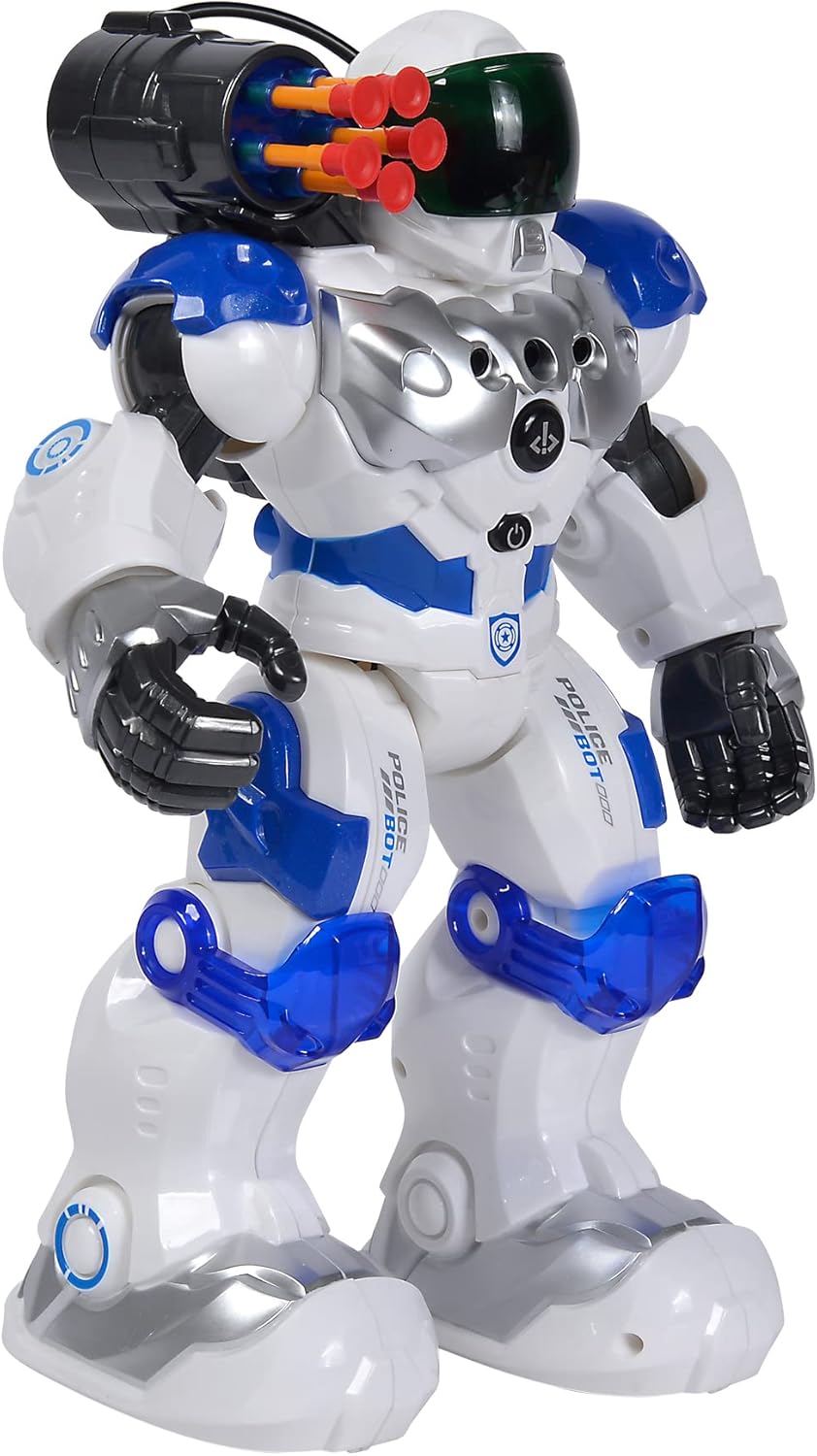
Kawalan Isyarat
The robot can respond to hand gestures. Specific sensors on the robot detect hand movements to initiate actions such as moving forward or turning. Experiment with different hand motions in front of the robot's sensors to discover its gesture-controlled responses.
Ciri-ciri Utama
- Alat Kawalan Jauh Inframerah: Full control over movement and actions.
- Kawalan Gerak Isyarat: Responds to hand movements for interactive play.
- Fungsi Menembak: Fires soft darts from a shoulder-mounted launcher.
- Kesan Cahaya dan Bunyi: Features a light-up visor and various robotic sounds.
- Pelbagai Mod Pergerakan: Capable of driving, running, and dancing.
- Pembinaan Tahan Lama: Made from plastic, designed for active play.

Penyelenggaraan
- Pembersihan: Lap robot dan alat kawalan jauh dengan kain lembut dan kering. Jangan gunakan bahan kimia yang keras atau pembersih yang kasar.
- Penjagaan Bateri: Remove batteries from both the robot and remote control if they will not be used for an extended period to prevent leakage.
- Storan: Store the robot and its accessories in a cool, dry place, away from direct sunlight and extreme temperatures.
Menyelesaikan masalah
| Masalah | Kemungkinan Punca | Penyelesaian |
|---|---|---|
| Robot tidak dihidupkan. | Bateri mati atau tidak dipasang dengan betul. | Periksa kekutuban bateri dan gantikan dengan bateri baru. |
| Alat kawalan jauh tidak bertindak balas. | Remote batteries are dead or robot is out of range/line of sight. | Replace remote batteries. Ensure remote is pointed at the robot within effective range. |
| Shooting function not working. | Darts not loaded correctly or mechanism jammed. | Ensure darts are fully inserted. Check for any obstructions in the launcher. |
| Robot bergerak tidak menentu atau tidak seperti yang dijangkakan. | Low batteries or interference. | Replace batteries. Move away from other infrared or radio-controlled devices. |
Spesifikasi
| Ciri | Perincian |
|---|---|
| Nombor Model | 108042509 |
| Jenama | Simba |
| Dimensi (L x W x H) | 11 x 21 x 31.5 cm |
| Berat badan | 1.34 kg |
| Umur Disyorkan | 5 tahun dan ke atas |
| Robot Battery Type | 3 x bateri AAA (tidak termasuk) |
| Jenis Bateri Kawalan Jauh | 2 x AA batteries (not included, typical for similar remotes) |
| Bahan Utama | plastik |
| Kaedah Kawalan | Infrared Remote Control, Gesture Control |
| Ciri-ciri | Light, Sound, Shooting Function, Various Movement Functions |
Waranti dan Sokongan
For warranty information and customer support, please refer to the documentation provided at the time of purchase or contact your retailer. Simba products are designed for quality and durability, and support is available for manufacturing defects.
For further assistance, please visit the official Simba webtapak atau hubungi bahagian perkhidmatan pelanggan mereka.


